
@ghostpaw/codex







Agent memory as beliefs with a source, a certainty and a revision history.
ghostpaw-codex --help
Local, evidence-backed memory for agents. One SQLite file, zero runtimedependencies.
Codex stores what an agent believes as claims with a source, a certainty,evidence counts, decay and an honest revision history. Agents search beforethey remember, confirm or correct instead of appending, and see which beliefsare stale, fading or weakly evidenced. It runs as a TypeScript library, an MCPserver, a CLI and an Agent Skill, all generated from the same seven tools.
Website: codex.ghostpaw.dev
The release binary includes its runtime. npm and library use require Node.js 24+.
Install
Release binary (default)
Each line downloads the latest release asset, checks it against the release's SHA256SUMS and installs ghostpaw-codex into ~/.local/bin. On Linux and macOS the trailing export puts that folder on PATH for the current shell only: neither the line nor install.sh edits ~/.profile or any other shell startup file. The Windows script adds its folder to the user PATH (open a new terminal afterwards).
linux-x64:
curl -fsSL https://raw.githubusercontent.com/GhostPawJS/codex/main/install.sh | sh -s -- --target linux-x64 && export PATH="$HOME/.local/bin:$PATH"
linux-arm64:
curl -fsSL https://raw.githubusercontent.com/GhostPawJS/codex/main/install.sh | sh -s -- --target linux-arm64 && export PATH="$HOME/.local/bin:$PATH"
darwin-arm64:
curl -fsSL https://raw.githubusercontent.com/GhostPawJS/codex/main/install.sh | sh -s -- --target darwin-arm64 && export PATH="$HOME/.local/bin:$PATH"
darwin-x64:
curl -fsSL https://raw.githubusercontent.com/GhostPawJS/codex/main/install.sh | sh -s -- --target darwin-x64 && export PATH="$HOME/.local/bin:$PATH"
windows-x64 (PowerShell):
irm https://raw.githubusercontent.com/GhostPawJS/codex/main/install.ps1 | iex
To keep ~/.local/bin on PATH in new shells, append it to ~/.profile once (this is the only step that edits a startup file):
echo 'export PATH="$HOME/.local/bin:$PATH"' >> ~/.profile
To pin a release instead of taking the latest, pass --version:
curl -fsSL https://raw.githubusercontent.com/GhostPawJS/codex/main/install.sh | sh -s -- --target linux-x64 --version 0.6.0 && export PATH="$HOME/.local/bin:$PATH"
$ ghostpaw-codex --version
ghostpaw-codex 0.6.0 (binary, linux-x64)
$ ghostpaw-codex --version --short
0.6.0
$ ghostpaw-codex --version --json
{"name":"ghostpaw-codex","version":"0.6.0","variant":"binary","target":"linux-x64"}
variant is binary, npm or library; target is null outside the release binary.
A session with the 0.5.2 linux-x64 binary against a small database of five beliefs:
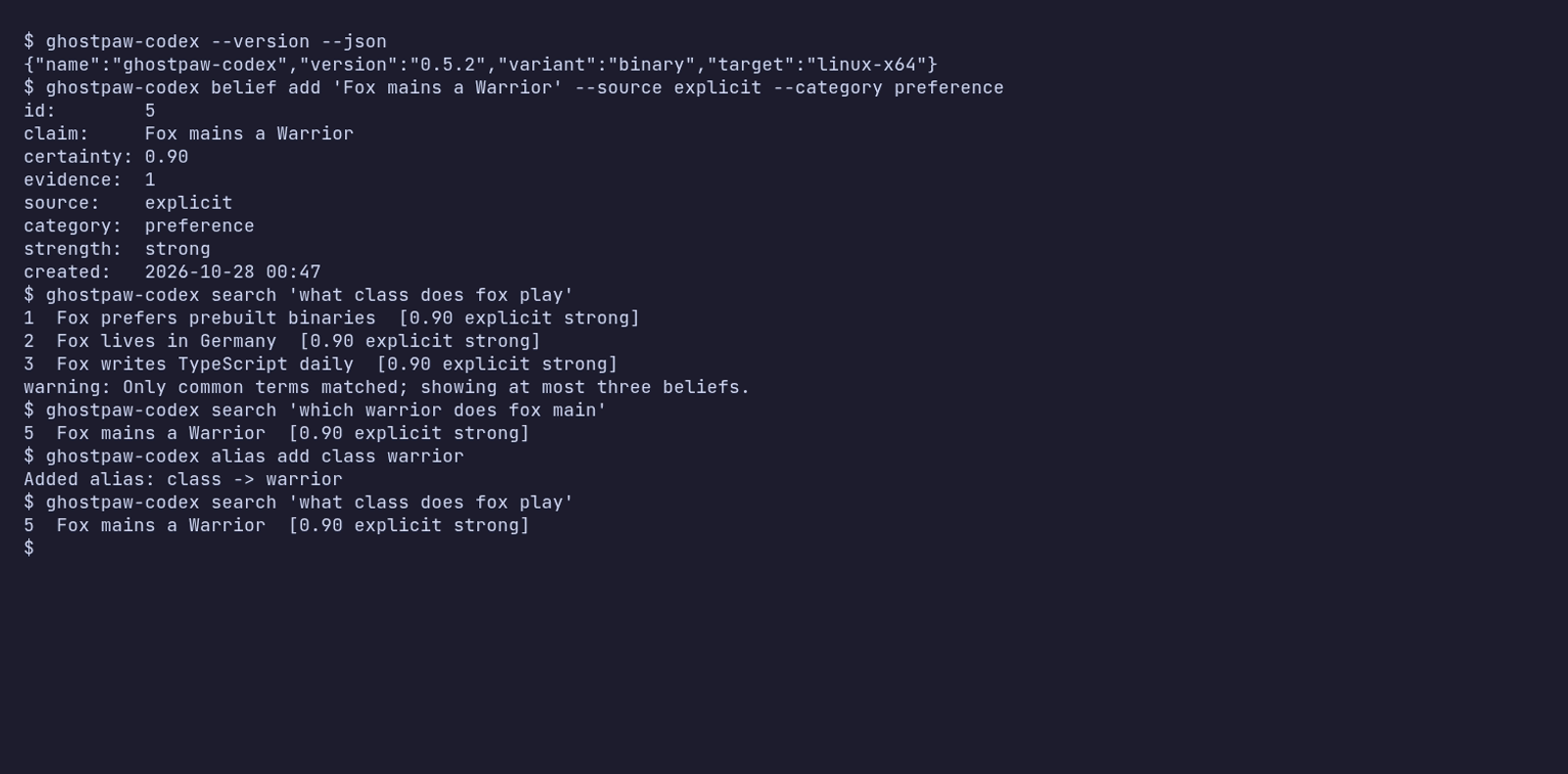
The same session as an animated GIF.
Other release installers:
mise use -g github:GhostPawJS/codex
ubi --project GhostPawJS/codex --exe ghostpaw-codex --in ~/.local/bin
eget GhostPawJS/codex
For aqua, define agithub_release package in aqua.yaml:
registries:
  - name: codex
    type: local
    path: codex-registry.yaml
packages:
  - name: GhostPawJS/[email protected]
    registry: codex
codex-registry.yaml:
packages:
  - type: github_release
    repo_owner: GhostPawJS
    repo_name: codex
    asset: ghostpaw-codex-{{trimV .Version}}-{{.OS}}-{{.Arch}}.tar.gz
    format: tar.gz
    replacements: { amd64: x64 }
    overrides:
      - goos: windows
        asset: ghostpaw-codex-{{trimV .Version}}-windows-{{.Arch}}.zip
        format: zip
    files:
      - name: ghostpaw-codex
Install scripts verify SHA256SUMS. To verify a downloaded archive'sbuild attestation:
gh attestation verify <archive> -R GhostPawJS/codex
Set GHOSTPAW_VERIFY=attestation for attestation verification in install.sh.Binaries are unsigned; macOS binaries carry an ad-hoc signature. For a browserdownload on macOS, remove quarantine withxattr -d com.apple.quarantine /path/to/ghostpaw-codex.Linux binaries require glibc 2.28+; use npx on Alpine.See the binary build workflow.
Approximate sizes for 0.5.2 (Node 26.12.1 inside each binary):
| Target | Archive | Binary |
|---|---|---|
| linux-x64 | 41.7 MB tar.gz | 117.4 MB |
| linux-arm64 | 41.2 MB tar.gz | 115.2 MB |
| darwin-arm64 | 44.8 MB tar.gz | 146.7 MB |
| darwin-x64 | 46.4 MB tar.gz | 149.5 MB |
| windows-x64 | 38.4 MB zip | 105.6 MB |
The npm package is about 920 KB unpacked and needs Node 24+. Every release isinstalled and run on ubuntu-24.04, macos-15 and windows-2025 by theinstall check.
npx / npm (for npm-based environments)
The npm package requires Node 24+:
npm install -g @ghostpaw/codex
npx -y @ghostpaw/codex --help
Library (for harnesses embedding it in code)
Requires Node 24+:
npm install @ghostpaw/codex
import { initCodexTables, read, write } from '@ghostpaw/codex';
See Library usage.
30-second quickstart
MCP server
Every client below starts the same stdio server: ghostpaw-codex mcp.Use the full executable path if its folder is not on PATH.For npm-based environments, use npx -y @ghostpaw/codex mcp.Beliefs live in ~/.ghostpaw/codex.db unless the GHOSTPAW_CODEX_DBenvironment variable (absolute path) or --db <path> says otherwise.
Claude Code
claude mcp add ghostpaw-codex -- ghostpaw-codex mcp
or as a plugin, which also installs the skill:
/plugin marketplace add GhostPawJS/codex
/plugin install ghostpaw-codex@ghostpaw-codex
Codex CLI (~/.codex/config.toml)
[mcp_servers.ghostpaw-codex]
command = "ghostpaw-codex"
args = ["mcp"]
Cursor (.cursor/mcp.json), Claude Desktop (claude_desktop_config.json)or a project .mcp.json:
{
  "mcpServers": {
    "ghostpaw-codex": {
      "command": "ghostpaw-codex",
      "args": ["mcp"]
    }
  }
}
Cline (MCP Servers → Configure MCP Servers, cline_mcp_settings.json).VS Code often starts without ~/.local/bin on PATH, so use the absolute paththat echo "$HOME/.local/bin/ghostpaw-codex" prints (PowerShell:"$env:LOCALAPPDATA\Programs\ghostpaw\bin\ghostpaw-codex.exe"). Merge theentry into the existing mcpServers. Settings file locations, thecline mcp add form and checks: llms-install.md.For Cline CLI 3.x, cline config mcp lists the configured servers.
{
  "mcpServers": {
    "ghostpaw-codex": {
      "command": "/absolute/path/to/ghostpaw-codex",
      "args": ["mcp"],
      "env": { "GHOSTPAW_CODEX_DB": "/absolute/path/to/.ghostpaw/codex.db" }
    }
  }
}
Claude Desktop users can also install server.mcpb from thelatest GitHub release.A Dockerfile is included for container hosts:docker build -t ghostpaw-codex . && docker run -i --rm -v codex:/data ghostpaw-codex.
The server speaks MCP 2026-07-28 (stateless, server/discover) and theinitialize-based revisions 2025-11-25, 2025-06-18, 2025-03-26 and 2024-11-05.
CLI
ghostpaw-codex search <query> [--limit N --min-score N --category C --source S]
ghostpaw-codex review <flags|status|log|trends> [--limit N --now N]
ghostpaw-codex belief add <claim> --source S --category C [--certainty N --provenance P]
ghostpaw-codex belief show <beliefId>
ghostpaw-codex belief retire <beliefId>
ghostpaw-codex belief confirm|correct|forget|defer <beliefId> [flags]
ghostpaw-codex belief merge <beliefIds...> [flags]
ghostpaw-codex proximity dismiss <beliefA> <beliefB>
ghostpaw-codex mcp|skill|tools|describe|call|completions|version|help
Global flags can appear anywhere: --db <path>, --json, --quiet,--compact, --help/-h, --version/-V/-v, --no-color.NO_COLOR is accepted; output uses no terminal colors.Noun-verb commands print short text by default, including when stdout is piped.Search and review lists show one belief per line: id claim [certainty source strength].Flags append reason codes; the log shows id type claim. Add, show, correct andmerge show aligned detail fields and nearby beliefs. Status and trends showaligned key: value lines. --json prints the full tool result and --compactremoves JSON indentation. Legacy tool invocation keeps its JSON output.--quiet prints only result ids for search, review flags and log, and the affectedbelief id for writes; status, trends and version print nothing.
Use help belief, belief --help or belief correct --help for schema-derivedhelp. Each revision verb accepts only the flags it uses. Correction takes--claim; forgetting also accepts --successor-id. Deferral accepts--deferred-until as YYYY-MM-DD, DD.MM.YYYY, today, tomorrow, +3d, an ISOdate-time with timezone, or epoch milliseconds. Calendar dates resolve to localend of day and must be in the future.Array flags repeat, kebab-case flags map to schema properties, and values are literal, including leading @. Use JSON stdin (-) for long input. -- ends flags. A positional -, or piped stdinwith no arguments, reads a JSON object; explicit flags override its fields.Database selection uses --db, GHOSTPAW_CODEX_DB, then ~/.ghostpaw/codex.db.Top-level help shows the resolved path. Version output starts withghostpaw-codex and identifies binary target, npm or library execution.
ghostpaw-codex skill prints the full skill reference. Useghostpaw-codex skill --list to list workflow guides andghostpaw-codex skill capture-beliefs-well to read a guide. skill --helpshows these forms; unknown guide names include a suggestion.
| Exit | Noun-verb result |
|---|---|
| 0 | Success, including no_op |
| 1 | Tool error |
| 2 | Usage or schema error |
| 3 | Clarification needed or not found |
| 4 | Conflict or version mismatch |
| 70 | Internal error |
Errors and recovery hints go to stderr. Clarification prints the question and missing flags to stderr. With --json, usage and internal errors also print{ok:false,error:{code,message}} to stdout. Tool results retain their fullshape. Legacy tools [--json], describe <tool>, call <tool> [JSON|-]and <tool_name> --parameter value keep their existing exit codes.completions bash, completions zsh and completions fish print shell scripts.
ghostpaw-codex belief add "Deploys go out on Tuesdays" --source explicit --category procedure
ghostpaw-codex search "when do we deploy" --json | jq '.data.results'
printf '%s' '{"beliefId":1}' | ghostpaw-codex belief show - --json
File values and leading @
File input is opt-in for each CLI argument. When an argument's help lists(@file, @- stdin, @@ literal @), @path reads a UTF-8 file, @- readsstdin, and @@text passes the literal value @text.
No current Codex argument enables this option: flags and positional valueskeep leading @ and @@ as written. For long claims, pass a JSON objectthrough stdin with - (see the example above).
Agent Skill
SKILL.md (repo root) and skills/codex/SKILL.md follow theAgent Skills format and ship in the npm package.Copy skills/codex/ into your agent's skills folder, or print it:
ghostpaw-codex skill > SKILL.md
Library
npm install @ghostpaw/codex
import { DatabaseSync } from 'node:sqlite';
import { initCodexTables, read, write } from '@ghostpaw/codex';

const db = new DatabaseSync('codex.db');
initCodexTables(db);

const { id } = write.remember(db, {
  claim: 'The API uses GraphQL with a REST fallback.',
  source: 'explicit',
  category: 'fact',
});
write.confirmBelief(db, id);
write.correctBelief(db, id, {
  claim: 'The API uses GraphQL exclusively; REST was retired.',
  source: 'observed',
  category: 'fact',
});

read.recall(db, 'graphql api'); // ranked, lineage-aware
read.listFlags(db);             // stale, fading, low-trust, single-evidence
Wire the same tools into any LLM SDK. Each tool carries a JSON Schema:
import { tools } from '@ghostpaw/codex';

for (const tool of tools.codexTools) {
  // tool.name, tool.description, tool.inputSchema, tool.handler(db, input)
}
Or embed the MCP server in your own process:
import { createCodexMcpServer } from '@ghostpaw/codex/mcp';
const server = createCodexMcpServer({ dbPath: './codex.db' });
Docs
The live demo runs the library in your browser against an in-memory SQLite database. Each view below opens a different part of it:
- Dashboard: integrity score and recent beliefs
- Capture: record a belief and see close matches you already hold
- Flags: beliefs flagged for review: confirm, correct or forget
- Activity Log: activity log of every write
Why not MEMORY.md?
A markdown memory file works until it doesn't:
- It only grows. Agents append, rarely delete, and the file ends up inevery prompt. Codex returns the few beliefs that match a query(FTS5 bm25 plus hashed character-trigram similarity, IDF-weighted with a 55% relative cutoff).
- Contradictions pile up. "We use REST" and "REST was retired" sit side byside. Codex detects near-duplicates on every write, and correctionssupersede the old belief while keeping the lineage.
- Everything looks equally true. A guess and a confirmed fact read thesame in prose. Codex tracks source (explicit, observed, distilled,inferred), certainty and evidence count, and flags what is stale or weaklysupported.
- No time. Codex decays freshness, so old beliefs surface for reviewinstead of quietly steering behaviour.
- Concurrent edits. Two agents writing one file clobber each other. Codexis a SQLite database in WAL mode.
It stays local: one file you can copy, back up or inspect with any SQLite tool.No server, no API key, no network.
Tools
| Tool | What it does |
|---|---|
search_codex |
Lexical recall with FTS5 bm25 and character-trigram similarity |
review_codex |
Dashboards: flags, status, trends, log |
inspect_codex_item |
One belief in full: metrics, lineage, nearby beliefs |
remember_belief |
Capture a claim with source, category and provenance |
revise_belief |
Confirm, correct, forget, defer or merge |
retire_belief |
Hard-delete for privacy or cleanup |
dismiss_proximity |
Mark two nearby beliefs as intentionally distinct |
Results are structured (outcome: success | no_op | needs_clarification | error) with entities, next-step hints and recovery advice. The MCP server,CLI, SKILL.md and plugin manifests are generated from this registry(npm run surfaces) and drift-checked in CI.
Performance
Measured with npm run bench on Node 24.14.0, Linux, Intel Xeon (sharedcloud vCPU), 10,000 beliefs in a file-backed database:
| Operation | p50 | p95 |
|---|---|---|
search_codex (tool) |
3.6 ms | 5.0 ms |
MCP tools/call search, stdio framing included |
3.8 ms | 4.2 ms |
read.recall |
3.7 ms | 4.8 ms |
inspect_codex_item |
3.5 ms | 3.8 ms |
write.remember (includes proximity scan) |
4.5 ms | 5.6 ms |
review_codex |
11.7 ms | 13.2 ms |
Cold start (process spawn to first response, median): --version 26 ms,MCP server/discover 24 ms, first search against the 10,000-belief file53 ms. Seeding 10,000 beliefs takes 2.2 s on disk.
Gzip sizes and cold-start medians are budgeted in budgets.json and enforcedby npm run check.
The model
| Concept | Purpose |
|---|---|
| Belief | A claim held with certainty, evidence, provenance, decay and revision lineage |
| Dismissal | A record that two beliefs close by character-trigram vectors are intentionally distinct |
| Flag | A derived attention signal: stale, fading, low-trust, single-evidence or gap |
| Proximity | Lexical nearness between beliefs (character-trigram vectors), detected on write |
| Lineage | The revision chain from corrections and supersessions, with version diffs |
State is derived, never toggled: freshness, strength, review priority and flagsare computed at read time.
Package surface
| Import | Contents |
|---|---|
@ghostpaw/codex |
initCodexTables, read, write, tools, skills, soul, all types |
@ghostpaw/codex/mcp |
createCodexMcpServer, serveCodexMcp, generic MCP server helpers |
ghostpaw-codex (bin) |
Noun-verb CLI, legacy tool forms, mcp, skill, shell completions |
dist/mcp-server.js |
Standalone stdio MCP server entry (used by the MCP Bundle and the Dockerfile) |
SKILL.md, skills/codex/ |
Agent Skill with 17 workflow references |
ESM and CommonJS, with type declarations for both.
Documentation
| Document | Audience |
|---|---|
| HUMAN.md | Developers using the read / write API |
| LLM.md | Agent builders wiring soul, tools and skills |
| docs/README.md | Architecture: model, invariants, scoring, source layout |
| docs/entities/ | Per-entity manuals with exact public API listings |
| CHANGELOG.md | Release history |
Development
npm install
npm run check   # types, lint, zero-deps, tests, build, surfaces, size, API, consumer, startup, ratchet
npm run bench   # hot-path benchmarks at 10,000 beliefs
npm run surfaces  # regenerate SKILL.md, plugin manifests, server.json, mcpb manifest
npm run check is the single gate, locally and in CI. Size budgets(budgets.json) and the public API snapshot (api-surface.json) can onlygrow with an explicit approval tag in the commit message. The repo is pinnedto Node 24.14.0 via .nvmrc.
Support
If this package helps your project, consider sponsoring its maintenance:

Anonyfox • MIT License
Query aliases
Search is lexical: FTS5 bm25 plus hashed character-trigram similarity, withIDF-like token weighting and a 55% relative cutoff. It does not provide semanticunderstanding. In corpora of at least 20 active beliefs, queries matching only common terms return at most three resultswith a partial_match warning.
Aliases are off by default (the table starts empty). Add directed, one-hop aliaseswhen query vocabulary differs from stored claims:
ghostpaw-codex alias add class warrior
ghostpaw-codex alias list
ghostpaw-codex alias remove class warrior
The library equivalents are write.addQueryAlias(db, term, alias, options?),write.removeQueryAlias(db, term, alias) (returns whether removed), andread.listQueryAliases(db) (sorted { term, alias, createdAt } records).Both words are normalized with normalizeClaim and must be distinct single words.Adding an existing pair preserves its creation time; options.now sets the timeon first insertion. Expansion is deduplicated and never follows alias chains;the query vector uses the original query.
Provenance and revision compatibility
Belief records include provenanceSources, an append-only list of distinct originreferences. Every write with --provenance adds a reference, including duplicateadds and unchanged corrections. Corrections and merges carry all sources forward.The legacy provenance field remains readable with its existing single-valuebehavior; use provenanceSources for the complete history.
Superseded-belief errors and belief show identify the current active successor.Library details also expose activeSuccessorId, while supersededBy retains theimmediate lineage link. Correcting to the same normalized claim and metadatareturns no_op. A merge into --successor-id can omit --claim.
belief --help lists belief verbs. review flags --now +8d andreview flags --now 2026-11-10 accept the same date formats as deferral, includinghistorical dates and epoch milliseconds. Relative day offsets also accept -3dand 30d. Calendar dates and relative days use local end of day.
New CLI and MCP database files use mode 0600; newly created parent directoriesuse 0700. Existing permissions are preserved. On first upgrade, legacy activenormalized duplicates consolidate into the oldest id, preserving summed evidence,source references and lineage. Later --allow-duplicate additions remain separate.Merge fan-in alone does not trigger unstable; repeated corrections still do.


