
Quick start · Screenshots · Tools · Deploy · Changelog · Architecture
Screenward
Turn “what should we watch?” into a plan. Discover movies and TV, compare streaming options, plan a group night, finish a franchise, and check when saved titles appear on your services.
Use the Screenward browser app or connect an AI assistant such as Codex or Claude Desktop through 27 MCP tools. The same shared workflows power the browser, local stdio, and remote Streamable HTTP MCP.
Formerly mcp-server-tmdb. Existing tool names, client identifiers, and the published Docker image address remain supported. See the rename and compatibility guide if you already have an installation.
New in Planning Lab: Release Calendar · TV Binge Planner · Saved Watchlists · Personal Availability Radar · Streaming Service Coverage
What you can do
| Start with a question | Get a useful next step |
|---|---|
| “Something funny, under two hours, on my services?” | A ranked shortlist with reasons and regional availability. |
| “Pick a movie for five people with different tastes.” | A primary pick, backup, and wildcard. |
| “Which ended series can I finish this weekend?” | Estimated total viewing time and a daily pace. |
| “What am I missing in this franchise?” | Watched/missing entries, remaining runtime, and a completion path. |
| “What’s coming out, and what can I watch already?” | Upcoming and recent releases with provider listings. |
| “Did anything on my watchlist arrive on my services?” | Observed changes since the last successful check. |
See it in action
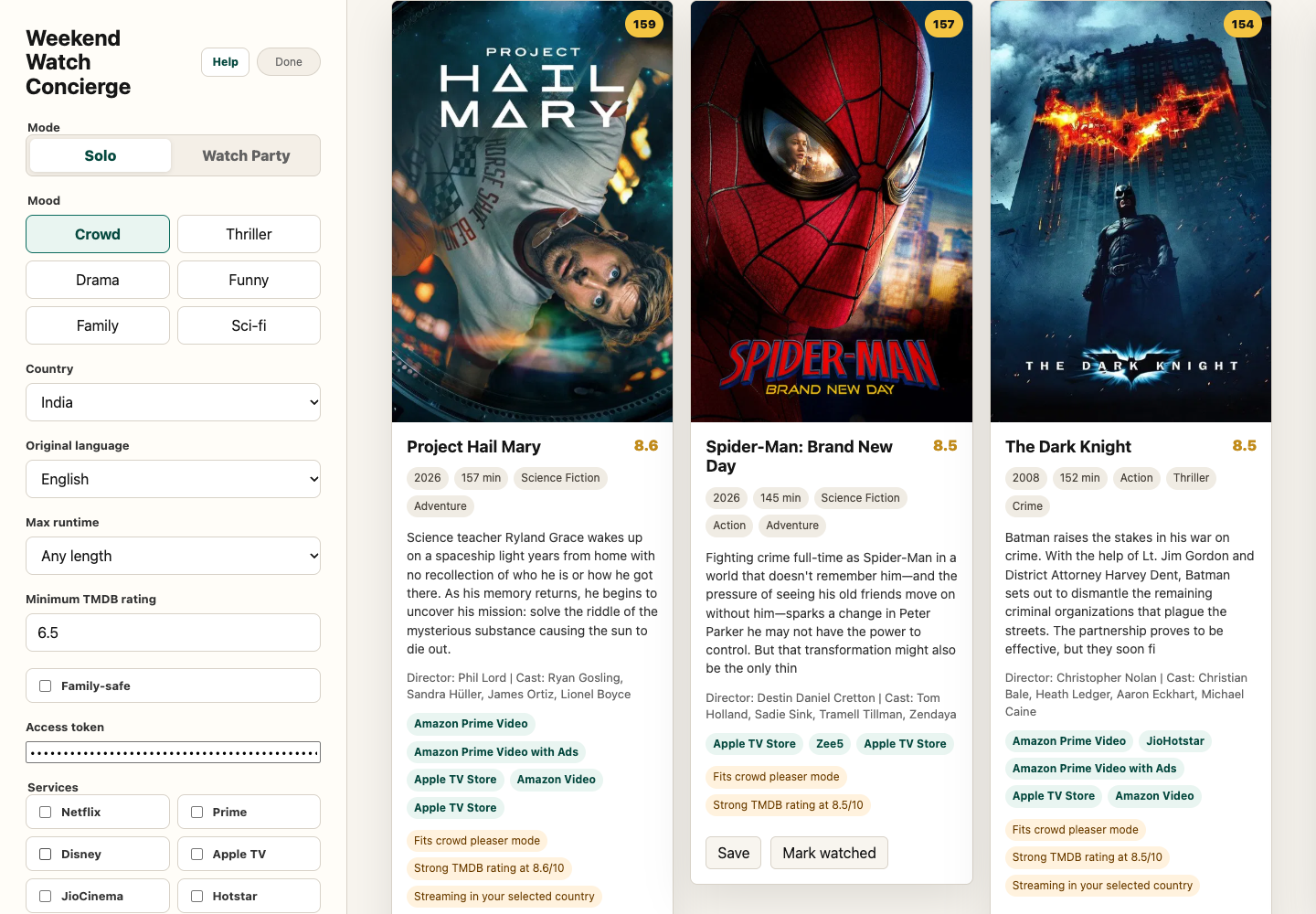
Weekend Watch Concierge — mood, language, runtime, and provider preferences in one view.
Screenward's product name is new; Concierge, Planning Lab, Watch Party, and Radar remain its familiar workflows.
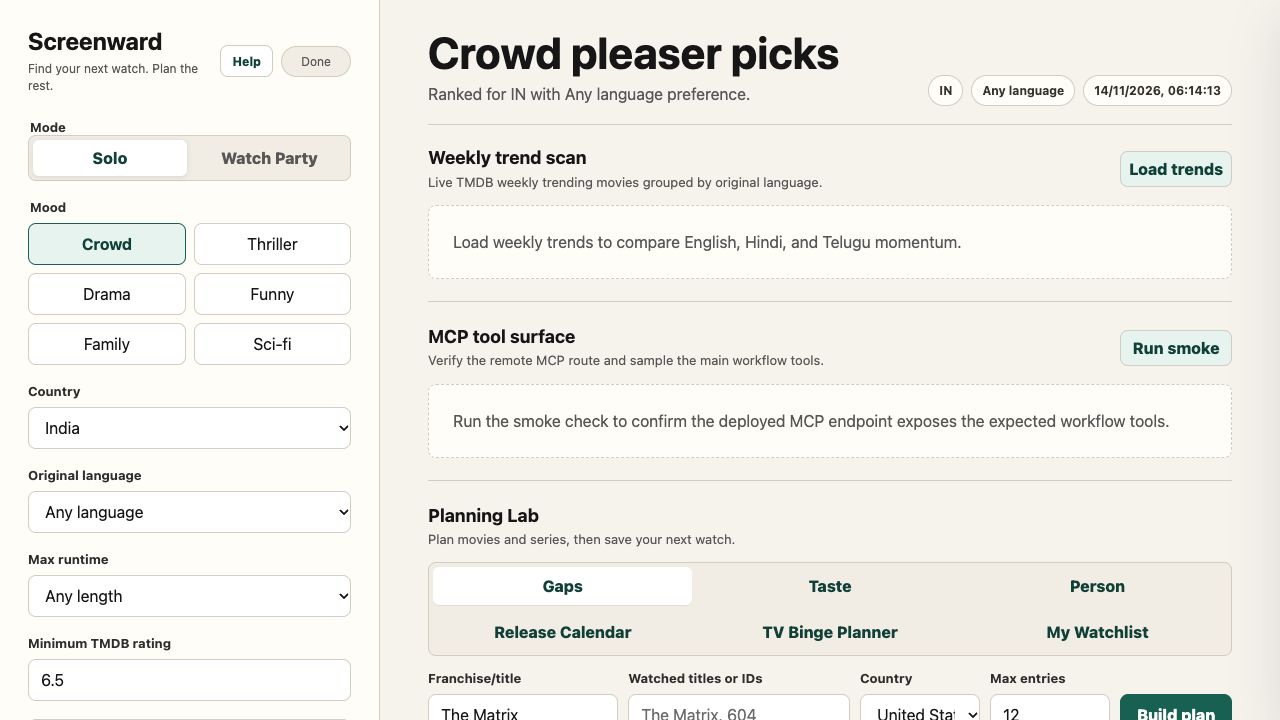
Screenward branding captured on 14 November 2026 with synthetic fixture titles and listings. The dated live workflow screenshots below show the earlier branding.
| Release CalendarUpcoming and recent movies, with subscription, rental, and purchase options. | TV Binge PlannerEnded-series filtering, estimated viewing time, and a daily watch plan. |
| Saved WatchlistsKeep movie and TV lists, mark watched, and export portable JSON. | Personal Availability RadarSee changes against your last successful regional check. |
Concierge, calendar, TV, and watchlist screenshots were captured from the deployed app on 10 November 2026. Radar uses a controlled fixture to demonstrate an addition; its titles and provider changes are illustrative. Live availability varies by country and date.
Quick start
Use Node.js 22.12+ and a TMDB API key.
git clone https://github.com/Laksh-star/screenward.git
cd screenward
npm install
cp .env.example .env
Add your key to .env, then check the setup:
npm run doctor
npm run doctor -- --online  # Optional: validate the key and TMDB connectivity
The doctor is read-only and hides credential values. See the diagnostic guide for repairs and JSON output. Then choose how to connect:
Repo installer on macOS — reads .env and configures the local Codex/Claude Desktop integrations:
npm run install:local
Restart your MCP client, then ask: “Find me something to watch this weekend.” The installer updates client configuration files; see exact installer behavior or the plugin guide.
Manual stdio configurationUse an absolute path to the built entrypoint and provide the key through the client environment:
{
  "mcpServers": {
    "tmdb": {
      "command": "node",
      "args": ["/absolute/path/to/screenward/dist/index.js"],
      "env": {
        "TMDB_API_KEY": "your_tmdb_api_key"
      }
    }
  }
}
npm install runs the build. After source changes, run npm run build and restart the MCP client. The repo launcher loads .env; a direct node command needs the key in its environment.
Docker stdio MCP
Use the public image for Intel/AMD or ARM64 and pass the key at runtime:
docker run --rm -i -e TMDB_API_KEY ghcr.io/laksh-star/mcp-server-tmdb:watch-planning-2026-11-10
Set TMDB_API_KEY in your terminal/client environment first. The non-root image serves stdio MCP; keep -i and omit -t. The browser app and remote MCP use Cloudflare, described below.
Docker client configuration and verification · Portable Node launcher
Watch Planning & Containers is published for linux/amd64 and linux/arm64. Both images passed anonymous pulls, non-root checks, and 27-tool MCP verification. See container releases for digest pinning and local builds to build from source.
The legacy image name is intentional for compatibility. The release workflow publishes the same image under both ghcr.io/laksh-star/screenward and ghcr.io/laksh-star/mcp-server-tmdb; see rename details.
Streaming Service Coverage
Open My Watchlist → Streaming Service Coverage. Select your existing services in the sidebar and compare a saved list. See how many titles they cover, what overlaps, and which additional services cover the most remaining titles.
The plan_streaming_coverage MCP tool accepts up to 50 movie/TV IDs, a country, current service names or exact provider IDs, and a limit of 0–3 additional services. Suggestions use a greedy coverage heuristic, not subscription prices. Rentals and purchases do not count; missing/failed lookups remain unknown. The browser uses the first 50 unwatched, non-disliked saved entries.
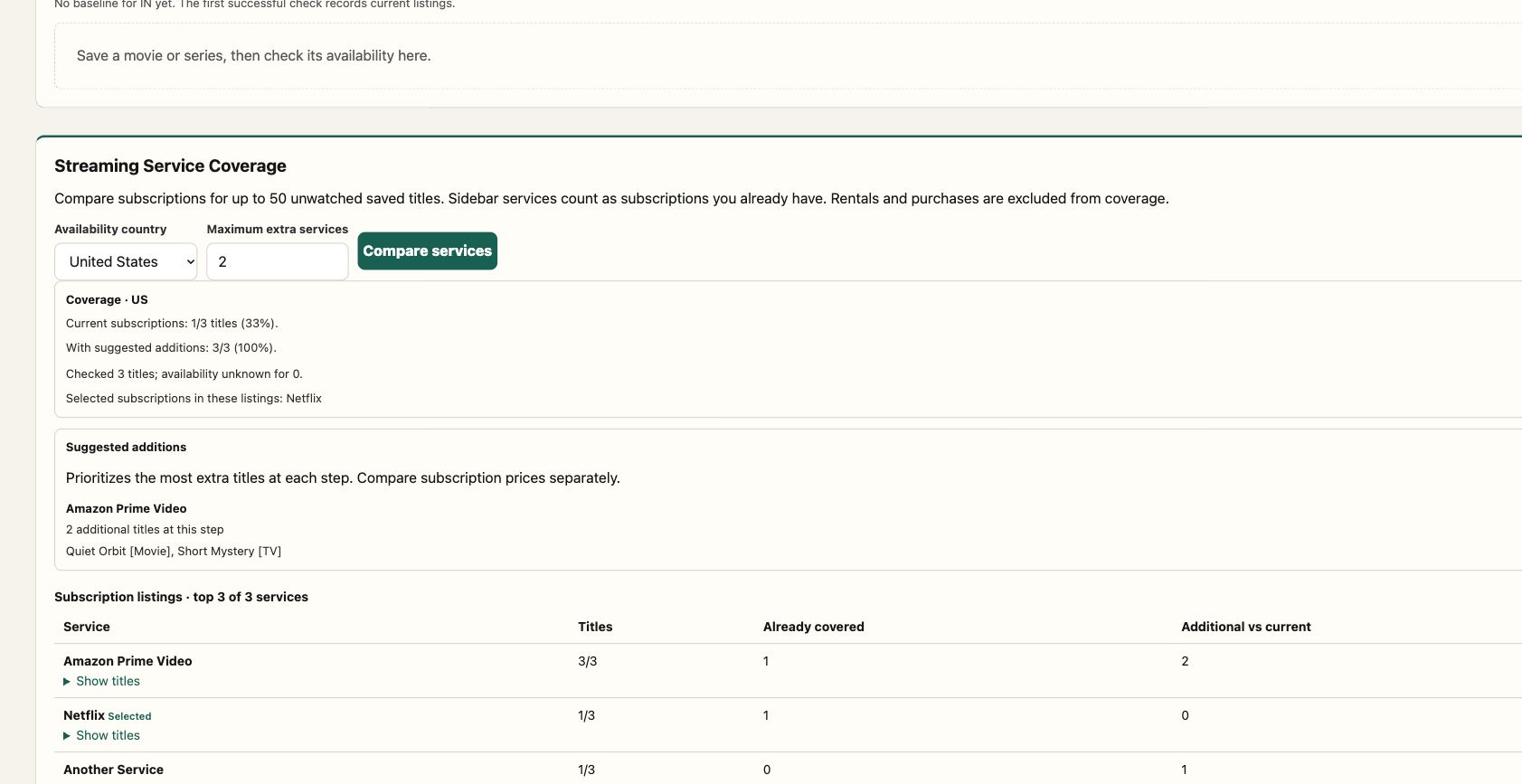
This screenshot uses synthetic titles and controlled provider listings to illustrate coverage and overlap. It is not a current catalog or pricing claim.
Personal Availability Radar
Open Planning Lab → My Watchlist, save movies or TV series, choose a country, and select Check saved titles.
- First check: record current listings as a baseline, without claiming they just arrived.
- Later checks: compare provider IDs and highlight new subscription listings on your selected services.
- Keep the distinctions: subscriptions, rentals, and purchases are reported separately.
- Handle gaps honestly: a failed lookup or missing country data keeps the last successful baseline and does not claim a removal.
The browser checks up to 50 unwatched, non-disliked entries. Baselines stay in browser storage, separately for each country. Checks run when you request them; this is not a background alert service. Watchlist JSON exports contain saved entries, not Radar baselines.
MCP clients use check_watchlist_availability with movie/TV IDs and an optional previousSnapshot. Store the returned snapshot in your client and pass it next time. The server does not persist personal state.
{
  "titles": [
    { "id": 603, "mediaType": "movie", "title": "The Matrix" },
    { "id": 1396, "mediaType": "tv", "title": "Breaking Bad" }
  ],
  "country": "US",
  "services": ["Netflix", "Prime Video"]
}
The first response creates a baseline. On the next call, add "previousSnapshot": <the returned snapshot object> to detect changes. Country changes create a new baseline. Service preferences highlight changes without filtering what the baseline stores.
Tools
27 tools, organized around decisions and reusable discovery primitives.
| Workflow tool | What it helps you decide |
|---|---|
get_weekend_watchlist |
What to watch tonight or this weekend. |
plan_watch_party |
A group pick, backup, and wildcard. |
recommend_from_taste_profile |
What fits your liked/disliked movies. |
build_tv_binge_plan |
Which series fits an estimated viewing budget. |
build_release_calendar_watchlist |
Which upcoming/recent movies to track. |
plan_streaming_coverage |
Which services cover your saved titles and what additional coverage they offer. |
check_watchlist_availability |
What changed on your saved titles’ providers. |
build_franchise_watch_order |
Where to start and how to watch a collection. |
build_collection_gap_plan |
Which franchise entries you still need. |
build_person_watch_path |
Where to start with an actor or director. |
compare_movies |
How 2–5 movies compare. |
find_where_to_watch |
Where specific movie titles are listed. |
| Category | Tools |
|---|---|
| Movie discovery | search_movies, get_trending, get_weekly_trending_by_language, search_by_genre, advanced_search, search_by_keyword, get_now_playing |
| Movie details | get_movie_details, get_recommendations, get_similar_movies, get_watch_providers |
| TV discovery | search_tv_shows, get_trending_tv |
| People | search_person, get_person_details |
Resource: tmdb:///movie/<id> provides full movie details as JSON.
Watched/disliked titles are excluded from browser recommendations. Headless clients pass their own excludeMovieIds or excludeTVIds. Saved likes can populate the Taste form; watched movies also contribute to collection progress.
Remote MCP & browser app
Deploy your own Cloudflare Worker. It serves the browser app at /, the MCP endpoint at /mcp, and health at /health.
npx wrangler login
npx wrangler secret put TMDB_API_KEY
npx wrangler secret put ACCESS_TOKEN
npm run worker:dry-run
npm run worker:deploy
Connect your remote MCP client to:
https://tmdb-mcp.<your-workers-subdomain>.workers.dev/mcp
When ACCESS_TOKEN is configured, send Authorization: Bearer <your-access-token> to protected APIs/MCP. The browser has an access-token field. Without it, the deployment is publicly callable and consumes your TMDB quota.
For local browser development: npm run worker:dev, then open http://127.0.0.1:8787/. This copies .env values into the ignored .dev.vars file. Merging code on GitHub does not redeploy the Worker.
Deployment and app guide · Full setup reference
Development & verification
npm test                         # Build + offline workflow, history, Radar, and stdio MCP checks
TMDB_API_KEY=dummy npm run smoke:plugin
npm run worker:dry-run
npm run smoke:docker              # After building the local image
For live tool verification, load your local environment and run npm run smoke:tools. It also supports --mcp-url for a hosted Worker. See verification instructions for authenticated HTTP, remote MCP, and browser fixtures.
The repo includes script demos for weekly language trends, a streaming radar, release calendars, provider monitoring, collection gaps, and a now-playing follow-on workflow. See demo commands.
Notes on the data
Movie/TV metadata comes from TMDB. Provider availability is supplied through TMDB’s JustWatch partnership; it is regional, can change, and may not cover every TV season. Observed changes do not establish exact arrival/departure times, prices, or future leaving dates.
TV viewing times are estimates; missing runtimes explicitly assume 45 minutes per episode. “Ended” is a metadata status, not a guarantee of story resolution. The existing family filter uses broad genre heuristics, not age certification or a parental guide.
This product uses the TMDB API but is not endorsed or certified by TMDB.
Contributing
Useful workflow ideas, bug reports, and focused PRs are welcome. Prefer a tool that answers a clear user question over a separate wrapper for every API endpoint. Shared workflows should work in both local and remote MCP; see architecture and verification.
Report a bug or suggest a workflow · MIT license


