
CruiseHops MCP
Connect an AI assistant to CruiseHops to find cruises, compare captured cabin fares, explore itineraries and price history, and discover Viator experiences at supported ports.
Remote endpoint: https://cruisehops.com/mcp
Transport: Streamable HTTP
Authentication: none — no CruiseHops account or API key needed.
This repository contains the public integration package: connection configuration, a cruise-planning skill, artwork and submission metadata. The hosted service runs on CruiseHops infrastructure. This repository does not contain its backend implementation or cruise dataset.
Connect your assistant
Codex
codex mcp add cruisehops --url https://cruisehops.com/mcp
Claude Code
claude mcp add --transport http --scope user cruisehops https://cruisehops.com/mcp
Cursor
Add this to .cursor/mcp.json, or merge the entry into an existing configuration:
{
  "mcpServers": {
    "cruisehops": {
      "url": "https://cruisehops.com/mcp"
    }
  }
}
VS Code
Add the entry to .vscode/mcp.json:
{
  "servers": {
    "cruisehops": {
      "type": "http",
      "url": "https://cruisehops.com/mcp"
    }
  }
}
For ChatGPT or other hosts with custom remote MCP connections, enter the endpoint and choose no authentication. Availability and UI support depend on the host, account and workspace policy. See the connection guide.
Direct connection exposes the server's tools. To also install the planning skill, use the portable plugin package with a host that supports Agent Plugins.
Try it
- Find cruises departing Miami under $800 per person in the next twelve months.
- Compare two balcony sailings and their itineraries.
- Show the captured price history of this sailing's selected offer.
- Find snorkeling experiences in Nassau for my port visit.
Coverage follows the live catalog and varies by provider and sailing. It is not a whole-market search. Cruise fares are captured observations, usually USD per person on the returned two-guest basis. They are not guaranteed live availability, a final quote, or a family total. Confirm current prices and conditions with the provider.
Port experiences use Viator. From-prices are indicative; confirm availability, meeting points and suitability for your time ashore before booking. CruiseHops may earn a commission from Viator bookings. CruiseHops does not make reservations, take payments or change bookings.
Available tools
| Tools | Purpose |
|---|---|
suggest_cruise_terms, search_cruises, list_departures |
Resolve names, discover itineraries and inspect departures |
get_sailing, compare_sailings |
Inspect a sailing and compare specific choices |
get_price_history, get_cabin_price_history |
Inspect exact-offer or cabin-series observations |
present_cruises |
Present an interactive shortlist in compatible MCP Apps hosts |
list_excursion_ports, find_port_excursions, get_excursion |
Explore supported ports and selected experiences |
present_excursions |
Present an interactive port-experience browser |
The live tools/list response is authoritative. All current tools advertise read-only behavior. Hosts without MCP Apps support can use structured results and text links.
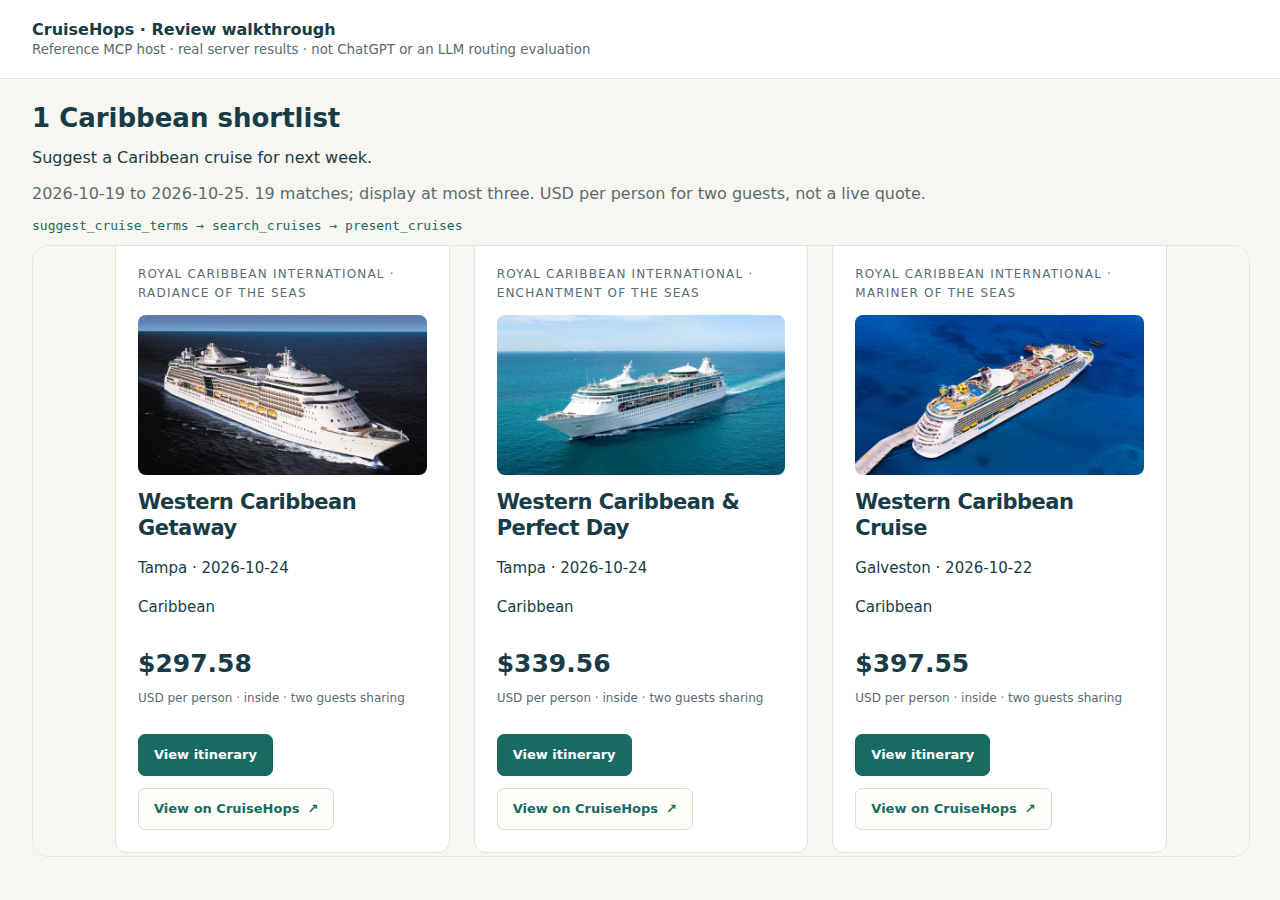
This screenshot is a historical reference-host example, not a current quote or evidence of testing inside a particular AI client.
Portable plugin package
plugin.json
mcp.json
skills/cruise-planning/SKILL.md
skills/cruise-planning/agents/openai.yaml
assets/
Download a ZIP from Releases, or build it from a clone of this repository:
python3 scripts/build.py
The ZIP contains the root Agent Plugins manifest, remote connection, skill and public assets. No local server process or credentials are bundled. Import it only through your host's supported plugin workflow; a GitHub repository or ZIP alone does not install an integration or grant a marketplace approval.
Validate and test
From a clone of this repository, Python 3.11 or newer is required. Use a virtual environment for validation dependencies:
python3 -m venv .venv
.venv/bin/pip install -r requirements-dev.txt
.venv/bin/python scripts/validate.py
.venv/bin/python scripts/build.py
python3 scripts/smoke.py
Validation checks pinned official schemas, skill metadata, referenced assets and the package allowlist. It needs internet access to fetch the schemas and rejects content that differs from schemas.lock.json. Building the deterministic ZIP needs only Python's standard library and works offline. The smoke check connects to the public server, discovers tools/resources and runs one bounded cruise search. It does not query Viator, book, pay or modify account data.
Submissions and maintenance
Use this repository URL when a catalog accepts an integration/plugin repository. It is not an open-source implementation of the hosted MCP server. Directories requiring the implementation source may still be unsuitable.
- Plugin package version: see
plugin.json. It is independent of the hosted server and official registry version. submission/server.jsonis a snapshot of the previously published domain registry manifest, version 1.4.0. It is supplied for reference, not as a new registry publication. Updating this repository does not update that registry entry. Its description names an earlier subset of coverage; consult the live server for current coverage.- The portable package follows Agent Plugins and OpenAI's packaging guide. Cursor documents support for this layout in its plugin reference.
- The package has been schema-validated and smoke-tested against the remote server. This does not establish installation testing or marketplace approval in every host. Review prompts in
plugin.jsondescribe expected behavior, not completed host-level evaluations. - When updating the endpoint or skill, validate the package, run the smoke check and review the ZIP file list before publishing a new release. Never add credentials, local account exports, private app-registration files or backend data.
Support and license
Operated by Just One More Feature, s.r.o. Contact [email protected] for help or security reports.
Support · Privacy · Service terms
Integration configuration, scripts and skill instructions are MIT licensed. See LICENSE. Artwork, screenshots, names and third-party material are covered separately in ASSETS.md. The package license does not license the hosted backend or its data.


