
PeerBrush
You and your AI. Same canvas.
An image editor where humans and AI agents work in the same editable project.



Website · Watch the trailer · Windows Store · macOS and Linux downloads · Published releases · Get started · Connect your AI · Development guide · Roadmap
PeerBrush is an image editing application designed from the ground up for humans and AI agents to work on the same project together.
Instead of treating AI as a separate prompt box, PeerBrush gives both the user and the agent access to the actual editing environment, including layers, selections, masks, transforms, brushes, effects, and document state.
The goal is simple: Make AI a participant in the creative workflow, not just a generator.
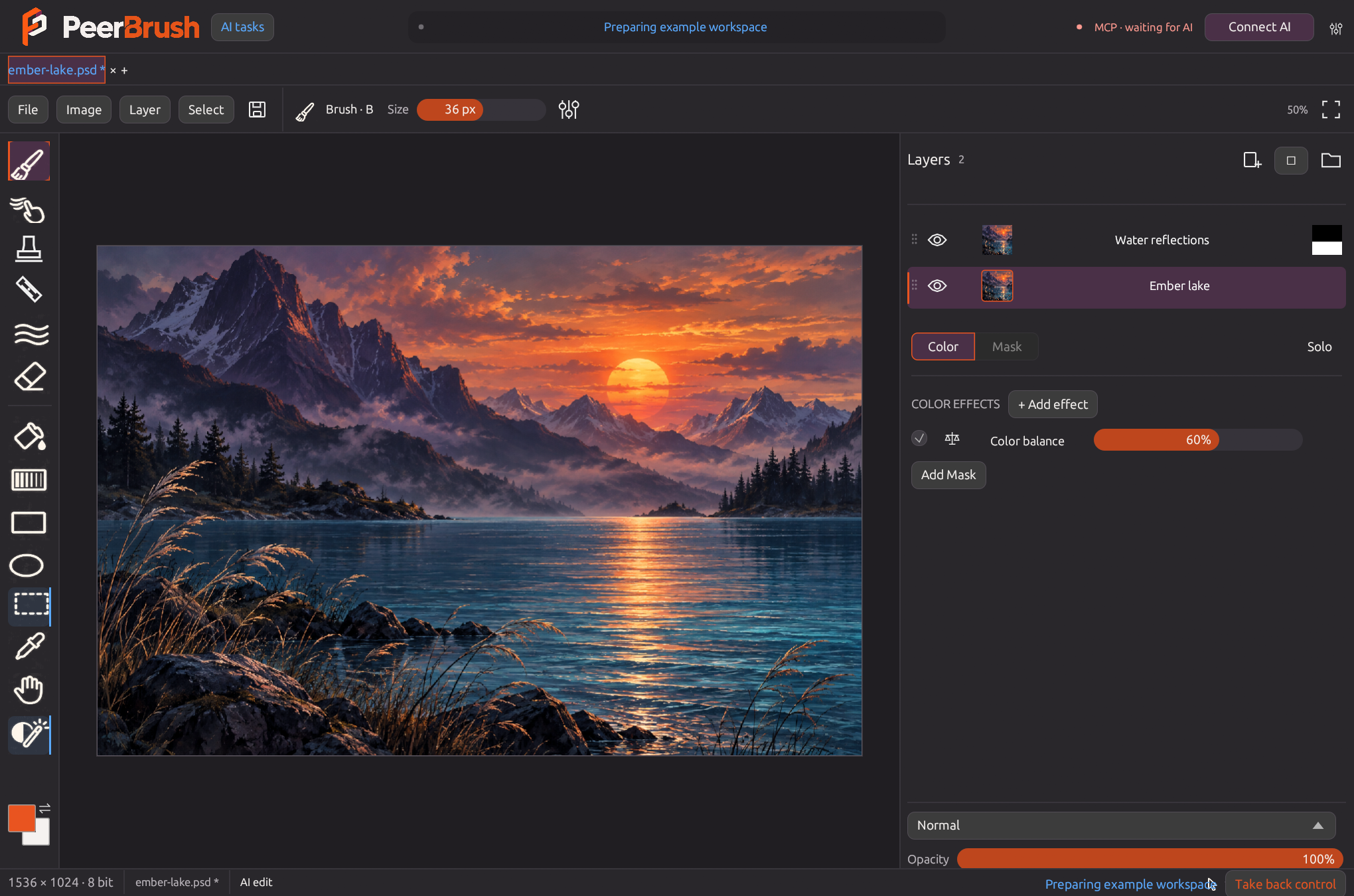
Actual native workspace with ImageGen example artwork. Ember orange identifies human interaction; blue identifies AI work.
A shared creative workspace
Most AI image workflows are built around Prompt → Generate → Result. PeerBrush is built around Human + AI → Shared Project.
You stay in control while AI works directly alongside you inside the same editing environment. Both participants use the current document state, the same editing commands, and visible, editable, reversible changes.
| Create and edit | Work with AI | Keep control |
|---|---|---|
| Paint, erase, fill, shapes, lassos, wand and soft selections | MCP and CLI access to the live document | Shared undo/redo with participant checks |
| Layer and folder hierarchy, multi-selection | Actual PNG views with pixel coordinates | Atomic edits and conflicting-revision checks |
| Separate editable color and mask effect stacks | Place generated images into exact regions | Optional layer/region reservations and takeover |
| Color balance, hue, curves, bloom and editable liquify | Blue activity markers and animated changes | PSD working files and PNG export |
Built for the way you work
- Progressive document loading. Cancellable native16 PSD decoding, saved-image feedback and bounded disposable effect caches. See large-document behavior.
- Independent project tabs. Compact rounded Ember tabs show unsaved changes and blue AI activity. Long names shorten with full-name tooltips; the all-projects picker keeps overflow accessible. New/open keeps existing work in its own tab. Copy editable layer trees across projects or drag onto a tab for a rendered destination preview; Shift moves them with an undo step in each project. Background AI edits use stable project handles. See project targeting.
- Visual, compact controls. White tool glyphs, Ubuntu Sans, uncluttered range values and live canvas feedback.
- Compact transform modes. Q/W/E/R sit at the bottom right, with the same shortcuts, live rendered gizmos and blue AI feedback.
- A browsable brush library. Twenty-one original procedural presets, six categories, search and readable stroke previews. Edit pressure response, texture, taper and flow, then save custom brushes; the UI and agents use the same native-depth painting engine.
- Live procedural AI editing. Run bounded code with native pixel buffers and shared commands in one guarded transaction. Declared blue scopes, task ownership, locks, cancellation and source checks preserve collaborative work. See live code.
- A useful hierarchy. Distinct folders, multi-layer editing, drag into or out of folders, animated reorder previews, visibility sweep gestures, inline renaming, grouping and merging.
- Editable effects. Compact color and mask stacks have recognizable icons and an inline strength percentage for every effect. Expand settings independently for each effect and project; native-precision HSV/HEX pickers retain editable colors. Top effects run last. Parameter drags preview through the shared engine and commit once on release. Blend and opacity sit beneath the stack.
- Whole-image filters. Browse searchable categories and rendered thumbnails, compare actual project previews, and retain editable native-depth settings above the complete composite. Save, rename, import and export custom presets. See filter controls and protocol.
- Editable text and vectors. Plain text with bundled font weights, multiline alignment, rectangles, ellipses and editable path points; native fill/stroke colors, live property previews and retained source placement. PSD files also contain current standard raster layers. See supported source behavior.
- Retained transform originals. Whole-layer rotation/scaling sample original native artwork and painted masks across gestures and PSD reopening; later pixel edits establish a fresh baseline for the changed source. See transform behavior.
- Familiar navigation. Maya-style W/E/R gizmos, Q to hide, F to frame, middle drag to pan, wheel or Alt + right drag to zoom.
- A painting brush. Round, dry, chalk, grain and bristle tips; size and opacity pressure, start/end taper, flow, spacing and smoothing. Wet blending carries pigment along the stroke. Live size changes, Alt eyedropper, two colors and X to swap.
- Native 16-bit precision. Open supported 16-bit RGB PSD layers, retain channel precision through edits and history, and save PSD or PNG at the same depth. Unsupported Photoshop structures stay protected, with an explicit copy that flattens structure while keeping 16-bit samples.
- Color that stays editable. Warm highlights and cool shadows independently, shift hue/saturation, posterize tonal levels, clamp individual RGBO channels, add threshold-controlled bloom, and brush an editable liquify warp. Clipped adjustments target one layer; a shared adjustment can affect selected artwork inside a folder.
- More blend choices. Linear dodge / Add, dodge/burn, soft/hard light, difference, exclusion, subtract and divide, with hover previews.
- Real clipboard support. Copy, cut, paste or duplicate whole layers and folders, including masks and effects; copy selected pixels or the composite; cut selected content with native precision and guarded source clearing; accept images copied in other applications.
Run PeerBrush
PeerBrush 0.30.0 is an unpublished release candidate. Windows users can install the earlier Microsoft Store version (MSIX 1.25.0.0). Apple silicon Mac and x64 Linux users can download release 0.26.0.
To develop from source:
cargo run
cargo test --locked
cargo build --release --locked
Version 0.25 passed exact-source CI and package verification on Windows, macOS and Linux. Windows native editing/save/reopen workflows were visually verified; macOS/Linux manual desktop interaction remains unverified. See getting started and platform development notes.
Connect an AI agent
Click Connect AI to register PeerBrush with detected Codex, Claude Desktop, Cursor and Gemini CLI installations. Existing client settings are preserved and backed up. A local discovery manifest gives other agents the executable, workspace and authenticated HTTP endpoint. Restart or reload a configured client to load the tools.
Green MCP available means the local server is ready for clients; green MCP connected confirms a live client. Red MCP unavailable means the server is unavailable. Client setup and server availability are separate states.
The adapter can initialize while the editor is closed, then reconnect when you open it. Advanced settings and manual setup are available beside Connect AI. See connection details.
Agents can observe a layer, mask, or cropped canvas region; edit through shared commands; place generated or edited pixels; and undo, inspect, refine, or redo an attempt. Model choice stays outside PeerBrush, so different compatible models and agents can plug into the same workflow.
{
  "path": "C:/art/generated.png",
  "rect": [100, 80, 500, 380],
  "layer": "CONTEXT_LAYER_OR_FOLDER_ID",
  "new_layer": true,
  "name": "Generated detail",
  "actor": "my-agent",
  "expected_revision": 7
}
Arguments for peerbrush_place_image. Placement is undoable and returns the layer ID plus cropped PNG feedback. Set new_layer:false and mode:"replace" for an edited patch on an existing layer.
See MCP and CLI for setup, tools, reservations, coordinate conventions and artistic iteration.
Core idea
PeerBrush is built around a shared creative workspace where:
- You can edit manually at any time
- AI agents can inspect and modify the same project
- Both sides work with the current document state
- Changes remain visible, editable, and reversible
- Tools can be used through the interface or programmatically
- Different AI models and agents can plug into the same workflow
Vision and planned features
The long-term goal is an MCP-native creative application where compatible AI agents inspect, understand, and manipulate the same project the user is actively editing.
- Layer-based image editing
- Masks and selections
- Transform and drawing tools
- Non-destructive editing where possible
- Shared document state
- MCP support and agent-accessible editing tools
- Local and remote model support through connected agents
- Extensible tool and plugin architecture
PeerBrush includes retained regional and broader GPU previews, folder transforms, selective agent-task undo, refined selections, optional external learned selection, native clone/heal, crop/canvas/image resizing, editable text/vector sources, retained transform originals, progressive loading, AI proposals and live code editing, stronger RGB PSD/color-profile support, brush and preset libraries, compact weighted effects and independent project tabs. The living FOLLOWUPS.MD records requests and their status; learned-selection setup keeps model choice outside the editor, and AI collaboration describes optional review.
Status
🚧 Experimental prerelease — PeerBrush 0.25
PeerBrush is currently experimental and under active development. Features, APIs, and project structure are expected to change.
Editable PSD support currently targets PSD v1, 8-bit and 16-bit RGB, basic raster layers, isolated and pass-through groups, supported blend modes, raster masks and default grouped raster clipping stacks. Supported clipping and raster-only pass-through folders stay layered in standard PSD data. PeerBrush preserves editable effect sources in private metadata and writes current standard raster/mask data and a merged composite. Supported embedded RGB matrix/TRC and classic LUT ICC profiles display through sRGB and support an explicit editable sRGB copy at the original depth. Protected-original PNG export keeps native samples and its ICC tag; converted PSD/PNG copies carry an sRGB tag. Unsupported Photoshop features and profiles open as a read-only merged preview at the original depth. Full Photoshop compatibility and full color management remain future work. See supported Photoshop behavior. Version 0.25 adds PSB v2 opening, dropping and saving through the same native 8/16-bit RGB codec. It keeps the 8192-pixel edge, 32 MP and 256 MiB file limits; unsupported structures remain protected.
The shell uses Rust, egui/eframe and wgpu. Sparse copy-on-write tiles share unchanged image data with history. Incremental strokes reuse coverage and composite affected regions, then upload only changed preview pixels. Larger previews use bounded parallel CPU rendering. GPU previews cover 8/16-bit blends, masks, clipping, folders and prepared adjustment stacks, with bounded caches and shared CPU fallback. History and PSD/PNG sources retain native precision. Larger workloads may remain faster on CPU.
License
GNU General Public License v3. See LICENSE. Bundled fonts and dependencies retain their own licenses; portable packages include source and third-party notices.
This project is developed with AI assistance.


