
ModernCV - AI Resume Builder




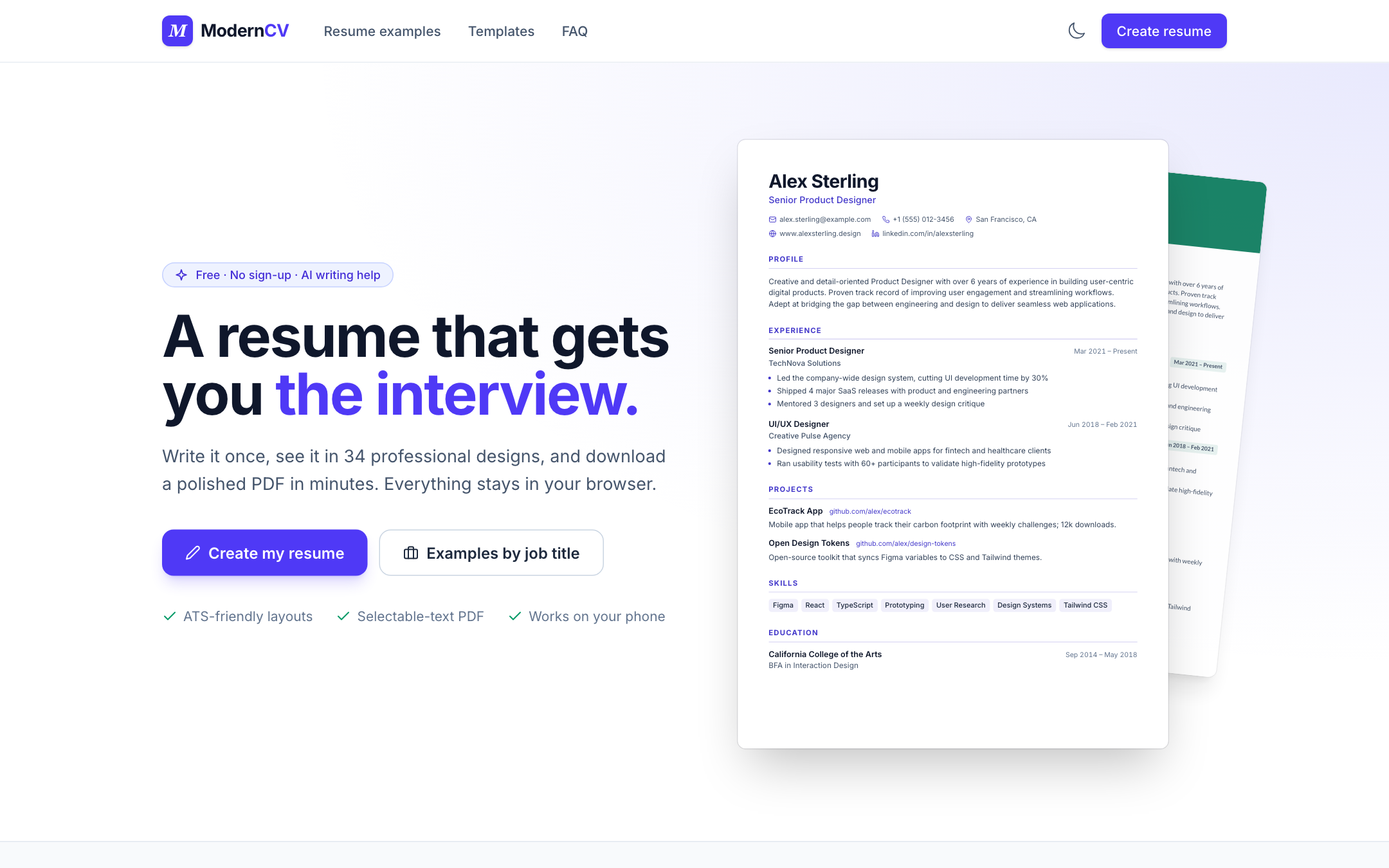
ModernCV is a free, local-first AI resume builder with 53 templates (including photo and academic CVs), a vector PDF export, 1,204 job-specific resume examples, and an MCP server so AI agents can build resumes with it.
Live Demo | Report Bug | Request Feature | Architecture | Roadmap
English | 中文
Table of Contents
- Why This Project?
- Who Is It For?
- Highlights
- Templates
- Preview
- Features
- SEO & Social Sharing
- For AI Agents and LLMs
- Getting Started
- Scripts Reference
- Project Structure
- Adding Job Titles
- Deployment
- Contributing
- Roadmap
- Community
- License
Why This Project?
ModernCV helps job seekers build professional resumes quickly while giving HR teams a consistent, template-driven way to review and share role-specific layouts. Editing stays local-first in the browser, while AI requests are routed through a server-side proxy for safer key management.
Who Is It For?
- Job seekers who want fast, polished resumes with AI-assisted wording.
- Career coaches who need reusable templates and consistent output.
- HR and recruiting teams that want role-based template previews and shareable resume layouts.
Highlights
- 53 resume templates, including research-based classics (Jake's, Harvard, Awesome-CV, moderncv, McDowell, billryan, Deedy, AltaCV) and 25 ATS-friendly single-column layouts.
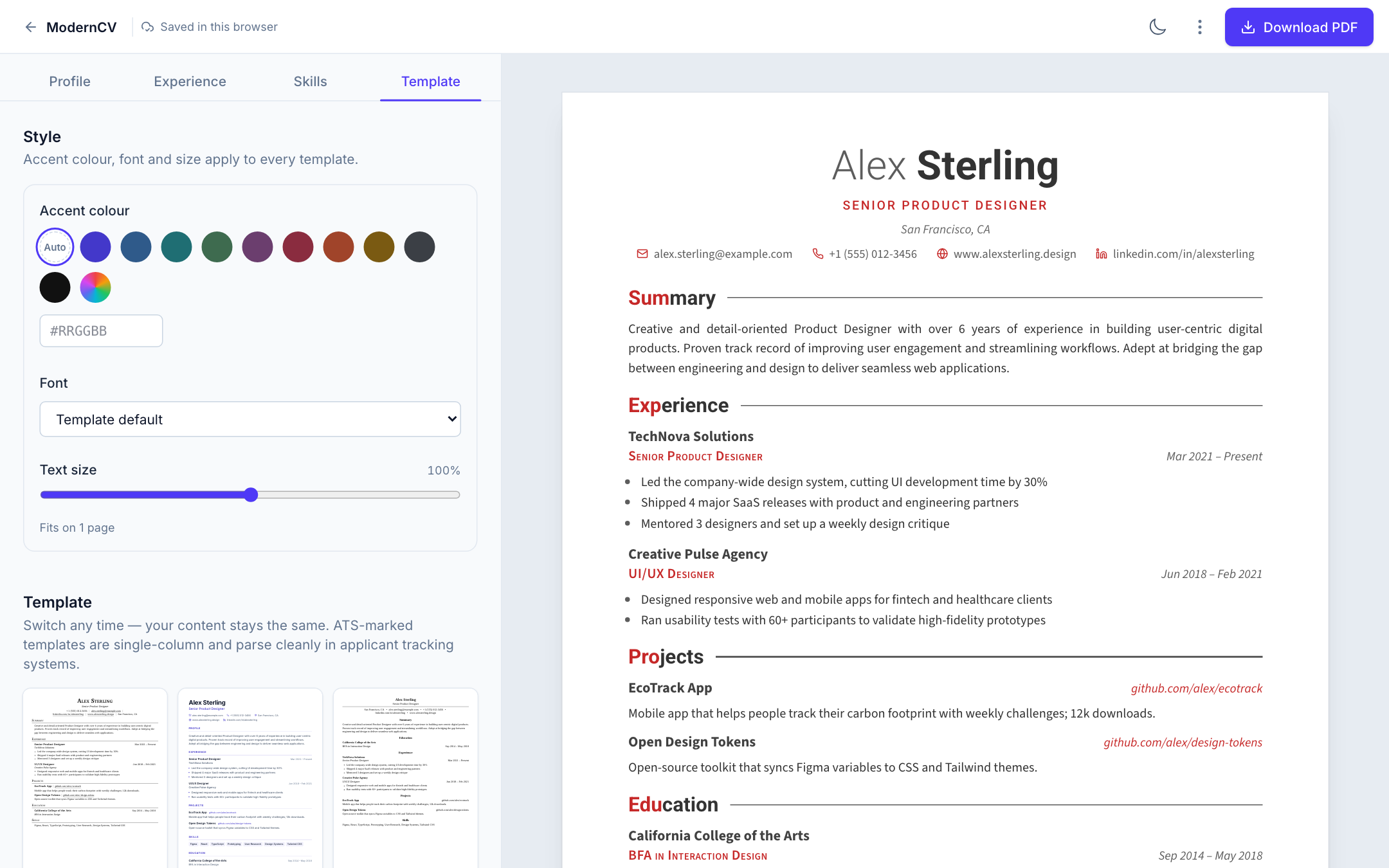
- Style controls for every template: accent colour (with contrast check), 10 self-hosted fonts, text size, and fit to one page.
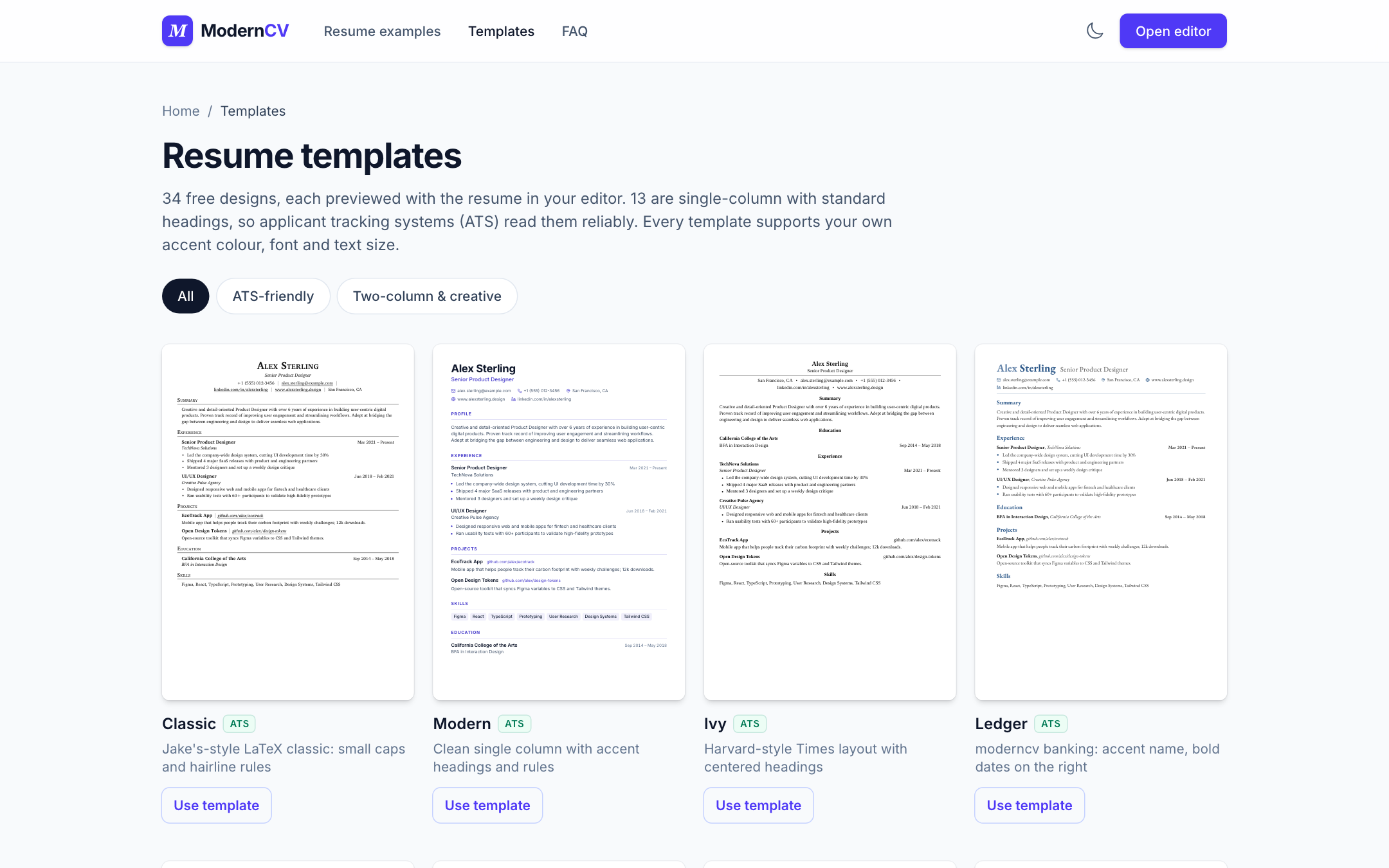
- A template gallery (
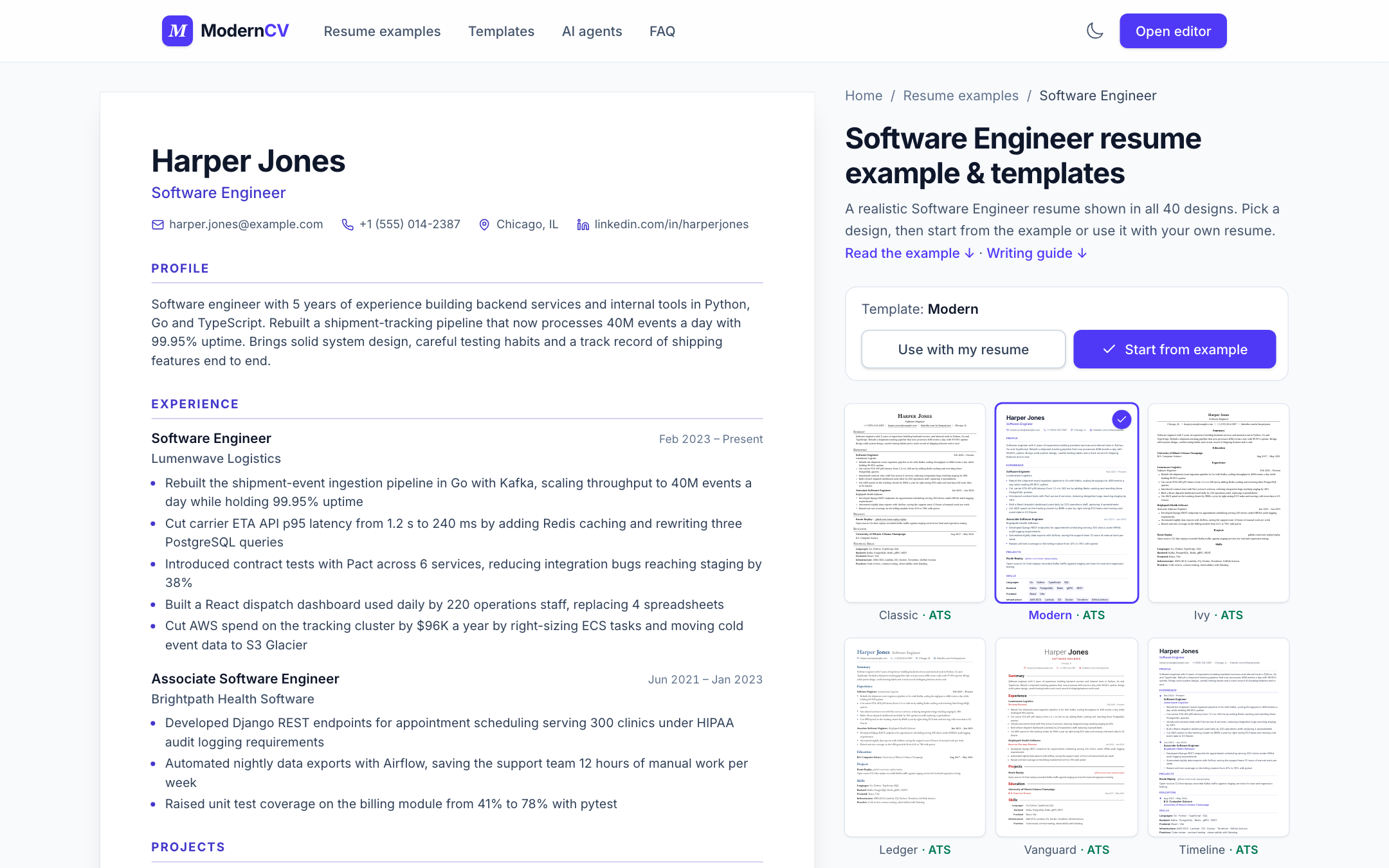
/templates/) with an ATS filter and a detail page per template. - 1,204 job titles in 21 families, each with a pre-rendered page: a realistic example resume written for that role and level, a writing guide (sections, skills, example bullets, recruiter tips) and FAQ. "Start from example" opens it in the editor.
- Social and custom links: up to 8 extra links (GitHub, portfolio, X, Dribbble, Behance, Google Scholar, …) with auto-detected icons in every template.
- Built for AI agents: a remote MCP server (
/mcp), an installable agent skill, an HTTP API with an OpenAPI spec, copy-paste prompts on every template and job page, plusllms.txt,llms-full.txt, a template catalog and a resume JSON Schema. See/agents/. - Imports JSON Resume files as well as ModernCV backups.
- AI writing help (Cloudflare Workers AI) for summaries and experience bullets.
- Local-first data storage with debounced segmented persistence for resume editing.
- AI runs through the Cloudflare Worker's Workers AI binding; no API keys in the browser.
- Vector PDF export rendered by Cloudflare Browser Rendering (selectable text, embedded fonts), with an in-browser image fallback, on A4 or US Letter paper.
- JSON export for portability or integration with other tools.
- Light and dark themes.
功能特性
- 40 套专业模板 - 吸收 Jake's、Harvard、Awesome-CV、moderncv、Deedy、AltaCV 等经典设计,其中 16 套为 ATS 友好单栏
- 样式控制 - 强调色(含对比度检查)、10 种自托管字体、字号与一键压缩到一页
- 模板画廊 -
/templates/支持 ATS 筛选,每套模板都有独立详情页 - 1,204 个职位页面(21 个职业大类) - 每个职位都有按岗位和级别撰写的真实示例简历、预渲染写作指南(章节顺序、技能、示例要点、招聘方建议)和 FAQ,可一键“从示例开始”编辑
- 社交与自定义链接 - 最多 8 个额外链接(GitHub、作品集、X、Dribbble、Behance、Google Scholar 等),自动识别图标,所有模板都会展示
- AI Agent 可直接使用 - 远程 MCP 服务(
/mcp)、可安装的 Agent Skill、带 OpenAPI 的 HTTP API,每个模板和职位页都有可复制的 Prompt;另有llms.txt、llms-full.txt、模板目录 JSON、简历 JSON Schema。详见/agents/ - JSON Resume 导入 - 可直接导入 JSON Resume 标准格式或本站备份文件
- 实时预览 - 输入内容时即时查看简历更新
- AI 智能优化 - 使用 Cloudflare Workers AI 优化和润色简历文本
- 自动生成摘要 - 根据职位和技能自动生成专业摘要
- 本地数据存储 - 数据优先保存在浏览器(分片存储 + 自动保存)
- 打印导出 - 使用
Cmd/Ctrl + P或 PDF 导出功能生成高质量简历 - JSON 导出 - 支持 JSON 格式导出,便于备份和迁移
- 矢量 PDF - 服务端按预览原样渲染,文字可选中、字体内嵌,纸张可选 A4 或 US Letter
- 明暗主题 - 支持浅色和深色主题切换
- 社交分享图 - 构建时自动生成适配职位页与目录页的分享缩略图
Templates
ModernCV ships with 53 templates. Photo templates (Europa, Tokyo, Jade, Portrait, Halo) show an optional headshot for markets that expect one. ATS-friendly (single column, standard headings): Classic, Modern, Ivy, Ledger, Vanguard, Timeline, Executive, Compact, Academic, Tech, Silk, Lateral, Opal, Meridian, Keystone, Vital, Plain, Text, Graduate, Wall Street, Scholar, Oxford, Standard, Lumen, Federal. Federal is the USAJOBS format for US government jobs: MM/YYYY dates and hours per week on every job, printed on US Letter, with a warning past the 2-page USAJOBS limit, plus Honors and Awards and a Certifications and Licenses section. Scholar, Oxford, Academic, Plain, Text and Graduate show Publications, Grants and awards, Talks and Teaching sections for academic CVs. Publications can be imported from BibTeX or ORCID, a whole LaTeX CV can be imported (AI converts it; you preview before it replaces anything), and any resume can be opened in Overleaf or downloaded as LaTeX.
Two-column and expressive: Minimalist, Duo, Altitude, Halo, Prism, Sidebar, Creative, Professional, Elegant, Swiss, Berlin, Iron, Ginto, Symmetry, Path, Wireframe, Quartz, Bronx, Paper, Moda, Noir, Mono, Pop, Cast.
Every template reads --rs-accent and the paper font variables, so the editor's accent, font and size controls apply everywhere.
Preview
| Editor with style controls | Template gallery | Example resume on a job page |
|---|---|---|
 |
 |
 |
Features
Resume Builder
- Real-time editor + preview with responsive layout.
- Template selector with instant style changes.
- PDF export:
/api/pdfprints the exact preview with Cloudflare Browser Rendering (BROWSERbinding); falls back to an image PDF built withpdf-lib. - JSON export for backup or reuse.
AI Assistance (Cloudflare Workers AI)
- Generate a professional summary based on role and skills.
- Improve experience bullets with action verbs and measurable impact.
- Frontend uses a Worker-injected
ai-client-tokento request a short-lived signed session via/api/ai/session, then calls/api/ai. - Worker enforces origin checks, client-token verification, session+request-id verification, and multi-dimensional rate limits (IP + session + global, backed by Durable Object) before calling Workers AI (
env.AI.run). - The model is set by the
AI_MODELWorker var (default@cf/zai-org/glm-5.3-flash). No API key is needed; billing goes to the Cloudflare account.
Job Title Directory and SEO
/directoryroute with searchable categories (1,204 titles in 21 families)./resume_tmpl/<slug>/pages: a complete example resume written for that title (src/data/roles/*.json), shown in every template and pre-rendered as readable text, with "Copy text", "Start from example" and "Use with my resume", plus a writing guide and five FAQs generated fromsrc/data/roleGuides.json./templates/gallery and/templates/<id>/detail pages with "best for" roles, similar templates and an editor deep link.- SEO postbuild script pre-renders every page (home, directory, templates, agents, 1,204 job pages) with unique titles and descriptions drawn from each example, JSON-LD (WebApplication, Occupation, FAQPage, BreadcrumbList, CreativeWork, ItemList, TechArticle, WebAPI) and a 1,257-URL sitemap.
- Unknown URLs return a real
404withx-robots-tag: noindexinstead of redirecting to home.
Privacy and Data
- Resume data is persisted in browser localStorage (
resumeData:v2:*) with debounced writes. Backups can be exported/imported as JSON. - AI requests send only the selected text to Cloudflare Workers AI for processing.
- No API keys are stored in the browser.
SEO & Social Sharing
- Open Graph + Twitter tags are set per page (runtime + build).
- Build generates share images (1200x630 PNG) for home, directory, editor, and each job page.
- Each template has a screenshot share image and page preview in
public/og/templates/. robots.txtallows search and AI crawlers (GPTBot, ClaudeBot, PerplexityBot, Google-Extended, …) and blocks/api/and/dev/.- Set
SITE_URL(build) orVITE_SITE_URL(runtime) to ensure correct canonical URLs.
For AI Agents and LLMs
ModernCV can be used directly by AI agents (Claude, ChatGPT, Cursor, Amp, …). Setup instructions for each client are on /agents/, and every template and job page has a copy-paste prompt that tells an agent to build the resume in that exact template through ModernCV.
MCP server (Streamable HTTP, no auth): https://genedai.cv/mcp
claude mcp add --transport http moderncv https://genedai.cv/mcp
| Tool | What it does |
|---|---|
list_templates |
All templates with description, best-for roles, ATS status and preview image |
get_writing_guide |
Section order, skills, metrics, example bullets and FAQs for a job title |
get_example_resume |
A complete example resume for a job title, in render-ready JSON |
get_resume_schema |
JSON Schema of the resume object |
import_publications |
Publications from an ORCID iD or BibTeX, filterable by kind and year |
render_preview |
Page 1 as a PNG plus the page count |
render_pdf |
A link that downloads an A4 or US Letter vector PDF (selectable text, embedded fonts) for 7 days (embedded instead when the resume is too long for a link) |
create_editor_link |
A link that opens the editor with the resume loaded (kept in the URL fragment) |
export_latex |
The resume as a standalone .tex file, ready for Overleaf |
Agent skill: /skills/moderncv-resume/SKILL.md (source in skills/). HTTP API: the same tools under /api/agent/ (the schema is the static /resume.schema.json; spec: /openapi.json); rendering is rate limited per IP and globally, and resumes are not stored.
The build also publishes plain files:
| File | Contents |
|---|---|
/llms.txt |
Short site map following the llms.txt convention |
/llms-full.txt |
All templates, writing guides per job family and FAQs in one file |
/templates.json |
Template catalog: id, name, description, ATS status, best-for roles, preview images, editor link |
/resume.schema.json |
JSON Schema for the import format |
/examples/<job-slug>.json |
The example resume of every job page, e.g. software-engineer.json |
An agent can draft a resume as JSON matching the schema (or as a JSON Resume document), have the user import it from Editor → More actions → Import backup, and open /editor/?template=<id> to preselect a template. Resume data never leaves the browser except for the text sent to AI actions.
Usage Guide
Editing Your Resume
- Open the editor from the home page, a template page, or a job page (
/editor/?template=<id>preselects a template) - Use the tabs to navigate between sections:
- Profile: Personal details and summary
- Experience: Work history, education and projects
- Skills: Skills (group them as "Languages: Go, Python"; pasting a list adds every item)
- Template: Template picker, accent colour, font, text size and "Fit to one page"
- Changes are autosaved locally (with visible warning if persistence fails)
- More actions saves or imports a backup (ModernCV JSON or JSON Resume), starts from blank, or restores the sample
AI Features
- Improve: rewrites the summary or an experience description; Undo restores the original
- Write: drafts a summary from your title and skills
Exporting
- Click "Download PDF" for a vector PDF with selectable text (rendered on the server; falls back to an image PDF if the server is unavailable)
- Or press
Cmd/Ctrl + Pto open the print dialog and select "Save as PDF"
Resume Sections
| Section | Description |
|---|---|
| Personal Info | Name, title, contact details, website, LinkedIn, and up to 8 social or custom links |
| Summary | Professional summary (AI-generated or custom) |
| Experience | Work history with company, role, dates, and descriptions |
| Education | Schools, degrees, and graduation dates |
| Skills | Skills, optionally grouped as "Category: item, item" |
| Projects | Personal or professional projects with links |
Tech Stack
| Category | Technology |
|---|---|
| Framework | React 19 |
| Language | TypeScript 5.8 |
| Build Tool | Vite 6 |
| Styling | Tailwind CSS 4 |
| Routing | React Router 6 |
| AI | Cloudflare Workers AI |
Cloudflare Browser Rendering (@cloudflare/puppeteer), pdf-lib fallback |
|
| SEO | JSON-LD, sitemap + OG images (sharp) |
| Deployment | Cloudflare Pages/Workers |
Getting Started
Prerequisites
- Node.js 18+ recommended
- npm
- Optional for AI features: a Cloudflare account with Workers AI
Quick Start
# Clone the repository
git clone https://github.com/yourusername/modern-ai-resume-builder.git

# Navigate to the project
cd modern-ai-resume-builder

# Install dependencies
npm install

# Start development server
npm run dev

# Open http://localhost:3000 in your browser
Environment Variables
Create a .env.local file if needed:
# Optional: frontend override for AI proxy endpoint
# Defaults to /api/ai
VITE_AI_PROXY_URL=

# Optional: runtime canonical site URL for SEO tags
VITE_SITE_URL=https://your-domain.com

# Optional: build-time site URL for SEO postbuild assets
SITE_URL=https://your-domain.com

# Optional: write SEO assets to public/ for local testing
SEO_WRITE_PUBLIC=1
Notes:
VITE_variables are embedded into the client bundle.- Do not store service keys in
VITE_variables. - For local Worker development, copy
.dev.vars.exampleto.dev.varsand set secrets there. - For Cloudflare Worker deployments, set a server secret:
wrangler secret put AI_SIGNING_SECRET
- For local AI proxy testing, run Worker dev and point the frontend to it:
VITE_AI_PROXY_URL=http://127.0.0.1:8787/api/ainpx wrangler dev
- Optional Worker vars:
ALLOWED_ORIGINS(comma-separated origins allowed to request AI sessions)AI_RATE_LIMIT_PER_MINUTEAI_PER_SESSION_RATE_LIMIT_PER_MINUTEAI_GLOBAL_RATE_LIMIT_PER_MINUTEAI_SESSION_RATE_LIMIT_PER_MINUTEAI_SESSION_TTL_SECONDSAI_CLIENT_TOKEN_TTL_SECONDS
- AI features require the
AIbinding (seewrangler.jsonc) and theAI_SIGNING_SECRETWorker secret.AI_MODELandAI_REASONING_EFFORTvars choose the model. npm run buildgenerates static SEO pages + OG images indist/og.
Scripts Reference
| Command | Description |
|---|---|
npm run dev |
Start development server |
npm run build |
Build for production and run SEO postbuild |
npm run build:clean |
Clean dist then run full production build |
npm run preview |
Preview the production build |
npm run test |
Run unit/integration tests (Vitest) |
npm run test:watch |
Run tests in watch mode |
npm run smoke:agent [-- <url>] |
Smoke-test the agent API and MCP server on a live deployment (default https://genedai.cv; uses 6 renders). Runs automatically after each Cloudflare deploy of main (.github/workflows/smoke-agent.yml) |
npm run seo:postbuild |
Run SEO postbuild only |
npm run jobtitles:validate |
Validate job titles (duplicates, slug collisions) |
npm run roles:sync |
Merge src/data/roles/*.json into jobTitles.json and roleGuides.json (--check reports missing examples, duplicates, collisions) |
npm run jobtitles:import |
Bulk import job titles |
npm run deploy |
Deploy to Cloudflare Workers |
npm run build:deploy |
Build and deploy in one command |
Project Structure
modern-ai-resume-builder/
├── .github/                    # GitHub templates
├── public/                     # Static assets (icons, OG image)
├── scripts/                    # SEO and job title scripts
├── src/
│   ├── components/             # UI components and templates
│   ├── constants/              # Template catalog and design settings
│   ├── contexts/               # React contexts
│   ├── data/                   # Job titles, role guides, FAQ, personas, role examples
│   ├── shared/                 # Code shared by the app and build scripts (role guides)
│   ├── views/                  # Pages (home, editor, templates, 404)
│   ├── hooks/                  # Custom React hooks
│   ├── services/               # AI client (Workers AI via the Worker)
│   ├── utils/                  # Utility functions
│   ├── App.tsx                 # Routes and page layout
│   └── types.ts                # TypeScript types
├── skills/                     # Agent skill (SKILL.md), also published at /skills/
├── worker/                     # Cloudflare Worker: AI, PDF, MCP server + agent API, CSP, 404s
├── ARCHITECTURE.md             # Architecture details
├── CHANGELOG.md                # Version history
├── CONTRIBUTING.md             # Contribution guide
├── CODE_OF_CONDUCT.md          # Community guidelines
├── ROADMAP.md                  # Product roadmap
└── SECURITY.md                 # Security policy
Adding Job Titles
Job titles power the /directory page and generate SEO pages under /resume_tmpl/<slug>. Each title has an example resume in src/data/roles/<family>.json, which is the source of truth.
Add a title with its example
- Add the title and its example (
summary,experience,education,projects,skills) to the family file insrc/data/roles/. A new family file also needs aguideobject (seeroleGuides.json). - Sync and check:
npm run roles:sync, thennpm run jobtitles:validate - Build:
npm run build
Bulk Import
# TXT format (one title per line)
npm run jobtitles:import -- --input titles.txt --dry-run

# CSV format (category,title)
npm run jobtitles:import -- --input titles.csv --format csv
Deployment
Cloudflare Pages (Recommended)
- Connect your GitHub repository to Cloudflare Pages
- Configure build settings:
- Build command:
npm run build - Build output directory:
dist
- Build command:
Cloudflare Workers
# First-time only: session signing secret for AI
wrangler secret put AI_SIGNING_SECRET

# Build and deploy
npm run build:deploy
Other Platforms
The dist folder can be deployed to any static hosting (Vercel, Netlify, GitHub Pages, S3 + CloudFront) for core resume editing.If you need AI features, deploy an API endpoint compatible with /api/ai and set VITE_AI_PROXY_URL when needed.
API Reference
AI Service (src/services/aiService.ts)
// Improve existing text with AI
improveText(text: string, context: string): Promise<string>

// Generate professional summary
generateSummary(role: string, skills: string[]): Promise<string>
Contributing
We welcome contributions! Please see CONTRIBUTING.md for details.
Development Guidelines
- Follow the existing code style
- Write TypeScript types for new features
- Test on both desktop and mobile viewports
- Ensure AI features gracefully degrade when API is unavailable
Roadmap
See ROADMAP.md for planned features and priorities.
Community
- Issues: Report bugs or request features
- Discussions: Share ideas or ask questions
- Security: See
SECURITY.md
License
Distributed under the MIT License. See LICENSE for more information.
Acknowledgments
- Cloudflare Workers AI for AI capabilities
- Tailwind CSS for styling
- Vite for the build tool
- Cloudflare for hosting
Back to Top
Made with love for job seekers everywhere


