
MCP Inspector
The MCP inspector is a developer tool for testing and debugging MCP servers.
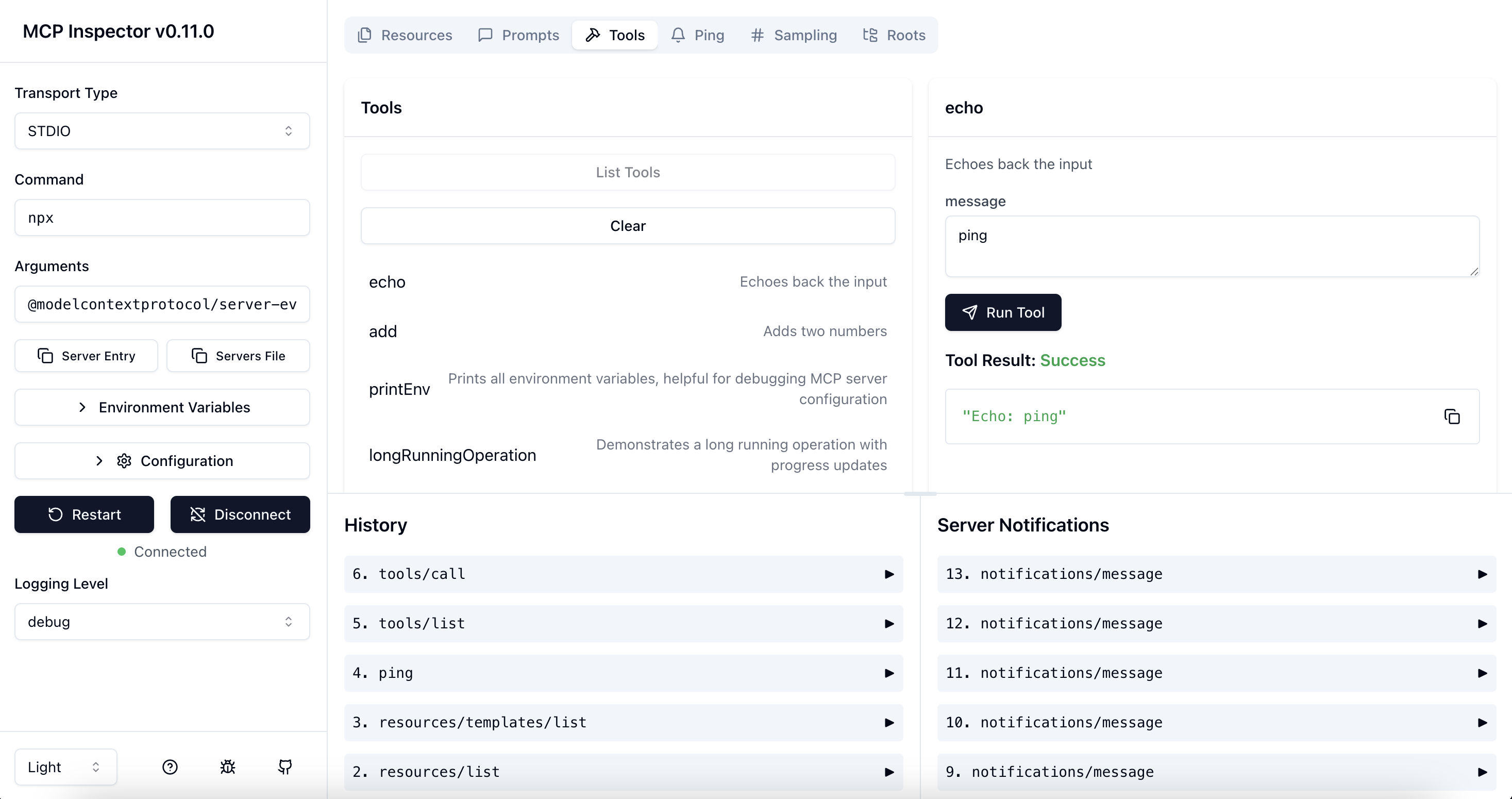
Running the Inspector
From an MCP server repository
To inspect an MCP server implementation, there's no need to clone this repo. Instead, use npx. For example, if your server is built at build/index.js:
npx @modelcontextprotocol/inspector node build/index.js
You can pass both arguments and environment variables to your MCP server. Arguments are passed directly to your server, while environment variables can be set using the -e flag:
# Pass arguments only
npx @modelcontextprotocol/inspector build/index.js arg1 arg2

# Pass environment variables only
npx @modelcontextprotocol/inspector -e KEY=value -e KEY2=$VALUE2 node build/index.js

# Pass both environment variables and arguments
npx @modelcontextprotocol/inspector -e KEY=value -e KEY2=$VALUE2 node build/index.js arg1 arg2

# Use -- to separate inspector flags from server arguments
npx @modelcontextprotocol/inspector -e KEY=$VALUE -- node build/index.js -e server-flag
The inspector runs both an MCP Inspector (MCPI) client UI (default port 6274) and an MCP Proxy (MCPP) server (default port 6277). Open the MCPI client UI in your browser to use the inspector. (These ports are derived from the T9 dialpad mapping of MCPI and MCPP respectively, as a mnemonic). You can customize the ports if needed:
CLIENT_PORT=8080 SERVER_PORT=9000 npx @modelcontextprotocol/inspector node build/index.js
For more details on ways to use the inspector, see the Inspector section of the MCP docs site. For help with debugging, see the Debugging guide.
Authentication
The inspector supports bearer token authentication for SSE connections. Enter your token in the UI when connecting to an MCP server, and it will be sent in the Authorization header.
Security Considerations
The MCP Inspector includes a proxy server that can run and communicate with local MCP processes. The proxy server should not be exposed to untrusted networks as it has permissions to spawn local processes and can connect to any specified MCP server.
Configuration
The MCP Inspector supports the following configuration settings. To change them click on the Configuration button in the MCP Inspector UI :
| Name | Purpose | Default Value |
|---|---|---|
| MCP_SERVER_REQUEST_TIMEOUT | Maximum time in milliseconds to wait for a response from the MCP server before timing out | 10000 |
| MCP_PROXY_FULL_ADDRESS | The full URL of the MCP Inspector proxy server (e.g. http://10.2.1.14:2277) |
null |
From this repository
If you're working on the inspector itself:
Development mode:
npm run dev
Note for Windows users: On Windows, use the following command instead:
npm run dev:windows
Production mode:
npm run build
npm start
License
This project is licensed under the MIT License—see the LICENSE file for details.


