
Overleaf MCP Server — Safe AI Editing for LaTeX Papers



Connect Claude Code, Claude Desktop, Codex, ChatGPT, Cursor, VS Code, or any MCP clientto Overleaf. Read, search, edit, compile, and review real LaTeX projects withoutcopy-pasting your paper into a chat window.
npx --yes [email protected] setup
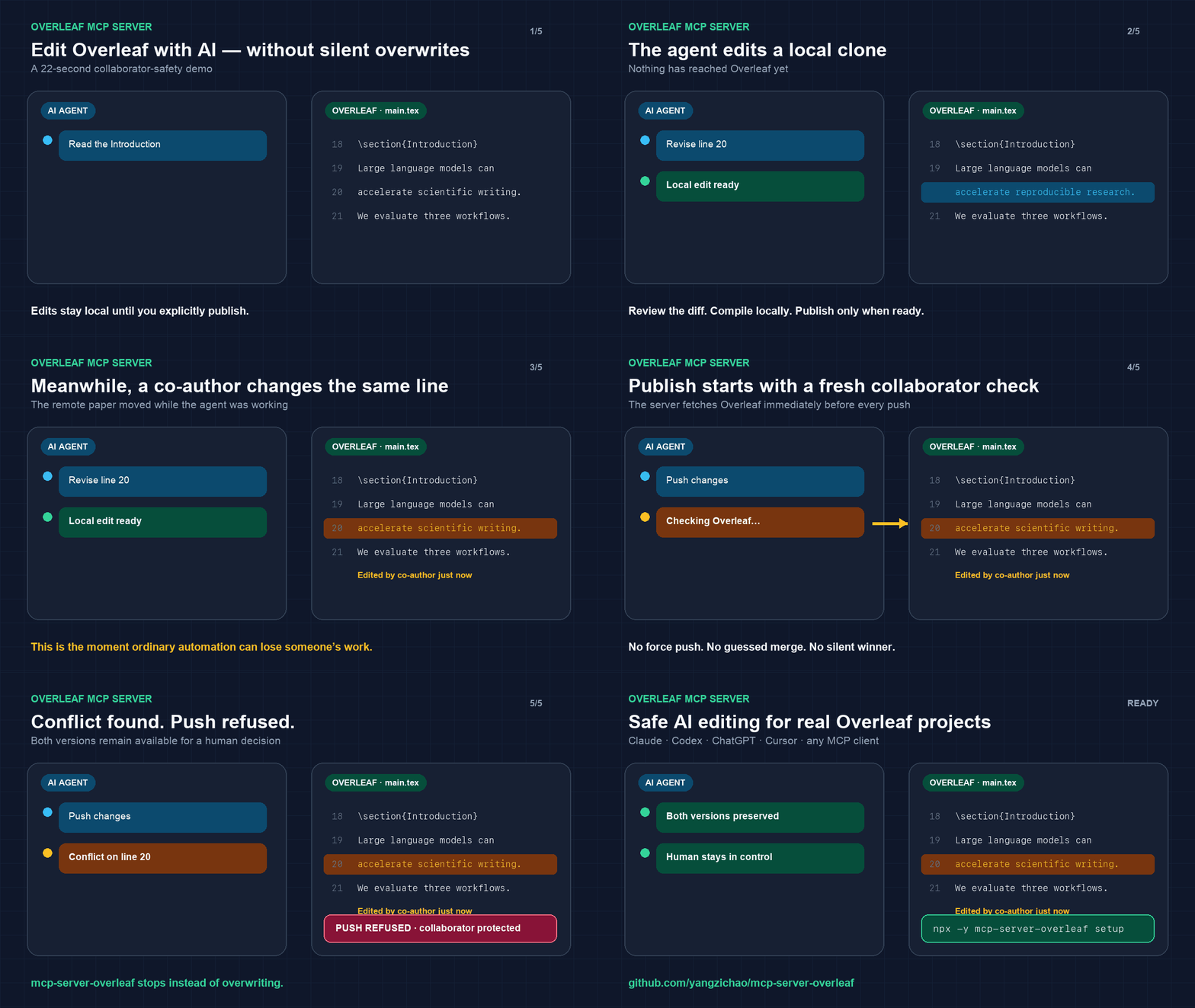
Edits stay in a local clone until you explicitly publish them. Before every read and everypush, this Overleaf MCP server checks what your collaborators changed. If both of you touchthe same lines, it stops the push and shows both versions instead of choosing a winner.
With an optional Overleaf session cookie, edits can also arrive as tracked-changesuggestions for co-authors to accept or reject, review-panel comments can be read, answeredand resolved, a project can be compiled on Overleaf itself, and projects, folders andsettings can be managed. A plain Git push cannot do any of that. The cookie alone alsoworks on a free plan without Git integration.
Download the one-click Claude Desktop bundleor use the setup command above for Claude Code, Codex, Cursor, and other local AI clients.
Independent community project; not affiliated with or endorsed by Overleaf.
Why choose this Overleaf MCP server?
Several Overleaf MCP servers exist. Of the ones built on Overleaf's official Git bridge,this is the most complete, and it is the only one that stops instead of overwriting when aco-author has already changed the lines you are editing.
- A conflict ends the push, not your co-author's paragraph. Every read and every pushfirst checks what changed on Overleaf. When two edits touch the same lines,
push_changesrefuses and shows you both versions. - 15 tools, each one a read or a write, and nothing reaches Overleaf until you say so.Read, search, and edit by section or by exact text; add, move, remove and upload files andfolders; browse, blame and restore earlier revisions; compile; inspect the diff; thenpublish deliberately.
- It checks the paper, not only the text.
check_referencesfinds undefined and unusedlabels and citations, and\inputfiles that do not exist, without compiling.look_up_citationslooks bibliography entries up at doi.org, Crossref and arXiv, flags aDOI that belongs to a different paper or an entry no search can find, and finds BibTeX fora DOI, an arXiv id or a title. - An edit can arrive as a suggestion, not as finished text. With a session cookie thesame tools also reach Overleaf's editor and web app: a change lands in the review panel fora co-author to accept or reject, comment threads can be read and answered, a projectcompiles on Overleaf without a local TeX installation, and projects can be copied, renamed,archived, tagged, configured and shared. An invitation goes out only after you confirm it inyour MCP client. Tracked changes
- Skills and prompts for the work around the tools. The Claude Code and Codex plugins addskills for chktex, latexindent, texcount, latexdiff, latexpand, arXiv packaging and SyncTeX,and the server offers prompts for reviewing a paper, revising a section, answering
#agentcomments, resolving a refused push and preparing an arXiv upload. - No terminal, if you do not want one. Claude Desktop installs it from a downloadedbundle; Claude Code and Codex install it as a plugin.
- The token is written once, to one file, at mode 600. No client configuration holdsit, and the published plugin declares no environment variables at all.
Related projects compares the alternatives tool by tool, and isequally direct about the things this server cannot do.
Common workflows include revising an academic paper by section, searching a large LaTeXproject, checking a bibliography, compiling before publication, reviewing the exact diff,and sending an edit to Overleaf as a tracked suggestion.
Where it installs
Every route below reaches the same server and the same tools, and every one of them keepsGit edits local until an explicit push. Pick the row for your client. Which tools appeardepends on the credentials you give it; see the tools.
| Client | How to install it |
|---|---|
| Claude Desktop | Download the bundle and double-click it. One click |
| Claude Code | Add this repository as a plugin marketplace. Two commands |
| Codex CLI, desktop, and IDE extension | The same, with the Codex commands. Two commands |
| Gemini CLI | Install the repository's Gemini CLI extension. |
| Kiro | Set up and add the local MCP server. |
| Cursor | npx --yes mcp-server-overleaf setup. One command |
| Visual Studio Code | A .vscode/mcp.json entry. Guide |
| Docker | Build and run the local stdio server. |
| ChatGPT on the web and desktop | An outbound-only Secure MCP Tunnel, no public endpoint and no open port. Guide |
| A catalogue that reads the MCP registry | Already listed as io.github.yangzichao/mcp-server-overleaf. Details |
| Any other MCP client | npx --yes mcp-server-overleaf --stdio, or Streamable HTTP. By hand |
| A machine you are developing on | A source checkout. From source |
Claude Desktop takes a packaged bundle; Claude Code and Codex each take a plugin.Everywhere else setup does the equivalent. All four routes end the same way: the token isverified against Overleaf, written to one file at mode 600, and no client configurationholds the secret.
Guides
- Project configuration and efficient reads covers independent credentials,sparse checkout, revision reads, and guarded edits.
- Related projects describes existing alternatives and thisproject's focus on collaborator safety and recovery.
- Release process and verification describes the tested artifact,provenance, first publication, and subsequent trusted publishing.
- Install the Claude Desktop bundle covers theone-click
.mcpbextension: what is inside it, how to build it, and how to remove it. - Install in Claude Code, Codex, Gemini CLI, or Kiro covers eachclient's install command and the shared local project configuration.
- Connect local MCP clients to Overleaf covers Codexdesktop and CLI, Claude Code, Claude Desktop, Cursor, Visual Studio Code, local stdio,verification, and troubleshooting.
- Connect ChatGPT to Overleaf with Secure MCP Tunnelcovers the complete private connection from a local stdio server to ChatGPT desktop andweb, including workspace association, least-privilege credentials, validation, andtroubleshooting.
What you are installing
An MCP server exposing up to 15 tools and 5 prompts over stdio or Streamable HTTP. Asession cookie adds tracked changes, comments and Overleaf's web appto what the Git bridge offers. One core, two transports; the tool implementations areidentical and only the framing differs. setup connects itto the AI clients on this computer and is the only command most people need.
Requires Node 22.14+ and git on PATH; Node 24 LTS is recommended. A localcompile_project additionally needs latexmk and a TeX distribution; every other tool workswithout them, and with a session cookie compile_project can compile on Overleaf's serversinstead.
The release test matrix covers macOS and Linux. Windows Git and TeX workflows are not yetvalidated. This server is a command-line application, not an importable JavaScript library.
The Git-bridge tools need Git integration on the project. Overleaf documents it as a premiumfeature gated on the project owner's subscription, so a free account invited to aproject owned by someone with a subscription can still use it, and that subscription can beindividual, group, or institutional. Do not tell a user their own plan disqualifies them.Verify it directly in step 3 instead. Without Git integration, a session cookie alone stillgives 13 tools; see the free-account question.
Install into Claude Desktop with one click
Download mcp-server-overleaf.mcpband double-click it. Claude Desktop opens an install panel, asks for the values below,and starts the server itself. No terminal, no Node installation, no build.
- Overleaf project address — open the project in Overleaf and copy the whole URL fromthe address bar.
- Overleaf Git token — generate one at https://www.overleaf.com/user/settings underGit integration. Claude Desktop stores it in the operating system keychain.
- Overleaf session cookie — optional; on a plan without Git integration, leave the tokenempty and fill this in instead.
The bundle carries the same server npm publishes, with its locked runtime dependencies andnothing else. It is macOS and Windows only, because that is where Claude Desktop runs. Forany other client, use the command below. Details inInstall the Claude Desktop bundle.
Install as a Claude Code or Codex plugin
Store the token once:
npx --yes [email protected] setup --clients none
Then, in Claude Code:
claude plugin marketplace add yangzichao/mcp-server-overleaf
claude plugin install overleaf@mcp-server-overleaf
Or in Codex:
codex plugin marketplace add yangzichao/mcp-server-overleaf
codex plugin add overleaf@mcp-server-overleaf
Restart the client, then ask it to list the files in your project.
Until this local MCP server is accepted into a public directory, both clients install itfrom this repository's marketplace: Claude Code reads .claude-plugin/marketplace.json andCodex reads .agents/plugins/marketplace.json, and both point at the sameplugins/overleaf directory. That plugin holds no token and sets no environment variable,because the first command writes the token to ~/.config/overleaf-mcp/projects.json and theserver finds it there. Public directory review is separate from this repository-basedinstallation. Details inInstall the Claude Code and Codex plugins.
Install with one command
npx --yes [email protected] setup
It checks Node and git, asks for the project and a token, proves the token reaches Overleafbefore writing anything, and registers the server with the clients it finds on thiscomputer: Claude Code, Codex, Claude Desktop and Cursor. A failed run leaves nohalf-configuration behind, because nothing is written until Overleaf accepts the token.
Two things are needed, both from the browser:
- The project address. Open the project in Overleaf and copy the whole URL from theaddress bar. A read-only share link is a different thing, and setup says so rather thanfailing later.
- A git authentication token, generated at https://www.overleaf.com/user/settingsunder Git integration. It is not echoed as you type.
The token is written to ~/.config/overleaf-mcp/projects.json at mode 600 and nowhereelse. The server finds that file on its own, so no client configuration holds the secret,a path to it, or any environment variable. Clients are registered with an absolute Nodepath and an absolute entry point rather than npx, because a desktop application startswith a much smaller PATH than a terminal.
Restart Claude Desktop, Cursor, or Codex afterwards; Claude Code picks it up on the nextrun. Then ask the assistant to list the files in the project.
Setup can also run unattended:
printf '%s' "$OVERLEAF_TOKEN" | npx --yes [email protected] setup \
  --project paper=https://www.overleaf.com/project/64a1b2c3d4e5f6a7b8c9d0e1 \
  --token-stdin --yes
--clients claude-code,codex limits which clients are touched, and --clients nonewrites the configuration without registering anything. Run it again to add anotherproject or to replace an expired token; the previous file is kept alongside it.
Find it in the MCP registry
The server is listed in the official Model Context Protocol registry asio.github.yangzichao/mcp-server-overleaf. The listing names the npm package and the ClaudeDesktop bundle, and clients and catalogues that read the registry pick it up from there. Therelease workflow publishes the listing itself, so it can never point at a version npm doesnot have.
Claude Code and Codex do not read that registry. They have their own plugin marketplaces,which is the section above, or the server can be added by hand:
claude mcp add --transport stdio --scope user overleaf -- npx --yes [email protected] --stdio
codex mcp add overleaf -- npx --yes [email protected] --stdio
Both forms need OVERLEAF_GIT_TOKEN and OVERLEAF_PROJECT_ID in the environment, which iswhy setup writes a projects.json instead and registers an absolute path.
Install from npm by hand
Use this when you want to see every step, or to configure a client setup does not cover.The commands below select version 0.6.3 explicitly so a client restart does not silentlyupgrade the server. If that version has not been published yet, use the source installationbelow. npm installs compiled JavaScript and locked runtime dependencies; no local build is needed.
npx --yes [email protected] --version
Keep configuration outside the npm installation and npx cache. Create a private file:
mkdir -p "$HOME/.config/overleaf-mcp"
touch "$HOME/.config/overleaf-mcp/env"
chmod 600 "$HOME/.config/overleaf-mcp/env"
Edit that file locally to contain your token and project ID:
OVERLEAF_GIT_TOKEN=olp_your_token_here
OVERLEAF_PROJECTS=paper=64a1b2c3d4e5f6a7b8c9d0e1
For clients using the mcpServers JSON format:
{
  "mcpServers": {
    "overleaf": {
      "command": "npx",
      "args": ["--yes", "[email protected]", "--stdio"],
      "env": {
        "OVERLEAF_MCP_ENV_FILE": "/absolute/path/to/.config/overleaf-mcp/env"
      }
    }
  }
}
Replace the file path with its actual absolute path; JSON does not expand ~ or $HOME.Clients with another configuration format should launch the same command and arguments withthe same environment variable. If a desktop app cannot find npx, use its absolute pathfrom command -v npx. See the client guide for sourceinstallation examples and client-specific configuration locations.
Alternatively, set both OVERLEAF_GIT_TOKEN and OVERLEAF_PROJECTS in the client's env.With OVERLEAF_MCP_ENV_FILE, environment variables override individual file values; anunreadable or relative explicit file path is an error. Without it, the install's .env isused only when the client supplies no project or credential settings (including file paths).A JSON projects file can provide independent credentials; see the configuration guide.The current working directory is never searched for configuration.
After restarting the client, call list_projects to check configuration andread_project with view: "files" to verify access to the real project. Tool discovery alone does not prove Overleaf access.
Install from a source checkout
Step 1: build
npm ci && npm run build
Confirm dist/index.js exists before continuing. Record the absolute path of therepository root; every client configuration below needs it, and relative paths will notwork because clients spawn the server from an arbitrary working directory.
Step 2: collect two values from the user
The git authentication token. Generated at https://www.overleaf.com/user/settings,under Git integration. One token covers all their projects and expires after a year. Itstarts with olp_.
Ask the user to paste it into .env themselves rather than into the chat, using thecommand in step 3. A token pasted into a conversation is in the transcript permanently andhas to be rotated. If they paste it anyway, tell them plainly to rotate it, and continue.
One or more project ids. The last path segment of a project URL:https://www.overleaf.com/project/<projectId>. A project id is exactly 24 hexadecimalcharacters. Anything else is not a project id, and you should ask again rather than guess.
Step 3: write .env and verify the token works
cp .env.example .env && chmod 600 .env
Then have the user fill in:
OVERLEAF_GIT_TOKEN=olp_...
OVERLEAF_PROJECTS=paper=64a1b2c3d4e5f6a7b8c9d0e1
OVERLEAF_PROJECTS is a comma-separated list of name=projectId pairs. The names arearbitrary labels the user picks. A bare project id with no name is also accepted andregisters under its own id. With exactly one project registered it becomes the default; withseveral, set OVERLEAF_DEFAULT_PROJECT, use an alias named default, or name the project in each call.
Verify the credentials reach Overleaf before configuring any client:
git ls-remote https://[email protected]/<projectId>
Git will prompt for a password. That is the token. Refs printed means it works. 403 orRepository not found means either the token is wrong or that account's plan does notinclude Git integration; resolve this before continuing, because every tool depends on it.
The server reads .env itself, because MCP clients spawn it without a shell. This keeps thetoken in one file whose permissions the user controls, instead of copied into every client'sconfig. Anything the client sets in the environment explicitly still wins.
Step 4: register with the client
Use the absolute path from step 1. Configure only the client the user actually asked for.For client-specific configuration locations, verification, and troubleshooting, see thelocal MCP client guide.
Claude Code
claude mcp add overleaf -s user -- node /absolute/path/to/mcp-server-overleaf/dist/index.js --stdio
Then run claude mcp list and confirm it reports ✔ Connected. Do not report successuntil you have seen that.
Claude Desktop or Cursor — add to the client's MCP config file. The file location andrestart steps differ by client; the local MCP client guide lists both.
{
  "mcpServers": {
    "mcp-server-overleaf": {
      "command": "node",
      "args": ["/absolute/path/to/mcp-server-overleaf/dist/index.js", "--stdio"]
    }
  }
}
Codex desktop, CLI, or IDE extension — the clients on one Codex host share~/.codex/config.toml:
[mcp_servers.mcp-server-overleaf]
command = "node"
args = ["/absolute/path/to/mcp-server-overleaf/dist/index.js", "--stdio"]
Add default_tools_approval_mode = "writes" inside the server table if the user wantsreads to run freely while every write asks first.
ChatGPT desktop local MCP settings can start the same stdio command directly on thecomputer that holds this repository. This local configuration is shared with Codex clientson the same host; the local MCP client guide includes the UI and CLI paths.
ChatGPT web or a workspace-shared ChatGPT app — use OpenAI Secure MCP Tunnel withoutexposing the server to the public internet. ChatGPT connects to an OpenAI-hosted tunnelendpoint while tunnel-client forwards requests to dist/index.js --stdio. Follow thestep-by-step Secure MCP Tunnel guide; itincludes the required Platform organization and ChatGPT workspace association, runtime key,developer-mode app setup, and end-to-end verification.
Remote clients over HTTP
node dist/index.js --http --port 3017
--http refuses to start without OVERLEAF_MCP_HTTP_AUTH_TOKEN, since anyone who reachesthe port could otherwise read and rewrite the user's papers. --allow-anonymous overridesthis and should only be used when the port is genuinely unreachable from outside themachine. Do not pass it to work around a missing token.
Over HTTP, the server can ask you to confirm an invitation or more access only on protocolrevision 2026-07-28. On a 2025 revision it answers each request on its own and cannot askback, so manage_project refuses to invite or give more access and points to the Share menu.
Step 5: verify end to end
Call read_project with view: "files". A file listing means the whole path works:configuration, token, clone, and the client connection. If it fails, the error text sayswhich.
The tools
Every tool takes an optional project: a project's Overleaf address, its raw 24-characterid, or a name from OVERLEAF_PROJECTS. Omit it to use the default. The address is acceptedbecause it is the form you already have, so a paper that was never configured can be reachedby pasting it. An unregistered project requires a default Git token or a session cookie;registered ones use their configured project credentials.
Each tool only reads or only writes, never both, so a client can approve every read at onceand still confirm each write. A tool with several jobs takes a view (reads) or an action(writes), and refuses an argument the chosen one does not use.
| Tool | Kind | What it does |
|---|---|---|
list_projects |
read | Configured projects, and with a cookie the account's projects with their tags, filtered by owned, shared, archived, trashed or tag |
read_project |
read | overview (main document, counts, clone path), files, outline across \input and \include, status (pull and sync state), changes (the unpushed diff), members (with a cookie), word_count |
read_file |
read | Text or line ranges, one section by title, a file at an earlier revision, a document with its included files inlined, or a figure the model can see |
search_project |
read | Plain-text or regular-expression search across the project's text files |
read_history |
read | commits for the project or one file, diff between two revisions, blame for who last changed each line |
check_references |
read | Undefined, duplicate and unused labels and citations, and missing included files, from the source |
look_up_citations |
read | verify bibliography entries at doi.org, Crossref and arXiv; find BibTeX for a DOI, an arXiv id or a title |
compile_project |
read | Compile locally with latexmk or on Overleaf, and report errors and warnings, BibTeX and biber ones included, with the paths of the PDF and SyncTeX map, and from Overleaf the log, .bbl and .blg |
read_review |
read | tracked_changes on a document, or comments with every message |
edit_file |
write | replace_text (refusing an ambiguous match), replace_section, append, or write a whole file |
manage_files |
write | delete, move, upload a file, upload_folder from this computer, restore an earlier revision, discard_local_changes, create_folder |
push_changes |
write | Commit and publish, refusing to overwrite a co-author's change to the same lines |
manage_tracked_changes |
write | suggest an edit as a tracked change, accept or reject suggestions |
manage_comments |
write | add, reply, resolve, reopen or delete a thread; edit_message or delete_message |
manage_project |
write | create, create_from_zip, copy, rename, archive/unarchive, trash/untrash, update_settings, tag/untag, download_zip, and for the owner invite, set_access, remove_member, revoke_invite |
Which tools appear depends on the credentials:
| Configured | Tools offered |
|---|---|
| A Git token | 11: all but read_review, manage_tracked_changes, manage_comments and manage_project |
| A session cookie only | 13: all but read_history and push_changes |
| Both | All 15 |
With a Git token, edit_file and manage_files change a local clone, and nothing reachesOverleaf until push_changes. With only a cookie, they change the live Overleaf project atonce, as a co-author typing in the editor would. manage_tracked_changes,manage_comments, manage_project and manage_files (action create_folder) always act onOverleaf at once. manage_project invites someone, or gives a member more access, only afteryour MCP client asks you through elicitation and you confirm; the model cannot answer for you.A client without elicitation, or one on HTTP with a 2025 protocol revision, is pointed toOverleaf's Share menu instead. The cookie and its trade-offs are described intracked changes.
Prompts
Five prompts start the common workflows, in clients that show prompts (as slash commands inClaude Code, for example). Each is offered only when the tools it uses are.
| Prompt | What it does |
|---|---|
review_paper |
Reads the paper, checks references and citations, compiles, and reports problems by severity without editing |
revise_section |
Revises one section toward a goal, shows the change, and waits for approval before anything is published |
address_review_comments |
Works through review-panel comments addressed to the agent with #agent |
resolve_push_conflict |
After a refused push, shows both versions and a proposed merge, and applies it only once approved |
prepare_arxiv_submission |
Checks and compiles the paper and assembles an arXiv upload outside the clone |
Skills
The Claude Code and Codex plugins also install five skills, for tools an agent runs in ashell beside the server: chktex, lacheck, latexindent and texcount; latexdiff and latexpand;arXiv packaging; PDF pages, SyncTeX and figure conversion; and the conflict and #agentcomment workflows. They work in the clone and leave publishing to push_changes.
How to use the tools safely
Edits made with a Git token are local until push_changes. This is the whole design, not animplementation detail, and it is what lets a bad edit be thrown away instead of published.
Read read_project with view: "changes" before calling push_changes. Push once, with areal commit message; the user sees it in Overleaf's history next to their co-authors'entries.
push_changes can return conflict-with-collaborator. This means someone edited the samelines while you were working. Nothing was published and both versions are intact. Do notretry, do not force, and do not merge the two on your own. Show the user both versions and aproposed merge, and apply it only once they approve.
A refused push leaves its commit in the clone, so the clone is then both ahead of andbehind Overleaf and every later sync conflicts on the same lines. manage_files withaction: "discard_local_changes" is the way out: it drops unpushed commits as well asuncommitted edits and returns the clone to what Overleaf holds. Tell the user what is beingthrown away before calling it, because their edit is what goes.
edit_file with action: "replace_text" refuses a snippet that appears more than oncerather than silently changing the first. Add surrounding context to make it unique, or passreplaceAll deliberately.
Prefer replace_text and replace_section over write. write replaces an entire file,so a partial reconstruction of a document silently deletes the rest of it.
Deleting and moving with manage_files are local until push_changes like every other Gitedit, so a removal can be undone with discard_local_changes right up to the push. Neitherrewrites LaTeX references: after a move, search_project for the old path and fix any\input, \include or \includegraphics that still names it, or the paper stopscompiling. Before deleting, check the file is genuinely unused; a co-author's \input isenough to break their build.
For a read–edit cycle, request read_file with mode: "full" or "smart" and pass itsrevision as expectedRevision to edit_file. The edit then refuses to overwrite a filechanged by a collaborator or another client since that read. See therevision protocol.
Compilation is optional and is not a gate. push_changes never checks that the documentbuilds, so a broken document can be published if you do not check first.
Configuration reference
| Variable | Meaning |
|---|---|
OVERLEAF_GIT_TOKEN |
Default credential; required unless supplied by a token file or per project. |
OVERLEAF_GIT_TOKEN_FILE |
Absolute path to a default token file. |
OVERLEAF_PROJECTS_CONFIG |
Absolute path to a JSON projects file with independent credentials. |
OVERLEAF_PROJECT_ID / OVERLEAF_PROJECT_NAME |
Single-project alternative to OVERLEAF_PROJECTS. |
OVERLEAF_MCP_ENV_FILE |
Absolute path to an external config file; recommended for npm/npx. |
OVERLEAF_PROJECTS |
name=projectId pairs; optional with JSON or raw-id access. |
OVERLEAF_DEFAULT_PROJECT |
Which registered name to use when a call omits project. |
OVERLEAF_MCP_CHECKOUT_MODE |
full (default) or text-only; see expansion behavior in the configuration guide. |
OVERLEAF_MCP_WORKSPACE_DIR |
Where clones live. Default ~/.overleaf-mcp/projects. |
OVERLEAF_GIT_BASE_URL |
Default https://git.overleaf.com. |
OVERLEAF_MCP_COMPILE_TIMEOUT_MS |
Compile timeout. Must be a positive integer. |
OVERLEAF_MCP_HTTP_AUTH_TOKEN |
Bearer token required by --http. |
OVERLEAF_MCP_HTTP_PORT |
Port for --http. --port overrides it. |
OVERLEAF_SESSION_COOKIE |
Overleaf session cookie. Turns on the review and web tools, and is enough on its own without Git integration. |
OVERLEAF_SESSION_COOKIE_FILE |
Absolute path to a file holding the same value. Preferred over the variable. |
OVERLEAF_WEB_BASE_URL |
Overleaf's web address for those tools. Default https://www.overleaf.com. |
OVERLEAF_MCP_DOI_RESOLVER_URL |
Where look_up_citations resolves DOIs. Default https://doi.org. |
OVERLEAF_MCP_CROSSREF_API_URL |
Where it searches titles. Default https://api.crossref.org. |
OVERLEAF_MCP_ARXIV_API_URL |
Where it reads arXiv ids. Default https://export.arxiv.org/api. |
Why it behaves the way it does
Overleaf's git bridge is not a general git remote. Each project has exactly one branch withone linear history, force pushes are refused, and there are no tags, submodules or LFS.Everything here stays inside that envelope.
The real risk is not a failed push, it is silently overwriting a co-author, so writing andpublishing are separate:
- Every read and every edit synchronizes with Overleaf first. If local work preventssynchronization, the call fails and preserves that work. Review it with
read_project(viewchanges), then publish it or explicitly discard it before continuing; stale readsand edits are refused. - Edits land in the local clone only. Nothing reaches Overleaf until
push_changes. push_changesre-checks Overleaf immediately before pushing and rebases onto anythingthat landed in the meantime. If that cannot be applied cleanly the push is refused andthe conflict reported, rather than resolved by guessing.
Git credentials are handed to git through a credential helper, so authentication tokensare absent from argv and .git/config. Git diagnostics redact the selected credential;tool errors redact every configured project credential. Keep secrets out of project files,which are intentionally readable by the connected client.
Compilation writes outside the clone, so .aux, .log and .pdf files are never stagedand pushed back. Clones also carry a local exclude list, so a .DS_Store never reaches aco-author's project.
Tool calls are serialized per project, first by an in-process queue and then by a lockdirectory under the workspace, so a second server process, such as the same serverregistered in two clients, waits instead of racing.
Client-supplied paths are checked twice: once as a path, and once against the filesystemafter symbolic links are resolved, so a link inside a clone cannot reach outside it or into.git.
Layout
src/
  config/      environment parsing, secret redaction
  overleaf/    git command runner, repository operations, project registry, path safety
  latex/       section parsing, include and reference checks, compile diagnostics
  citations/   bibliography parsing, DOI, Crossref and arXiv lookups, BibTeX search
  images/      figures prepared as image content for the model
  workflow/    sync-before-edit, publish-with-conflict-check, compile, word count
  tools/       MCP tool definitions, one folder per feature
  prompts/     MCP prompts for the common workflows
  transport/   stdio and Streamable HTTP
  server/      server factory shared by both transports
  setup/       the setup command that connects local clients to Overleaf
tests/
  features/                 Gherkin specifications, bound to the server over stdio
  integration/              spawn the built server and speak MCP to it over stdio or HTTP
  support/                  helpers the other folders share
  every other folder        unit tests by feature, run in-process
Development
npm run check
Runs the type checker, Biome, knip, the build, and the tests in one pass. docs/testing.mddescribes each layer of tests and the static checks.The type checker includes test code. Every Vitest invocation builds the server first,including focused runs and coverage, so the subprocess tests cannot use an old dist.
| Command | What it does |
|---|---|
npm run typecheck |
Type-check source, tests and Vitest configuration |
npm run lint |
Biome lint and format check |
npm run format |
Biome, applying fixes |
npm test |
Build, then Vitest, whole suite |
npm run test:features |
The Gherkin feature suites alone |
npm run test:properties |
The fast-check property tests alone, with the fixed seed CI uses |
npm run test:properties:explore |
The property tests with a new random seed and 2,000 runs each |
npm run test:e2e |
The server against a real Overleaf project you own, see docs/testing.md |
npm run check:unused |
knip: unused files, exports and dependencies |
npm run check:regex |
Fail on any regular expression in src that backtracks super-linearly |
npm run package:check |
Build twice, compare tarballs, install as a user would, and test the installed server |
npm run check:release |
Source checks, the regular expression check, package checks, and dependency audit |
npm run test:coverage |
Build, then Vitest with v8 coverage |
The suites cover the same tool contract over stdio and HTTP, including schemas, errorflags, reading, editing, reviewing and publishing. Recovery tests exercise dirty-treesync, conflict recovery, remote rejection and reconnection, process restarts, a killedlock holder, and simultaneous clients. New files and unpushed commits must remainvisible in read_project (view changes). Deterministic subprocess fixtures test Git and compiler timeoutswithout needing a network connection or TeX installation.
tests/features/ states the publishing contract as a Gherkin feature file: plain sentencesabout what a co-author sees, each one bound to a real call against the server over stdio.A sentence with no binding fails the run, so the document cannot drift away from thebehaviour it describes. Add a scenario by writing it in the .feature file and binding itsnew steps in the .test.ts beside it; steps are shared across the scenarios of a feature,so most new scenarios need no new bindings at all.
TeX-dependent tests share one availability check. Set OVERLEAF_TEST_TEX=skip to runwithout TeX, or OVERLEAF_TEST_TEX=required to fail if latexmk or pdflatex is missing.The default, auto, runs those tests when both executables are available. GitHub Actionsruns core checks on Linux and macOS with Node 22.14, 24, and 26, plus a Linux job that installsTeX and requires the compilation tests to run.
npm-shrinkwrap.json is the canonical dependency lock. Update it with npm and commit it withpackage.json. The copy inside the published package is the runtime half of that file:prepack removes the development entries and postpack restores the full lock, because npmbuilds a dependency's tree from the shipped lock and would otherwise install the compiler,the linter and the test runner on every user's machine. The package check fails if theshrinkwrap inside the tarball still describes development dependencies.Release package tests reuse the integration suites against an installed tarball from anunrelated working directory, covering stdio, HTTP, edits, conflicts, and recovery.
That install resolves the declared ranges freshly against the registry rather than readingthe archive's own shrinkwrap, so the tree it tests is the newest one those ranges allow, andit is compared against the lock by shape rather than by version. A package in one tree andnot the other fails the check, and so does a major version apart (a minor, for a 0.xpackage) — an unpinned peer dependency can put one there without any direct dependencychanging. A newer patch or minor is only printed, and npm update brings the lock level:both trees are tested, and requiring the versions to match turned every upstream patchrelease red on branches that had not touched a dependency.
Tests never touch the real Overleaf. tests/integration/fakeOverleafRemote.ts stands up abare git repository plus a second clone acting as a co-author, which reproduces everythingthe safety contract depends on: fetch, rebase, and a rejected push.
Coverage under-reports. The integration tests spawn node dist/index.js as a separateprocess, and v8 cannot instrument a child, so src/tools/ and src/server/ report 0% whilebeing driven end to end over the real MCP wire protocol.
Frequently asked questions
Can Claude Code or Claude Desktop edit an Overleaf project?
Yes. Claude Desktop can install the one-click .mcpb bundle, while Claude Code can installthe repository as a plugin or run the npm package over stdio. Both expose the same saferead, edit, compile, diff, and push workflow.
Can Codex, ChatGPT, Cursor, or VS Code connect to Overleaf?
Yes. Codex can install the included plugin, Cursor and other local clients can run the npmpackage, VS Code can use .vscode/mcp.json, and ChatGPT can connect through an outbound-onlySecure MCP Tunnel. Start with the client table for the shortest route.
Will an AI edit overwrite my co-author's work?
Not silently. The server synchronizes before reads and writes, keeps edits local until anexplicit push_changes, and checks Overleaf again immediately before publishing. If aco-author changed the same lines, the push is refused and both versions are preserved.
Does this work with a free Overleaf account?
Yes. With only an Overleaf session cookie, the server offers 13 of the 15tools: reading, searching and checking the paper, editing files and folders,tracked suggestions, comment threads, compiling on Overleaf, and managing projects. Editsmade this way change the live document at once, with no local clone and no push_changesstep.
What needs Overleaf's Git integration is the local clone: read_history, push_changeswith its collaborator check, the unpushed diff, restoring a file from an earlier revision,and compiling locally. Overleaf gates Git integration on the project owner's subscription,so a free account invited to a project whose owner has an individual, group, orinstitutional plan can use all of them.
Can it compile LaTeX and show tracked changes?
Yes. compile_project runs locally when latexmk and a TeX distribution are installed,and with a session cookie it can compile on Overleaf's servers instead (where: "overleaf"). The cookie also turns on the review tools: tracked suggestions, accepting andrejecting them, and reading, answering and resolving comment threads.
Privacy Policy
The server runs entirely on your computer. It has no analytics, no telemetry, and noservice behind it. It talks to Overleaf's Git bridge, and to Overleaf's web app only when asession cookie is configured. look_up_citations is the one tool that contacts anyoneelse: it sends the titles, identifiers, first authors and years of the entries it checks,and the DOIs, arXiv ids or titles it is asked to find, to doi.org, Crossref and arXiv. Your token isstored either in the operating system keychain, when Claude Desktop installs the bundle, orin a mode 600 file written by setup, and it is redacted from error output.
Whatever a tool returns becomes part of the conversation with the MCP client you connected,and is handled under that client's own policy.
Full text: docs/privacy-policy.md.
For installation and usage support, open a GitHub issue.
License
MIT


