
Rivian MCP
Ask Claude or ChatGPT about your Rivian and its recorded drives. Host the recorder in your Cloudflare account, or use the local version for live vehicle data. Tool results go to the AI app you connect. See data handling.
It only reads from Rivian. It sends no commands to your vehicle and changes no settings. This project is unofficial and not affiliated with or endorsed by Rivian.
Self-host on Cloudflare
You need:
- A free Cloudflare account. See cost and removal.
- A free GitHub account. The Deploy button asks you to connect it, and Cloudflare keeps your copy of the project there.
- Your Rivian email and password, and the phone or email that gets Rivian's one-time code.
To skip GitHub, deploy from a terminal with Node.js 24.
1. Deploy
- Select the button and sign in to Cloudflare.
- Connect your GitHub account when asked.
- On Create and deploy, keep the suggested names and select Deploy.
- In the Worker's Settings, then Build, clear Enable Preview Builds.
See the setup guide for screenshots and account sign-up.
The first Rivian account that signs in becomes the owner. Connect right after you deploy.
Cloudflare creates the storage and starts the server. It shows your address:
https://rivian-mcp.<your-name>.workers.dev
Add /mcp to get your connector address:
https://rivian-mcp.<your-name>.workers.dev/mcp
2. Connect Claude
Works on claude.ai and in the Claude desktop and mobile apps.
- Open Settings, then Connectors, then Add custom connector.
- Name it
Rivianand paste your connector address. - Select Add, then Connect.
- Sign in with your Rivian email and password, then enter the one-time code Rivian sends you.
Recording starts as soon as you are signed in. In a new chat, ask "Is the recorder running?"
ChatGPT and Codex work too: Connect ChatGPT, Connect Codex.
What you can ask
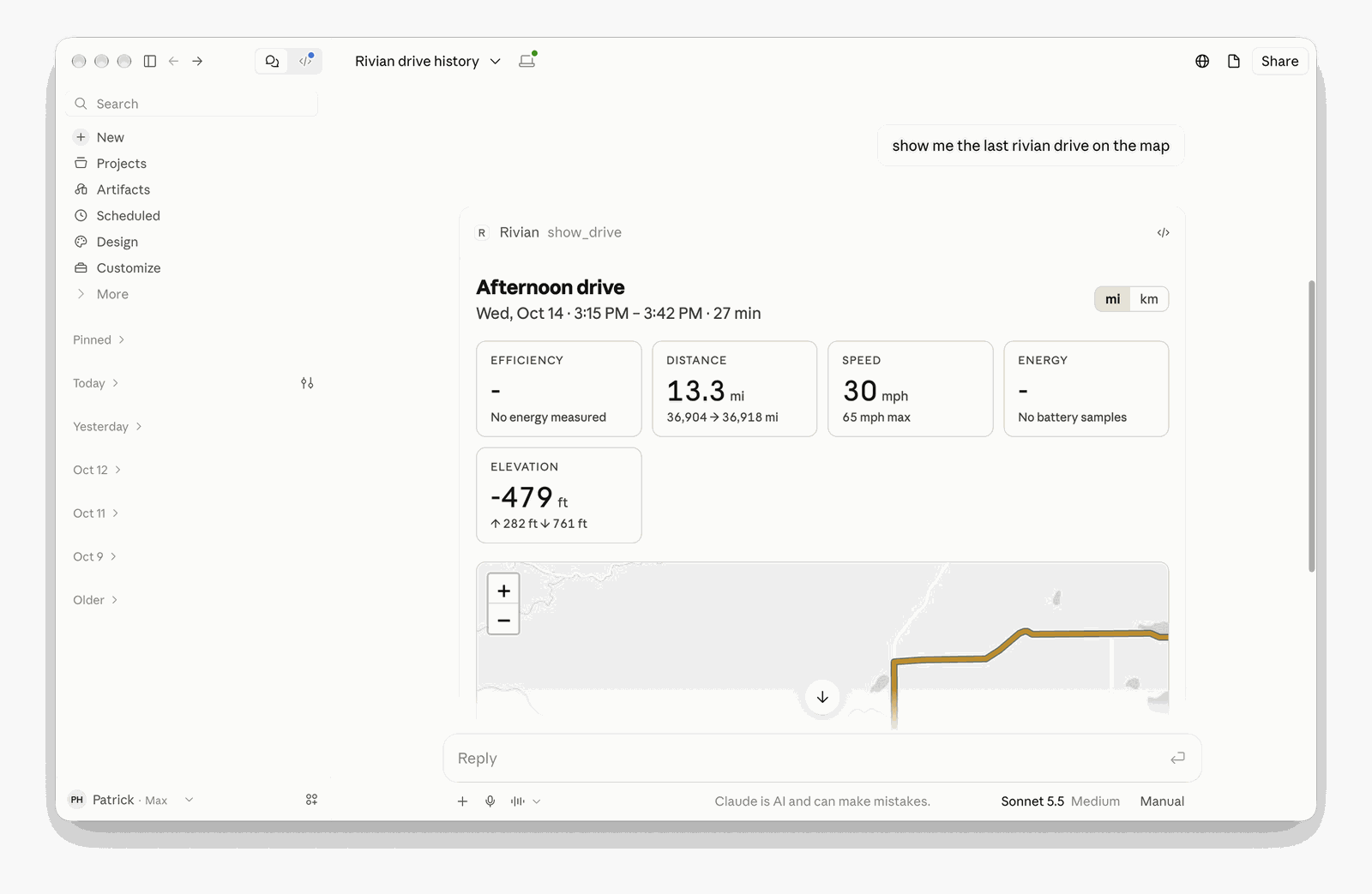
- "Show my last drive."
- "Rivian status."
- "List my drives this week."
- "Show my stats for the last 30 days."
- "Show my charging sessions."
- "Export my last drive for Roadbook."
- "What's my battery level?"
- "Is there a software update available?"
- "Are all the doors locked?"
Take your drives to Roadbook
Export your route, places and stats for Roadbook, an electric road-trip planner. Importing requires a Roadbook connector with an import_drive tool. Check its availability and privacy settings before sending a drive. See the export format.
Tools
| Tool | What it does |
|---|---|
show_status |
Live dashboard: doors, locks, tires, battery, charging and updates |
show_drive |
One drive with its route map and speed, energy and elevation charts |
show_stats |
Totals and efficiency for a period, with every route on one map |
show_charging |
Charging sessions with energy added, power and battery level curves |
list_drives |
Drives with places, local times, energy, elevation and quality |
get_drive |
One drive as a GeoJSON Feature with the route and all stats |
export_drive |
One drive or a date range as a Roadbook payload, GeoJSON or GPX |
recorder_status |
Whether the recorder is signed in and connected |
rivian_get_user_info |
Your account, vehicles and software versions |
rivian_get_vehicle_state |
Live battery, doors, tires, location, climate and OTA status |
rivian_get_ota_status |
Current and available software versions |
rivian_get_charging_session |
Active charging session |
rivian_get_charging_history |
Past charging sessions with energy, cost and location |
rivian_get_charging_schedule |
Your charging schedule |
rivian_get_drivers_and_keys |
Drivers and their phone keys and key fobs |
Cost, updates, where your data lives and how to remove it are in docs/cloudflare.md.
Run it locally
The npm package provides a CLI and a local MCP server. Both query your vehicle while they are running; neither records drives. You need Node.js 24 or newer.
CLI
npx rivian-mcp ota    # software update status
npx rivian-mcp stats  # full vehicle state
Or install it globally:
npm install -g rivian-mcp
rivian ota
rivian stats
The CLI reads RIVIAN_EMAIL and RIVIAN_PASSWORD from the environment, or asks for them. Password and one-time-code prompts require an interactive terminal.
Local MCP server
claude mcp add rivian \
  -e [email protected] \
  -e RIVIAN_PASSWORD=your-password \
  -- npx rivian-mcp
Add to ~/.claude.json or your project's .mcp.json:
{
  "mcpServers": {
    "rivian": {
      "command": "npx",
      "args": ["-y", "rivian-mcp"],
      "env": {
        "RIVIAN_EMAIL": "[email protected]",
        "RIVIAN_PASSWORD": "your-password"
      }
    }
  }
}
Rivian asks for a one-time code on every new sign-in:
- Ask Claude, "Log in to Rivian."
- Rivian sends a code to your phone or email.
- Tell Claude, "The code is 123456."
The local server adds rivian_login and rivian_submit_otp for this step. The CLI and the local server share the session in ~/.rivian-mcp/session.json. It is reused for up to 90 days.
Support
If you are thinking about getting a Rivian, my referral code gets you benefits on your purchase and supports this project:
Get a Rivian R1 with referral benefits
Development
git clone https://github.com/zentered-studios/rivian-mcp.git
cd rivian-mcp
npm ci
npm run typecheck
npm run lint
npm test
npm run build
npx wrangler deploy --dry-run
Use Node.js 24 or newer. Tests use fixtures, mocked requests and an in-memory SQLite database; they do not need Rivian credentials or a Cloudflare account. The dry run builds the Worker and embedded views without deploying.
For local Worker development, run npm run worker:dev and apply the schema with npx wrangler d1 migrations apply DB --local. No .dev.vars file is required. To pin the owner, create an ignored .dev.vars containing RIVIAN_EMAIL="[email protected]". Hosted AI connectors need a publicly reachable HTTPS Worker; localhost is for development.
Register live queries in src/tools.ts and local login tools in src/mcp-server.ts. Recorder tools belong in worker/src/mcp.ts; embedded views belong in worker/ui/. Add a regression test for behavior changes. Rivian access must remain read-only apart from authentication.
See tool-call examples for JSON arguments.
Claude Code plugin
The plugin documents the Rivian API fields, authentication and formatters for Claude Code.
claude /plugin marketplace add zentered-studios/rivian-mcp
claude /plugin install rivian-mcp@rivian-ai
References
- Rivian API Docs, community-maintained
- rivian-python-client, the Python client this is based on
- home-assistant-rivian, the Home Assistant integration


