
Sophos Fusion MCP Server (formerly Sophos Central)
Unofficial project, not from Sophos. This is a personal project by an individual. It isnot an official Sophos product and it is not built, endorsed, supported, or warranted bySophos. It calls the public Sophos APIs using credentials you supply. Use it at your ownrisk, and raise problems as issues on this repository rather than with Sophos support.
MCP (Model Context Protocol) server for the Sophos Fusion and Sophos Central APIs. Supports partner, organisation, and single-tenant credential types with automatic region routing. 310 tools covering 22 Sophos API namespaces: the Sophos Central REST APIs plus the Sophos Fusion GraphQL APIs (sophos_fusion_*). Install it as a Claude Desktop extension (.mcpb), run it with npx, or host it yourself over streamable HTTP.
The npm package, the .mcpb bundle and the binaries keep the sophos-central-mcp-server name so existing installs update in place.
Prerequisites
You need these before any of the install options below.
Sophos Central API credentials
Every install method needs a Client ID and Client Secret. The same credential authorises both the Sophos Central REST tools and the Sophos Fusion GraphQL tools; there is no second credential. The credential type decides what the server can see:
- Tenant-level: In Sophos Central, go to Settings > API Credentials Management and create a new credential. The server operates on that one tenant.
- Partner-level: In the Sophos Partner Dashboard, create API credentials under Settings > API Credentials. The server can query every tenant the partner manages.
- Organisation-level: In Sophos Central Enterprise, use Global Settings > API Credentials Management. Same cross-tenant behaviour as partner credentials.
Node.js 20 or later (npm and self-hosted installs only)
The .mcpb bundle for Claude Desktop does not need Node.js on your machine: Claude Desktop ships its own Node.js runtime and the bundle carries the server and all of its dependencies. Install Node.js 20+ only if you use the Claude Code or self-hosted options.
Install
Pick one:
| Option | Best for | Needs Node.js? |
|---|---|---|
| Claude Desktop extension (.mcpb) | Claude Desktop users who want a two-minute install | No |
| Claude Code | Terminal use with Claude Code | Yes |
| Self-hosted with npm | Running the server yourself for any MCP client, over streamable HTTP or stdio | Yes |
Option 1: Claude Desktop extension (.mcpb, recommended)
The .mcpb file is an MCP Bundle: a zip containing the built server, its production dependencies, and a manifest that tells Claude Desktop how to run it and which settings to ask for. No terminal and no config file edits.
- Download
sophos-central-mcp-server-<version>.mcpbfrom the latest GitHub release. - Open the file with Claude Desktop. Double-clicking it works on macOS and Windows. You can also go to Settings > Extensions > Advanced settings, find the Extension Developer section, click Install Extension... and pick the file.
- Claude Desktop shows the extension details and asks for your Sophos Central Client ID and Client Secret. Both fields are marked sensitive in the manifest, so Claude Desktop keeps them in the operating system's secure storage instead of a config file.
- Click Install, make sure the extension is enabled, then start a new chat. The
sophos_*tools are available straight away.
To update, download the newer .mcpb and install it the same way. To remove it, open Settings > Extensions and uninstall the extension.
To change the credentials later, open Settings > Extensions and click this extension. The Sophos Central Client ID and Client Secret fields are editable there. They are stored in the operating system's secure storage and show masked, so you replace a value rather than read the old one back. The server reads them at startup, so toggle the extension off and on, or restart Claude Desktop, if a change does not take effect.
The bundle runs the server in stdio mode and sets TRANSPORT=stdio for you. Which tools you get depends on the credential type, exactly as with the other install options: partner and organisation credentials unlock the cross-tenant tools, tenant credentials do not.
Option 2: Claude Code
Requires Node.js. Run this once in your terminal. The -e flags save the credentials permanently to Claude Code's MCP config so you don't need to re-export them each session:
macOS / Linux:
claude mcp add sophos-central \
  -e SOPHOS_CLIENT_ID="your-client-id" \
  -e SOPHOS_CLIENT_SECRET="your-client-secret" \
  -e TRANSPORT="stdio" \
  -- npx -y sophos-central-mcp-server
Windows (Command Prompt):
claude mcp add sophos-central ^
  -e SOPHOS_CLIENT_ID="your-client-id" ^
  -e SOPHOS_CLIENT_SECRET="your-client-secret" ^
  -e TRANSPORT="stdio" ^
  -- cmd /c npx -y sophos-central-mcp-server
Option 3: Self-hosted with npm (streamable HTTP or stdio)
Use this when you want to run the server yourself, on a workstation, a jump box, or in a container, for any MCP client that speaks streamable HTTP or can spawn a stdio process. Nothing here depends on the .mcpb bundle.
Install from npm:
npm install -g sophos-central-mcp-server
Or from source:
git clone https://github.com/Aaronjacobs000/sophos-mcp.git
cd sophos-mcp
npm install
npm run build
Configure. Either export the variables in your shell or put them in a .env file in the directory you start the server from. The full table is under Configuration.
SOPHOS_CLIENT_ID=your-client-id
SOPHOS_CLIENT_SECRET=your-client-secret
PORT=3100
TRANSPORT=http
Run:
sophos-central-mcp      # global npm install
npm start               # from a source checkout
With TRANSPORT=http (the default) the server listens on http://127.0.0.1:3100/mcp and answers GET /health with {"status":"ok","server":"sophos-central-mcp-server"}. The MCP endpoint is stateless: every request gets a fresh transport. Point any streamable HTTP client at it, for example Claude Code:
claude mcp add --transport http sophos-central http://127.0.0.1:3100/mcp
With TRANSPORT=stdio the server speaks MCP over stdin/stdout and is meant to be spawned by the client, which is what Options 1 and 2 do for you.
The HTTP server binds to 127.0.0.1 only and has no authentication of its own. If it needs to be reachable from another host, put it behind something that adds TLS and auth (an SSH tunnel or an authenticating reverse proxy) rather than changing the bind address.
Build the .mcpb yourself (maintainers)
The bundle is produced by scripts/build-mcpb.mjs using the mcpb CLI, which is a dev dependency. From a source checkout:
npm install
npm run build:mcpb
The script:
- Compiles TypeScript to
dist/(vianpm run build). - Rewrites
manifest.jsonso itsversionmatchespackage.jsonand itstoolslist matches everyregisterToolcall insrc/tools/. Commit the result. The manifest in git is always the one that was last built. - Validates the manifest with
mcpb validate. - Stages
dist/,package.json,LICENSE, andmanifest.jsoninbuild/mcpb/and runsnpm ci --omit=devthere, so only production dependencies are bundled..mcpbignoreadds a few exclusions on top of the CLI's defaults. - Packs the staging directory into
release/sophos-central-mcp-server-<version>.mcpb.
build/ and release/ are git-ignored. To inspect a bundle without installing it, npx mcpb info release/<file>.mcpb prints its size and signature state, and npx mcpb unpack release/<file>.mcpb <dir> extracts it. Signing is optional; npx mcpb sign --self-signed release/<file>.mcpb adds a self-signed signature if you want one.
Tests (maintainers)
npm test
Builds, then runs the node:test suites in test/ with fetch stubbed: the Fusion GraphQL transport (including the HTTP 200 with errors case), the QL builder, the reference-data cache, and the path-keyed retry for the intermittent case-write fault, the migration guard, and a registration check that lists all 310 tools over an in-memory transport and checks the descriptions for the measured warnings. Nothing in npm test reaches Sophos.
To exercise the Fusion tools against a live tenant, put credentials in .env (or export them) and run:
node scripts/fusion-smoke.mjs                  # read-only, tenant credential
node scripts/fusion-smoke.mjs <tenant-id>      # read-only, partner or organisation credential
node scripts/fusion-smoke.mjs --write          # plus the Fusion write tools on one new case
node scripts/fusion-smoke.mjs --write-classic  # plus the Classic case tools on one new case
node scripts/fusion-smoke.mjs --all            # everything
It spawns the built server over stdio and calls the tools through an MCP client, so what runs is what a host runs. Read-only mode covers the reference data, the case list with filter and cursor variants, the newest case by short ID, its evidence, summary, comments and files, the detection search, the not-found and legacy-ID refusals, and the Classic side: on a migrated tenant the migration refusal, otherwise the six Classic read tools. --write creates one case titled MCP smoke test <timestamp> (managed_by CUSTOMER), exercises comment add, edit and delete with the mention read-back, link create, update and delete, tag merge and replace, evidence add and remove_all, file upload, list and soft delete, the verdict clear on reopen, the one way door on new and the closed-case freeze, then closes it with a verdict and archives it (Fusion has no delete). --write-classic creates, updates and deletes one Classic case; the Cases API requires an assignee and a detection that still exists, so set SMOKE_CLASSIC_ASSIGNEE (a tenant admin email) and, if needed, SMOKE_CLASSIC_DETECTION_ID (a recent detection ID). Every write is listed at the end. Existing cases are never modified.
Cutting a release: bump version in package.json, run npm run build:mcpb, commit package.json, package-lock.json, and manifest.json, tag, and attach the .mcpb from release/ to the GitHub release. Publish to npm as before so the Claude Code and self-hosted options pick up the same version.
Features
- Universal caller support: Works with partner, organisation, and tenant-level API credentials
- Multi-tenant: Partner/org callers can query across all managed tenants
- Partner gap analysis: Single-call sales opportunity report across all managed tenants. Fetches health data in parallel and returns a compact ranked list of security gaps per customer
- Auto region routing: Discovers tenant data regions via
/whoami/v1and routes requests to the correct regional API host - Token lifecycle: Automatic OAuth2 token refresh before expiry
- Rate limit handling: Retry with backoff on 429 responses
- Dual transport: stdio (Claude Desktop, Claude Code, and the
.mcpbbundle) or streamable HTTP (self-hosted) - One-click install: Ships as a Claude Desktop extension (
.mcpb) with credentials held in the OS secure store - Two API generations: the Sophos Central REST APIs and the Sophos Fusion GraphQL APIs on one credential, with
sophos_fusion_*tools for the GraphQL side - Migration aware: the Classic case and detection tools refuse a tenant that has moved to Sophos Fusion and name the
sophos_fusion_*tool to use instead - Full API coverage: 310 tools across endpoints, alerts, policies, firewalls, web filtering, licensing, audit events, email, mobile, XDR, cases, SIEM, and more
Screenshots
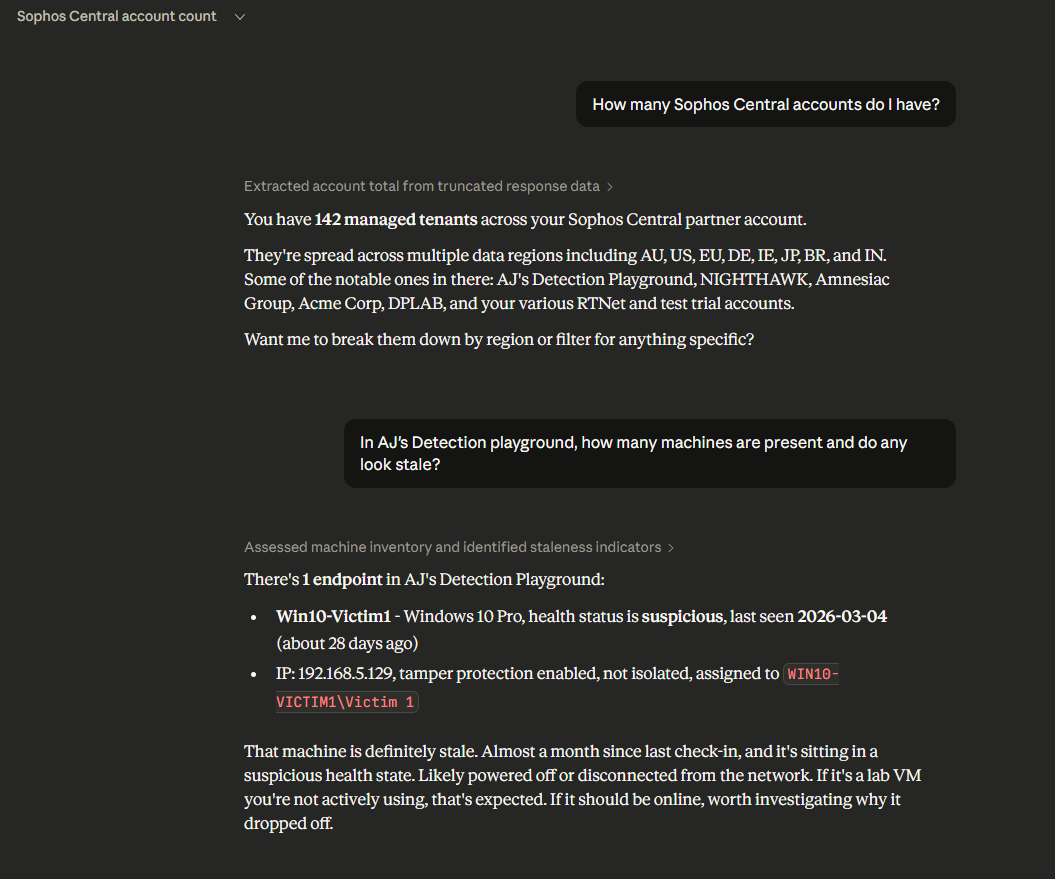
Querying tenants and drilling into endpoint status:
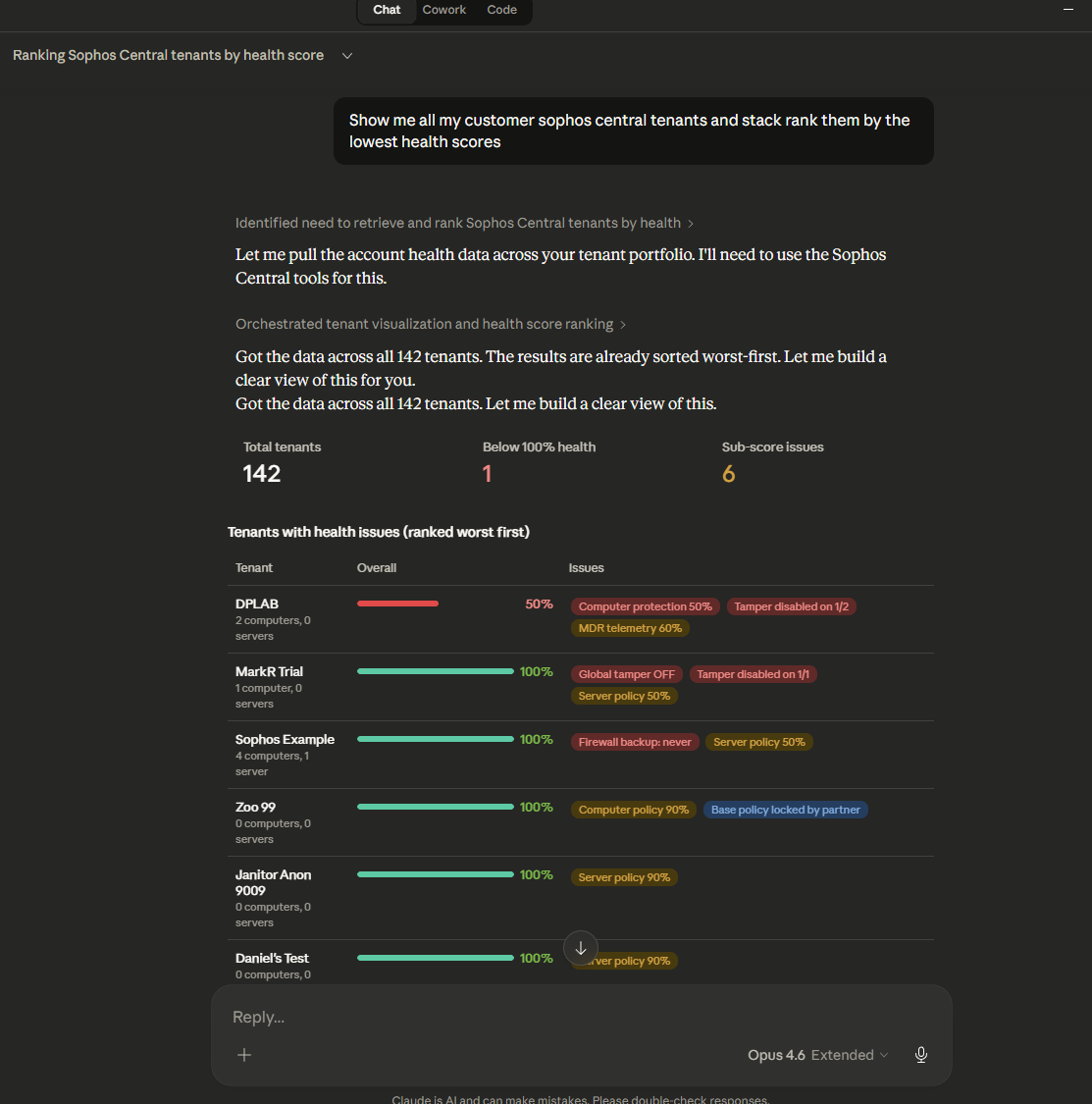
Tenant health audit with full category breakdown:
Configuration
Applies to the Claude Code and self-hosted options. The Claude Desktop extension asks for the credentials in its install dialog and sets TRANSPORT=stdio itself.
Copy .env.example to .env and set your credentials:
SOPHOS_CLIENT_ID=your-client-id
SOPHOS_CLIENT_SECRET=your-client-secret
PORT=3100
TRANSPORT=http
| Variable | Required | Default | Description |
|---|---|---|---|
SOPHOS_CLIENT_ID |
Yes | - | OAuth2 client ID |
SOPHOS_CLIENT_SECRET |
Yes | - | OAuth2 client secret |
PORT |
No | 3100 | HTTP server port |
TRANSPORT |
No | http | http for streamable HTTP, stdio for subprocess mode |
CHARACTER_LIMIT |
No | 50000 | Maximum characters per tool response before truncation (minimum 10000) |
SOPHOS_FUSION_GRAPHQL_URL |
No | https://api.taegis.sophos.com/graphql |
Sophos Fusion GraphQL endpoint. Override when the Fusion branded hostnames ship |
SOPHOS_CLASSIC_MIGRATION_CHECK |
No | on | off skips the migration check on the Classic case and detection tools (they then run for every tenant) |
Tools
Two API generations
The server speaks to two Sophos API generations on one credential:
- Sophos Central REST APIs (retained). Every tool without the
fusionprefix. Regional hosts, discovered from/whoami/v1. - Sophos Fusion GraphQL APIs (new, 18/09/2026). The
sophos_fusion_*tools. One endpoint,https://api.taegis.sophos.com/graphql, same token, sameX-Tenant-IDheader. Filters are written in Fusion Query Language (QL). Case types, statuses and verdicts are tenant reference data resolved to IDs at runtime, case severity is an integer (2 to 10), and assignees are Subject IDs, not email addresses. A GraphQL failure arrives as HTTP 200 with anerrorsarray; the client treats that as an error, and a partial response (data plus errors) is returned with awarningslist rather than as a clean result.
Sophos is moving tenants to Fusion over the coming months (the upgrade centre announces each account's slot). This is a point in time change, not a fallback: once a tenant has moved, the Classic Cases and Detections REST APIs reference the pre-migration Sophos Central objects, so their answers are wrong rather than stale. The Classic tools therefore check which world a tenant is in before every call, using the Fusion case reference data (a tenant that has not moved gets an empty case type list), and refuse a migrated tenant with a message naming the sophos_fusion_* tool to use. For a tenant that has not moved they stay correct and carry no deprecation label. Fusion holds a separate case set (a UUID plus a CSE##### short ID) and neither ID form resolves in the other API. Live Discover and XDR Query are unaffected. Data Lake search over GraphQL has not shipped (Sophos says October 2026), so sophos_run_xdr_query stays on the SQL XDR Query API. Fusion tools for events, threat timeline and live endpoint search are planned.
Two Fusion case writes, createCase and addEvidenceToCase, fail 74% of the time with not allowed on partnerPreferences from investigations-v2. It is an intermittent downstream fault, not authorisation: the identical call succeeds on retry, and updateCase does not carry the fault at all. Measured on a live tenant 22/09/2026: 111 faults in 150 calls, drifting from 60% to 85% across four samples six minutes apart. The client retries a call whose first error path is partnerPreferences, and only that, up to 20 times with a short backoff, which leaves about 1 call in 410 failing at the measured rate and about 1 in 26 at the worst rate observed; an error naming the operation in its path is a real input or permission error and surfaces at once.
Partner & Organisation (18 tools)
These tools are only available with partner or organisation-level credentials. They operate across all managed tenants.
| Tool | Description |
|---|---|
sophos_list_tenants |
List all managed tenants with IDs, names, and data regions |
sophos_list_account_health |
Bulk health scores for all tenants, ranked worst-first |
sophos_partner_gap_analysis |
Security gap and upsell opportunity report across all tenants |
sophos_create_tenant |
Create a new managed tenant |
sophos_get_managed_tenant |
Get managed tenant details |
sophos_list_partner_roles |
List partner-level roles |
sophos_get_partner_role |
Get partner role detail |
sophos_create_partner_role |
Create a partner role |
sophos_delete_partner_role |
Delete a partner role |
sophos_list_partner_permission_sets |
List available partner permission sets |
sophos_list_partner_admins |
List partner administrators |
sophos_get_partner_admin |
Get partner admin detail |
sophos_create_partner_admin |
Create a partner admin |
sophos_delete_partner_admin |
Delete a partner admin |
sophos_list_partner_admin_role_assignments |
List admin role assignments |
sophos_add_partner_admin_role_assignment |
Add role assignment to admin |
sophos_delete_partner_admin_role_assignment |
Remove role assignment |
sophos_get_billing_usage |
Get billing usage for a specific month |
Alerts (4 tools)
| Tool | Description |
|---|---|
sophos_list_alerts |
List alerts with severity/category/product/date filters |
sophos_get_alert |
Get full alert detail with allowed actions |
sophos_acknowledge_alert |
Mark an alert as reviewed |
sophos_search_alerts |
Advanced search with structured filters and sorting |
Endpoints (18 tools)
| Tool | Description |
|---|---|
sophos_list_endpoints |
List endpoints with health/OS/hostname/isolation filters |
sophos_get_endpoint |
Get full endpoint detail |
sophos_scan_endpoint |
Trigger an on-demand scan |
sophos_isolate_endpoint |
Network-isolate a compromised endpoint |
sophos_release_endpoint |
Release an endpoint from isolation |
sophos_delete_endpoint |
Delete a specific endpoint |
sophos_bulk_delete_endpoints |
Bulk delete multiple endpoints |
sophos_get_tamper_protection |
Get tamper protection status and password |
sophos_toggle_tamper_protection |
Enable/disable tamper protection |
sophos_get_adaptive_attack_protection |
Get adaptive attack protection status |
sophos_toggle_adaptive_attack_protection |
Enable/disable adaptive attack protection |
sophos_trigger_update_check |
Trigger a software update check |
sophos_request_forensic_logs |
Request forensic log upload |
sophos_get_forensic_log_status |
Get forensic log request status |
sophos_request_memory_dump |
Request memory dump from endpoint |
sophos_get_memory_dump_status |
Get memory dump request status |
sophos_bulk_isolate_endpoints |
Bulk isolate/release multiple endpoints |
sophos_get_endpoint_isolation_status |
Get endpoint isolation status |
Endpoint Settings (30 tools)
| Tool | Description |
|---|---|
sophos_list_installer_downloads |
List available installer packages |
sophos_get_installer_download |
Get specific installer download link |
sophos_list_blocked_addresses |
List blocked network addresses |
sophos_add_blocked_address |
Add a blocked network address |
sophos_delete_blocked_address |
Delete a blocked address |
sophos_list_local_sites |
List web control local site definitions |
sophos_add_local_site |
Add a local site for web control |
sophos_update_local_site |
Update a local site |
sophos_delete_local_site |
Delete a local site |
sophos_list_web_control_categories |
List web control categories |
sophos_get_tls_decryption_settings |
Get TLS decryption settings |
sophos_update_tls_decryption_settings |
Update TLS decryption settings |
sophos_get_global_tamper_protection |
Get global tamper protection settings |
sophos_update_global_tamper_protection |
Update global tamper protection |
sophos_list_detected_exploits |
List detected exploits |
sophos_get_detected_exploit |
Get exploit detail |
sophos_list_exploit_mitigation_categories |
List exploit mitigation categories |
sophos_get_exploit_mitigation_category |
Get category detail |
sophos_list_exploit_mitigation_apps |
List exploit mitigation applications |
sophos_get_exploit_mitigation_app |
Get application detail |
sophos_add_exploit_mitigation_app |
Add application to exploit mitigation |
sophos_update_exploit_mitigation_app |
Update exploit mitigation application |
sophos_list_ips_exclusions |
List IPS exclusions |
sophos_add_ips_exclusion |
Add IPS exclusion |
sophos_delete_ips_exclusion |
Delete IPS exclusion |
sophos_list_isolation_exclusions |
List isolation exclusions |
sophos_add_isolation_exclusion |
Add isolation exclusion |
sophos_delete_isolation_exclusion |
Delete isolation exclusion |
sophos_get_lockdown_settings |
Get server lockdown settings |
sophos_update_lockdown_settings |
Update server lockdown settings |
Endpoint Migrations (7 tools)
| Tool | Description |
|---|---|
sophos_list_migrations |
List endpoint migration jobs |
sophos_get_migration |
Get migration job details |
sophos_create_migration |
Create a new migration job |
sophos_delete_migration |
Delete a migration job |
sophos_list_migration_endpoints |
List endpoints in a migration |
sophos_list_recommended_packages |
List recommended software packages |
sophos_list_static_packages |
List static software packages |
Policies (6 tools)
| Tool | Description |
|---|---|
sophos_list_policies |
List endpoint policies with optional type filter |
sophos_get_policy |
Get full policy detail including all settings |
sophos_create_policy |
Create a new endpoint policy |
sophos_clone_policy |
Clone an existing policy under a new name |
sophos_update_policy |
Update policy name, enabled state, priority, or settings |
sophos_delete_policy |
Delete a policy |
Endpoint Groups (7 tools)
| Tool | Description |
|---|---|
sophos_list_endpoint_groups |
List endpoint groups |
sophos_get_endpoint_group |
Get group detail with optional member list |
sophos_create_endpoint_group |
Create a new endpoint group |
sophos_update_endpoint_group |
Rename or update a group |
sophos_delete_endpoint_group |
Delete an endpoint group |
sophos_add_endpoints_to_group |
Add endpoints to a group |
sophos_remove_endpoint_from_group |
Remove an endpoint from a group |
Exclusions & Allow/Block Lists (9 tools)
| Tool | Description |
|---|---|
sophos_list_exclusions |
List global scanning exclusions |
sophos_add_exclusion |
Add a scanning exclusion |
sophos_delete_exclusion |
Delete a scanning exclusion |
sophos_list_allowed_items |
List globally allowed items |
sophos_add_allowed_item |
Allow an item by SHA256, path, or certificate |
sophos_delete_allowed_item |
Remove an allowed item |
sophos_list_blocked_items |
List globally blocked items |
sophos_add_blocked_item |
Block an item by SHA256, path, or certificate |
sophos_delete_blocked_item |
Remove a blocked item |
Account Health (3 tools)
| Tool | Description |
|---|---|
sophos_get_account_health |
Get tenant health check scores |
sophos_list_account_health |
Bulk health scores for all tenants (partner/org only) |
sophos_partner_gap_analysis |
Gap analysis across all tenants (partner/org only) |
Directory Users & Groups (17 tools)
| Tool | Description |
|---|---|
sophos_list_users |
List directory users |
sophos_get_user |
Get user detail |
sophos_create_user |
Create a directory user |
sophos_update_user |
Update a user |
sophos_delete_user |
Delete a user |
sophos_list_user_groups |
List directory user groups |
sophos_get_user_group |
Get user group detail |
sophos_create_user_group |
Create a user group |
sophos_update_user_group |
Update a user group |
sophos_delete_user_group |
Delete a user group |
sophos_list_user_group_members |
List members of a user group |
sophos_add_users_to_group |
Add users to a group |
sophos_remove_user_from_group |
Remove a user from a group |
sophos_list_user_group_endpoints |
List endpoints in a user group |
sophos_list_user_group_policies |
List policies assigned to a user group |
sophos_list_admins |
List admin accounts and roles |
sophos_list_roles |
List available admin roles |
Admin Management (13 tools)
| Tool | Description |
|---|---|
sophos_get_admin |
Get admin detail |
sophos_create_admin |
Create an admin account |
sophos_delete_admin |
Delete an admin account |
sophos_list_admin_role_assignments |
List admin's role assignments |
sophos_add_admin_role_assignment |
Add role assignment to admin |
sophos_delete_admin_role_assignment |
Remove role assignment |
sophos_get_admin_role_assignment |
Get specific role assignment |
sophos_create_role |
Create an admin role |
sophos_get_role |
Get role detail |
sophos_update_role |
Update a role |
sophos_delete_role |
Delete a role |
sophos_list_permission_sets |
List available permission sets |
sophos_reset_admin_password |
Reset an admin's password |
Cases (9 tools)
Sophos Central Cases REST API. Correct for a tenant that has not moved to Fusion, and the only way to read its legacy cases (IDs like 1-598868). Refused for a tenant that has moved, with a pointer to the sophos_fusion_* tool to use (see "Two API generations").
| Tool | Description |
|---|---|
sophos_list_cases |
List investigation cases |
sophos_get_case |
Get full case details |
sophos_create_case |
Create a new investigation case (the API requires an assignee and a detection that still exists) |
sophos_update_case |
Update case status, severity, assignee |
sophos_delete_case |
Delete a case |
sophos_list_case_detections |
List detections linked to a case |
sophos_get_case_detection |
Get specific detection detail |
sophos_list_case_impacted_entities |
List impacted entities for a case |
sophos_get_case_mitre_summary |
Get MITRE ATT&CK breakdown for a case |
Fusion Cases (21 tools)
Sophos Fusion Cases GraphQL API v2. Case IDs are UUIDs; short IDs (CSE00001) are accepted and resolved. Severity is 2 informational, 4 low, 6 medium, 8 high, 10 critical. Detection severity inside the case summary is a 0 to 1 float, a different scale from both the case severity and the Classic REST 0 to 10 detection severity; none of them convert. There is no delete: close the case (with a verdict when its type needs one), then archive it.
managed_by is required on create and decides who works the case: PROVIDER hands it to Sophos MDR, CUSTOMER keeps it self managed. It cannot be changed afterwards, and a case created without it is unclaimed, so the tool never omits it. Detection and event IDs on the evidence tools are six section resource names (alert://priv:event-filter:123456:1789526908712:<uuid>), which sophos_fusion_search_detections returns. Evidence writes are queued jobs that land category by category (an add showed after about 5 seconds, a three category removal took about 25 seconds), so read the evidence back with a poll; adding a detection also attaches its linked asset and events, and removing it does not retract them (remove_all does). Comment @mentions (@authorized_contacts, @customer, @sophos) fire wherever they appear, including in prose, and an unrecognised token is dropped silently, so the comment tools read the stored mentions back. Tags are merged on update unless replace_tags is set. File deletion is soft. Split and merge are irreversible and need a confirmation argument.
| Tool | Description |
|---|---|
sophos_fusion_list_cases |
List cases with QL filters (type, status, verdict resolved to IDs), offset or cursor pagination |
sophos_fusion_get_case |
Full case detail including key findings, verdict, links and processing status |
sophos_fusion_get_case_evidence |
Detection, event, asset and saved-search source IDs attached to a case |
sophos_fusion_get_case_summary |
Case plus its detections resolved in one batched call and a MITRE ATT&CK roll-up |
sophos_fusion_list_case_reference_data |
The tenant's case types, primary statuses and verdicts (15 minute cache) |
sophos_fusion_create_case |
Create a case: required managed_by, type and status by name or ID, integer severity, Markdown key findings, genesis evidence |
sophos_fusion_update_case |
Update fields, merge or replace tags, close with a verdict, reopen (verdict cleared), archive or unarchive; refuses frozen fields on a closed case rather than reopening it |
sophos_fusion_split_case |
Move named evidence into a new case (irreversible, confirm_split) |
sophos_fusion_merge_cases |
Merge source cases into a target and close them (asynchronous, irreversible, confirm_merge) |
sophos_fusion_list_case_comments |
List comments (raw author IDs, resolved mentions, read state) |
sophos_fusion_add_case_comment |
Add a comment and report which @mentions actually fired |
sophos_fusion_update_case_comment |
Edit a comment or mark it read |
sophos_fusion_delete_case_comment |
Delete a comment |
sophos_fusion_add_case_evidence |
Attach detections, events, hosts or saved searches (asynchronous, RNs checked) |
sophos_fusion_remove_case_evidence |
Detach evidence by source ID, or everything with remove_all (asynchronous) |
sophos_fusion_list_case_files |
List a case's files (deleted hidden by default, download URLs on request) |
sophos_fusion_upload_case_file |
Attach a file: register, PUT to the presigned URL, poll to UPLOADED |
sophos_fusion_delete_case_file |
Soft delete a file |
sophos_fusion_create_case_link |
Attach an external link (ServiceNow ticket, report) |
sophos_fusion_update_case_link |
Change a link's URL, title, type or reference |
sophos_fusion_delete_case_link |
Remove a link |
Fusion Detections (1 tool)
Sophos Fusion Detections GraphQL API v2. One QL search replaces the Classic run, poll, results triple. Source keyword alert; working example from alert severity >= 0.1 EARLIEST=-90d. Severity is a 0 to 1 float.
| Tool | Description |
|---|---|
sophos_fusion_search_detections |
Search detections with QL; returns the resource-name IDs the case evidence tools take |
Detections (6 tools)
Sophos Central Detections REST API, async: start a query, poll for completion, then fetch results. Refused for a tenant that has moved to Fusion, with a pointer to sophos_fusion_search_detections.
| Tool | Description |
|---|---|
sophos_run_detections_query |
Start async query for individual detections |
sophos_get_detections_run |
Poll detection query status |
sophos_get_detections_results |
Fetch completed detection query results |
sophos_run_detection_groups_query |
Start async query for grouped detections |
sophos_get_detection_groups_run |
Poll detection groups query status |
sophos_get_detection_groups_results |
Fetch completed detection groups results |
SIEM (2 tools)
| Tool | Description |
|---|---|
sophos_list_siem_events |
Stream security events (cursor-based, last 24h default) |
sophos_list_siem_alerts |
Stream security alerts (cursor-based, last 24h default) |
XDR Data Lake (9 tools)
Async API: submit SQL queries against historical telemetry.
| Tool | Description |
|---|---|
sophos_run_xdr_query |
Start async SQL query against the Data Lake |
sophos_get_xdr_query_run |
Poll XDR query run status |
sophos_get_xdr_query_results |
Fetch completed XDR query results |
sophos_list_xdr_query_runs |
List XDR query runs |
sophos_cancel_xdr_query_run |
Cancel a running XDR query |
sophos_list_xdr_query_categories |
List XDR query categories |
sophos_get_xdr_query_category |
Get XDR query category detail |
sophos_list_xdr_queries |
List saved XDR queries |
sophos_get_xdr_query |
Get saved XDR query detail |
Live Discover (4 tools)
Async API: run OSquery SQL on live endpoints. Rate limited to 10 runs/minute, 500/day.
| Tool | Description |
|---|---|
sophos_list_live_discover_queries |
List available saved OSquery queries |
sophos_run_live_discover_query |
Run a saved or ad hoc query on live endpoints |
sophos_get_live_discover_run |
Poll Live Discover run status |
sophos_get_live_discover_results |
Fetch Live Discover results |
Firewall (21 tools)
| Tool | Description |
|---|---|
sophos_list_firewalls |
List managed firewalls |
sophos_update_firewall |
Update firewall properties |
sophos_delete_firewall |
Delete a firewall |
sophos_firewall_action |
Perform an action (approveManagement, the only documented action) |
sophos_check_firmware_upgrade |
Check firmware upgrades for a set of firewalls |
sophos_start_firmware_upgrade |
Start or schedule firmware upgrades |
sophos_cancel_firmware_upgrade |
Cancel scheduled firmware upgrades |
sophos_list_firewall_groups |
List firewall groups |
sophos_get_firewall_group |
Get firewall group detail |
sophos_create_firewall_group |
Create a firewall group |
sophos_update_firewall_group |
Update a firewall group |
sophos_delete_firewall_group |
Delete a firewall group |
sophos_get_firewall_sync_status |
Get sync status of the firewalls in a group |
sophos_get_threat_feed_settings |
Get a firewall's MDR threat feed |
sophos_update_threat_feed_settings |
Update a firewall's MDR threat feed settings |
sophos_search_threat_feed_indicators |
Search a firewall's MDR threat feed indicators |
sophos_get_firewall_transaction |
Poll a per-firewall transaction (threat feed ops) |
sophos_export_firewall_config |
Start a config export (backup) of a firewall |
sophos_get_firewall_import_export_transaction |
Poll an export/import transaction |
sophos_download_firewall_backup |
Download a finished backup archive to a local file |
sophos_import_firewall_config |
Upload and import a config archive into firewalls |
Config import/export requires the firewall to run SFOS v22 MR2 or later, bemanaged by Sophos Central, and hold an active license. On an HA pair, targetthe primary node (the auxiliary rejects config operations). The exportedarchive can appear in storage a couple of minutes after the transactionreports finished; sophos_download_firewall_backup retries automaticallyfor about 3 minutes to cover that window.
Email Protection (29 tools)
| Tool | Description |
|---|---|
sophos_search_quarantine |
Search quarantined emails |
sophos_preview_quarantine_message |
Preview quarantined email content |
sophos_get_quarantine_urls |
Get URLs in quarantined email |
sophos_get_quarantine_attachments |
Get quarantined email attachment info |
sophos_release_quarantine_message |
Release quarantined email to recipient |
sophos_delete_quarantine_message |
Permanently delete quarantined email |
sophos_strip_quarantine_attachments |
Strip attachments and release |
sophos_reattach_quarantine_attachments |
Reattach stripped attachments |
sophos_download_quarantine_attachment |
Download specific attachment |
sophos_search_post_delivery_quarantine |
Search post-delivery quarantine |
sophos_preview_post_delivery_message |
Preview post-delivery quarantined message |
sophos_get_post_delivery_attachments |
Get post-delivery attachment info |
sophos_release_post_delivery_message |
Release post-delivery message |
sophos_delete_post_delivery_message |
Delete post-delivery message |
sophos_download_post_delivery_attachment |
Download post-delivery attachment |
sophos_clawback_message |
Clawback/recall a delivered message |
sophos_get_clawback_status |
Get clawback action status |
sophos_list_mailboxes |
List mailboxes |
sophos_create_mailbox |
Create a mailbox |
sophos_bulk_create_mailboxes |
Bulk create mailboxes |
sophos_get_mailbox |
Get mailbox detail |
sophos_update_mailbox |
Update a mailbox |
sophos_delete_mailbox |
Delete a mailbox |
sophos_list_mailbox_aliases |
List mailbox aliases |
sophos_add_mailbox_alias |
Add a mailbox alias |
sophos_delete_mailbox_alias |
Delete a mailbox alias |
sophos_list_mailbox_delegates |
List mailbox delegates |
sophos_add_mailbox_delegate |
Add a mailbox delegate |
sophos_delete_mailbox_delegate |
Remove a mailbox delegate |
Mobile Device Management (32 tools)
| Tool | Description |
|---|---|
sophos_get_mobile_auto_enrollment |
Get auto-enrollment settings |
sophos_update_mobile_auto_enrollment |
Update auto-enrollment settings |
sophos_list_mobile_os |
List supported mobile OS platforms |
sophos_list_mobile_devices |
List mobile devices with filters |
sophos_get_mobile_device |
Get device detail |
sophos_create_mobile_device |
Enroll a new mobile device |
sophos_update_mobile_device |
Update device properties |
sophos_delete_mobile_device |
Delete/unenroll a device |
sophos_list_mobile_device_properties |
Get device properties |
sophos_get_mobile_device_compliance |
Get compliance status |
sophos_get_mobile_device_scans |
Get scan results |
sophos_get_mobile_device_policies |
Get assigned policies |
sophos_get_mobile_device_apps |
Get installed apps |
sophos_get_mobile_device_location |
Get device location |
sophos_list_mobile_device_groups |
List device groups |
sophos_get_mobile_device_group |
Get device group detail |
sophos_create_mobile_device_group |
Create a device group |
sophos_update_mobile_device_group |
Update a device group |
sophos_delete_mobile_device_group |
Delete a device group |
sophos_sync_mobile_device |
Sync a device |
sophos_request_mobile_device_logs |
Request device logs |
sophos_scan_mobile_device |
Trigger device scan |
sophos_unenroll_mobile_device |
Unenroll a device |
sophos_send_mobile_device_message |
Send message to device |
sophos_locate_mobile_device |
Request device location update |
sophos_lock_mobile_device |
Lock device remotely |
sophos_wipe_mobile_device |
Wipe device remotely |
sophos_list_mobile_app_groups |
List app groups |
sophos_get_mobile_app_group |
Get app group detail |
sophos_create_mobile_app_group |
Create an app group |
sophos_update_mobile_app_group |
Update an app group |
sophos_delete_mobile_app_group |
Delete an app group |
DNS Protection (5 tools)
| Tool | Description |
|---|---|
sophos_list_dns_locations |
List DNS protection locations |
sophos_get_dns_location |
Get location detail |
sophos_create_dns_location |
Create a DNS location |
sophos_update_dns_location |
Update a DNS location |
sophos_delete_dns_location |
Delete a DNS location |
Cloud Security (5 tools)
| Tool | Description |
|---|---|
sophos_list_cloud_security_profiles |
List cloud security profiles |
sophos_get_cloud_security_profile |
Get profile detail |
sophos_create_cloud_security_profile |
Create a cloud security profile |
sophos_update_cloud_security_profile |
Update a profile |
sophos_delete_cloud_security_profile |
Delete a profile |
Wi-Fi (3 tools)
| Tool | Description |
|---|---|
sophos_list_wifi_mac_filters |
List Wi-Fi MAC filtering entries |
sophos_add_wifi_mac_filter |
Add a MAC filter entry |
sophos_delete_wifi_mac_filter |
Delete a MAC filter entry |
User Activity (2 tools)
| Tool | Description |
|---|---|
sophos_create_attestation |
Create a user attestation/sign-off |
sophos_get_attestation |
Get attestation detail |
Audit Events (1 tool)
| Tool | Description |
|---|---|
sophos_list_audit_events |
List Sophos Central audit events (who did what, 90-day window) |
Licensing (2 tools)
| Tool | Description |
|---|---|
sophos_list_licenses |
List a tenant's product licenses, usage, and entitlements |
sophos_list_firewall_licenses |
List firewall license details (tenant or partner-wide) |
Web Filtering (16 tools)
| Tool | Description |
|---|---|
sophos_list_web_filtering_profiles |
List web filtering profiles |
sophos_get_web_filtering_profile |
Get a web filtering profile |
sophos_create_web_filtering_profile |
Create a web filtering profile |
sophos_update_web_filtering_profile |
Update (replace) a web filtering profile |
sophos_delete_web_filtering_profile |
Delete a web filtering profile |
sophos_clone_web_filtering_profile |
Clone a web filtering profile |
sophos_get_web_filtering_metadata |
Get categories, groups, and presets |
sophos_list_site_lists |
List site lists |
sophos_get_site_list |
Get a site list |
sophos_create_site_list |
Create a site list |
sophos_update_site_list |
Update (replace) a site list |
sophos_delete_site_list |
Delete a site list |
sophos_clone_site_list |
Clone a site list |
sophos_list_sites |
List the sites in a site list |
sophos_add_site |
Add a site to a site list |
sophos_delete_site |
Delete a site from a site list |
Switch Management (3 tools)
| Tool | Description |
|---|---|
sophos_get_switch_mac_filtering |
Get global switch MAC filtering settings |
sophos_update_switch_mac_filtering |
Replace the switch MAC filtering address list |
sophos_list_switch_tasks |
List switch configuration tasks |
Accounts / Access Tokens (4 tools)
| Tool | Description |
|---|---|
sophos_list_access_tokens |
List repository access tokens |
sophos_create_access_token |
Create a repository access token (Sophos Linux Sensor) |
sophos_update_access_token |
Update a token's label or expiry |
sophos_revoke_access_token |
Revoke a token |
Business Automation (4 tools)
Distributor-scoped: requires distributor-entitled credentials and anX-Distributor-ID.
| Tool | Description |
|---|---|
sophos_list_ba_quotes |
List distributor quotes (new, amendment, renewal) |
sophos_get_ba_quote |
Get a quote by proposal number |
sophos_get_ba_partner_levels |
Partner program levels for a billing sub-region |
sophos_get_ba_pricing |
Price a set of product lines for a reseller |
Tenant context
For partner/org callers, every tenant-scoped tool requires a tenant_id parameter. Use sophos_list_tenants first to discover available tenant IDs.
For tenant-level callers, tenant_id is optional and defaults to the authenticated tenant.
Architecture
Authenticate (OAuth2 client credentials)
    |
    v
/whoami/v1 -> Discover identity type (partner | organization | tenant)
    |
    v
If partner/org: enumerate tenants, cache {tenantId -> apiHost}
    |
    v
Register tools based on identity type
    |
    v
Per tool call: resolve tenant -> regional API host -> execute request
Per sophos_fusion_* call: resolve tenant -> POST api.taegis.sophos.com/graphql -> inspect data and errors
Key decisions
- Dynamic tool registration: Only tools valid for the caller type are exposed to the LLM
- Explicit tenant context: Partner/org callers must specify
tenant_idto prevent cross-tenant accidents - Stateless HTTP: Each MCP request creates a fresh transport instance (no session affinity)
- Localhost binding: HTTP server binds to
127.0.0.1only
Project Structure
src/
├── index.ts                     # Entry point, server bootstrap
├── config/config.ts             # Environment config
├── auth/token-manager.ts        # OAuth2 token lifecycle
├── client/
│   ├── sophos-client.ts         # REST client with region routing (Sophos Central)
│   ├── fusion-client.ts         # GraphQL client (Sophos Fusion), 200-with-errors handling, path-keyed retry
│   └── tenant-resolver.ts       # Whoami + tenant cache
├── fusion/
│   ├── queries/cases.ts         # Cases v2 GraphQL documents
│   ├── queries/detections.ts    # Detections v2 documents: the case summary lookup and the QL search
│   ├── case-reference-data.ts   # Per-tenant cache of case types, statuses, verdicts
│   ├── cases-ql.ts              # QL builder for the cases search
│   ├── format.ts                # Severity scales, timestamps, ID checks, mentions, tags, detection rows
│   ├── migration.ts             # Has this tenant moved to Fusion? Gates the Classic case and detection tools
│   └── types.ts                 # Fusion response types
├── tools/
│   ├── helpers.ts               # Shared response formatting
│   ├── fusion-cases.ts          # Sophos Fusion cases (GraphQL)
│   ├── fusion-detections.ts     # Sophos Fusion detection search (GraphQL)
│   ├── tenants.ts               # Tenant listing (partner/org only)
│   ├── partner.ts               # Partner admin, roles, billing (partner/org only)
│   ├── alerts.ts                # Alert list, get, acknowledge, search
│   ├── endpoints.ts             # Endpoint CRUD, scan, isolate, tamper, forensics
│   ├── endpoint-settings.ts     # Installer, web control, exploit mitigation, IPS, etc.
│   ├── endpoint-migrations.ts   # Migration jobs, software packages
│   ├── health.ts                # Account health, gap analysis
│   ├── directory.ts             # Users, user groups, group membership
│   ├── admin-management.ts      # Admin CRUD, roles, permission sets
│   ├── policies.ts              # Policy CRUD, clone
│   ├── groups.ts                # Endpoint group CRUD, membership
│   ├── exclusions.ts            # Scanning exclusions, allowed/blocked items
│   ├── cases.ts                 # Investigation cases, detections, MITRE
│   ├── detections.ts            # Detection queries (async)
│   ├── siem.ts                  # SIEM events and alerts
│   ├── xdr.ts                   # XDR Data Lake queries (async)
│   ├── live-discover.ts         # Live Discover queries (async)
│   ├── firewall.ts              # Firewall CRUD, firmware, groups, threat feed, config import/export
│   ├── email.ts                 # Quarantine, mailboxes, message actions
│   ├── mobile.ts                # Mobile devices, groups, actions, policies
│   ├── dns-protection.ts        # DNS locations
│   ├── cloud-security.ts        # Cloud security profiles, assets
│   ├── wifi.ts                  # Wi-Fi MAC filtering
│   └── user-activity.ts         # User attestations
└── types/sophos.ts              # Sophos API response types
Packaging files at the repo root: manifest.json (MCPB manifest, regenerated by the build), scripts/build-mcpb.mjs (bundle builder), and .mcpbignore (extra exclusions applied when packing). schemas/fusion/ holds the five Fusion GraphQL schemas as downloaded from https://developer.sophos.com/assets/graphql/<api>.graphql on 21/09/2026, unmodified, for reference and for diffing when Sophos changes them. test/ holds the node:test suites and scripts/fusion-smoke.mjs the live check.
Security
- Credentials are read from environment variables only, never logged
- JWT tokens are held in memory with automatic refresh
- HTTP server binds to
127.0.0.1(localhost only) - Write actions have
destructiveHintannotations so clients can warn users - Partner/org callers require explicit
tenant_idon every call - With the
.mcpbinstall, Claude Desktop holds the credentials in the OS secure store (they aresensitiveinmanifest.json) and hands them to the server as environment variables when it starts the process
License
MIT


