
Getting Started with Remote MCP Servers using Azure Functions (Node.js/TypeScript)
This is a quickstart template to easily build and deploy a custom remote MCP server to the cloud using Azure functions. You can clone/restore/run on your local machine with debugging, and azd up to have it in the cloud in a couple minutes. The MCP server is secured by design using keys and HTTPs, and allows more options for OAuth using EasyAuth and/or API Management as well as network isolation using VNET.
If you're looking for this sample in more languages check out the .NET/C# and Python versions.

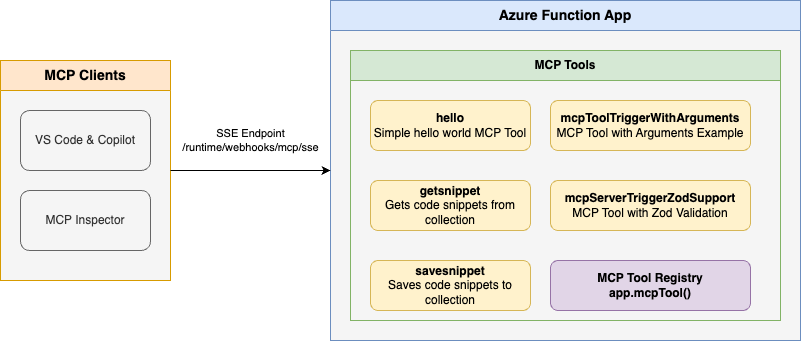
Below is the architecture diagram for the Remote MCP Server using Azure Functions:
Prerequisites
- Node.js version 18 or higher
- Azure Functions Core Tools
- Azure Developer CLI
- To use Visual Studio Code to run and debug locally:
Prepare your local environment
An Azure Storage Emulator is needed for this particular sample because we will save and get snippets from blob storage.
Start Azurite
docker run -p 10000:10000 -p 10001:10001 -p 10002:10002 \
    mcr.microsoft.com/azure-storage/azurite
Note if you use Azurite coming from VS Code extension you need to run
Azurite: Startnow or you will see errors.
Run your MCP Server locally from the terminal
Install dependencies
npm installBuild the project
npm run buildStart the Functions host locally:
func start
Note by default this will use the webhooks route:
/runtime/webhooks/mcp/sse. Later we will use this in Azure to set the key on client/host calls:/runtime/webhooks/mcp/sse?code=<system_key>
Use the MCP server from within a client/host
VS Code - Copilot Edits
Add MCP Server from command palette and add URL to your running Function app's SSE endpoint:
http://0.0.0.0:7071/runtime/webhooks/mcp/sseList MCP Servers from command palette and start the server
In Copilot chat agent mode enter a prompt to trigger the tool, e.g., select some code and enter this prompt
Say HelloSave this snippet as snippet1Retrieve snippet1 and apply to newFile.tsWhen prompted to run the tool, consent by clicking Continue
When you're done, press Ctrl+C in the terminal window to stop the
func.exehost process.
MCP Inspector
In a new terminal window, install and run MCP Inspector
npx @modelcontextprotocol/inspector node build/index.jsCTRL click to load the MCP Inspector web app from the URL displayed by the app (e.g. http://0.0.0.0:5173/#resources)
Set the transport type to
SSESet the URL to your running Function app's SSE endpoint and Connect:
http://0.0.0.0:7071/runtime/webhooks/mcp/sseList Tools. Click on a tool and Run Tool.
Deploy to Azure for Remote MCP
Run this azd command to provision the function app, with any required Azure resources, and deploy your code:
azd up
You can opt-in to a VNet being used in the sample. To do so, do this before azd up
azd env set VNET_ENABLED true
Additionally, API Management can be used for improved security and policies over your MCP Server, and App Service built-in authentication can be used to set up your favorite OAuth provider including Entra.
Connect to your function app from a client
Your client will need a key in order to invoke the new hosted SSE endpoint, which will be of the form https://<funcappname>.azurewebsites.net/runtime/webhooks/mcp/sse. The hosted function requires a system key by default which can be obtained from the portal or the CLI (az functionapp keys list --resource-group <resource_group> --name <function_app_name>). Obtain the system key named mcp_extension.
For MCP Inspector, you can include the key in the URL: https://<funcappname>.azurewebsites.net/runtime/webhooks/mcp/sse?code=<your-mcp-extension-system-key>.
For GitHub Copilot within VS Code, you should instead set the key as the x-functions-key header in mcp.json, and you would just use https://<funcappname>.azurewebsites.net/runtime/webhooks/mcp/sse for the URL. The following example uses an input and will prompt you to provide the key when you start the server from VS Code:
{
    "inputs": [
        {
            "type": "promptString",
            "id": "functions-mcp-extension-system-key",
            "description": "Azure Functions MCP Extension System Key",
            "password": true
        }
    ],
    "servers": {
        "my-mcp-server": {
            "type": "sse",
            "url": "<funcappname>.azurewebsites.net/runtime/webhooks/mcp/sse",
            "headers": {
                "x-functions-key": "${input:functions-mcp-extension-system-key}"
            }
        }
    }
}
Redeploy your code
You can run the azd up command as many times as you need to both provision your Azure resources and deploy code updates to your function app.
[!NOTE]Deployed code files are always overwritten by the latest deployment package.
Clean up resources
When you're done working with your function app and related resources, you can use this command to delete the function app and its related resources from Azure and avoid incurring any further costs:
azd down
Source Code
The function code for the getSnippet and saveSnippet endpoints are defined in the TypeScript files in the src directory. The MCP function annotations expose these functions as MCP Server tools.
This shows the code for a few MCP server examples (get string, get object, save object):
// Hello function - responds with hello message
export async function mcpToolHello(context: InvocationContext): Promise<string> {
    return "Hello I am MCP Tool!";
}

// Register the hello tool
app.mcpTool('hello', {
    toolName: 'hello',
    description: 'Simple hello world MCP Tool that responses with a hello message.',
    handler: mcpToolHello
});

// GetSnippet function - retrieves a snippet by name
export async function getSnippet(_message: unknown, context: InvocationContext): Promise<string> {
    console.info('Getting snippet');

    // Get snippet name from the tool arguments
    const mcptoolargs = context.triggerMetadata.mcptoolargs as { snippetname?: string };
    const snippetName = mcptoolargs?.snippetname;

    console.info(`Snippet name: ${snippetName}`);

    if (!snippetName) {
        return "No snippet name provided";
    }

    // Get the content from blob binding - properly retrieving from extraInputs
    const snippetContent = context.extraInputs.get(blobInputBinding);

    if (!snippetContent) {
        return `Snippet '${snippetName}' not found`;
    }

    console.info(`Retrieved snippet: ${snippetName}`);
    return snippetContent as string;
}


// Register the GetSnippet tool
app.mcpTool('getsnippet', {
    toolName: GET_SNIPPET_TOOL_NAME,
    description: GET_SNIPPET_TOOL_DESCRIPTION,
    toolProperties: [
        {
            propertyName: SNIPPET_NAME_PROPERTY_NAME,
            propertyValue: PROPERTY_TYPE,
            description: SNIPPET_NAME_PROPERTY_DESCRIPTION,
        }
    ],
    extraInputs: [blobInputBinding],
    handler: getSnippet
});

// SaveSnippet function - saves a snippet with a name
export async function saveSnippet(_message: unknown, context: InvocationContext): Promise<string> {
    console.info('Saving snippet');

    // Get snippet name and content from the tool arguments
    const mcptoolargs = context.triggerMetadata.mcptoolargs as {
        snippetname?: string;
        snippet?: string;
    };

    const snippetName = mcptoolargs?.snippetname;
    const snippet = mcptoolargs?.snippet;

    if (!snippetName) {
        return "No snippet name provided";
    }

    if (!snippet) {
        return "No snippet content provided";
    }

    // Save the snippet to blob storage using the output binding
    context.extraOutputs.set(blobOutputBinding, snippet);

    console.info(`Saved snippet: ${snippetName}`);
    return snippet;
}

// Register the SaveSnippet tool
app.mcpTool('savesnippet', {
    toolName: SAVE_SNIPPET_TOOL_NAME,
    description: SAVE_SNIPPET_TOOL_DESCRIPTION,
    toolProperties: [
        {
            propertyName: SNIPPET_NAME_PROPERTY_NAME,
            propertyValue: PROPERTY_TYPE,
            description: SNIPPET_NAME_PROPERTY_DESCRIPTION,
        },
        {
            propertyName: SNIPPET_PROPERTY_NAME,
            propertyValue: PROPERTY_TYPE,
            description: SNIPPET_PROPERTY_DESCRIPTION,
        }
    ],
    extraOutputs: [blobOutputBinding],
    handler: saveSnippet
});
Note that the host.json file also includes a reference to the experimental bundle, which is required for apps using this feature:
"extensionBundle": {
  "id": "Microsoft.Azure.Functions.ExtensionBundle.Experimental",
  "version": "[4.*, 5.0.0)"
}
Next Steps
- Add API Management to your MCP server
- Add EasyAuth to your MCP server
- Enable VNET using VNET_ENABLED=true flag
- Learn more about related MCP efforts from Microsoft


