
Scumble
An AI-native image editor for ComfyUI and the models you already use. Inpaint, edit, upscale and generate, and every edit comes back as a layer of its own.
⭐ Star on GitHub · Download · Microsoft Store
Get Scumble
| Platform | Get it | Notes |
|---|---|---|
| Windows | Microsoft Store, or winget install 9NDBTNNMXF2R |
Signed by Microsoft, no SmartScreen warning, updated by the Store |
| Windows | Installer: Scumble-Setup-<version>.exe |
Updates itself; not code-signed yet, so SmartScreen asks once |
| Windows, portable | Zip: Scumble-<version>-portable-win-x64.zip |
No install; keeps its data in a folder beside it |
| Linux (x64) | AppImage or .deb | Early builds made by CI, not run by the author yet; reports welcome |
| macOS | not yet | Planned, not started |
Scumble is free and needs no account of its own. The details, and what it needs to render, are underInstallation.
What can it do?
Scumble is a desktop image editor built around AI models. Select part of a picture, or draw boxes on an emptycanvas, say what should be there, and the answer comes back as a layer of its own, colour-matched to what surroundsit, that you can mask, blend, filter and export like any other. It renders on your own ComfyUI (on your machine or aremote one), on Comfy Cloud, or through the API keys you may already have for FLUX, GPT Image, Nano Banana, Seedreamand more: a key alone is enough, no ComfyUI needed. It is free software (GPL-3.0), runs on Windows today, and isyoung (0.1.x), so expect rough edges and keep backups of your pictures.
Five things it does well
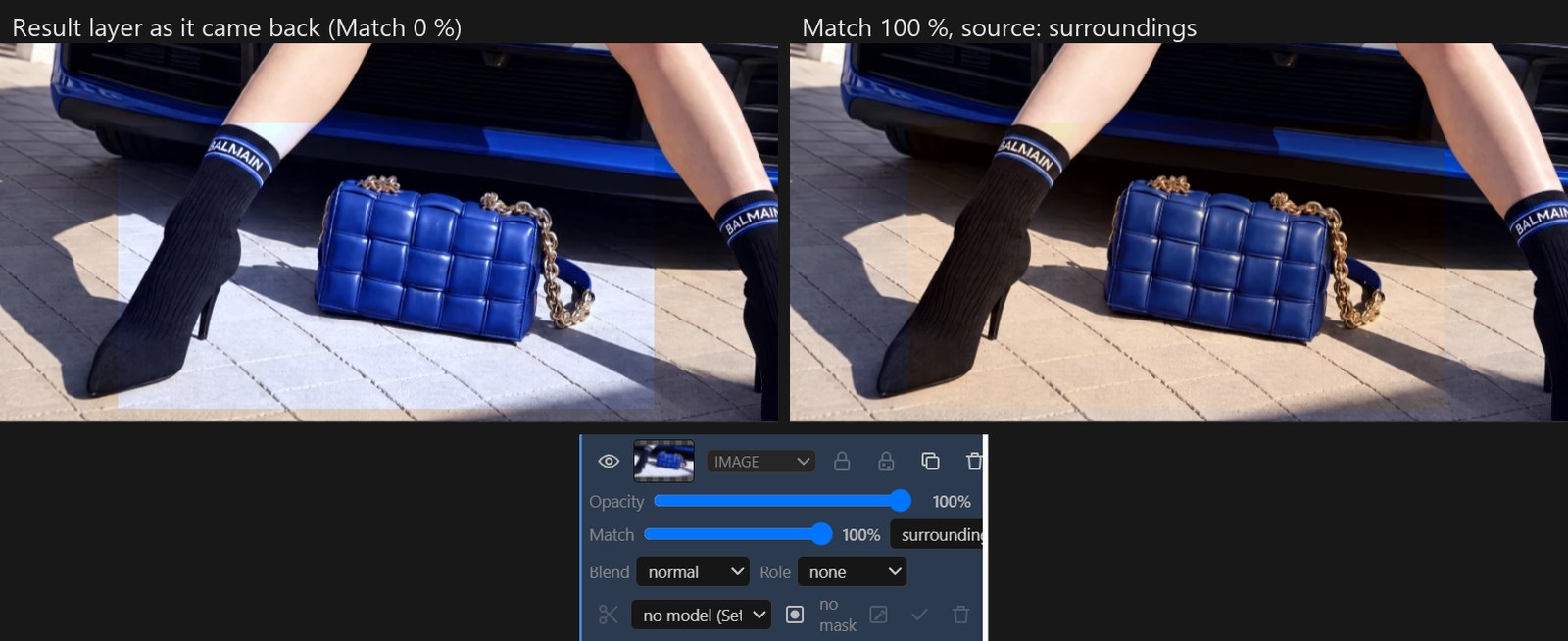
Every result is its own layer
A result lands over your selection as a new layer, faded in at the edge and colour-matched to the picture around it.The Match slider in the layer's row changes that match at any time, and nothing else is baked in either: mask thelayer, erase parts, change its blend mode, put filters and text on top. The picture only becomes one when you flatten.
Say where things go: boxes and @img1
Draw boxes on the picture and describe each one: something new, something kept, moved or removed, a reference pictureplaced, words rendered. FLUX 3 Image from Black Forest Labs (on every provider Scumble runs it on) gets the boxes withthe prompt and is told where each thing goes; Ideogram 4 on fal takes the new, kept and text boxes. Reference layersare named in the prompt as @img1, @img2, and each one goes out under the name the chosen model knows that pictureby.
Your ComfyUI, Comfy Cloud, or just your keys
Recipes instead of node graphs: you pick a model and where it runs. On your own ComfyUI, local or on a rented boxsuch as RunPod, any workflow with the Inpaint Canvas node becomes a recipe, and the ComfyUI button opens yourComfyUI's own page beside the editor to change a recipe's graph and save it back. Comfy Cloud runs on your Comfy key,with 13 recipes from Comfy's own templates. Or paste a key into Settings › API providers: Black Forest Labs, OpenAI,Google, fal.ai, Replicate, OpenRouter and more. Keys go into the system's credential store, never into a settingsfile.
Agents can drive it
Every feature is a command, and the commands are an MCP server: Help › Copy MCP registration (or, for ClaudeDesktop, the .mcpb file of every release, installed with one click), and Claude Code, Claude Desktop or any otherMCP client gets 109 tools to open, select, generate, match and export, in the same window and with the same undo. (A built-in chat assistant on your own key is there too; see The assistant.)
Made for real files
PSD export with layers and masks, OpenRaster with layers, and both open again with their layers. A tile engine withcompiled Rust kernels keeps a 15,000 × 10,000 pixel document painting, selecting and exporting without freezing the window, andPNGs up to 65,535 pixels a side open and save in strips. Filters are layers too, on the GPU: 46 film looks, grain,curves, LUTs and more.
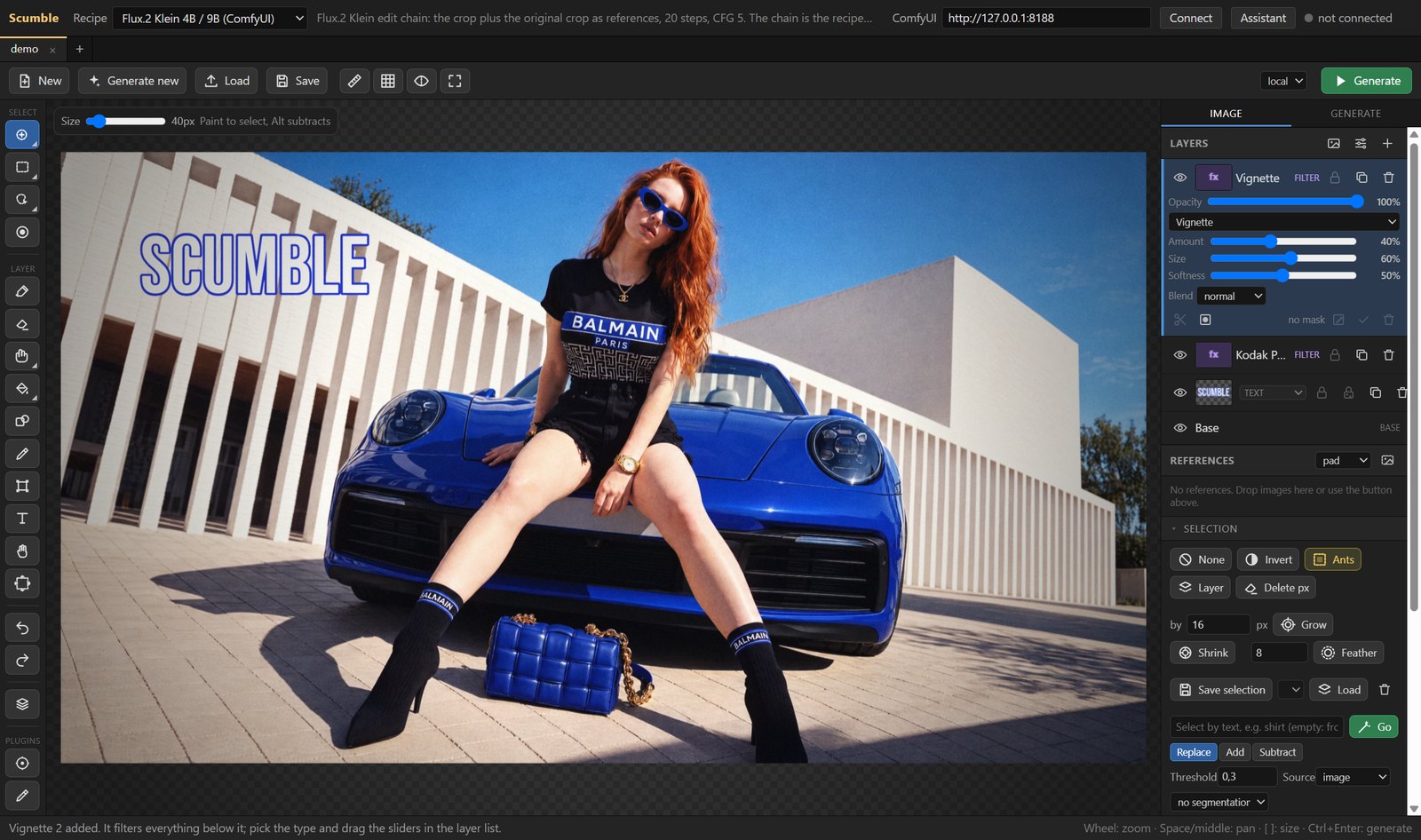
The photo in the editor screenshots (the woman on the blue car) is a sample picture used to show the features;nothing in it was generated with Scumble. The café picture at the top and below was made in Scumble with FLUX 3Image.
Before / After
Three boxes drawn and described on an empty canvas (left), and the picture FLUX 3 Image made from them withGenerate new (right).
Installation
Windows (10 and 11, 64-bit)
Microsoft Store: Scumble in the Microsoft Store, or in aterminal:
winget install 9NDBTNNMXF2R(winget installs the same Store copy and may ask you to accept the Store's terms first.) Microsoft signs the Storecopy, so it installs without a SmartScreen warning, and the Store keeps it up to date. A new version arrives thereafter Microsoft has certified it, so sometimes a little after the GitHub release. The Store copy keeps its ownsettings, keys and files (
%APPDATA%\Scumble Store), so it can sit beside the GitHub one.Installer from GitHub:
Scumble-Setup-<version>.exefrom thelatest release. It is not code-signed yet, so SmartScreenshows "Windows protected your PC" once: click More info, then Run anyway. After that the app downloads its ownupdates and asks before it restarts into a new version.Portable zip:
Scumble-<version>-portable-win-x64.zipfrom the same release. Unpack it into a folder you canwrite to, such asC:\Tools(not Program Files, not a folder OneDrive syncs), and start theScumble.exein itsScumblefolder (SmartScreen asks once, as for the installer). Everything it stores stays in adatafolder beside it, so it runs beside an installed Scumble.It does not update itself: it tells you when a new version is out, and you unpack the new zip over the old one (thedatafolder stays). API keys are encrypted for the Windows account, so on another PC they have to be typed again(and after that possibly on the first PC too).
Linux
The same release carries scumble-<version>.AppImage and scumble-<version>.deb (x64). They are built by CI andhave not been run by the author yet; reports are welcome in theissues. Details are under Linux notes below.
macOS
Planned, not started yet.
What you need to render
Only an API key: Settings › API providers (Ctrl+,), paste the key, Save. No ComfyUI and no server; you paythe provider directly. The same keys serve the assistant and prompt upsampling.
Your own ComfyUI: the node pack ComfyUI-InpaintCanvasinstalled there, and the models of the recipe you pick. Install the pack with git into ComfyUI's
custom_nodesfolder, then restart ComfyUI (the pack needs no extra Python packages):cd ComfyUI/custom_nodes git clone https://github.com/DenRakEiw/ComfyUI-InpaintCanvasThe ComfyUI Manager does not list the pack at the moment; once it does, you can install it from there too. Thentype the server's address in Scumble's top bar and press Connect. Scumble checks for the pack when it connects andsays so when it is missing; it does not install it for you.
Comfy Cloud: your Comfy key in Settings › API providers; the same key runs Comfy Router.
Without any of these Scumble still opens, paints, selects, layers, filters, saves and exports, and its in-app models(object selection, background removal, Remove) run on your own machine once downloaded.
Demo: videos and the manual
- Videos: "Scumble, explained by someone who did not ask" (4:40) and"Scumble, part two: he has more questions" (4:03), two voices, one of them a sceptic, recorded in the app at version 0.1.28 (boxes, the ComfyUI window and thenewer recipes came later).
- Manual: from the first picture to the export. The same text shipswith the app: F1 opens it beside the picture, searchable and offline, and with any API key a chat answers questionsfrom it. Its source is docs/MANUAL.md.
⭐ If you like it
If Scumble is useful to you, a star on GitHub helps other people find it.Something broken? Open an issue with what you did and what happened;Ctrl+Shift+L opens the console, which shows the path of the log file. What is being built, what was measured and whatdid not work is on the dev blog, and CHANGELOG.md listsevery version.
What has been tried live
Scumble is at 0.1.x and not every feature has been tested end to end. Run against the real thing so far: localrendering through ComfyUI, the in-app helper models, the film pack, the command core, the MCP server, the tile engineon large documents and auto-update; among the API providers FLUX 3 Image on Black Forest Labs (with boxes),OpenRouter and Comfy Router, GPT Image 2.5 through OpenRouter, GPT Image 2 and Nano Banana 2 on Comfy Router,Ideogram 4 on fal (with boxes), Qwen Image 2.1 Edit on Comfy Cloud, and the upscalers Topaz Precision on fal andMagnific Precision and Creative on Magnific; on a local ComfyUI the Realism Pass (Windows only, RTX only) and RTXVideo Super Resolution, the latter once on Comfy Cloud too. The other API routes were built from the providers'documentation and have not run against the live services yet, nor have the assistant's model calls, the portable zipon a second PC, or the Linux builds.
Features in detail
Select, prompt, generate
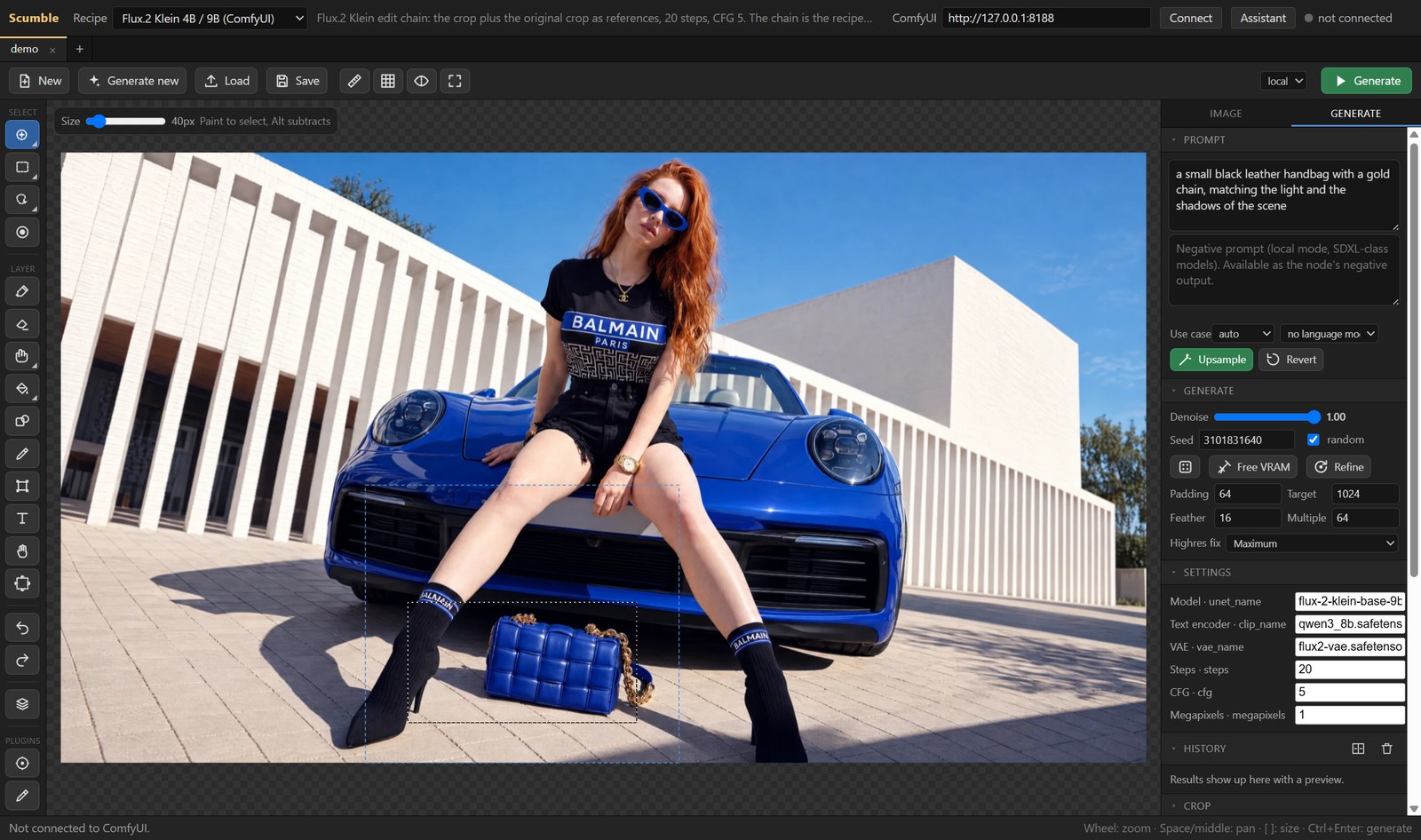
- Selection by brush, rectangle, ellipse, lasso, magic wand, object hover (SAM2, in the app) or by text (SAM3 on yourComfyUI); grow, shrink, feather, invert, from layer, saved selections.
- Models: FLUX 3 Image, FLUX.2 (max, pro, flex, klein) and FLUX.1 Fill from Black Forest Labs; GPT Image 2.5 Flare /Sunburst and GPT Image 2; Nano Banana 2.1, 2, 2 Lite and Pro; Seedream 5 and 4.5; Qwen Image Edit and Qwen Image 2.1;Ideogram 4 and 4.5; Grok Imagine, Krea 2, Recraft V4, Reve, Z-Image and HY Image 3.5; Magnific's Mystic, Ideograminpainting and Image Expand outpainting. Each runs on the model's own API where Scumblehas one, or through ToAPIs, fal.ai, Replicate, WaveSpeedAI, Comfy Cloud, Comfy Router, OpenRouter, Oxen.ai andMagnific. API runs go out at the size the provider really takes, with your reference layers.
- Your own workflow becomes a recipe when it holds an Inpaint Canvas node. The ComfyUI window (Ctrl+Shift+K) showsyour ComfyUI's page or Comfy Cloud; Edit in ComfyUI opens a recipe's graph there, and Save to recipe or Save asnew recipe brings it back.
- Comfy Cloud has a mode of its own beside local and api. Thirteen recipes from Comfy's templates come withScumble (image edits, and new images for Generate new); Cloud copy turns one of your ComfyUI recipes into one thatruns there, and a workflow made on Comfy Cloud imports as it is.
- Generate new makes the base picture from the prompt alone, locally or through a provider, and you edit it fromthere.
- Boxes in the prompt for FLUX 3 Image and Ideogram 4 (on fal): the Boxes tool (X) draws them, a double-clickdescribes one right on the picture, one switch under the prompt turns them on and off, and they are saved with thedocument. With the switch on and no boxes drawn, the selection goes as one box. Ideogram 4 takes the new, kept andtext boxes (it has no move, remove or reference boxes).
- Prompt upsampling through a stored API key or a local OpenAI-compatible server, with your own prompt-writing rulesas Markdown templates.
Retouch, upscale, refine
- Clone, heal, smudge, dodge and burn, liquify, and Patch for a whole area. Remove and Content-aware move fillwith LaMa, a model that runs inside Scumble: no prompt, no key, no ComfyUI (download it once in Settings › Helpers(in-app models)).
- Object masks (SAM2) and background removal (BiRefNet, RMBG) run in the app through ONNX Runtime.
- Upscale takes the selection (it comes back as a layer) or the whole picture (it becomes the new base, every layerand mask scaled along, in one undo step). Topaz, Clarity, SeedVR2, Recraft and Magnific through their providers; theupscale models of your own ComfyUI; RTX Video Super Resolution on your ComfyUI or on Comfy Cloud, 1 to 4 times.
- Realism Pass (Windows only, RTX only), a refiner for generated pictures: it sends the picture through your ownComfyUI and adds the answer as a new layer, so generated skin, hair and fabric look more natural; at 1.5× to 3× it makesthe picture larger in the same step. It needs a ComfyUI on Windows with an RTX 30, 40 or 50 card and a community nodepack with its runtime, which you install there; Scumble ships none of it, and there is no Comfy Cloud version. Themanual's chapter of the same name has the steps.
Layers, filters, text
- A full layer stack: paint, image, text and filter layers, groups, masks, blend modes (the usual eight and linearlight), opacity, transform, crop and extend (which is how outpainting starts), copy and paste of whole layersbetween tabs, SVG files as layers.
- Colour match per layer, non-destructive, matched to the picture around the layer or to what lies below it.
- Filter layers on the GPU (WebGL2, with a processor fallback): grain with film presets, curves, levels, colourbalance, HSL, LUT (.cube), vignette, sharpen, blur and more. The film pack plugin adds 46 film looks, halation, glow,bleach bypass, cross processing, split toning, light leaks, frames and control points.
- A shape tool, custom brushes from
.abrfiles, and 3D objects (.glb) placed into the picture with their ownlight. .scumbledocuments keep everything editable (layers, filters, text, 3D objects, prompts and results). ExportPNG, JPEG, WebP, TIFF, PSD and ORA, at a percentage or into a frame of a given size; the AI label panel adds theEU's label for AI-generated content.
The assistant
A chat column next to the canvas (Ctrl+Shift+A), on your own key: Anthropic, OpenAI, Google or any OpenAI-compatibleendpoint (OpenRouter, DeepSeek, Moonshot / Kimi, Z.ai / GLM, ToAPIs, WaveSpeed, Oxen.ai, or a local server). It drivesthe editor through the same commands an MCP client gets. Everything that costs money, queues on your ComfyUI, clearsthe undo stack or touches a layer it did not make asks first. Ctrl+Z takes back each of its steps; chats are savedwith their screenshots, and Settings › Assistant deletes everything it stored. What leaves your machine per providerand what it costs: docs/ASSISTANT.md.
Large pictures, plugins, agents
- The tile engine keeps the picture, every layer and every mask in tiles, and the pixel kernels run as compiled Rustin workers. PNGs beyond the browser's canvas limit (up to 65,535 px a side, about a gigapixel) open and save instrips.
- JavaScript plugins (filters with GPU and processor paths, panels, menu actions, tools, commands) and a command corewith 109 documented commands, 92 core and 17 from the built-in plugins (docs/COMMANDS.md,docs/PLUGINS.md).
- MCP server for any MCP client (an
.mcpbbundle for Claude Desktop with every release), plus--headlessand--cmdfor scripts (docs/MCP.md). - Tabs with session restore, a local file mirror (no server needed to reopen your work), a console and a log file,updates from GitHub releases with the release notes shown before you restart.
Linux notes
The AppImage: chmod +x it and start it; it updates itself like the Windows app (the .deb does not: install the nextone over it). On Ubuntu 23.10 and later AppArmor's limit on unprivileged user namespaces may keep Electron's sandbox,and so the AppImage, from starting; the .deb installs the sandbox helper properly. The helper models run on theprocessor on Linux. API keys go into the desktop's keyring (GNOME Keyring, KWallet); without one, Settings › APIproviders says the keys are only obfuscated.
First steps
For an API model, put its key into Settings › API providers (Ctrl+,). For your own ComfyUI, type its URL in the topbar (default http://127.0.0.1:8188) and press Connect. Then open a picture (Ctrl+O, drop, paste), paint aselection, type a prompt and Generate (Ctrl+Enter). Ctrl+S saves the document as a .scumble file, Ctrl+Shift+Eexports the picture. Every document is a tab (Ctrl+T new, Ctrl+W close, Ctrl+Tab next); a run keeps going whileanother tab is in front. Ctrl+Shift+A opens the assistant, F1 the manual.
Every image the editor uploads or receives is kept under %APPDATA%/Scumble/files/ (in a portable copy data/files/beside Scumble.exe), in input/ and output/ folders that mirror ComfyUI's. The server only holds copies: before arun the app uploads what the server lacks, so a fresh or restarted ComfyUI (RunPod) works without reloading thedocument, and the last session comes back at the next start even with no server connected.
Run from source
npm install
npm start
npm run dist builds the installer (dist/Scumble Setup <version>.exe, NSIS, unsigned), then npm run dist:portablethe portable zip from the same build (dist/Scumble-<version>-portable-win-x64.zip). Releases are built by GitHubActions: a tag v<version> that matches package.json builds a draft release with the installer, its blockmap,latest.yml (the auto-update feed) and the portable zip; publishing the draft makes it visible to the app. The Rustpixel kernels are committed as renderer/editor/px/px.wasm; python tools/build_px.py rebuilds them.
The tests live in tools/ (docs/TESTING.md says what each covers), and tools/run_gates.sh runsa list of them on a fresh instance. How releases are built, who approves them and what the app sends over the networkis in the code signing policy. See CLAUDE.md for the development notes.
Layout
electron/main/     main process: window, scumble:// scheme with the ComfyUI proxy, websocket, menu, dialogs, settings,
                   file mirror, keys.js (safeStorage), recipes.js, llm.js + llm_custom.js (prompt upsampling, the user's
                   own models), providers/ (one adapter per API provider), onnx/ (SAM2, matting), plugins.js,
                   updater.js (GitHub releases), bridge.js + local.js + mcp/ (agents), assistant/ (the loop, the
                   policy, the four model adapters, the chat store), comfyview.js (the ComfyUI window),
                   documents.js + docfile.js (.scumble files)
electron/preload.js
renderer/          shell.js (connection bar, recipe picker, tabs, settings), commands.js (the command core),
                   plugins.js (plugin loader and the `scumble` API), assistant.js (the chat panel)
renderer/editor/   the editor, shared with the ComfyUI node (docs/BUILD_NODE.md); host.js is the app side of it,
                   inpaint_filters_gl.js the WebGL2 filter path, stitch.js the in-app crop / stitch for provider runs,
                   inpaint_tiles.js + inpaint_arena.js + inpaint_pool.js the tile engine and its workers, px/ the Rust
                   kernels (wasm), inpaint_bands.js the strip writers
crates/px/         the Rust source of the pixel kernels
recipes/           ComfyUI recipes, Comfy Cloud recipes and model recipes (one per model, a variant per provider),
                   docs/RECIPES.md
plugins/           built-in plugins: sample, film (the film pack), glb (3D objects), ailabel (the EU AI label),
                   boxes (boxes in the prompt), and two skins
docker/runpod/     Dockerfile + provision.sh for a ComfyUI box on RunPod (draft, docs/RUNPOD.md)
tools/             build_node.py (the node's editor), build_px.py (the kernels), cdp.py (DevTools driver), the tests,
                   run_gates.sh
docs/              MANUAL.md, BRIEF.md (vision, decisions, phases), ASSISTANT.md, COMMANDS.md, PLUGINS.md, FILM.md,
                   MCP.md, RECIPES.md, HELPERS.md, TESTING.md, CODE_SIGNING_POLICY.md and more, images/
.github/workflows/ build.yml (Windows installer and portable zip, Linux AppImage and .deb, draft release on a version tag)
The editor is the same code as the ComfyUI node Inpaint Canvas:if you work inside ComfyUI, you get the same canvas there.
Licence
GPL-3.0, the same licence as the Inpaint Canvas node and ComfyUI. See LICENSE. Free to use, modify andredistribute; modified versions must be published under the same licence. Bundled fonts are OFL / Apache licensed,see renderer/editor/fonts/licenses. Film names in the grain presets and the film pack are trademarks of theirowners; the looks are Scumble's own approximations, not licensed products. The get a key links of ToAPIs andWaveSpeedAI carry the author's referral code.


