
BlenderMCP
Control Blender 3D with Claude AI — in real time, through natural language
🌐 Website · 📹 Tutorial · 💬 Discord · 📖 Wiki · 📋 Changelog
BlenderMCP connects Blender 3D to Claude AI (and any other LLM) through the Model Context Protocol. It enables prompt-driven 3D modeling, scene creation, and real-time object manipulation — directly from your AI assistant.
Table of Contents
- Features
- Whats New
- Quick Start
- Installation
- Usage
- Integrations
- API Credentials
- Troubleshooting
- Technical Details
- Security and Telemetry
- Contributors
- Community
- Contributing
Features
| Capability | Description | |
|---|---|---|
| 🔁 | Two-way communication | Real-time socket bridge between Claude and Blender |
| 🧊 | Object manipulation | Create, move, scale, and delete 3D objects via prompts |
| 🎨 | Material control | Apply, modify, and generate materials and colors |
| 🔍 | Scene inspection | Full scene state — objects, lights, cameras |
| 📷 | Viewport screenshot | Let the AI see the Blender viewport |
| 🐍 | Code execution | Run arbitrary Python inside Blender |
| 🌍 | Poly Haven | Download HDRIs, textures, and models via API |
| 🤖 | AI model generation | 3D assets via Hyper3D Rodin and Hunyuan3D |
| 🗂️ | Sketchfab | Search and import 3D models |
| 🌐 | Remote host | Run the MCP server on a remote machine |
Whats New
Full changelog: Releases
- Hunyuan3D 3D model generation
- Viewport screenshot for scene understanding
- Sketchfab model search and import
- Poly Haven asset integration
- Hyper3D Rodin AI model generation
- Remote host support
Updating from an older version:
- Download the latest
addon.pyand replace it in Blender - Remove and re-add the MCP server in your client config
Codex
Add to ~/.codex/config.toml (or %USERPROFILE%\.codex\config.toml on Windows):
[mcp_servers.blender]
command = "uvx"
args = ["blender-mcp"]
On Windows, if uvx is missing from PATH, set command to the full uvx.exe path.
Hunyuan3D
| Mode | What you need |
|---|---|
| official api | Tencent Cloud SecretId + SecretKey (billed per job) |
| local api (default) | Your own Hunyuan3D inference server — BlenderMCP only POSTs to {API URL}/generate and imports the GLB. Default URL is http://localhost:8081. Nothing is bundled or started for you. |
Remote Blender host
- In the BlenderMCP panel, enable Listen on all interfaces (0.0.0.0) only on a trusted network (no auth on the socket).
- Point the MCP client at Blender with
BLENDER_HOST/BLENDER_PORT.
Quick Start
# macOS
brew install uv
Add to Claude > Settings > Developer > Edit Config > claude_desktop_config.json:
{
    "mcpServers": {
        "blender": {
            "command": "uvx",
            "args": ["blender-mcp"]
        }
    }
}
Install the Blender addon, click Connect, and start prompting.
Installation
Prerequisites
| Requirement | Minimum version |
|---|---|
| Blender | 3.0 |
| Python | 3.10 |
| uv | Latest |
Install uv:
macOSbrew install uv
powershell -c "irm https://astral.sh/uv/install.ps1 | iex"
Add to PATH (restart your client after):
$localBin = "$env:USERPROFILE\.local\bin"
$userPath = [Environment]::GetEnvironmentVariable("Path", "User")
[Environment]::SetEnvironmentVariable("Path", "$userPath;$localBin", "User")
curl -LsSf https://astral.sh/uv/install.sh | sh
Do not use
pip install uv— it may not create theuvxcommand.
uvx not found by your client
GUI clients don't inherit your terminal PATH. Get the full path:
which uvx(macOS/Linux) orwhere uvx(Windows)- Use it as
"command"in your config - Windows:
"command": "cmd", "args": ["/c", "uvx", "blender-mcp"] - Fully quit and relaunch your client after any config change
Apple Silicon (M1/M2/M3/M4) arch mismatch
If uvx tries to build for x86_64 on an arm64 Mac (cryptography wheel errors), force arm64 Python:
"args": ["--python", "3.11-aarch64", "blender-mcp"]
Docker / WSL / remote host
Blender must listen where the MCP process can reach it:
"env": {
  "BLENDER_HOST": "host.docker.internal",
  "BLENDER_PORT": "9876"
}
On WSL2 talking to Windows Blender, try BLENDER_HOST=127.0.0.1 or your Windows host IP. Screenshots are returned as base64 (no shared temp path required).
Blender versions
Blender 3.0+ is supported; 4.x / 5.x recommended. Use a normal GUI Blender session (not blender -b background) so the MCP socket and viewport tools work.
Keep addon and server in sync
The TCP link uses length-prefixed JSON frames. Update both the Blender addon (addon.py) and the MCP package (uvx --refresh blender-mcp) together after upgrades.
Windows: Claude Extension egg_base '.' does not exist
If Claude Desktop’s built-in extension fails to build with egg_base / wrong path under Packages\Claude_..., skip the extension launcher and run the package via uvx (config above). That path is the supported install on Windows.
uv tool install blender-mcp
uv tool upgrade blender-mcp
uvx --refresh blender-mcp
blender-mcp does not depend on pywin32. If uv tries to install a locked pywin32 wheel from an old env, clear the stuck build cache or use a fresh uvx/uv tool install rather than a partial site-packages tree.
Claude Desktop
Claude > Settings > Developer > Edit Config > claude_desktop_config.json:
{
    "mcpServers": {
        "blender": {
            "command": "uvx",
            "args": ["blender-mcp"]
        }
    }
}
{
    "mcpServers": {
        "blender": {
            "command": "uvx",
            "args": ["--python", "3.11", "blender-mcp"],
            "env": { "UV_PYTHON_PREFERENCE": "only-managed" }
        }
    }
}
pipx install blender-mcp
pipx ensurepath
Cursor

{
    "mcpServers": {
        "blender": {
            "command": "uvx",
            "args": ["blender-mcp"]
        }
    }
}
{
    "mcpServers": {
        "blender": {
            "command": "cmd",
            "args": ["/c", "uvx", "blender-mcp"]
        }
    }
}
Run only one MCP server at a time — Cursor or Claude Desktop, not both.
VS Code

{
    "mcpServers": {
        "blender": {
            "command": "uvx",
            "args": ["blender-mcp"]
        }
    }
}
OpenCode
{
  "mcp": {
    "blender-mcp": {
      "type": "local",
      "command": ["uvx", "blender-mcp"],
      "enabled": true,
      "environment": {
        "BLENDER_HOST": "localhost",
        "BLENDER_PORT": "9876"
      }
    }
  }
}
Claude Code CLI
claude mcp add blender uvx blender-mcp
Blender Addon
- Download
addon.py - In Blender: Edit > Preferences > Add-ons > Install...
- Select
addon.py - Enable "Interface: Blender MCP"
Usage
Starting the Connection
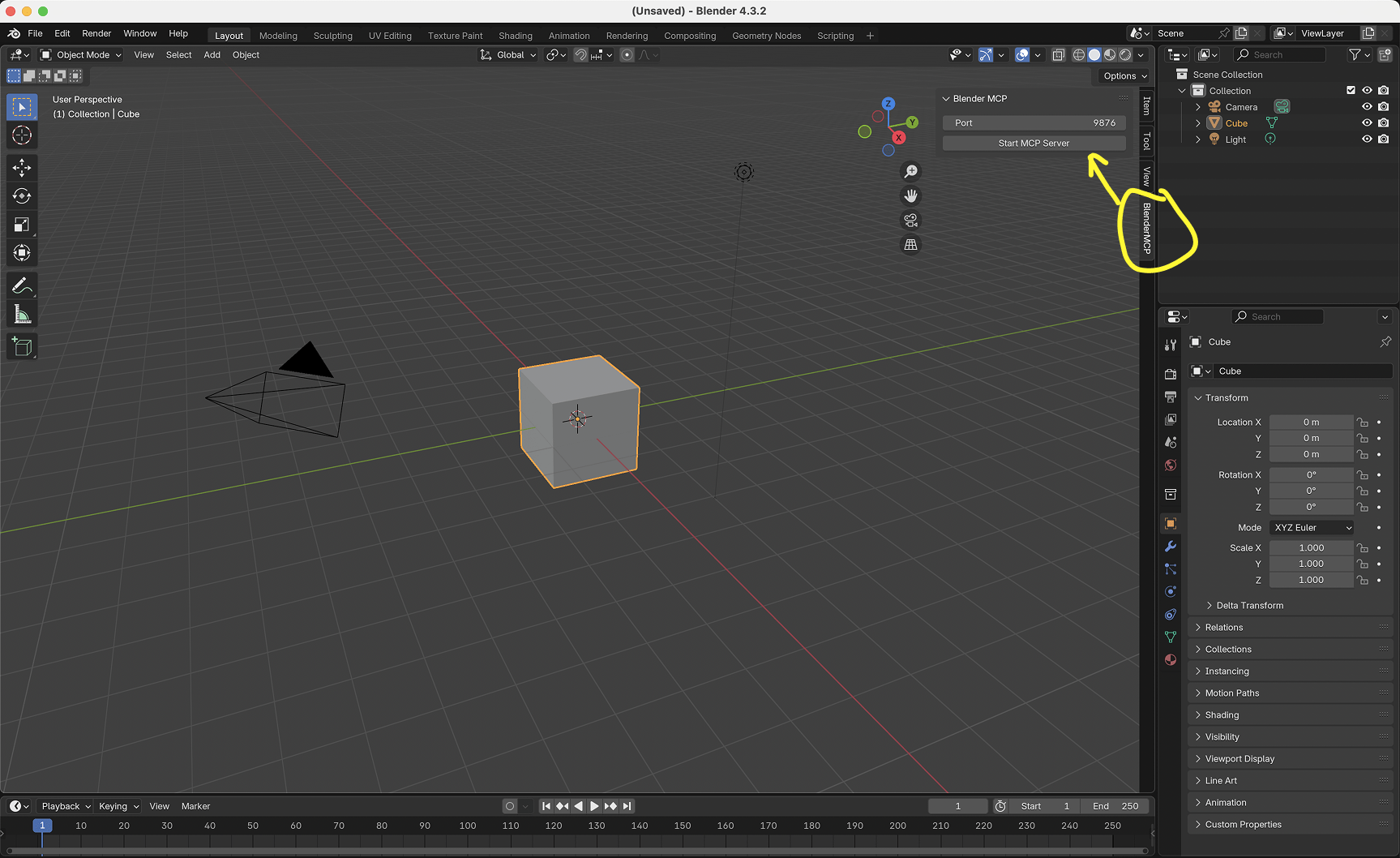
- Open the 3D View sidebar (press
Nif not visible) - Go to the BlenderMCP tab
- (Optional) Enable Poly Haven for asset downloads
- Click Connect to Claude
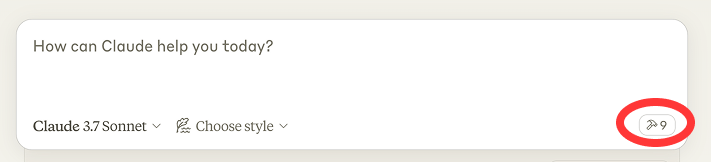
When connected, Claude shows a hammer icon confirming Blender tools are active:
Example Prompts
| Prompt | Demo |
|---|---|
| "Create a low poly dungeon with a dragon guarding gold" | Watch |
| "Beach scene with Poly Haven HDRIs, rocks, and vegetation" | Watch |
| "Recreate this reference image as a Blender scene" | Watch |
| "Export the scene and build a Three.js sketch from it" | Watch |
| "Generate a garden gnome with Hyper3D" | — |
| "Make this car red and metallic" | — |
| "Studio lighting, isometric camera" | — |
Integrations
Poly Haven
Download HDRIs, textures, and 3D models. Enable in the BlenderMCP sidebar.
Hyper3D Rodin
AI 3D models. Free trial has a daily limit — get your own key at hyper3d.ai or fal.ai.
Hunyuan3D
Tencent 3D generation. Configure credentials in Blender addon preferences.
Sketchfab
Search and import 3D models into your scenes.
API Credentials
Store in Edit > Preferences > Add-ons > Blender MCP to persist across restarts:
| Credential | Environment variable |
|---|---|
| Sketchfab API Key | BLENDERMCP_SKETCHFAB_API_KEY |
| Hyper3D API Key | BLENDERMCP_HYPER3D_API_KEY |
| Hunyuan3D SecretId | BLENDERMCP_HUNYUAN3D_SECRET_ID |
| Hunyuan3D SecretKey | BLENDERMCP_HUNYUAN3D_SECRET_KEY |
| Hunyuan3D API URL | BLENDERMCP_HUNYUAN3D_API_URL |
export BLENDER_HOST=localhost
export BLENDER_PORT=9876
Troubleshooting
Connection issues- Confirm the addon server is running in the BlenderMCP sidebar
- Do not run
uvxmanually — the client starts the server - First command often fails; try again
which uvx   # macOS / Linux
where uvx   # Windows
Use that full path as "command" in your config.
Break the request into smaller sequential prompts.
Python version conflicts"args": ["--python", "3.11", "blender-mcp"],
"env": { "UV_PYTHON_PREFERENCE": "only-managed" }
Clear cache: uv cache clean blender-mcp && uvx --refresh blender-mcp
Restart your MCP client and the Blender server.
Technical Details
LLM Client <-- MCP --> MCP Server (src/blender_mcp/server.py) <-- TCP:9876 --> Blender Addon (addon.py)
JSON over TCP sockets:
{ "type": "create_object", "params": { "type": "SPHERE", "name": "Ball" } }
{ "status": "success", "result": { "name": "Ball", "location": [0, 0, 0] } }
Security and Telemetry
execute_blender_coderuns arbitrary Python in Blender. Save your work before using it.
Optional anonymous usage stats (tool names, success/duration, version/platform) may be sent to help improve the project. Detailed fields (prompts/code/screenshots) require the addon privacy checkbox. Credential-like strings are stripped before upload.
Disable entirely:
BLENDER_MCP_DISABLE_TELEMETRY=true uvx blender-mcp
Or in client config: "env": { "BLENDER_MCP_DISABLE_TELEMETRY": "true" }
In Blender: Edit → Preferences → Add-ons → Blender MCP → telemetry checkbox.
Contributors
Made with contrib.rocks
Community
| 💬 Discord | Join the community |
| 📝 Feedback | Share your thoughts |
| 📞 Call | Schedule a call |
| 🐛 Issues | GitHub Issues |
| 💖 Sponsor | Support BlenderMCP |
Supporters: CodeRabbit
Contributing
- Fork the repository
- Create a branch:
git checkout -b feature/your-feature - Commit and open a PR
See CONTRIBUTING.md and TERMS_AND_CONDITIONS.md.
License
MIT — see LICENSE.
Star History
MCPBlender · blendermcp.org · Not affiliated with the Blender Foundation
⭐ Star the repo if it helps your workflow!


