
Zephyr MCP
An MCP server for Zephyr Scale. The current version provides tools for readingtest cases and test steps.
Requirements
- Node.js 20.6 or later
- A Zephyr Scale API token
- Codex CLI or Claude Code CLI
- Bash on Linux or macOS
- Git Bash or WSL on Windows
On Windows, use Git Bash when Node.js and the MCP client are installed onWindows. Use WSL only when Node.js and the Codex or Claude Code CLI are alsoinstalled inside the same WSL environment.
1. Get the repository
Clone the repository and enter its directory:
git clone <repository-url>
cd zephyr-mcp
The setup scripts resolve the repository from their own location. After therepository has been cloned, the scripts can be launched from any workingdirectory.
2. Create the repository .env
Get a Zephyr Scale API token
- Sign in to Jira.
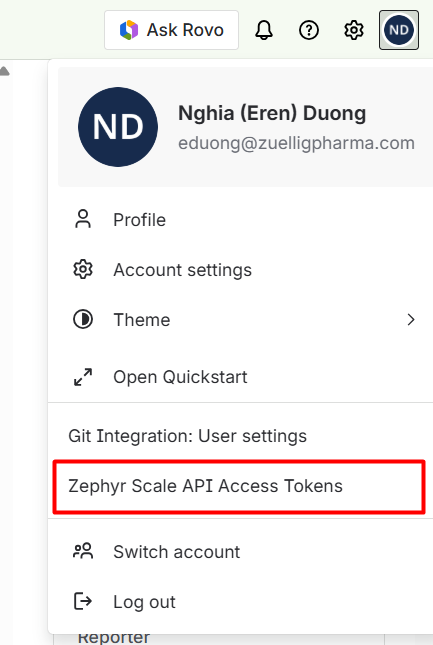
- Open the profile menu in the top-right corner.
- Select Zephyr Scale API Access Tokens.
- Create a token, copy it, and store it securely. Do not commit or share it.
Configure .env
Copy .env.example to .env in the root of the cloned zephyr-mcprepository:
cp .env.example .env
Then replace the placeholder token:
ZEPHYR_API_TOKEN=your-zephyr-api-token

# Optional
# ZEPHYR_CUSTOM_BASE_URL=https://api.zephyrscale.smartbear.com/v2
The repository ignores .env files. Do not commit your API token.
The setup scripts store only the path to this file in the MCP configuration.They do not copy the token into Codex or Claude Code configuration files.
3. Run the setup script
No separate dependency installation, build, or manual MCP configuration isrequired. The selected script handles those steps automatically.
If zephyr-mcp was previously installed globally from a .tgz package, append--global to the setup command to use that package instead of building therepository source.
Codex
From the repository:
bash setup-mcp-codex.sh
From another directory:
bash /absolute/path/to/zephyr-mcp/setup-mcp-codex.sh
The script registers a user-level zephyr MCP server in Codex. If a serverwith that name already exists, it is replaced.
Restart Codex and verify the connection:
/mcp
Claude Code
From the repository:
bash setup-mcp-claude.sh
From another directory:
bash /absolute/path/to/zephyr-mcp/setup-mcp-claude.sh
The script registers a user-scoped zephyr MCP server in Claude Code. If aserver with that name already exists, it is replaced.
Restart Claude Code and verify the connection:
/mcp
You can also inspect the registration from the terminal:
claude mcp get zephyr
What the setup scripts do
Both scripts:
- Resolve the repository path from the script location.
- Require Node.js 20.6 or later.
- Check that
.envexists in the repository. - Verify that
ZEPHYR_API_TOKENis not empty without printing it. - Install missing dependencies and build the local server in default
--sourcemode. - Use the globally installed
.tgzpackage when passed--global. - Normalize paths when running through Git Bash on Windows.
- Replace the existing
zephyrMCP registration. - Configure Node to load the repository
.envusing--env-file.
Troubleshooting
Missing .env
Error: Missing .../.env. Create it with ZEPHYR_API_TOKEN before running this script.
Create .env next to setup-mcp-codex.sh andsetup-mcp-claude.sh.
Missing API token
Error: ZEPHYR_API_TOKEN is missing or empty in .../.env.
Add a non-empty ZEPHYR_API_TOKEN to the repository .env.
MCP startup failure
Run the relevant setup script again:
bash setup-mcp-codex.sh
# or
bash setup-mcp-claude.sh
The script validates .env, rebuilds the server in source mode, and replacesthe existing MCP registration. Restart the MCP client and check /mcp afterthe script completes.
Development
npm run typecheck
npm run build
Source code is located in src/; compiled output is written to build/.


