
agent-device


Device automation CLI for AI agents. Mobile, TV, and desktop apps.
agent-device lets coding agents run real apps, inspect UI state, interact with visible elements, and collect debugging evidence through one CLI.
It is built around token-efficient accessibility snapshots, not pixel-first screenshots. Agents read compact UI trees, locate elements through refs like @e3, perform touch and text actions, and capture screenshots, video, logs, network, CPU/memory/perf, crash-related logs, and React profiles only when evidence is needed.
Agents can ingest the current docs from llms-full.txt. The installed CLI help remains authoritative for exact command syntax.
Agentic QA And Development
- Quality Assurance: dogfood flows, validate PR builds, check accessibility coverage, and turn stable explorations into
.ade2e tests. - Development: build from specs, inspect real runtime behavior, and iterate until the UI matches the work.
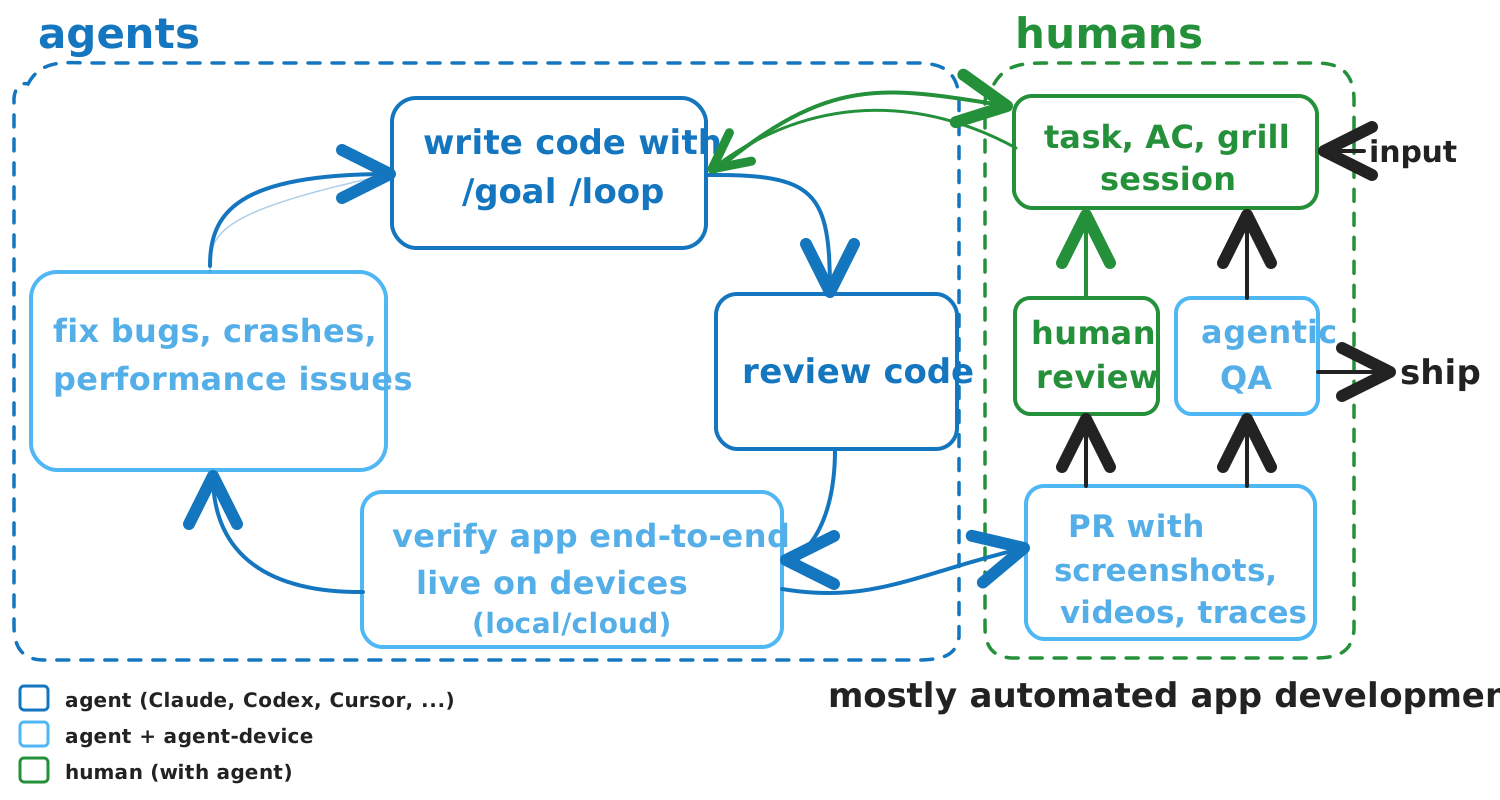
agent-device closes the agentic development loop: agents can write code, run the real app, verify the UI end-to-end, collect screenshots/videos/logs/perf evidence, and feed bugs, crashes, or performance findings back into the next fix iteration before a human reviews the PR.
If you know Vercel's agent-browser, this is the same idea for apps and devices.
Use it for AI mobile testing, AI QA for React Native and Expo apps, iOS Simulator automation, Android Emulator automation, tvOS/Android TV checks, and desktop app verification from coding agents. Humans install and configure agent-device; agents run the workflows.
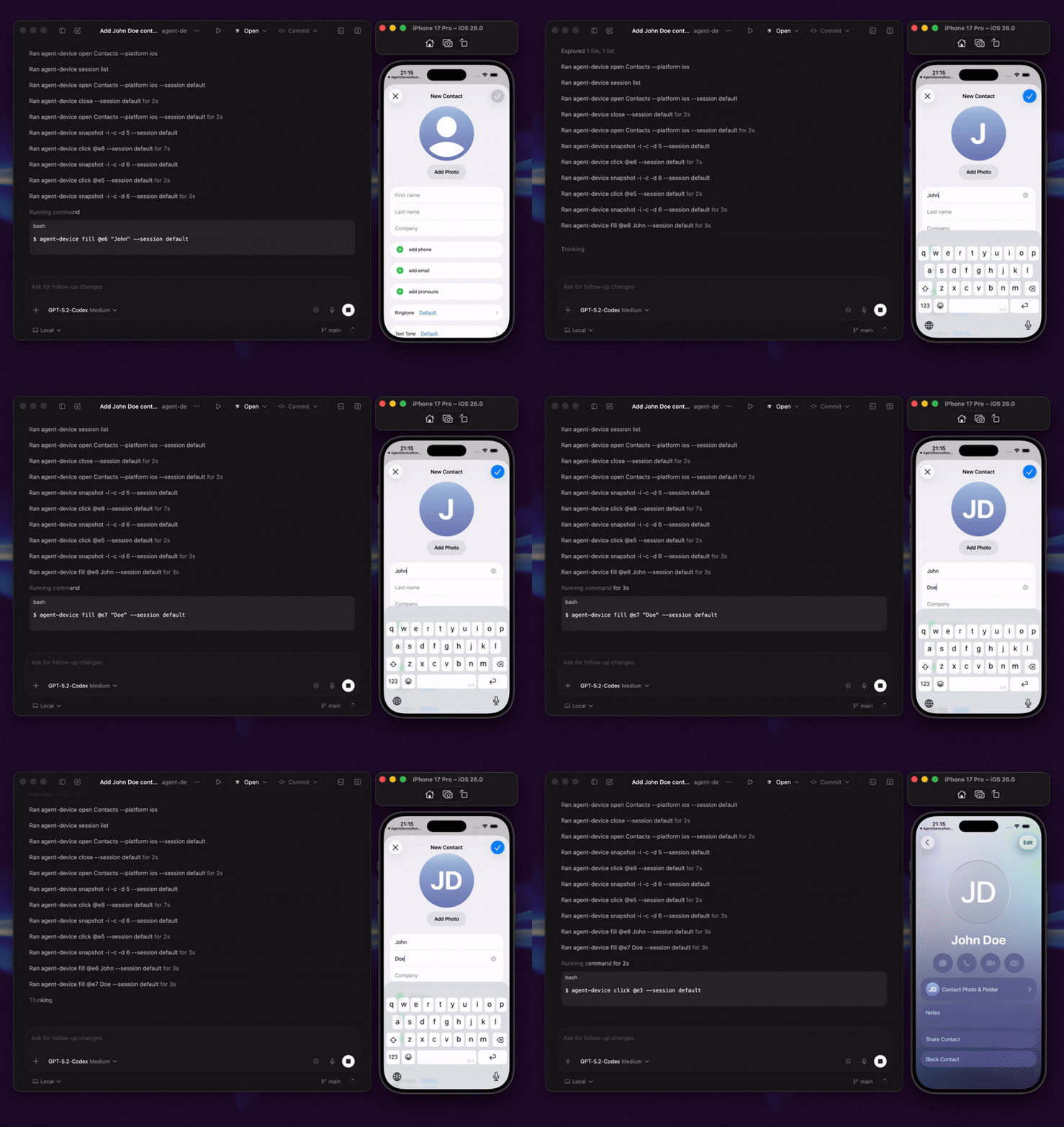
Demo: Codex uses agent-device to inspect iOS Contacts through accessibility snapshots, interact with visible UI, and create a contact from a simple prompt.
Quick Start
Install the CLI first:
npm install -g agent-device@latest
agent-device --version
agent-device help workflow
The CLI help is the source of truth for agents and is shipped with the installed version. Skills are optional but recommended when your agent runtime supports them: they auto-route device, React DevTools, and dogfood tasks to the right agent-device help <topic> page and verify the CLI is new enough before acting.
If you install skills separately, keep the CLI on agent-device >= 0.14.0. Older CLIs do not include the workflow help topics that the router skills expect.
AI Agent Entry Points
- Agent + terminal: in Cursor, Codex, Claude Code, Windsurf, and similar clients, run
agent-devicein the integrated terminal. Start planning withagent-device help workflow; CLI help is authoritative. - Skills or rules: install the skill with
npx skills add callstackincubator/agent-device, use the bundled agent-device skill, or mirror it as a thin project rule, so the agent checks the installed version and readsagent-device help workflowbefore acting. - MCP router: use
agent-device mcpwhen an MCP-aware client needs install, status, and version-matched help discovery. MCP is intentionally a thin router; device automation still runs through CLI commands.
For client-specific setup, see AI Agent Setup. For agent-readable docs, use llms-full.txt.
MCP Router
agent-device ships an official stdio MCP router for discovery-oriented clients. It exposes only status, install, and help tools plus workflow prompts/resources; it does not expose device automation or generic shell execution over MCP.
Paste one of these into clients that accept mcpServers, such as Cursor project .cursor/mcp.json or user-level MCP settings.
{
  "mcpServers": {
    "agent-device": {
      "command": "agent-device",
      "args": ["mcp"]
    }
  }
}
{
  "mcpServers": {
    "agent-device": {
      "command": "npx",
      "args": ["-y", "agent-device@latest", "mcp"]
    }
  }
}
Registry metadata uses MCP name io.github.callstackincubator/agent-device, npm package agent-device, stdio transport, mcpName package verification, server.json, and smithery.yaml.
npm install -g agent-device@latest
agent-device --version
agent-device help
agent-device performs a lightweight background upgrade check for interactive CLI runs and, when a newer package is available, suggests a global reinstall command. Updating the package also refreshes the bundled skills/ shipped with the CLI.
Prerequisites: Node.js 22+, Xcode for iOS/tvOS/macOS targets, Android SDK + ADB for Android, and macOS Accessibility permission for desktop automation. See Installation.
Try the loop.
# Find the app.
agent-device apps --platform ios

# Start a session.
agent-device open SampleApp --platform ios

# Inspect the current screen. -i returns interactive elements only.
agent-device snapshot -i
# @e1 [heading] "Settings"
# @e2 [button] "Sign In"
# @e3 [text-field] "Email"

# Act, capture a screenshot, and close.
agent-device fill @e3 "test"
agent-device screenshot ./artifacts/settings.png
agent-device close
Snapshots assign refs like @e1, @e2, and @e3 to current-screen elements. Refs from the default snapshot are immediately actionable; for hidden content, scroll and re-snapshot.
First 5 Minutes: Expo Test App
Use the bundled Expo fixture when you want a concrete first agent run with setup checks, screenshots, replay, and performance evidence. This path requires a repo checkout because examples/test-app and the pnpm test-app:* scripts are not included in the published npm package.
git clone https://github.com/callstackincubator/agent-device.git
cd agent-device
First terminal:
pnpm test-app:install
cd examples/test-app
npx expo-doctor@latest
cd ../..
pnpm test-app:ios
# or: pnpm test-app:android
Then give your agent this prompt:
Use agent-device to dogfood the bundled Expo app and produce an evidence-backed report.

Setup:
- Read `agent-device help workflow`, `agent-device help dogfood`, `agent-device help debugging`, and `agent-device help react-devtools` before planning commands.
- Confirm the test app setup commands were run: `pnpm test-app:install`, `cd examples/test-app && npx expo-doctor@latest`, then `pnpm test-app:ios` or `pnpm test-app:android`.
- If Metro prints an Expo URL, prefer opening the shell with that URL. On iOS use `agent-device open "Expo Go" <url> --platform ios`; on Android use the visible Expo/dev-client target or URL. Confirm the app UI with `snapshot -i`.

Run:
- Create `./dogfood-output/screenshots`, `./dogfood-output/videos`, `./dogfood-output/traces`, `./dogfood-output/perf`, and `./dogfood-output/replays`.
- Open a named session `expo-qa` and save a replay script to `./dogfood-output/replays/expo-test.ad`.
- Use command shapes like `agent-device --session expo-qa open "Expo Go" <url> --platform ios --save-script ./dogfood-output/replays/expo-test.ad`, `agent-device --session expo-qa screenshot ./dogfood-output/screenshots/home.png`, `agent-device --session expo-qa perf --json > ./dogfood-output/perf/baseline.json`, and `agent-device --session expo-qa record start ./dogfood-output/videos/checkout.mp4`.
- Capture a baseline `snapshot -i`, screenshot, and `perf --json` sample.
- Exercise Home, Catalog, product detail, Checkout, and Settings. Re-snapshot after each mutation and use refs/selectors from fresh snapshots.
- Capture at least one overlay-ref screenshot, one normal screenshot, one short video recording for a meaningful flow, logs marks around any issue, and trace output if a runtime symptom needs diagnostics.
- Run focused performance checks: compare `perf --json` before and after a navigation or form flow; if React DevTools connects, capture profile slow/rerender output. If it cannot connect, include the status and continue.
- Close the session so the `.ad` replay is written.

Report:
- Write `./dogfood-output/report.md`.
- Link every screenshot, video, trace, log path, replay file, and performance artifact you used.
- Include setup results, platform/device, Expo doctor outcome, coverage, severity counts, findings with repro commands, and a short performance section summarizing startup/CPU/memory/frame-health or React profile findings.
- If no issues are found, report covered flows and residual risk instead of claiming the app is bug-free.
Where To Run agent-device
| Path | Best for | Start with |
|---|---|---|
| Local | Exploration, debugging, and development loops on simulators, emulators, physical devices, macOS apps, and Linux desktop targets. | Follow the Quick Start. |
| CI/CD | Automated PR and merge validation with replay scripts and captured artifacts. | Start with the EAS workflow template. GitHub Actions template coming soon. |
| Cloud / remote execution | Linux runners, managed devices, and remote execution. | Use Agent Device Cloud, see Commands for remote profiles, or contact Callstack for team-scale QA. |
Capabilities
- Platforms: iOS, Android, tvOS, Android TV, macOS, and Linux. Real devices and simulators are supported.
- Agent-native UI model: token-efficient accessibility snapshots, current-screen refs for exploration, selectors for durable replay, and skill-tested workflow guidance.
- Capture and debug: screenshots, video, logs, network traffic, CPU/memory/performance data, crash-related logs, accessibility snapshots, and React render profiles.
- Produce: replayable
.adscripts (recorded replay files that run locally or in CI), e2e test runs, snapshot and screenshot diffs, and debugging artifacts. - React Native and Expo: component tree inspection, props/state/hooks, and render profiling.
- MCP boundary: discovery and help over MCP; app/device control through the CLI for explicit, auditable commands.
- License: MIT. Free to use.
How It Works
agent-device runs session-aware commands through platform backends: XCTest for iOS and tvOS, ADB plus the Android snapshot helper for Android, a local helper for macOS desktop automation, and AT-SPI for Linux desktop targets. See Introduction and Commands for platform details.
Node consumers can use the typed client and public subpaths for bridge integrations. agent-device/android-adb exposes the Android ADB provider contract, logcat/clipboard/keyboard/app helpers, and port reverse management.
Used By
Used by teams and developers at Callstack, Expensify, Shopify, Kindred, Total Wine & More, LegendList, HerLyfe, App & Flow, and more.
Documentation
- Installation
- AI Agent Setup
- Typed Client
- Commands
- Replay & E2E
- Security & Trust
- Known limitations
- llms-full.txt
Agent integration:
- agent-device skill
- react-devtools skill
- dogfood skill
- MCP router:
agent-device mcp - agent-device skill on ClawHub
Contributing
See CONTRIBUTING.md.
Made at Callstack
agent-device is open source and MIT licensed. Visit agent-device.dev, try the EAS workflow template, read the incubator docs, or contact us at [email protected].


