
An MCP server for orchestrating parallel Claude Code worker swarms with protocol-based behavioral governance. Enables multi-hour autonomous coding sessions with persistent state, parallel workers, and runtime enforcement of behavioral constraints.
Installation • Quick Start • Dashboard • Protocols • Tools
Features
Worker Orchestration
- Persistent State - Session state survives context compaction via MCP server
- Parallel Workers - Run multiple Claude Code workers simultaneously via tmux
- Git Worktree Isolation - Workers run in isolated git worktrees for safe parallel modification
- Worker Plan Mode - Workers analyze codebases and produce plans before implementing (auto-approved)
- Competitive Planning - Complex features get two competing implementation plans
- Confidence Monitoring - Multi-signal scoring detects struggling workers
- Enforced Verification - Test-as-supervisor pattern with configurable verification commands
- Auto-retry - Failed features automatically retry with configurable limits
- Feature Dependencies - Define execution order between features
- File-Based Task Locking - Atomic mutual exclusion prevents workers from conflicting
- Post-Completion Reviews - Automated code and architecture reviews with actionable findings
Long-Running Autonomy
- Ralph Loop - Fresh Claude context per iteration eliminates context rot for long sessions
- Days-Long Sessions - Supports hours/days of autonomous execution with checkpointing
- Crash Recovery - Automatic session resumption after crashes or machine restarts
- Failure Pattern Learning - Records what works/fails for future worker prompts
Protocol-Based Governance
- Behavioral Protocols - Define constraints on what workers can/cannot do
- Pre-spawn Validation - Verify protocols allow task before worker starts
- Continuous Monitoring - Track constraint violations during execution
- LLM-Generated Protocols - Workers can propose new protocols (validated against base constraints)
- Cross-instance Sync - Share protocols across MCP instances
Monitoring & Dashboard
- Real-time Web Dashboard - Live UI at
http://localhost:3456with Server-Sent Events - Live Terminal Streaming - Watch worker output with ANSI color support
- Review Worker Visibility - Code and architecture review progress in dashboard
- Violation Tracking - Audit log of all protocol violations
- Git Checkpoints - Commit progress after each feature
Repository Setup
- Auto-Configuration - Set up CI/CD, issue templates, and documentation in parallel
- Platform Detection - GitHub, GitLab, Gitea, Bitbucket, Azure DevOps support
- Project Analysis - Detects languages, frameworks, and adapts configuration
- Merge Mode - Preserves existing configs by default, with optional force overwrite
How It Works
The orchestrator pattern separates concerns for reliable long-running sessions:
- Orchestrator (Claude Code): Plans work, monitors progress, makes decisions
- MCP Server: Maintains persistent state that survives context compaction
- Workers: Isolated Claude Code sessions in git worktrees via tmux that implement individual features
- Protocols: Behavioral constraints governing what workers can/cannot do
- Ralph Loop: External bash loop that launches fresh Claude sessions per iteration, with state persisted to the filesystem (progress files, git history)
Worker Lifecycle
Workers follow a two-phase lifecycle when plan mode is enabled (complexity >= 30):
- Plan Phase - Worker runs with read-only tools (Read, Glob, Grep, Write), analyzes the codebase, and produces a structured plan
- Auto-Review - Orchestrator scores the plan on test strategy, risk assessment, file specificity, and step count
- Implement Phase - Worker runs with full tools, following the approved plan step by step
Ralph Loop (Long-Running Autonomy)
For long-running features, the Ralph Loop replaces single long-lived sessions:
- Each iteration launches a fresh Claude session (no context rot)
- State persists via filesystem: progress.md, git history, .done files
- Prompt re-reads current state each iteration (self-reloading context)
- Configurable stopping conditions: completion marker, time limit, max iterations
- Git diff injected into prompt so worker sees what changed
Session Resilience
Sessions survive crashes and machine restarts:
- Checkpointing - State snapshots every ~15 minutes while workers are running
- Heartbeat Detection - PID-based liveness detection identifies stale sessions
- Crash Recovery -
resume_sessiondetects crashes, loads checkpoints, restarts dead workers - Graceful Shutdown -
shutdown_sessioncreates checkpoint and stops workers cleanly
This separation enables:
- Parallel execution: Multiple workers implement features simultaneously
- State persistence: Session state survives context compaction via the MCP server
- Failure recovery: Workers can retry, rollback, or be guided when stuck
- Behavioral governance: Protocols enforce constraints on worker actions
Quick Start
Prerequisites
- Node.js 18+
- tmux (
brew install tmuxon macOS) - Claude Code CLI
Installation
One-liner install (recommended):
curl -fsSL https://raw.githubusercontent.com/cj-vana/claude-swarm/main/install.sh | bash
This will clone the repo, build, register the MCP server, and install the /swarm skill.
git clone https://github.com/cj-vana/claude-swarm.git
cd claude-swarm
npm install
npm run build

# Add to Claude Code
claude mcp add claude-swarm --scope user -- node $(pwd)/dist/index.js

# Install the skill (optional but recommended)
mkdir -p ~/.claude/skills/swarm && cp skill/SKILL.md ~/.claude/skills/swarm/
Basic Usage
Tell Claude to use the swarm:
Use /swarm to build a REST API with authentication, user management, and tests
Or follow the workflow phases manually:
Phase 1: Setup
  → orchestrator_init - Initialize session with features
  → configure_verification - Set up test/build commands
  → set_dependencies - Define feature order

Phase 2: Pre-Work (per feature)
  → get_feature_complexity - Check if competitive planning needed
  → enrich_feature - Add relevant context

Phase 3: Execute
  → start_worker or start_parallel_workers

Phase 4: Monitor
  → sleep 180 - Wait before checking
  → check_worker (heartbeat: true) - Lightweight status
  → send_worker_message - Guide if stuck

Phase 5: Complete
  → run_verification - Run tests
  → mark_complete - Record success/failure
  → commit_progress - Git checkpoint

Phase 6: Review
  → check_reviews - Monitor automated reviews
  → get_review_results - See findings
The /swarm Skill
The /swarm skill provides guided orchestration with a complete workflow:
Use /swarm to build a REST API with authentication, user management, and tests
The skill automates:
- Phase 0: Repository readiness check (runs
setup_analyze) - Phase 1: Session setup with feature decomposition
- Phase 2: Pre-work preparation (complexity analysis, context enrichment)
- Phase 3: Execution (manual or auto-orchestration)
- Phase 4: Monitoring loop with confidence tracking
- Phase 5: Completion verification and git checkpoints
- Phase 6: Post-completion reviews
Installing the skill:
mkdir -p ~/.claude/skills/swarm && cp skill/SKILL.md ~/.claude/skills/swarm/
See skill/SKILL.md for the complete workflow reference.
Protocol System
Protocols define behavioral constraints that govern worker actions, enabling safe autonomous operation with clear boundaries.
Constraint Types
| Type | Description | Example |
|---|---|---|
tool_restriction |
Allow/deny specific tools | Only allow Read, Glob, Grep |
file_access |
Control file system access | Block access to .env files |
output_format |
Require specific output patterns | Must include test coverage report |
behavioral |
High-level behavior rules | Require confirmation before destructive actions |
temporal |
Time-based constraints | Max 30 minutes per feature |
resource |
Resource usage limits | Max 100 file operations |
side_effect |
Control external effects | No network requests, no git push |
Example Protocol
{
  "id": "safe-refactoring-v1",
  "name": "Safe Refactoring Protocol",
  "version": "1.0.0",
  "priority": 100,
  "constraints": [
    {
      "id": "no-secrets",
      "type": "file_access",
      "rule": {
        "type": "file_access",
        "deniedPaths": ["**/.env", "**/secrets.*", "**/credentials.json"]
      },
      "severity": "error",
      "message": "Cannot access files that may contain secrets"
    }
  ],
  "enforcement": {
    "mode": "strict",
    "preExecution": true,
    "postExecution": true,
    "onViolation": "block"
  }
}
Protocol Workflow
1. protocol_register - Register a new protocol
2. protocol_activate - Activate for enforcement
3. start_worker - Workers are validated against active protocols
4. [worker runs with continuous monitoring]
5. get_violations - Review any constraint violations
LLM-Generated Protocols
Workers can propose new protocols validated against immutable base constraints:
1. get_base_constraints - View immutable security rules
2. propose_protocol - Worker submits proposal
3. review_proposals - See pending proposals with risk scores
4. approve_protocol / reject_protocol - Human review for high-risk
Base Constraints (cannot be overridden):
- Certain tools always denied (e.g., dangerous system commands)
- Critical paths always protected (e.g.,
/etc, system files) - Maximum privilege ceiling enforced
Competitive Planning
For complex features, spawn two planners with different approaches:
1. get_feature_complexity(featureId)     # Analyze complexity (0-100)
2. start_competitive_planning(featureId) # Spawn Planner A & B
3. [wait for planners to complete]
4. evaluate_plans(featureId)             # Compare and pick winner
5. start_worker(featureId)               # Implement with winning plan
- Planner A: Incremental, safe approach
- Planner B: Elegant, innovative approach
- Threshold: Features scoring 60+ trigger competitive planning
Confidence Monitoring
Real-time confidence scoring detects struggling workers:
| Signal | Weight | Measures |
|---|---|---|
| Tool Activity | 35% | Read->Edit->Test cycles, stuck loops |
| Self-Reported | 35% | Worker writes to .confidence file |
| Output Analysis | 30% | Error patterns, frustration language |
Levels: High (80-100), Medium (50-79), Low (25-49), Critical (0-24)
set_confidence_threshold(35)       # Configure alert level
get_worker_confidence(featureId)   # Get detailed breakdown
Auto-Orchestration
For fully autonomous execution, use auto_orchestrate:
auto_orchestrate(projectDir, strategy: "adaptive", maxConcurrent: 5)
This handles Phases 3-5 automatically:
- Schedules workers based on dependencies
- Monitors progress and handles failures
- Runs verification commands
- Marks features complete
- Commits progress at checkpoints
Scheduling Strategies
| Strategy | Behavior |
|---|---|
breadth-first |
Maximize parallel execution of independent features |
depth-first |
Focus on unblocking dependent feature chains |
adaptive |
System decides based on dependency graph (default) |
When to Use
- Auto-orchestration: Large feature sets, hands-off execution
- Manual orchestration: Fine-grained control, complex dependencies, debugging
Post-Completion Reviews
Automated code and architecture reviews run after all workers complete:
1. All features complete -> session status changes to "reviewing"
2. Code review worker analyzes: bugs, security, style, test coverage
3. Architecture review worker analyzes: coupling, patterns, scalability
4. Findings aggregated into progress log
5. Session completes with review summary
Review workers output structured JSON findings:
.claude/orchestrator/workers/code-review.findings.json.claude/orchestrator/workers/architecture-review.findings.json
Severity levels: clean, minor, moderate, major, critical
Acting on Review Findings
Convert review findings into actionable features:
# View available issues from reviews
implement_review_suggestions(projectDir)

# Create features from specific issues
implement_review_suggestions(projectDir, issueIndices: [0, 2, 5])

# Auto-select warnings and errors
implement_review_suggestions(projectDir, autoSelect: true, minSeverity: "warning")
Configure or trigger manually:
configure_reviews(enabled: true, skipOnFailure: false)
run_review(reviewTypes: ["code", "architecture"])
get_review_results(format: "detailed")
Repository Setup
Automatically configure repositories with development best practices:
# Analyze repository freshness and missing configs
setup_analyze(projectDir)

# Initialize setup with parallel workers
setup_init(projectDir)

# Check setup progress
setup_status(projectDir)
Configuration Types
| Type | Description | Files Created |
|---|---|---|
| CLAUDE.md | Project guidance for Claude Code | CLAUDE.md |
| GitHub CI | Build, test, lint workflows | .github/workflows/ci.yml |
| Dependabot | Automated dependency updates | .github/dependabot.yml |
| Release Please | Automated version bumps and changelogs | .github/workflows/release-please.yml |
| Issue Templates | Structured bug/feature reporting | .github/ISSUE_TEMPLATE/*.yml |
| PR Template | Consistent pull request descriptions | .github/PULL_REQUEST_TEMPLATE.md |
| CONTRIBUTING.md | Contribution guidelines | CONTRIBUTING.md |
| SECURITY.md | Security policy and vulnerability reporting | SECURITY.md |
Customization
# Skip specific config types
setup_init(projectDir, skipConfigs: ["dependabot", "release-please"])

# Force overwrite existing files
setup_init(projectDir, force: true)

# Override platform detection
setup_init(projectDir, platform: "gitlab")
Feature Rollback
The orchestrator creates git snapshot branches before each worker starts, enabling safe rollback of failed features.
How Rollback Works
- Snapshot Creation:
start_workercreatesswarm/{featureId}branch at current HEAD - Worker Execution: Worker makes changes to working directory
- On Failure: Use
rollback_featureto restore pre-worker state
Rollback Tools
| Tool | Description |
|---|---|
rollback_feature |
Restore files changed by a worker |
check_rollback_conflicts |
Check for conflicts with other workers |
Usage
# Rollback all files changed by feature
rollback_feature(projectDir, featureId: "feature-1")

# Rollback specific files only
rollback_feature(projectDir, featureId: "feature-1", files: ["src/component.ts"])
Warning: When rolling back in parallel worker environments, other workers' changes to the same files will also be reverted.
Web Dashboard
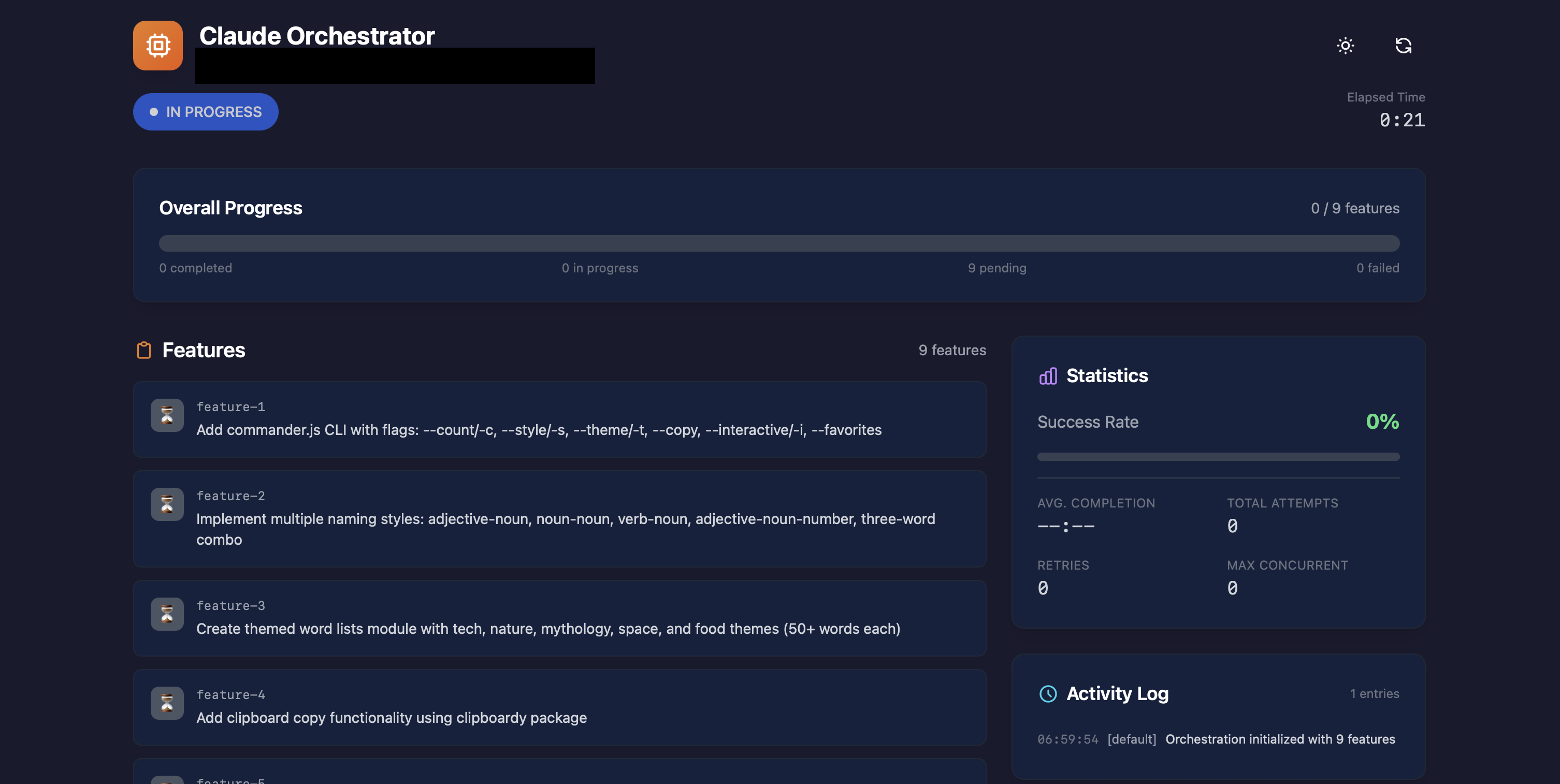
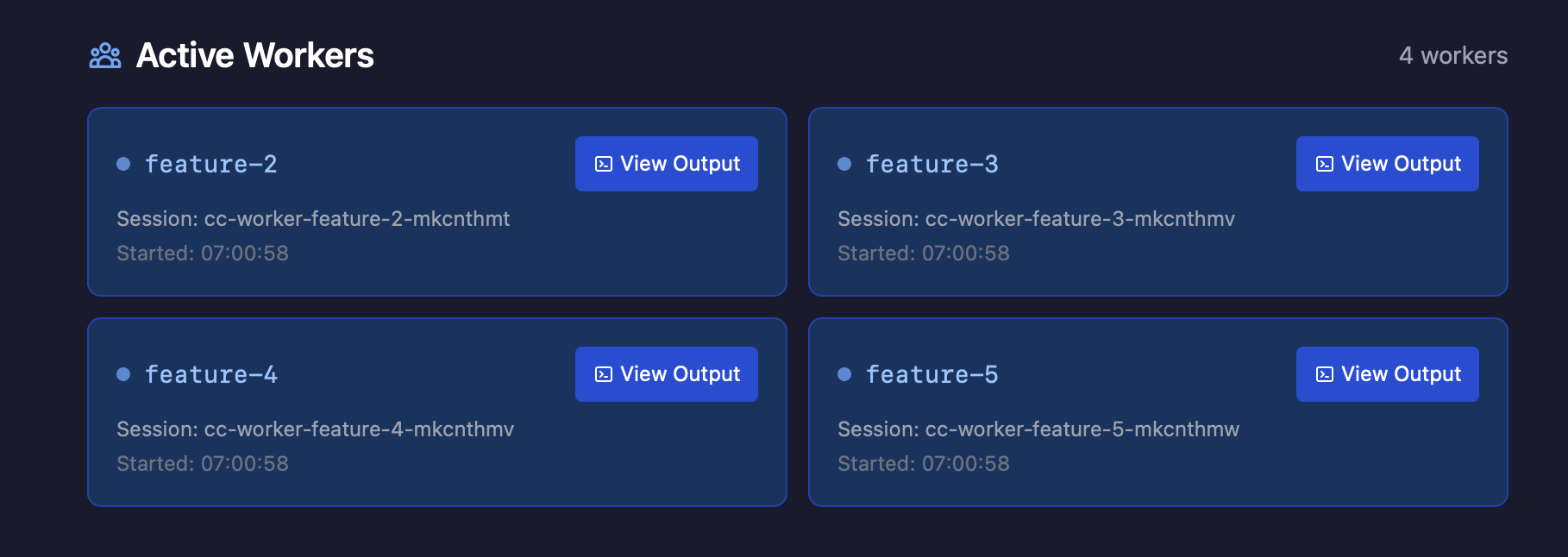
A real-time web dashboard is available at http://localhost:3456:
- Session Overview - Progress bar, feature counts, session statistics
- Feature Cards - Status, dependencies, worker assignment
- Live Terminal Output - Real-time streaming with ANSI color support
- Review Worker Progress - Code and architecture review visibility
- Dark Mode - Automatic theme detection
Dashboard API
The dashboard exposes a REST API for programmatic access:
| Endpoint | Method | Description |
|---|---|---|
/api/status |
GET | Session overview with elapsed time and progress summary |
/api/features |
GET | Feature list with details (supports ?status= filter) |
/api/workers |
GET | All worker statuses with summary counts |
/api/workers/:featureId/output |
GET (SSE) | Stream worker terminal output in real-time |
/api/review-workers |
GET | Review worker statuses and findings summary |
/api/review-workers/:type/output |
GET (SSE) | Stream review worker output |
/api/logs |
GET | Progress log entries (supports ?limit=N) |
/api/stats |
GET | Session statistics (completion times, success rates) |
/api/events |
GET (SSE) | Real-time updates for all session changes |
/health |
GET | Health check endpoint |
Server-Sent Events (/api/events):
status- Session status changesfeature- Feature status updatesworker- Active worker count changesreviewWorker- Review worker status updateslog- New progress log entriesheartbeat- Keep-alive (every 15s)
Architecture
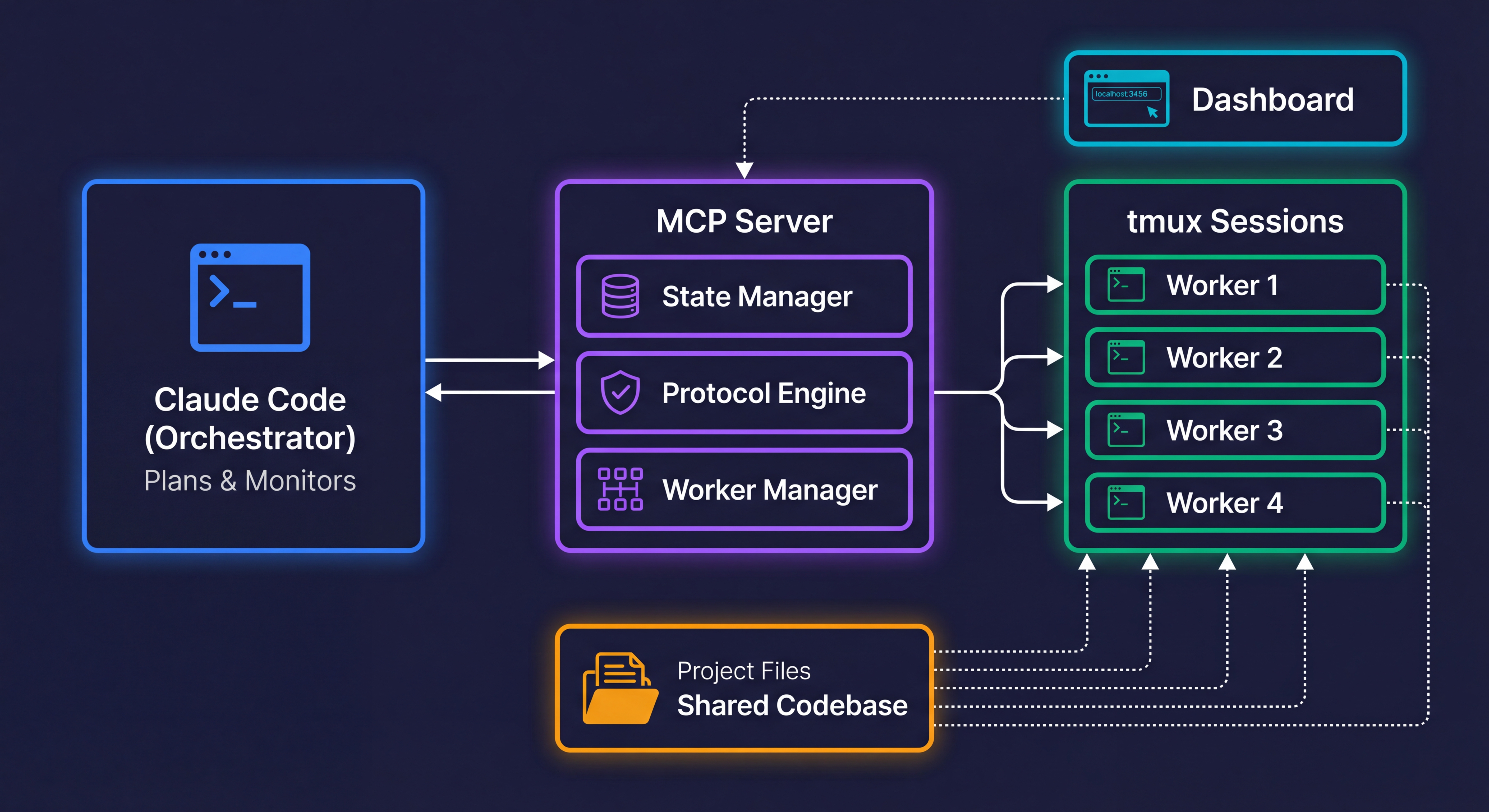
Claude Code orchestrates workers through the MCP Server. Workers run in isolated tmux sessions and share access to the project codebase. The dashboard provides real-time monitoring via SSE.
MCP Tools Reference
Core Orchestration (3 tools)
| Tool | Description |
|---|---|
orchestrator_init |
Start session with task and features |
orchestrator_status |
Get current state (use after compaction) |
orchestrator_reset |
Clear state and kill all workers |
Worker Management (9 tools)
| Tool | Description |
|---|---|
start_worker |
Launch worker for a feature |
start_parallel_workers |
Launch multiple workers simultaneously |
start_ralph_loop |
Launch worker with Ralph Loop (fresh context per iteration) |
validate_workers |
Pre-flight validation before parallel execution |
check_worker |
Get worker output (supports heartbeat mode) |
check_all_workers |
Check all active workers at once |
send_worker_message |
Send instructions to running worker |
configure_plan_mode |
Enable/configure worker plan-before-implement mode |
configure_ralph_loop |
Enable/configure Ralph Loop execution defaults |
Competitive Planning (3 tools)
| Tool | Description |
|---|---|
get_feature_complexity |
Analyze complexity score |
start_competitive_planning |
Spawn 2 planners with different approaches |
evaluate_plans |
Compare plans and select winner |
Confidence Monitoring (2 tools)
| Tool | Description |
|---|---|
get_worker_confidence |
Get detailed confidence breakdown |
set_confidence_threshold |
Configure alert threshold |
Feature Management (6 tools)
| Tool | Description |
|---|---|
mark_complete |
Mark feature done/failed (auto-retry) |
retry_feature |
Reset failed feature for retry |
run_verification |
Run tests/build commands |
add_feature |
Add discovered work |
set_dependencies |
Define feature dependencies |
configure_verification |
Set pre-completion verification commands |
Pre-Completion Verification
Configure commands that workers must run before marking features complete:
configure_verification(projectDir, commands: ["npm test", "npx tsc --noEmit"])
Workers will run these commands and fix any errors before completion. Allowed commands include:
npm test,npm run test,yarn test,pnpm testnpx tsc --noEmit,npx vitest,npx jestpytest,python -m pytestcargo test,cargo checkgo test,make test
Session & Progress (7 tools)
| Tool | Description |
|---|---|
get_progress_log |
View history (paginated) |
get_session_stats |
Success rates and timing |
pause_session |
Pause and stop all workers |
resume_session |
Resume paused session (supports crash recovery) |
shutdown_session |
Graceful shutdown with checkpoint |
commit_progress |
Create git checkpoint |
auto_orchestrate |
Hands-free orchestration until completion |
Feature Rollback (2 tools)
| Tool | Description |
|---|---|
rollback_feature |
Restore files changed by a worker |
check_rollback_conflicts |
Check for conflicts with other workers |
Post-Completion Reviews (5 tools)
| Tool | Description |
|---|---|
run_review |
Manually trigger code/architecture reviews |
check_reviews |
Monitor review worker status |
get_review_results |
Get aggregated findings (summary/detailed/json) |
configure_reviews |
Set auto-review preferences |
implement_review_suggestions |
Convert review findings into features |
Repository Setup (3 tools)
| Tool | Description |
|---|---|
setup_analyze |
Analyze repo freshness and missing configs |
setup_init |
Initialize repo configuration with parallel workers |
setup_status |
Check setup progress |
Protocol Management (5 tools)
| Tool | Description |
|---|---|
protocol_register |
Register a new protocol |
protocol_activate |
Activate protocol for enforcement |
protocol_deactivate |
Deactivate protocol |
protocol_list |
List all registered protocols |
protocol_status |
Get protocol details and violations |
Protocol Enforcement (4 tools)
| Tool | Description |
|---|---|
validate_feature_protocols |
Check if feature can run under active protocols |
get_violations |
Get recorded violations (paginated) |
resolve_violation |
Mark violation as resolved |
get_audit_log |
Get protocol audit history |
LLM Protocol Generation (5 tools)
| Tool | Description |
|---|---|
get_base_constraints |
View immutable base constraints |
propose_protocol |
Submit a protocol proposal |
review_proposals |
List pending proposals with risk scores |
approve_protocol |
Approve a protocol proposal |
reject_protocol |
Reject a protocol proposal |
Protocol Networking (4 tools)
| Tool | Description |
|---|---|
export_protocols |
Export protocols to shareable bundle |
import_protocols |
Import protocols from bundle |
sync_protocols |
Sync with peer instances |
discover_protocols |
Discover peer MCP instances |
Context Management (4 tools)
| Tool | Description |
|---|---|
enrich_feature |
Auto-enrich feature with relevant docs and code |
set_feature_context |
Manually set feature context |
get_feature_graph |
View feature dependency graph with context |
route_feature |
Configure worker routing preferences |
Files Created
your-project/
├── .claude/orchestrator/
│   ├── state.json              # Session state
│   ├── feature_list.json       # Feature status
│   ├── protocols/
│   │   ├── registry.json       # Protocol definitions
│   │   ├── active.json         # Active protocols
│   │   ├── violations.json     # Violation records
│   │   ├── audit.json          # Audit log
│   │   └── proposals/          # Pending proposals
│   ├── sync/                   # Cross-instance sync
│   ├── checkpoints/            # Session checkpoints for crash recovery
│   │   └── *.json              # Timestamped state snapshots
│   ├── heartbeat.json          # Orchestrator liveness detection
│   ├── learnings.json          # Failure pattern learning
│   ├── locks/                  # File-based mutual exclusion
│   │   └── *.lock              # Per-file lock files
│   ├── worktrees/              # Git worktree directories
│   └── workers/
│       ├── *.prompt            # Worker prompts
│       ├── *.log               # Worker output logs
│       ├── *.done              # Completion markers
│       ├── *.status            # Worker status
│       ├── *.plan.json         # Competitive plans
│       ├── *.confidence        # Self-reported confidence
│       ├── *.worker-plan.json  # Worker plan-phase output
│       ├── *.plan-done         # Plan phase completion markers
│       ├── *.progress.md       # Ralph Loop progress files
│       ├── code-review.findings.json        # Code review results
│       └── architecture-review.findings.json # Architecture review results
├── claude-progress.txt         # Human-readable log
└── init.sh                     # Environment setup
Configuration
| Variable | Default | Description |
|---|---|---|
DASHBOARD_PORT |
3456 |
Dashboard HTTP port |
ENABLE_DASHBOARD |
true |
Set to false to disable |
Security
Input Validation
- Path traversal protection - All file paths validated against project directory
- Cryptographically secure IDs - Uses
crypto.randomUUID() - Symlink escape prevention - Real paths validated before file operations
- Input validation - All inputs validated with Zod schemas
Regex Safety (ReDoS Protection)
- Pattern validation -
isDangerousRegexPattern()detects catastrophic backtracking - Safe regex testing -
safeRegexTest()falls back to literal matching for dangerous patterns - Glob-to-regex conversion - Proper metacharacter escaping prevents injection
Memory Safety
- Bounded collections - Operation counts, alerts, and observed patterns have maximum limits
- LRU eviction - Least-recently-used entries removed when limits reached (max 50 cached managers)
- Timestamp truncation - Historical data pruned to prevent unbounded growth
Network Safety
- Localhost-only CORS - Dashboard only accepts requests from localhost origins
- No external network access - Workers operate in isolated tmux sessions
Execution Safety
- Fail-closed enforcement - Unknown constraint types block by default
- Command allowlist - Only safe verification commands allowed
- No shell injection - Uses
execFilewith arguments, prompts via files - Circuit breaker pattern - Monitor auto-stops after repeated failures
- Review worker isolation - Read-only tools (no Bash access)
Protocol Security
- Base constraints - Immutable security rules cannot be overridden
- Proposal validation - LLM-generated protocols checked against security boundaries
- Token-based matching - Tool prohibition uses exact token matching, not substring
Inspiration
- Anthropic's "Effective harnesses for long-running agents"
- Ralph Loop: A Continuous Iteration Paradigm for AI Agents
- Claude Code Agent Teams
- MAKER: "Solving a Million-Step LLM Task with Zero Errors"
- Multi-Agent Collaboration via Evolving Orchestration
- AFlow: Automatic Workflow Optimization
- AgentsNet: Coordinating Multi-Agent Networks
Troubleshooting
"No active session"
Run orchestrator_status to check state, or orchestrator_init to start fresh.
Worker seems stuck
check_worker(featureId)to see current outputget_worker_confidence(featureId)to check confidence scoresend_worker_message(featureId, "guidance")to provide direction- If truly stuck,
mark_complete(featureId, success: false)triggers auto-retry
Lost context after compaction
Call orchestrator_status(projectDir) - the MCP server maintains all state externally.
Feature has unmet dependencies
- Check dependencies with
orchestrator_status - Complete dependency features first
- Or use
set_dependenciesto modify the chain
Protocol violations blocking work
get_violations()to see what was violatedresolve_violation(violationId, resolution)if false positive- Adjust protocol constraints if too restrictive
Debugging tmux sessions
# List all worker sessions
tmux list-sessions | grep cc-worker

# Attach to a worker session
tmux attach -t cc-worker-feature-1-abc123

# Capture recent output
tmux capture-pane -t <session-name> -p -S -100
Session crashed, how to recover
Use resume_session(projectDir) - it automatically detects crashes via stale heartbeat, loads the latest checkpoint, and restarts dead workers. Set restartDeadWorkers: true (default) to auto-restart Ralph Loop workers that were running.
Worker keeps failing verification
Check the Ralph Loop progress file (.claude/orchestrator/workers/{featureId}.progress.md) for error patterns across iterations. The progress file records issues encountered in each iteration, helping identify systematic problems.
Plan mode is too slow
Lower the complexity threshold (default: 30) via configure_plan_mode(projectDir, { complexityThreshold: 50 }) so only higher-complexity features trigger planning. Or disable per-feature by setting planMode: false on the feature.
Monitor stops unexpectedly
The monitor auto-stops after 5 consecutive errors (circuit breaker). Check MCP server logs and restart if needed.
Limitations
- Requires tmux (WSL on Windows)
- Workers use your Claude Code subscription
- Protocol enforcement is observational (monitors but doesn't intercept tool calls)
- Complex feature detection is heuristic-based
Contributing
Contributions welcome! See CONTRIBUTING.md for guidelines.
License
MIT


