
deskbrid
mcp-name: io.github.coe0718/deskbrid
📖 Documentation | API Reference | Architecture
The HAL your Linux desktop agents are missing.
Deskbrid is a single Rust binary that auto-detects your desktop environment and wraps it into a JSON-over-Unix-socket protocol. GNOME, Hyprland, KDE, COSMIC, Sway, Niri, Wayfire, Labwc, Cinnamon, MATE — one daemon, one protocol, one binary.
# Human
deskbrid windows list
deskbrid clipboard read

# Agent (same socket)
{"action": "windows.list"}  →  [{"title": "VS Code", "app_id": "code", ...}]
Table of Contents
- Why Deskbrid
- Supported Desktops
- Installation
- Quick Start
- Features
- Protocol
- Python Client
- MCP Integration
Why Deskbrid
Every major AI lab is racing to ship desktop agents. AppleScript gives macOS agents native control. Windows has UI Automation. Linux has xdotool — which breaks on Wayland, the default display protocol for every major distro.
Deskbrid fills that gap. It auto-detects your compositor and loads the right backend — GNOME (Mutter RemoteDesktop DBus), Hyprland (hyprctl + ydotool + grim), KDE (KWin D-Bus + ydotool + spectacle), wlroots-style compositors, or shared X11. Same binary, same protocol, same socket.
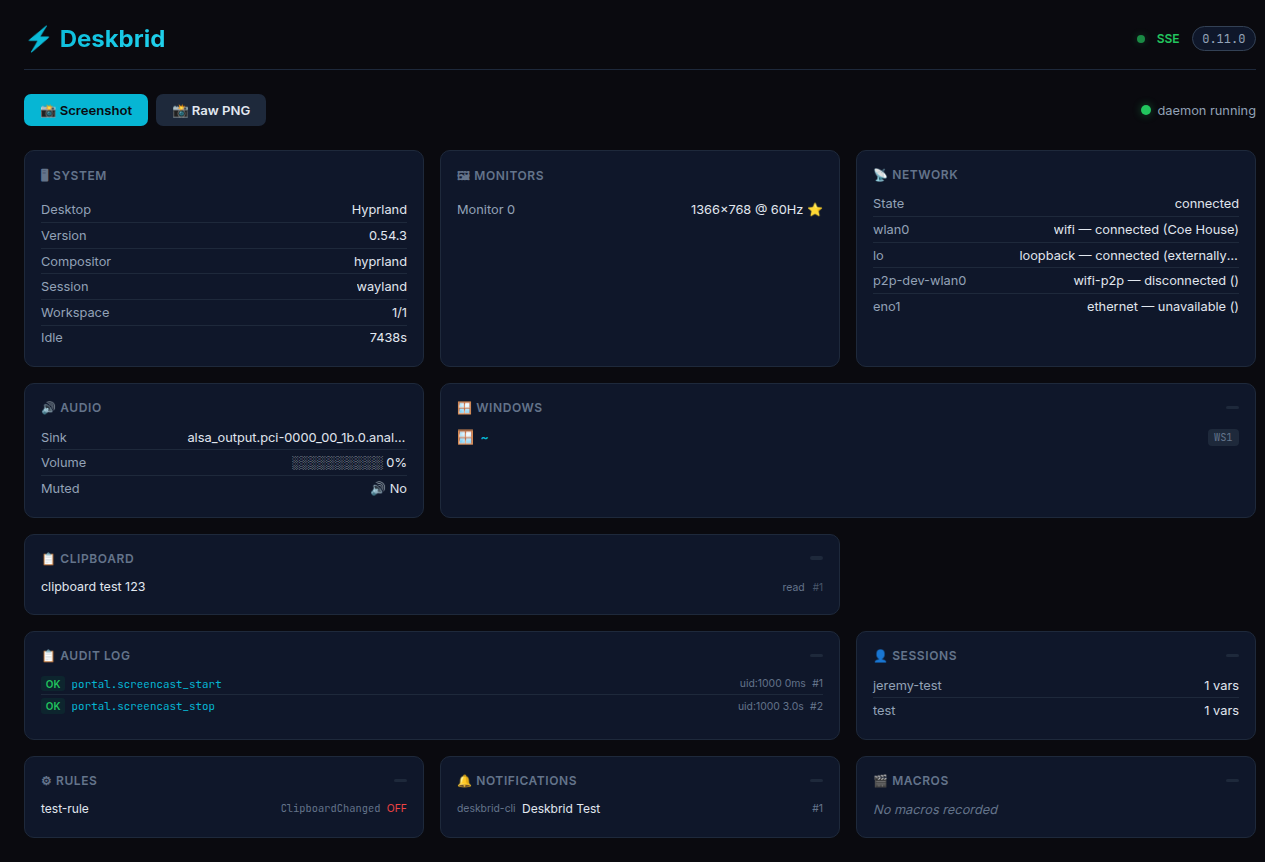
Dashboard
Deskbrid ships with a built-in web dashboard at localhost:20129 — system info, monitors, windows, network, audio, clipboard, and an audit log of agent actions, all live:
Supported Desktops
| Desktop | Session | Status | Backend |
|---|---|---|---|
| GNOME 46–50 | Wayland | ✅ Supported | Mutter RemoteDesktop + Shell Extension |
| Hyprland | Wayland | ✅ Supported (v0.3.0) | hyprctl + ydotool + grim |
| KDE Plasma | Wayland | ✅ Supported (v0.4.0) | KWin D-Bus + ydotool + spectacle |
| COSMIC | Wayland | ⚠️ Partial | cosmic-helper + cosmic-randr + ydotool + grim |
| Sway | Wayland | ✅ Supported | swaymsg + ydotool + grim |
| Niri | Wayland | ✅ Partial | niri msg + ydotool + grim + wlr-randr |
| Wayfire | Wayland | ✅ Supported (no move/resize) | wf-ipc + ydotool + grim + wlr-randr |
| Labwc | Wayland | ✅ Supported (no move/resize) | wlrctl + ydotool + grim + wlr-randr |
| Cinnamon | X11 | ✅ Supported (shared X11) | xdotool + wmctrl + xclip + import |
| MATE | X11 | ✅ Supported (shared X11) | xdotool + wmctrl + xclip + import |
| X11 (generic) | X11 | ✅ Supported (shared X11) | xdotool + wmctrl + xclip + import |
Deskbrid auto-detects your desktop at startup ($XDG_CURRENT_DESKTOP → process scan → GNOME fallback). No config files, no flags.
See DE Test Matrix for per-action compatibility across all desktops — every action, every compositor, tested on real hardware.
Installation
One-liner install (recommended):
bash <(curl -fsSL https://deskbrid.patchhive.dev/install.sh)
Auto-detects your distro and desktop environment, installs dependencies, sets up uinput, and downloads the binary.
Manual installation:
Download the latest release binary from the releases page:
curl -LO https://github.com/coe0718/deskbrid/releases/latest/download/deskbrid
chmod +x deskbrid
sudo mv deskbrid /usr/local/bin/
Or build from source:
git clone https://github.com/coe0718/deskbrid
cd deskbrid
cargo build --release
sudo cp target/release/deskbrid /usr/local/bin/
Desktop Setup
GNOME:
sudo apt install -y grim wl-clipboard python3-gi gstreamer1.0-tools gstreamer1.0-pipewire
deskbrid setup
Hyprland (and other standalone Wayland compositors — Sway, Niri, Wayfire, Labwc):
sudo pacman -S grim wl-clipboard ydotool
echo 'KERNEL=="uinput", GROUP="input", MODE="0660"' | sudo tee /etc/udev/rules.d/99-input.rules
sudo usermod -aG input $USER
⚠️ Standalone Wayland compositors don't ship a notification daemon. Deskbrid's
notify sendwill hang without one. Install dunst, mako, or swaync and add it to your compositor's autostart.
KDE Plasma:
sudo apt install spectacle imagemagick wl-clipboard ydotool
Quick Start
deskbrid daemon &

deskbrid windows list          # List open windows
deskbrid clipboard read        # Read clipboard
deskbrid screenshot            # Take screenshot
deskbrid system info           # Get system info
deskbrid windows focus --app code  # Focus VS Code
deskbrid input keyboard type "Hello!"  # Type text
Features
Windows & Workspaces
| Action | Description |
|---|---|
windows.list |
List all open windows |
windows.focus |
Focus a window by app_id or title |
windows.get |
Get details for a specific window |
windows.close |
Request window close |
windows.minimize/maximize |
Window state control |
windows.move_resize |
Move and resize windows |
windows.tile |
Tile to screen regions |
windows.activate_or_launch |
Focus or launch app |
workspaces.* |
Workspace management |
layout_profiles.* |
Save/restore layouts |
Input & Clipboard
| Action | Description |
|---|---|
input.keyboard type |
Type text |
input.keyboard key |
Send keypress |
input.keyboard combo |
Send key combinations |
input.mouse.* |
Mouse control |
clipboard.read/write |
Clipboard access |
clipboard.history |
Clipboard history |
Screenshots & Media
| Action | Description |
|---|---|
screenshot |
Screen capture |
screenshot.ocr |
Extract text via Tesseract |
screenshot.diff |
Compare screenshots |
mpris.* |
Media player control |
color.pick |
Sample pixel colors |
System & Services
| Action | Description |
|---|---|
system.info |
Desktop information |
system.battery |
Battery status |
system.idle |
Idle detection |
system.power |
Power management |
service.* |
systemd units |
journal.query |
Log inspection |
terminal.* |
PTY sessions |
monitor.* |
Display control |
Network & Bluetooth
| Action | Description |
|---|---|
network.* |
WiFi status/connect |
bluetooth.* |
Device pairing/control |
Protocol
Deskbrid uses JSON-over-Unix-socket. See PROTOCOL.md for the complete specification.
→ {"action": "windows.list"}
← {"type": "response", "status": "ok", "data": [{"title": "VS Code", ...}]}

→ {"action": "windows.focus", "window_id": "code"}
← {"type": "response", "status": "ok"}
Events
Subscribe to real-time updates:
{"action": "subscribe", "events": ["file.*"]}
Python Client
from deskbrid import Deskbrid

client = Deskbrid()

# List and focus VS Code
windows = client.windows_list()
code_window = next((w for w in windows if w.app_id == 'code'), None)
if code_window:
    client.focus_window(app_id='code')
    client.type_text("Fixed the bug!\n")

# Subscribe to events
@client.on("file.*")
def on_file_change(event):
    print(f"File changed: {event['path']}")
MCP Integration
Deskbrid exposes a full Model Context Protocol server for AI coding tools:
deskbrid mcp
Claude Desktop (~/.config/Claude/claude_desktop_config.json):
{
  "mcpServers": {
    "deskbrid": {
      "command": "/usr/local/bin/deskbrid",
      "args": ["mcp"]
    }
  }
}
Available MCP tools (20+):
list_windows,focus_windowtype_text,press_keys,mouse_move,mouse_clickscreenshot,clipboard_read,clipboard_writelist_apps,get_accessibility_treeperform_action,set_element_value,get_element_text,click_elementdoctor,setup_accessibility,capabilities
Compared to Alternatives
| Tool | Wayland | Agent-native | JSON | Windows | Input | Clipboard | Screenshot | Bluetooth | Audio |
|---|---|---|---|---|---|---|---|---|---|
| deskbrid | ✅ | ✅ | ✅ | ✅ | ✅ | ✅ | ✅ | ✅ | ✅ |
| xdotool | ❌ | ❌ | ❌ | ✅ | ✅ | ❌ | ❌ | ❌ | ❌ |
| ydotool | ✅ | ❌ | ❌ | ❌ | ✅ | ❌ | ❌ | ❌ | ❌ |
| grim | ✅ | ❌ | ❌ | ❌ | ❌ | ❌ | ✅ | ❌ | ❌ |
| wl-clipboard | ✅ | ❌ | ❌ | ❌ | ❌ | ✅ | ❌ | ❌ | ❌ |
License
MIT
How This Started
Deskbrid began with Tuck — an autonomous agent that needed to control a real Linux desktop. When the community asked for Hyprland support, Tuck asked Jeremy for a bare Arch Linux box with SSH and sudo. He installed Hyprland himself and built the backend from inside the environment he just configured.
The first working demo was a Telegram message: Tuck focused a window and typed "Hello from the other side" in under 60 seconds. That moment — an agent controlling a real desktop through a Unix socket — became Deskbrid. It's built for agents first: same protocol for humans on the CLI, same socket for AIs, one binary that works everywhere.


