
Callout




You used AI to write code for 3 days. Callout tells you 60% of it was over-engineered.
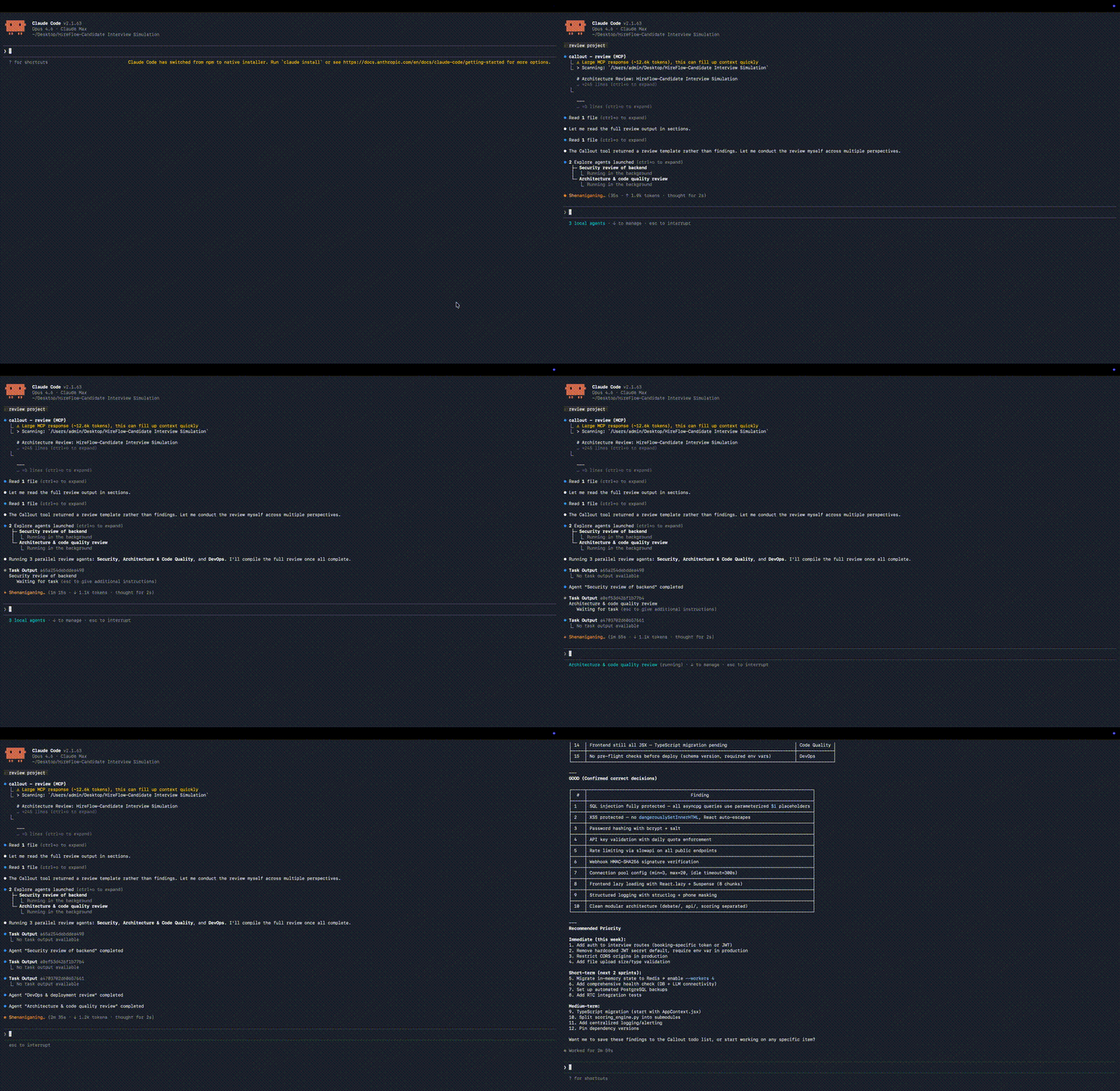
AI coding tools make you 10x faster at writing code. Nobody checks if you're building the right thing. Callout is the second pair of eyes — 5 expert perspectives that catch what you miss, delivered as an MCP server that works inside Claude Code, Cursor, VS Code, and Windsurf.
Why Callout exists
A real product was built using Claude Code in 6 days: 186 files, 691 tests. A multi-perspective review on Day 5 found that 60% was over-engineered. 9 days of planned work reduced to 3.5 days. The key insight: the problem wasn't bad code — it was wrong priorities and missed blind spots.
Callout makes that review available to every developer, automatically.
30-second setup
cd /path/to/your/project
npx callout-dev setup
That's it. No global install needed. Callout auto-configures your editor and sets up smart triggers.
After setup, restart your editor (or re-enter Claude Code from the project directory), then try:
Review this project
What it does
review — Five expert perspectives on your project
| Perspective | What it catches |
|---|---|
| CTO | "Your 4-level role system only needs 2 levels. Cut it, save 3 days." |
| Security | "JWT missing orgId — multi-tenant data can leak across tenants." |
| Product | "HR managers won't self-register. Replace with invite-only flow." |
| DevOps | "Billing doesn't need a DB table. A config object saves 1 day." |
| Customer | "No compliance page = enterprise customers won't even evaluate you." |
Every finding is categorized as MUST FIX, SHOULD FIX, or GOOD — with effort estimates. Starts with an Executive Summary so you know what to focus on in 30 seconds.
Example output (click to expand)## Executive Summary
3 MUST FIX | 5 SHOULD FIX | 8 GOOD
Estimated total effort: 4-6 hours
### CTO Perspective
[MUST FIX] Your 4-level role system (owner/admin/manager/member) only
needs 2 levels (owner/member). Cut it — saves 2 days of work.
Effort: 2 hours.
[SHOULD FIX] billing_history table duplicates what Stripe already tracks.
Delete the table, query Stripe API directly. Effort: 1 hour.
### Security Perspective
[MUST FIX] JWT tokens missing orgId claim — multi-tenant data can leak
across organizations. Add orgId to token payload and validate on every
API endpoint. Effort: 1 hour.
> Review this project
> Run a security + CTO review
> Review from the perspective of an enterprise HR manager
challenge — Is this worth building at all?
When you've been fixing the same bug for an hour, Callout asks the hard question: is this feature even worth keeping?
Checks ROI, sunk cost, complexity budget, scope creep. Returns a verdict:
- CONTINUE — keep going, this is valuable
- SIMPLIFY — right goal, over-engineered approach
- PAUSE — validate the need before writing more code
- DELETE — negative ROI, remove it
Git diff and recent changes are collected automatically — zero effort from you.
guide — What should I be thinking about right now?
Detects your project stage (research → architecture → building → testing → launch) and surfaces the questions you should be asking but aren't.
spot_check — Is this code safe to ship?
Quick security scan for AI-generated code. Flags only the dangerous stuff — vulnerabilities, logic errors — in under 10 seconds. Not a full audit, just "can I trust this output?"
test_translate — What do I actually need to test manually?
Parses test output and tells you in plain language: what's automated, what needs manual verification, and gives you a 15-minute manual test script.
cleanup — What can I delete?
Scans for dead code, duplicate files, unused dependencies, and modules that should be merged. Returns concrete steps: delete this, merge that.
validate — Should I use X or Y?
Technical decision validator. "Should I use Supabase or Firebase?" — gives you a verdict, confidence level, and alternatives based on your project's stage, scale, and stack.
recommend — What tools should I use?
Detects what your project needs (auth, database, payments, email, deployment, etc.) and recommends the best tool for each scenario — with install commands, setup steps, and alternatives. Considers your existing dependencies so it never recommends what you already have. Same scenario is only recommended once.
> Recommend tools for this project
> What should I use for authentication?
> I need to add payments
Smart auto-triggers
After setup, Callout speaks up automatically when it matters:
- Editing the same file for the 3rd time → "Are you chasing a bug in a low-value feature?"
- Creating a new file → "Is this new module necessary?"
- Bug fix exceeding 30 minutes → "Should this feature be simplified or removed?"
- Adding a new dependency → "Is there a simpler alternative?"
- Completing a milestone → Full 5-perspective review
- Starting work that needs auth, payments, etc. → Tool recommendation
You don't need to remember to call it. It interrupts you when it should.
How it works
Callout is an MCP server. It collects your project context (file structure, dependencies, README, CLAUDE.md, git history) and assembles expert-perspective prompts. Your AI tool executes the review.
Callout never calls an LLM itself. Zero API cost. No API key needed. Works with whatever model you already use.
One server, works everywhere:
| Editor | Config file |
|---|---|
| Claude Code | .mcp.json |
| Cursor | .cursor/mcp.json |
| VS Code | .vscode/mcp.json |
| Windsurf | ~/.codeium/windsurf/mcp_config.json |
Installation
Option 1: Automatic (recommended)
cd /path/to/your/project
npx callout-dev setup
Detects your editor and configures everything automatically. No npm install -g required.
Important: After setup, restart your editor so it picks up the new MCP server.
| Editor | What to do after setup |
|---|---|
| Cursor / VS Code / Windsurf | Close and reopen the project |
| Claude Code | Exit and re-enter from the project directory: cd /path/to/project && claude |
Option 2: Manual (Cursor / VS Code)
Add to your editor's MCP config file:
{
  "mcpServers": {
    "callout": {
      "command": "npx",
      "args": ["callout-dev"]
    }
  }
}
Option 3: Manual (Claude Code)
claude mcp add callout -- npx callout-dev
Tools reference
| Tool | Description |
|---|---|
review |
5-perspective architecture review |
challenge |
Question whether current work is worth doing |
guide |
Stage detection + checklist of questions to ask |
spot_check |
Quick security scan for AI-generated code |
test_translate |
Turn test output into plain-language manual test plan |
cleanup |
Find dead code, duplicates, unused deps |
validate |
Technical decision validator with confidence scoring |
todo_add |
Add a finding to the project todo list |
todo_update |
Update todo status |
todo_list |
View todos, filtered by priority or status |
todo_summary |
Project health overview |
init |
Initialize Callout + auto-trigger rules |
save_review_findings |
Persist review summary for progress tracking |
recommend |
Detect project needs and recommend best tools with install commands |
recommend_dismiss |
Dismiss a recommendation scenario so it won't be suggested again |
recommend_reset |
Reset all dismissed recommendations to re-enable detection |
set_target_user |
Set who the target user is for customer perspective reviews |
portfolio |
Multi-project overview with health status and resource allocation advice |
callout_help |
Show usage guide |
Roadmap
See docs/roadmap.md for the full plan.
V0.4 (current): 19 MCP tools, 124 tests, portfolio overview, MCP instructions auto-trigger, modular architecture, npm publishedV1.0 (next): Web UI dashboard, cloud sync, custom perspectives, paid tier
Contributing
Contributions welcome. Please open an issue before submitting a PR for significant changes.
npm install
npm run build
npm test
See docs/architecture.md for technical details.
License
MIT


