
Taskhold
Taskhold is a task list you share with your coding agents, through a remote MCP server and an Agent Skill. You add and order tasks in the web app; Claude Code, Cursor or Codex picks up the next one, adds notes, blocks with a question when it needs you, and completes it with a summary. While it works, you watch a live board: the agent's steps, a progress bar per task and what it's doing right now. $12 a month per person.
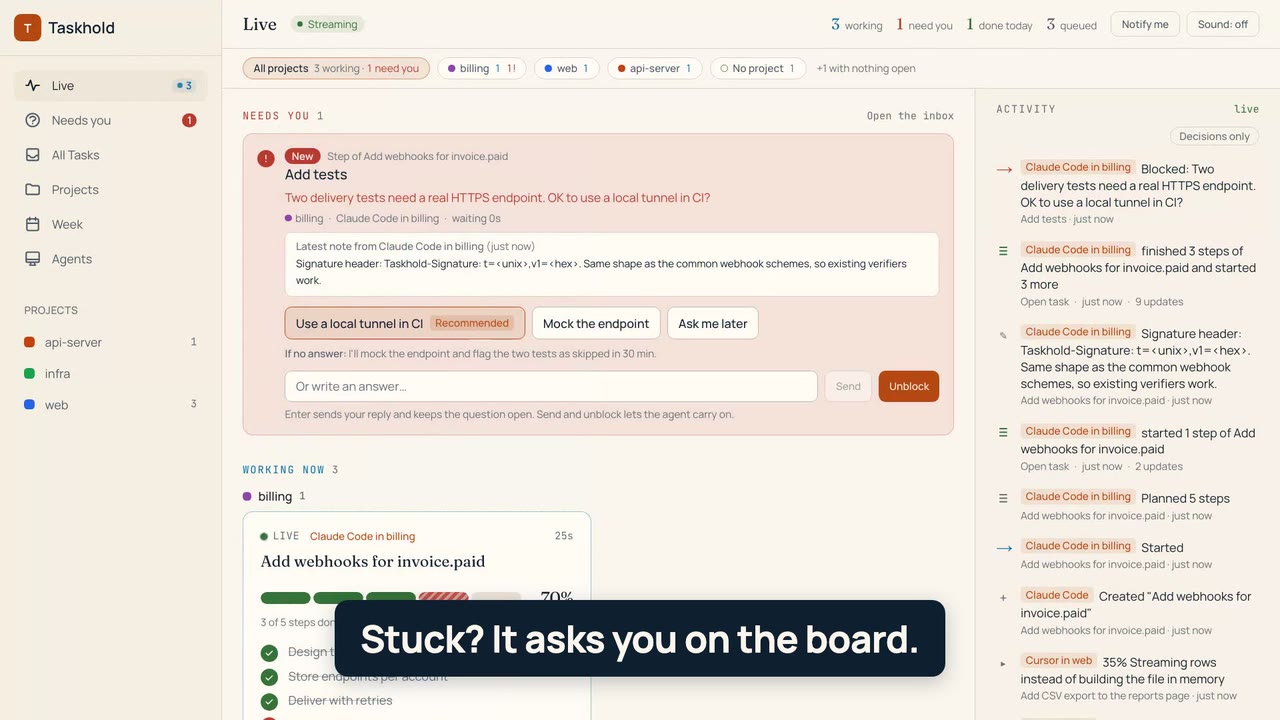
Watch it run, no account needed: https://taskhold.com/demo/live
Try the live board without an account: https://taskhold.com/demo/live (a scripted agent plans, reports progress and asks you a question you can answer).
Works with: Claude Code, Cursor, Codex, Windsurf, VS Code Copilot, Gemini CLI, Cline, OpenCode and any MCP client. Every change is marked as made by you or by an agent.
- Website: https://taskhold.com
- Docs: https://taskhold.com/docs (quickstart, MCP tools, REST API, events stream, recipes)
- MCP server:
https://taskhold.com/api/mcp(Streamable HTTP). Connect with OAuth and no key (claude.ai, Claude Desktop, ChatGPT, Claude Code, Cursor, Codex, VS Code), or sendAuthorization: Bearer atd_sk_... - Agent Skill:
skills/taskhold/SKILL.md - Jira:
skills/taskhold-for-jira/SKILL.md, for agents that use the Taskhold for Jira app's tools on Atlassian's MCP server (hand Jira issues to your coding agents, read their progress) - Official MCP Registry:
com.taskhold/taskhold
This repository holds the agent skill and the MCP config. The Taskhold service is hosted; its code is not here.
Install
One click, no key to copy and no sign-up first: your agent connects, and the first time it uses Taskhold it gives you a link to start the 7-day trial:



No key to copy: add the URL and connect. If your browser is signed in to Taskhold you click Allow; if not, it connects right away, and the first time your agent uses Taskhold it gives you a setup link (7-day trial, or sign in to an account you already have). In claude.ai or Claude Desktop, Taskhold is in the connector directory: open https://claude.ai/directory/connectors/taskhold and click Connect (or add https://taskhold.com/api/mcp as a custom connector). In Claude Code, claude mcp add --transport http --scope user taskhold https://taskhold.com/api/mcp, then run /mcp and choose Authenticate. In Codex, codex mcp add taskhold --url https://taskhold.com/api/mcp then codex mcp login taskhold. In ChatGPT, Plugins > Add > Add custom MCP server, paste the URL, choose OAuth and sign in to Taskhold (steps: https://taskhold.com/integrations/chatgpt).
Already have an account and want a key instead? In Taskhold, open Settings, make a setup URL, paste it into your agent and say "set this up". It returns a new API key and the exact config for your client.
| Agent | How |
|---|---|
| Claude Code | claude mcp add --transport http --scope user taskhold https://taskhold.com/api/mcp, then /mcp and choose Authenticate. With an API key instead: add --header "Authorization: Bearer <your atd_sk_ key>" |
| Claude Code plugin (skill + server) | /plugin marketplace add gettaskhold/taskhold-plugin, then /plugin install taskhold@taskhold. It connects on first use with no key to copy; the first time it uses Taskhold you get a setup link |
| Skill only (any agent that reads skills) | npx skills add gettaskhold/taskhold-plugin |
| Cursor, Windsurf, Codex, VS Code, Gemini CLI | Config generator: https://taskhold.com/tools/mcp-config |
Per-agent guides: https://taskhold.com/for/claude-code, /for/cursor, /for/codex, /for/windsurf.
Install the skill in any agent

npx skills add gettaskhold/taskhold-plugin        # this project (asks which agents)
npx skills add gettaskhold/taskhold-plugin -g     # user-level, every project
Where the skill lands (to install by hand, copy skills/taskhold/ there):
| Agent | Project folder | User folder (-g) |
|---|---|---|
| Claude Code | .claude/skills/taskhold/ |
~/.claude/skills/taskhold/ |
| Codex | .agents/skills/taskhold/ |
~/.codex/skills/taskhold/ |
| Cursor | .agents/skills/taskhold/ |
~/.cursor/skills/taskhold/ |
| GitHub Copilot | .agents/skills/taskhold/ |
~/.copilot/skills/taskhold/ |
| Gemini CLI | .agents/skills/taskhold/ |
~/.gemini/skills/taskhold/ |
| OpenCode | .agents/skills/taskhold/ |
~/.config/opencode/skills/taskhold/ |
| Cline | .agents/skills/taskhold/ |
~/.agents/skills/taskhold/ |
| Windsurf | .windsurf/skills/taskhold/ |
~/.codeium/windsurf/skills/taskhold/ |
| Goose | .goose/skills/taskhold/ |
~/.config/goose/skills/taskhold/ |
| OpenClaw | skills/taskhold/ |
~/.openclaw/skills/taskhold/ |
The skill tells your agent when and how to use Taskhold; the MCP server does the work, so connect that too (see Install above).
Watch your agents work
Once the skill and server are connected, ask your agent:
Take my next Taskhold task. Plan it in steps, report progress as you go, and block it with a question if you need me.
Then open https://taskhold.com/dashboard/live (or see it first at https://taskhold.com/demo/live, no account needed). Each task the agent works on shows a bar split into its steps, the agent's name, elapsed time, an estimate of time left and what it's doing now. Blocked tasks sit at the top with the agent's question; you reply there and the agent reads it with taskhold_updates.
More ways to see it, no extra install:
- Claude Code status line with the current task and its bar: https://taskhold.com/docs/claude-code-status-line
- A SessionStart hook that starts each session with your replies: https://taskhold.com/docs/claude-code-hooks
- Progress from CI jobs over plain curl: https://taskhold.com/docs/ci-progress
- Slack messages when an agent is blocked: https://taskhold.com/docs/slack-alerts
What your agent can do
| Tools | Use |
|---|---|
taskhold_begin |
File a task (or take one), plan its steps and start it in one call |
taskhold_plan, taskhold_progress, taskhold_updates |
Plan steps, move the progress bar, read the person's replies since a cursor (with wait up to 50 s) |
taskhold_get_current, taskhold_list, taskhold_get, taskhold_search |
Find work |
taskhold_start, taskhold_complete, taskhold_block, taskhold_unblock |
Claim, finish, ask, resume |
taskhold_create, taskhold_create_from_todo, taskhold_add_note, taskhold_update, taskhold_set_priority |
File and edit |
taskhold_list_projects, taskhold_create_project, taskhold_list_labels, taskhold_get_summary |
Context |
Pass project: "<repo folder name>" on any call: projects are matched by name and created the first time an agent uses one, so agents never look up ids. 22 tools in all.
Full reference with arguments and example output: https://taskhold.com/docs/mcp-tools
What this plugin runs and sends
- It runs no code on your machine. It adds one skill (
skills/taskhold/SKILL.md, instructions for the agent) and one remote MCP server,https://taskhold.com/api/mcp. - When your agent calls a Taskhold tool, the request goes to taskhold.com over HTTPS: task titles, descriptions, notes, steps, progress messages, project names and the agent's label, plus your sign-in token. Nothing else from your machine or repository is read or sent, unless your agent puts it in a task or note itself.
- Taskhold stores that data to show it on your board, and never sells it or uses it to train models. Privacy policy: https://taskhold.com/privacy. Security details: https://taskhold.com/docs/security
Pricing
One plan: $12 a month or $120 a year per person, every agent you run included. 7-day trial with a card up front; cancel before it ends and nothing is charged. Details: https://taskhold.com/#pricing
Support and contributing
[email protected]. Taskhold is made by Great Work LLC. Issues and pull requests that improve the skill's instructions or trigger phrases are welcome; describe the agent and the prompt where it misfired.
License
The skill and the files in this repository are MIT licensed. The Taskhold service itself is hosted and is not open source.
Last updated: 2026-11-11


