
Sweet Home 3D MCP Plugin



A plugin for Sweet Home 3D that embeds an MCP (Model Context Protocol) server directly inside the application. Lets Claude and other AI assistants control Sweet Home 3D over HTTP — create walls, place furniture, render photos, and more — without any external proxy or separate server process.
Claude Desktop / Claude Code
         │  HTTP (JSON-RPC 2.0)
         ▼
┌─────────────────────────────────────┐
│  Sweet Home 3D  +  MCP Plugin       │
│  Built-in HTTP server on port 9877  │
│  http://127.0.0.1:9877/mcp         │
└─────────────────────────────────────┘
Screenshot
Requirements
| Requirement | Version |
|---|---|
| Sweet Home 3D | 6.0 or newer |
| Java (bundled with SH3D or system) | 11 or newer |
Note: Sweet Home 3D ships with a bundled JRE. Make sure it is Java 11+. Very old SH3D builds (32-bit Windows installer with JRE 1.8) will silently fail to load the plugin due to
UnsupportedClassVersionError.
Installation
Step 1. Download the latest .sh3p file from Releases.
Step 2. Copy it to your Sweet Home 3D plugins folder:
| OS | Plugins folder |
|---|---|
| Windows | %APPDATA%\eTeks\Sweet Home 3D\plugins\ |
| macOS | ~/Library/Application Support/eTeks/Sweet Home 3D/plugins/ |
| Linux | ~/.sweethome3d/plugins/ |
Step 3. (Re)start Sweet Home 3D. The MCP server starts automatically on port 9877.
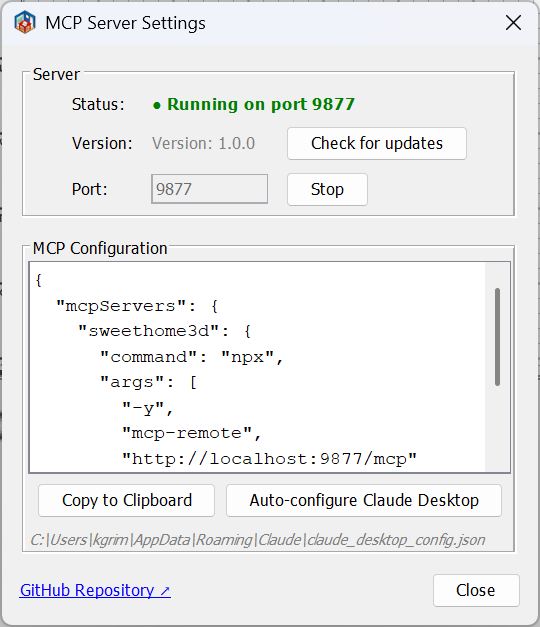
You can verify it is running: Tools → MCP Server... shows the server status.
Claude Configuration
Add to your Claude Desktop claude_desktop_config.json:
{
  "mcpServers": {
    "sweethome3d": {
      "type": "http",
      "url": "http://localhost:9877/mcp"
    }
  }
}
For Claude Code, create .mcp.json in your project directory:
{
  "mcpServers": {
    "sweethome3d": {
      "type": "http",
      "url": "http://localhost:9877/mcp"
    }
  }
}
The plugin also has a built-in "Auto-configure Claude Desktop" button in Tools → MCP Server... that writes this config automatically.
Available Commands
42 commands across 12 categories.
Scene
| Command | Description |
|---|---|
get_state |
Full scene state: walls, furniture, rooms, camera, labels, levels |
clear_scene |
Remove all objects from the scene |
Walls
| Command | Description |
|---|---|
create_wall |
Single wall between two points |
create_walls |
Rectangular room (4 connected walls) |
modify_wall |
Change height, thickness, color, arc, coordinates |
delete_wall |
Delete wall by ID |
connect_walls |
Connect two walls for correct corner rendering |
Rooms
| Command | Description |
|---|---|
create_room_polygon |
Room from an array of polygon points |
modify_room |
Change name, floor/ceiling color, visibility |
delete_room |
Delete room by ID |
Furniture
| Command | Description |
|---|---|
list_categories |
All furniture catalog categories with item counts |
list_furniture_catalog |
Browse catalog; filter by name, category, or type |
place_furniture |
Place a catalog item in the scene |
modify_furniture |
Move, rotate, resize, recolor furniture by ID |
delete_furniture |
Delete furniture by ID |
duplicate_objects |
Duplicate one or more objects by ID |
group_furniture |
Group multiple pieces into one object |
ungroup_furniture |
Split a group back into individual pieces |
Doors & Windows
| Command | Description |
|---|---|
place_door_or_window |
Place from catalog into a wall (auto-computes position and angle) |
Textures & Appearance
| Command | Description |
|---|---|
list_textures_catalog |
Browse texture catalog; filter by name or category |
apply_texture |
Apply catalog texture to wall side or room surface |
set_environment |
Ground/sky colors, lighting, wall transparency, drawing mode |
3D Shapes
| Command | Description |
|---|---|
generate_shape |
Create custom 3D geometry: primitives (box, sphere, cylinder, cone, wedge, arch, stairs, torus, hemisphere, pipe), extrude, mesh, and CSG boolean operations (union, subtract, intersect) |
Annotations
| Command | Description |
|---|---|
add_label |
Text annotation on the 2D floor plan |
add_dimension_line |
Measurement line with auto-offset |
Camera
| Command | Description |
|---|---|
set_camera |
Switch to top/observer mode; set position, lookAt point, or target object |
store_camera |
Save the current viewpoint as a named bookmark |
get_cameras |
List all saved camera viewpoints |
Multi-level
| Command | Description |
|---|---|
add_level |
Add a new level (floor/storey) |
list_levels |
List all levels; shows which is currently selected |
set_selected_level |
Switch the active level |
delete_level |
Delete a level and all its objects |
Rendering & Export
| Command | Description |
|---|---|
render_photo |
Ray-traced 3D render (Sunflow); standard or overhead bird's-eye view; inline JPEG or saved PNG |
export_plan_image |
2D floor plan as PNG |
export_svg |
2D floor plan as SVG |
export_to_obj |
3D scene as Wavefront OBJ (ZIP: OBJ + MTL + textures) |
Save / Load
| Command | Description |
|---|---|
save_home |
Save the scene to a .sh3d file |
load_home |
Load a .sh3d file, replacing the current scene |
Checkpoints (undo timeline)
| Command | Description |
|---|---|
checkpoint |
Save an in-memory snapshot (optional description) |
restore_checkpoint |
Restore from a snapshot (supports force mode) |
list_checkpoints |
List all snapshots with the current undo cursor position |
Batch
| Command | Description |
|---|---|
batch_commands |
Execute multiple commands in one request |
Coordinate System
- Units: centimeters (500 = 5 meters)
- X axis: right, Y axis: down (screen coordinates)
- All object IDs are stable UUIDs — safe to use across multiple calls
Building from Source
Prerequisites: Java 11+, Maven 3.6+ (or use the included mvnw wrapper).
# 1. Clone
git clone https://github.com/grimashevich/sweethome3d-mcp-server.git
cd sweethome3d-mcp-server

# 2. Obtain SweetHome3D.jar (copies from your SH3D installation or downloads it)
./scripts/setup-dev.sh        # macOS / Linux / Git Bash on Windows
# scripts\setup-dev.bat       # Windows Command Prompt

# 3. Build
./mvnw clean package

# 4. Run tests
./mvnw test

# The plugin artifact is at:
# target/sh3d-mcp-plugin-1.0.0.sh3p
Why the setup script?
SweetHome3D.jaris a 46 MB binary excluded from git.The script first checks your local Sweet Home 3D installation (fastest, works offline),then falls back to downloading from SourceForge.The three Java3D JARs (j3dcore,j3dutils,vecmath) are included inlib/directly.
Architecture
The plugin is a single self-contained component with no external runtime dependencies:
plugin— Entry point (SH3DMcpPlugin), settings dialoghttp— Streamable HTTP MCP server (JSON-RPC 2.0, port 9877)command— 42 command handlers, auto-registered viaCommandRegistrybridge— Thread-safe Sweet Home 3D API wrapper (HomeAccessorvia EDT,CheckpointManager,ObjectResolver)protocol— Hand-written JSON parser (zero external dependencies)config— Plugin settings, Claude Desktop auto-configurator
See ARCHITECTURE.md for the full design, ADR decisions, and sequence diagrams.
Adding a New Command
One class is all it takes — the registry picks it up automatically:
public class MyCommandHandler implements CommandHandler, CommandDescriptor {

    @Override
    public Response execute(Request request, HomeAccessor accessor) {
        // All Home mutations must run on the Event Dispatch Thread:
        Object result = accessor.runOnEDT(() -> {
            Home home = accessor.getHome();
            // ... do something
            return "done";
        });
        return Response.success(result);
    }

    @Override
    public String getDescription() { return "Does something useful."; }

    @Override
    public Map<String, Object> getSchema() {
        return SchemaBuilder.object()
            .prop("name", "string", "Object name")
            .required("name")
            .build();
    }
}
Then register it in SH3DMcpPlugin.createCommandRegistry():
registry.register("my_command", new MyCommandHandler());
See CONTRIBUTING.md for the full development guide.
License
GNU General Public License v2.0 — see LICENSE for details.
This plugin uses the Sweet Home 3D Plugin API (GPL v2) and Java3D (BSD / JOGL license).


