
haden-browser
haden-browser is a fast, AI-first web browser exposed as a local Model Context Protocol server. It gives an AI the smallest useful page representation for its current goal instead of sending screenshots and raw page source on every turn.
Benchmark: 33% less AI browser context
Primary result: Haden used 7,822 reference tokens for the core browsing session—32.7% fewer than Playwright MCP and 32.5% fewer than Chrome DevTools MCP full mode. Among the tested browser MCPs that returned semantic action refs and image-alt coverage, Haden had the lowest token footprint.
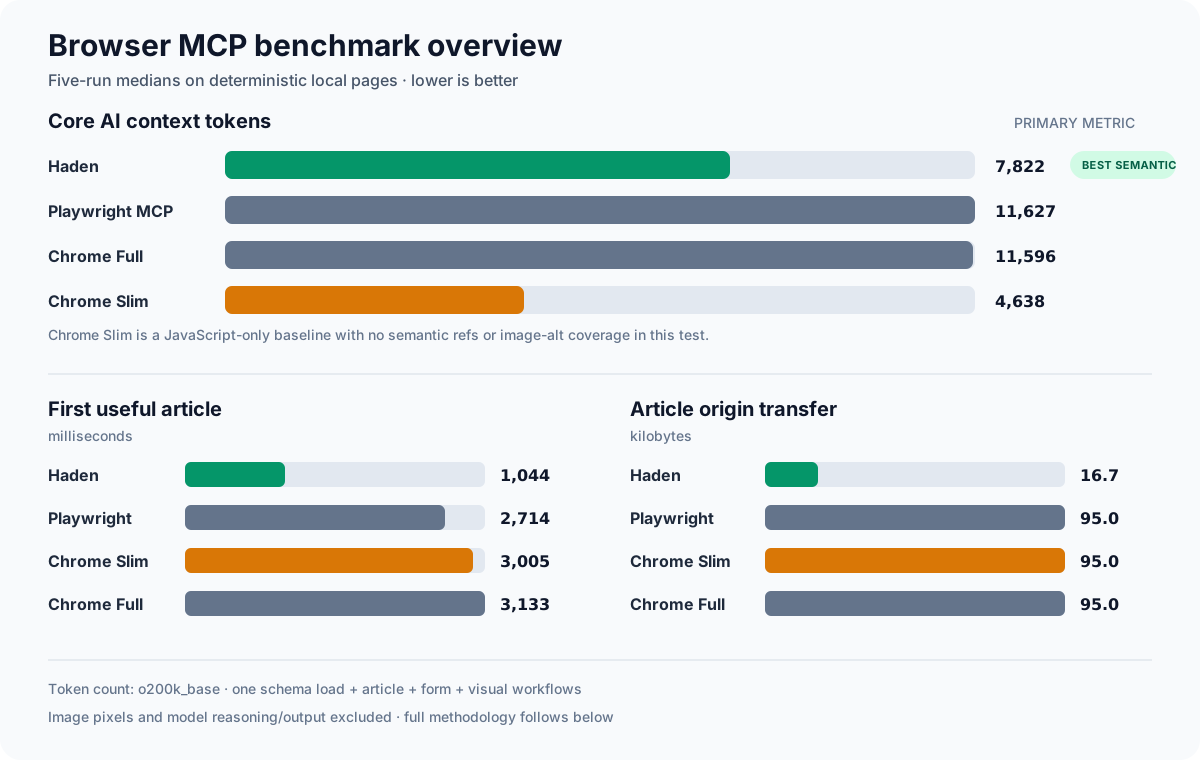
| Five-run median | Haden | Playwright MCP | Chrome Slim† | Chrome Full |
|---|---|---|---|---|
| Core context tokens | 7,822 | 11,627 | 4,638 | 11,596 |
| Tool-schema tokens | 727 | 3,999 | 221 | 4,974 |
| Article workflow tokens | 2,732 | 4,640 | 2,497 | 4,388 |
| First useful article | 1,044 ms | 2,714 ms | 3,005 ms | 3,133 ms |
| Article origin transfer | 16.7 KB / 1 request | 95.0 KB / 10 | 95.0 KB / 10 | 95.0 KB / 10 |
| Semantic action refs | 15 | 172 | 0 | 143 |
| Image-alt coverage | 8/8 | 8/8 | 0/8 | 8/8 |
† Chrome Slim is the absolute token minimum, but it is a low-level JavaScript control baseline: the model must author page scripts, and the tested path returned no semantic action refs or image alt text. It is therefore shown transparently but is not treated as a semantic-browser equivalent.
Core context includes one complete tool-schema load plus the serialized MCP tool calls and results for article reading, form submission, and computed-style inspection. Counts use the o200k_base tokenizer. Image pixels, user/system prompts, and model reasoning or prose are excluded, so actual billed usage depends on the MCP host and model.
See the full benchmark report, raw per-run data, and reproduction instructions.
Why it is different
- Goal-based views — use compact semantic text for research, sanitized DOM for structure, or bounded computed styles for visual work.
- Images stay lazy — an image is represented as its alt text or
[image img1]. Pixel data is returned only when the AI explicitly callshaden_image. - Low round-trip control — every interaction returns a fresh snapshot, so most click/type flows need one tool call per step.
- Stable action references — visible controls become
e1,e2, and so on, which are cheaper and more reliable than asking a model to invent CSS selectors. - Fast by default — image, media, and font requests are blocked during ordinary browsing. CSS remains available for the visual view.
- Safer local execution — non-HTTP schemes, credential-bearing URLs, and private-network targets are blocked unless the user explicitly opts in.
flowchart LR
    AI[AI / MCP host] -->|stdio tools| MCP[haden-browser]
    MCP --> PW[Playwright Chromium]
    PW --> PAGE[Web page]
    PAGE -->|semantic text / DOM / computed CSS| MCP
    MCP -.->|only haden_image imgN| PIXELS[Image bytes]
    PIXELS -.-> AI
Views
| View | Best for | Returned data |
|---|---|---|
text |
Search, reading, form flows | Headings, visible text, links and controls with e refs, image placeholders |
dom |
HTML structure and attributes | Sanitized HTML; scripts and embedded content removed; <img> replaced by <haden-image> |
visual |
Layout and CSS reasoning | Visible meaningful elements with boxes and a bounded set of computed CSS properties |
text is the default and should be preferred unless the task truly needs structure or presentation details.
MCP tools
| Tool | Purpose |
|---|---|
haden_open |
Open an HTTP(S) URL and return its first snapshot |
haden_read |
Read the current page, optionally within a CSS selector |
haden_interact |
Click, fill, select, press, scroll, navigate history, reload, or wait; then return the updated snapshot |
haden_image |
Return actual image pixels for one img ref from the latest snapshot |
haden_status |
Report the active page without starting Chromium |
Example text output:
# Example Domain
URL: https://example.com/
View: text
Interactive elements: 1
Images: 1 (use haden_image with an img ref only when visual inspection is needed)

# Example Domain
This domain is for use in illustrative examples.
[e1] link "More information" -> https://iana.org/domains/example
[image img1: "Example diagram"]
References are scoped to the latest snapshot. Read again after substantial page changes before reusing an old e or img ref.
Requirements
- Node.js 20 or newer
- Chromium installed through Playwright
Install from this repository
git clone https://github.com/Haden-Min/haden-browser.git
cd haden-browser
npm ci
npm run setup-browser
npm run build
Then configure an MCP host to launch the built stdio server. Use an absolute path in real configuration:
{
  "mcpServers": {
    "haden-browser": {
      "command": "node",
      "args": ["/absolute/path/to/haden-browser/dist/index.js"]
    }
  }
}
During development, a host can launch npx tsx /absolute/path/to/haden-browser/src/index.ts instead.
After the package is published to npm, the intended configuration is:
{
  "mcpServers": {
    "haden-browser": {
      "command": "npx",
      "args": ["-y", "haden-browser"]
    }
  }
}
Run npx playwright install chromium once on that machine before the first browser call.
Configuration
| Environment variable | Default | Meaning |
|---|---|---|
HADEN_HEADLESS |
true |
Run Chromium without a visible window |
HADEN_BLOCK_HEAVY_ASSETS |
true |
Block images, media, and fonts during normal browsing |
HADEN_ALLOW_PRIVATE_HOSTS |
false |
Allow localhost and private-network destinations |
HADEN_NAVIGATION_TIMEOUT_MS |
20000 |
Navigation and image-fetch timeout |
HADEN_ACTION_TIMEOUT_MS |
8000 |
Click, fill, and locator timeout |
HADEN_MAX_CHARS |
30000 |
Default snapshot character limit |
HADEN_MAX_IMAGE_BYTES |
5242880 |
Maximum bytes returned by haden_image |
Boolean variables accept true/false, 1/0, yes/no, and on/off.
Local development pages
Private hosts are blocked by default to reduce SSRF risk. To browse an application on localhost, opt in for that MCP process only:
{
  "mcpServers": {
    "haden-browser-local": {
      "command": "node",
      "args": ["/absolute/path/to/haden-browser/dist/index.js"],
      "env": { "HADEN_ALLOW_PRIVATE_HOSTS": "true" }
    }
  }
}
Development
npm install
npm run setup-browser
npm run check
npm run build
The test suite covers network policy, text shaping, real Chromium extraction, ref-based interactions, lazy image retrieval, and an in-memory MCP client/server connection.
Current limitations
- One active browser context is maintained per stdio MCP connection.
- Image refs currently cover visible HTML
<img>elements, not CSS background images, canvases, video frames, or iframe contents. - The visual view reports computed properties; it does not dump every stylesheet rule.
- Downloads, file uploads, browser extensions, persistent profiles, and CAPTCHA solving are outside the MVP.
- Private-host filtering reduces SSRF exposure but is not a substitute for OS/container-level network isolation in hostile multi-tenant environments.
See CONTRIBUTING.md for development guidance and SECURITY.md for vulnerability reporting.
License
MIT


