





code-context is the retrieval layer under your coding agent: one localindex over the whole repo (keyword, semantic, hybrid, and SQL), reachedthrough an MCP server and a CLI, with the index living in plain files insideyour repo. Your agent answers questions about the codebase without reading itfile by file.
The rule of thumb: the more a question spans the repo, the more this saves,because the answer comes from a ranked index instead of pulling source intocontext one file at a time.
On your own codebase, ~30-40% fewer tokens and ~50% fewer tool calls(so answers land faster too - aggregation questions run about 2× quicker).The harness is in the repo, so you can reproduce it on your own code.
Try it live (early preview): ask questions about any public GitHub repoat lantern.infino.ai, a demo agent that runs oncode-context.
- 🔎 Find code by words or meaning. One ranked pass fuses exact keywordmatching with semantic similarity, and every hit carries the code with
path:linecitations. - 📊 Ask questions grep can't answer. Search works as a SQL tablefunction, so "which files have the most code about X" is one query:ranked by relevance, tallied by
GROUP BY. - ⚡ Searching in seconds, fresh forever. The keyword index commitsbefore the embedding model even finishes downloading, vectors backfill inthe background, and edits re-sync incrementally: only changed filesre-chunk and re-embed.
- 🔒 Nothing leaves your machine. No accounts, no API keys, no databaseserver, no telemetry. Embedding is a small local model, downloaded once;after that everything works offline.
Built on infino, a fast retrievalengine that runs SQL, full-text search, and vector search over a single copyof your data. Text and numeric data is stored as spec-compliant Parquet, andthe same engine handles logs, docs, and agent memory.
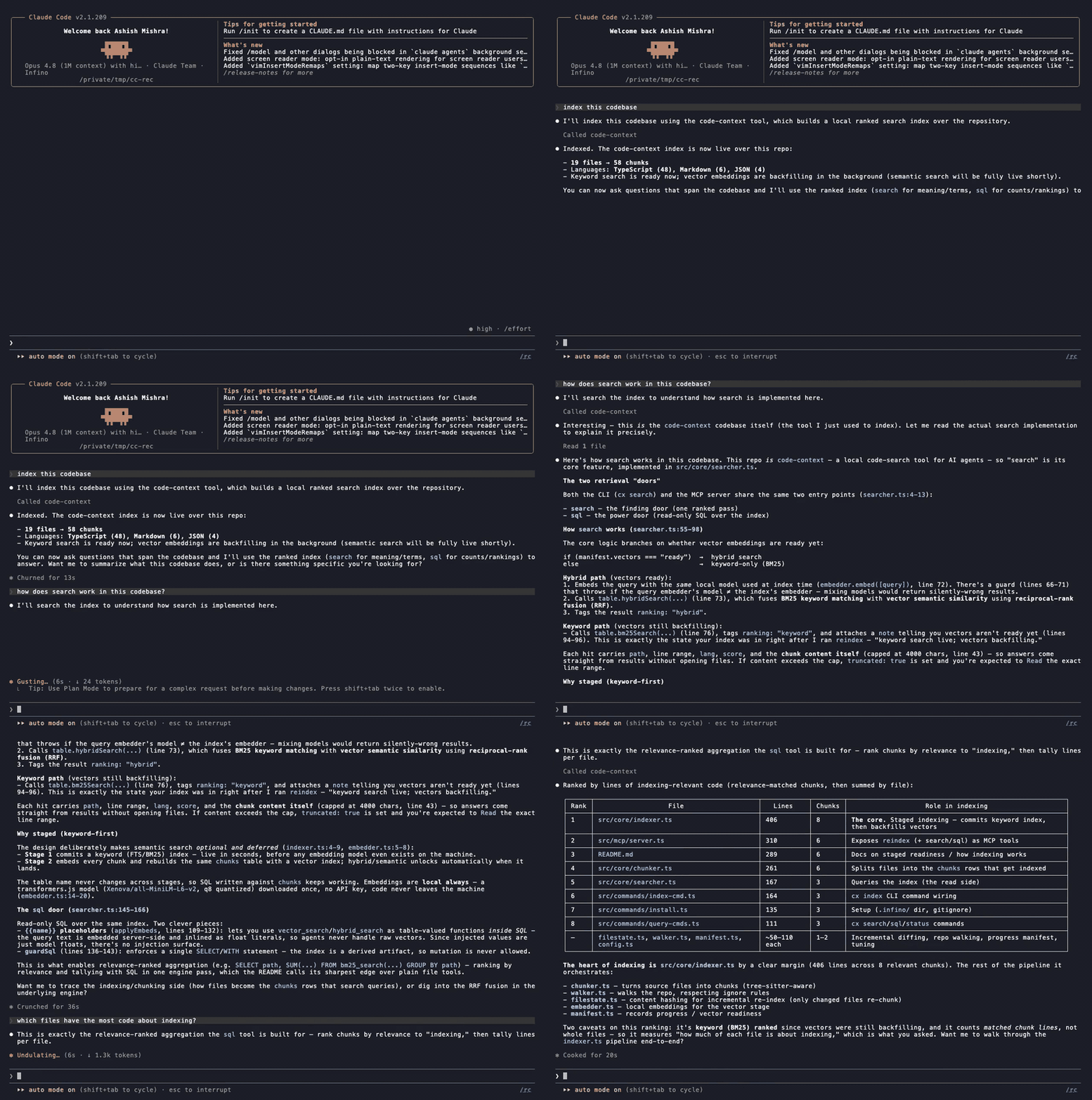
Claude Code answering questions about a repo through code-context: index it, then ask, and it reaches for search and SQL on its own.
Quick start
Install the Claude Code plugin - nothing to paste into a config:
/plugin marketplace add infino-ai/code-context
/plugin install code-context@infino-ai
It registers code-context's three tools with alwaysLoad already set, so theagent keeps them in view and reaches for the index directly instead of fallingback to plain file search.
Not on Claude Code, or prefer a one-line command? Add it as an MCP server:
claude mcp add-json code-context -s user '{"command":"npx","args":["-y","@infino-ai/code-context","mcp"],"alwaysLoad":true}'
The alwaysLoad flag pins this small tool set so that in a setup with many MCPservers - where clients defer tool definitions behind a tool-search step - theagent doesn't miss the index and fall back to plain file search. (Use eitherthe plugin or this command, not both.)
Then just ask a question about the code. The first search or sql on anunindexed repo builds the index inline and answers on the same call: keywordsearch is live in seconds, and vectors backfill in the background. (Prefer tokick it off yourself? The reindex tool does the same build on demand.)
CI-tested on Linux x64 (glibc) and macOS arm64; linux-arm64, musl, andWindows-via-WSL are expected to work through the engine's prebuilt bindingsbut are not CI-covered.
Evaluation
Real agent runs over a codebase-Q&A suite (claude-sonnet-4-6, the sameminimal prompt for both lanes), on a repo the model has not memorized -infino, the engine this is built on -because that is the realistic case for your private code. Baseline is stockfile tools including Bash; the code-context lane is the same tools plus theMCP server. Measured on three axes:
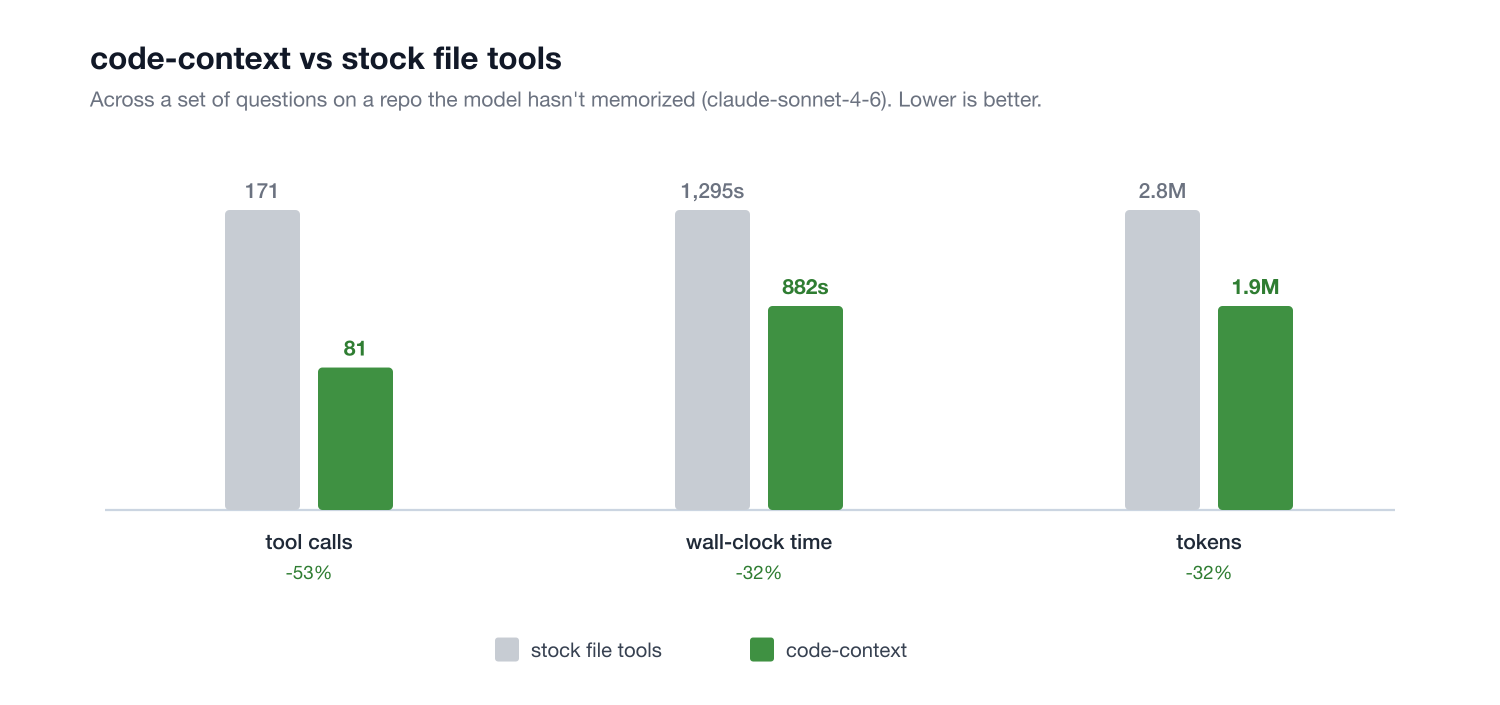
| Category | Tokens | Tool calls | Wall time |
|---|---|---|---|
| Aggregation ("most code about X") | -43% | -71% | -48% |
| Comprehension ("how does X work") | -29% | -27% | -13% |
| Blended | -32% | -53% | -32% |
Aggregation is the structural win - ranked search composed with GROUP BY,which file tools cannot express at any budget - and it roughly halvesend-to-end time. These numbers are on a strong model; weaker, cheaper modelsexplore less efficiently, so the savings tend to be larger there. Onpinpoint symbol lookup, where a single grep is already cheap, an indexmatches file tools rather than beating them.
Full methodology and per-question tables are indocs/benchmark.md, with the harness inbench/ so you can run the same lanes on your own repo.
What you get
One index and a deliberately small tool surface for agents:
| Tool | What it does | When agents use it |
|---|---|---|
search |
One ranked pass fusing exact keyword matching (BM25) with semantic similarity (reciprocal-rank fusion). Hits carry the chunk content, so answers come straight from results. | A strong default for finding and understanding code: how a subsystem works, code by meaning or exact term, context before a change, similar implementations - exact identifiers and paraphrases in the same call. |
sql |
Read-only SQL over the index, with the ranked search functions (bm25_search/hybrid_search) usable as table-valued relations. |
Counts, rankings, aggregates over the whole repo in one query. |
reindex |
Incremental sync (the server also auto-syncs in the background). | After significant edits. |
Three tools is a deliberate design: one way to find, one way to count, oneway to stay fresh. Every additional near-duplicate retrieval tool worsens anagent's tool selection, and hybrid search's keyword half already ranksexact identifier terms highly, so a separate lexical tool has no job left.
The SQL move
Search-as-a-table composes with aggregation. Ranked by relevance, tallied bySQL, one engine pass:
SELECT path, SUM(end_line - start_line + 1) AS lines, COUNT(*) AS chunks
FROM bm25_search('chunks', 'content', 'vector index quantization', 300)
GROUP BY path ORDER BY lines DESC LIMIT 15
hybrid_search(...) and vector_search(...) work the same way. The CLI andMCP server embed {{name}} placeholders server-side, so agents never handleraw vectors.
Staged readiness
cx index commits the keyword (BM25) index first. On a ~3,000-chunk repothat takes under a second, so search works before any embedding model evenexists on the machine. Vectors backfill in the background with a local model(downloaded once, no key; about two minutes for that same repo), andhybrid/semantic ranking unlocks automatically when they land. If the vectorstage fails, keyword search stays live and the index says so honestly.
The default model optimizes quality-per-minute. Seedocs/embedder-eval.md for how it was chosen.
Your index is just files
Everything lives in .infino/ in your repo root (added to your.gitignore automatically on first index): plain files you can copy,cache in CI, or put on object storage. It's a live index the engine queries in place, not a snapshot youexport and pass around.
Setup for agents
code-context is an MCP server over stdio, so any MCP client works. Registerit once and the tools (search, sql, reindex) become available to theagent.
Install as a plugin - alwaysLoad already set, nothing to paste into aconfig:
/plugin marketplace add infino-ai/code-context
/plugin install code-context@infino-ai
Or register it as an MCP server directly:
claude mcp add-json code-context -s user '{"command":"npx","args":["-y","@infino-ai/code-context","mcp"],"alwaysLoad":true}'
alwaysLoad: true pins code-context's tools into context so the agent reachesfor the index directly. In sessions with many MCP servers Claude Code deferstool definitions behind a tool-search step; without alwaysLoad the agent canmiss code-context and fall back to grep/read. It's a small, always-loaded set(three tools). Omit it (or use the shorter claude mcp add code-context -- npx -y @infino-ai/code-context mcp) if you'd rather leave the tools deferred.
Use either the plugin or the add-json command, not both. They register thesame code-context server, so running both just collides.
For a team, commit a project-scoped .mcp.json at the repo root soeveryone gets it (after the one-time project-server approval):
{ "mcpServers": { "code-context": { "command": "npx", "args": ["-y", "@infino-ai/code-context", "mcp"], "alwaysLoad": true } } }
Add to .cursor/mcp.json:
{ "mcpServers": { "code-context": { "command": "npx", "args": ["-y", "@infino-ai/code-context", "mcp"] } } }
In ~/.codex/config.toml (note the key is mcp_servers):
[mcp_servers.code-context]
command = "npx"
args = ["-y", "@infino-ai/code-context", "mcp"]
In ~/.gemini/settings.json:
{ "mcpServers": { "code-context": { "command": "npx", "args": ["-y", "@infino-ai/code-context", "mcp"] } } }
Standard stdio MCP config:
{ "mcpServers": { "code-context": { "command": "npx", "args": ["-y", "@infino-ai/code-context", "mcp"] } } }
Point the server at a repo explicitly with env: { "CX_ROOT": "/path/to/repo" }when the client's working directory is not the repo.
Tools: search, sql, reindex (incremental sync: an unchanged repo isa fast no-op, and the server also auto-syncs in the background as queriesarrive, so results track your edits without anyone asking).
Multiple repos in one session. Each tool takes an optional path (anabsolute repo root). Omit it and the server uses its startup root; set it totarget a specific repo when a session spans more than one. One serverinstance serves them all, each with its own index in its own .infino/ -no restart, no per-repo config.
Configuration
| Variable | Default | Purpose |
|---|---|---|
CX_INDEX_DIR |
<repo>/.infino |
where the index lives |
CX_SEARCH_K |
10 | default number of hits search returns (also settable per call and via the CLI -k flag) |
CX_MAX_FILES / CX_MAX_FILE_BYTES |
20000 / 1MB | indexing caps (files over the file cap are left out; search/sql then flag the index as partial so an absence isn't read as proof) |
CX_ROOT |
current directory | default repo root for the MCP server / CLI when not run from the repo (each tool call can override it with a path argument) |
CX_AUTO_INDEX |
on | 0 makes a query on an unindexed repo error instead of building the index inline on the first search/sql |
CX_AUTO_SYNC |
on | 0 disables the MCP server's background staleness sync |
CX_SYNC_INTERVAL_SECS |
30 | auto-sync debounce between staleness checks |
CX_NO_EMBED |
off | keyword-only mode for the MCP server (skip the vector stage) |
CX_NO_RECEIPT |
off | 1 turns off usage accounting - the per-call receipt on results and the cx usage ledger |
Every search / sql result carries a usage receipt - a terse, local lineshowing the tokens it returned, the files it spanned, and a running sessiontotal (e.g. returned ~1.2k tokens | 4 chunks / 3 files | session ~8.4k over 7 queries). Every figure is a ~ estimate, computed in-process - nothing aboutyour queries or code leaves the machine.
CLI
The same index is reachable from the terminal too, for scripting, CI, orinspecting results yourself. Install the binary, then run any command insidea repo:
npm install -g @infino-ai/code-context
cx index [path]           sync the index (incremental; --full rebuilds, --watch follows edits)
cx search <query>         exact terms + meaning, one ranked pass           (-k hits)
cx sql <statement>        read-only SQL; --embed q="text" fills {{q}}
cx status                 what the index holds, how fresh, vector readiness
cx usage                  ledger of queries run and what each returned  (-n, --all, --clear, --json)
cx mcp                    serve the MCP tools over stdio
cx usage reads the local ledger at .infino/usage.jsonl - every search /sql (from the CLI or the MCP server) appends one line recording the query anda compact summary of what came back (paths and line ranges for search, rowcount for sql), plus the token figures from the receipt. It's a deterministic,model-independent view of what went through the index - no running server oragent needed to read it back. CX_NO_RECEIPT=1 turns off both the inlinereceipt and this ledger.
How often does the agent actually reach for it?
cx usage can also show, per session, in how many of your prompts code-contextwas used - e.g. code-context used in 2 of 3 prompts (2 calls). The MCP servercan only count its own calls, not your prompts, so this ratio comes from twoClaude Code hooks that keep a local tally (nothing is sent anywhere). Add themto your Claude Code settings (~/.claude/settings.json or a project.claude/settings.json):
{
  "hooks": {
    "UserPromptSubmit": [
      { "hooks": [{ "type": "command", "command": "cx usage --hook" }] }
    ],
    "PostToolUse": [
      { "matcher": "mcp__code-context.*", "hooks": [{ "type": "command", "command": "cx usage --hook" }] }
    ]
  }
}
cx usage --hook reads the event on stdin, updates .infino/prompt-stats.json,and prints nothing. If you run code-context via npx, usenpx -y @infino-ai/code-context usage --hook as the command.
What it is, and what it isn't
code-context's lane is ranked content retrieval and content-relevanceaggregation: find code by words or meaning, rank whole files by how muchthey're about a topic, always with path:line receipts. It deliberatelydoes not do structural code intelligence (call-graph tracing, dead-codedetection, type resolution). Tools that do are complementary: MCP serversstack, so run both.
Architecture
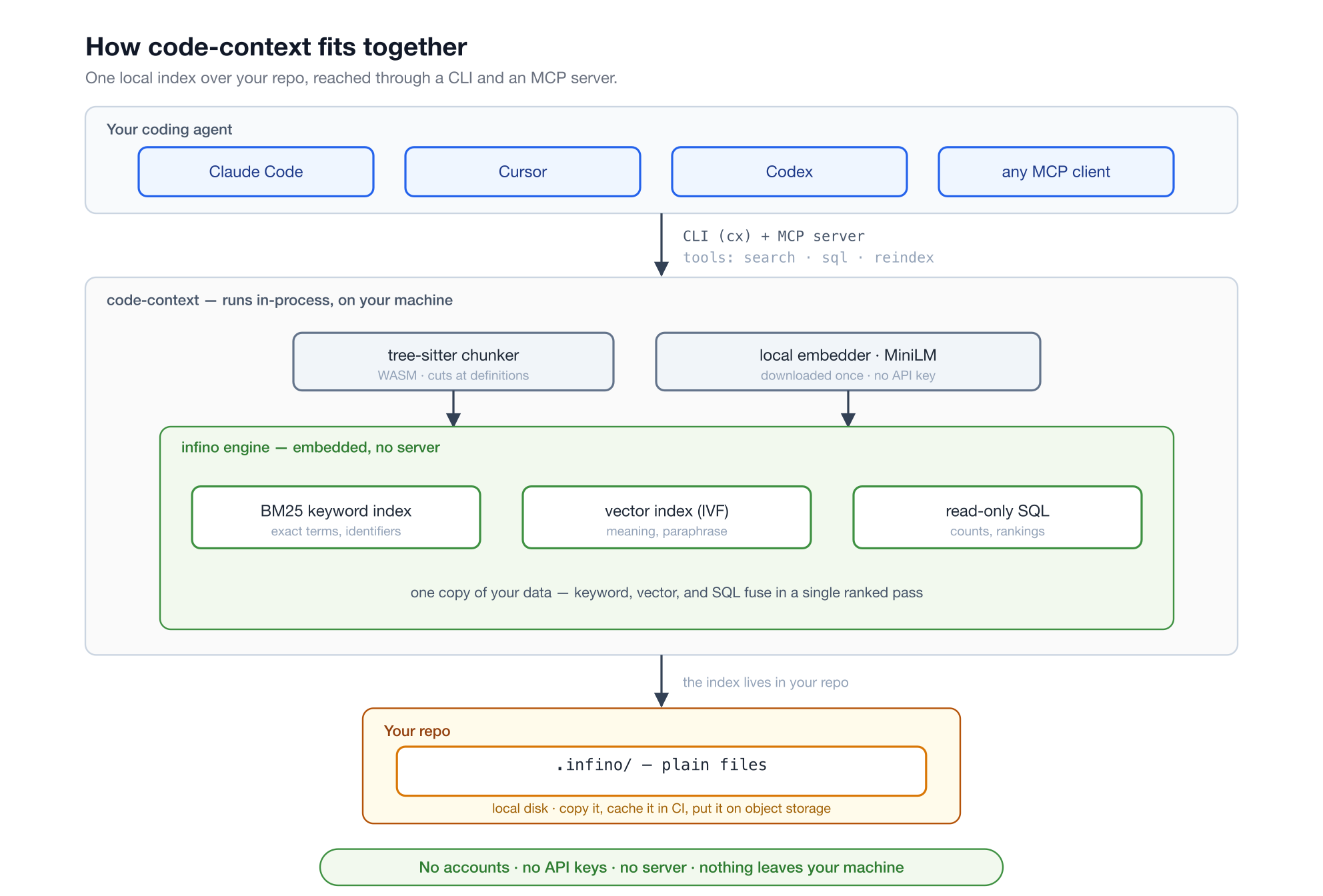
- Chunking: tree-sitter (WASM, no native compiles) cuts at definitionboundaries for TypeScript/JS, Python, Rust, Go, Java, C/C++, Ruby, C#, PHP;Markdown splits at headings; everything else falls back to fixed windows.Every chunk carries
path, start_line, end_line, lang, content. - Index: infino tables in
.infino/: BM25 (FTS) and IVF vector indexes over a single copy of thedata, queried in-process through the Node binding. No server. - Embeddings: always local. A small model (chosen by ameasured eval) downloaded once; no key, noper-query network, code never leaves the machine. Queries embed with thesame model the index was built with, and a mismatch is a clear error, notsilently wrong results.
- Freshness: incremental by design. A per-file state map (size/mtimeprefilter, then content hash) means a sync re-chunks and re-embeds onlythe files that changed: on a ~3,000-chunk repo an unchanged tree checksin ~20ms and a one-file edit syncs in ~0.7s with vectors kept current(larger-repo numbers in the benchmark). The MCPserver auto-syncs in the background as queries arrive (never blocking aquery),
cx indexis incremental by default (--fullto rebuild), andcx index --watchsyncs on file events.
Learn more
- Code search for coding agents - the crawl-vs-retrieve model and when an index saves tokens.
- FAQ - what it is, when to use it, local-only guarantees, freshness.
- Tradeoffs - the honest limits.
- Benchmark - measured results, with a harness to reproduce them on your own repo.
License
Apache-2.0


