
Notion MCP Server


AI-powered knowledge management with Notion integration and spaced repetition learning system.
✨ Features
- 📝 Auto-save conversations - Save AI Q&A to Notion with intelligent categorization
- 🔍 Advanced search - Query by date, category, tags, and full-text search
- 🧠 Spaced repetition - Science-based review scheduling (1/2/4/7/15 days)
- 📊 Progress tracking - Track mastery levels (⭐-⭐⭐⭐⭐⭐) and review counts
📦 Installation
Option 1: NPM (Recommended)
npm install -g @itsyuimorii/notion-mcp-server
Option 2: From Source
git clone https://github.com/itsyuimorii/notion-mcp-server.git
cd notion-mcp-server
npm install
npm run build
🚀 Quick Start
1. Create Notion Integration
- Go to Notion Integrations and create a new integration
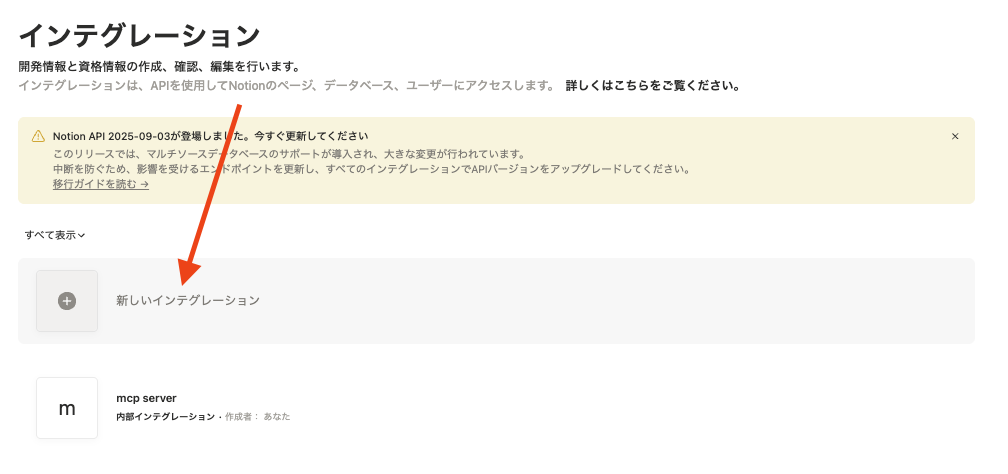
- Give your integration a name (e.g., "AI Learning Tracker") and select the appropriate capabilities (read & write)
- Copy the "Internal Integration Token" and paste it into your
.envfile

- Share your Notion page with the integration
2. Configure Environment
Create a .env file:
NOTION_API_TOKEN=ntn_your_token_here
NOTION_PARENT_PAGE_ID=your_page_id_here
NOTION_DATABASE_ID=your_database_id_here  # Optional
3. Configure Claude Desktop
Edit ~/Library/Application Support/Claude/claude_desktop_config.json:
{
  "mcpServers": {
    "notion-mcp-server": {
      "command": "node",
      "args": ["/path/to/notion-mcp-server/dist/index.js"],
      "env": {
        "NOTION_API_TOKEN": "ntn_your_token",
        "NOTION_PARENT_PAGE_ID": "your_page_id",
        "NOTION_DATABASE_ID": "your_database_id"
      }
    }
  }
}
4. Restart Claude Desktop
You're ready to use it!
🛠️ Available Tools
| Tool | Description |
|---|---|
notion_setup_database |
Create pre-configured database with spaced repetition fields |
notion_ai_save_entry |
Save Q&A with auto-categorization and tags |
notion_query_database |
Search with filters (date/category/tags) |
notion_check_reviews |
Check overdue and upcoming reviews |
notion_update_mastery |
Update mastery level and schedule next review |
📁 Project Structure
notion-mcp-server/
├── src/
│   ├── index.ts       # Main MCP server
│   ├── config.ts      # Configuration
│   └── types.ts       # TypeScript types
├── docs/
│   └── images/        # Documentation images
├── QUICKSTART.md      # Detailed setup guide
├── DEMO_SCENARIOS.md  # Usage examples
├── LICENSE            # MIT License
└── package.json       # Dependencies
📚 Documentation
- QUICKSTART.md - Complete setup guide
- DEMO_SCENARIOS.md - Real-world usage examples
🔧 Requirements
- Node.js 18+
- npm 9+
- Notion account with workspace
- Claude Desktop (latest version)
🐛 Troubleshooting
Connection failed?
- Check
.envfile has correct token - Run
npm run buildto generatedist/index.js - Verify path in Claude config
- Restart Claude Desktop
Database permission denied?
- Go to your Notion page
- Click "..." → "Add connections"
- Select your integration
- Restart Claude Desktop
📄 License
MIT - see LICENSE
🔗 Links
New to this project? Start with QUICKSTART.md 🚀


