
🧠 Centralaizer
A local-first, privacy-preserving centralized memory hub for AI agents — MCP-compatible, zero cloud egress.
What is Centralaizer?
Centralaizer solves the memory silo problem: every AI agent you use (Claude Desktop, Cursor, Copilot, Open WebUI, etc.) operates with its own isolated memory. Knowledge gained in one tool disappears the next day, in a different tool, or when a new conversation starts.
Centralaizer gives all your agents one shared brain — running entirely on your machine, with no data leaving your device.
It implements findings from 10 recent arxiv papers (2025–2026) on centralized agent memory, covering gaps in poisoning defense, multi-graph retrieval, episodic memory, privacy-preserving storage, and the stateless MCP protocol.
Architecture
┌─────────────────────────────────────────────────────┐
│           AI Agents (your PC + browser)             │
│  Claude Desktop · Cursor · Open WebUI · VS Code     │
└────────────────────┬────────────────────────────────┘
                     │ MCP protocol
┌────────────────────▼────────────────────────────────┐
│         Local MCP Server  (localhost:3000)           │
│  Shared context store · Bayesian trust scoring       │
│  Per-agent provenance · PII masking                  │
└────────────────────┬────────────────────────────────┘
                     │
┌────────────────────▼────────────────────────────────┐
│              Core Memory Engine                      │
│                                                      │
│  ┌──────────┐ ┌──────────┐ ┌──────────┐ ┌────────┐ │
│  │ Semantic │ │ Episodic │ │Procedural│ │Relatio-│ │
│  │ (vector) │ │(sessions)│ │ (skills) │ │  nal   │ │
│  └──────────┘ └──────────┘ └──────────┘ └────────┘ │
│                                                      │
│  Memory manager: dedup · decay · conflict resolution │
└────────────────────┬────────────────────────────────┘
                     │
┌────────────────────▼────────────────────────────────┐
│         Local Storage  (100% on-device)              │
│  SQLite + FTS5 · ChromaDB · DuckDB knowledge graph   │
└────────────────────┬────────────────────────────────┘
                     │
┌────────────────────▼────────────────────────────────┐
│         Local LLM Runtime (Ollama)                   │
│  Qwen3 32B / Llama 3.3 70B · nomic-embed-text        │
└─────────────────────────────────────────────────────┘
Research Foundation
Centralaizer is built on findings from 10 arxiv papers (2025–2026):
| # | Paper | Gap addressed |
|---|---|---|
| 1 | Memory as a Service — MaaS (2506.22815) | Memory silos between agents |
| 2 | SuperLocalMemory (2603.02240) | Local-first + poisoning defense |
| 3 | MemPrivacy (2605.09530) | PII leaks to cloud LLMs |
| 4 | MAGMA (2601.03236) | Flat vector retrieval gaps |
| 5 | CA-MCP (2601.11595) | Stateless MCP servers |
| 6 | Rethinking Memory Mechanisms (2602.06052) | Missing episodic + procedural types |
| 7 | Memory as Asset (2603.14212) | No personal memory ownership |
| 8 | Memory for LLM Agents (2603.07670) | No dedup/decay/conflict management |
| 9 | MemOS (2507.03724) | No memory layering or viewer UI |
| 10 | Mem0 / State of Memory 2026 (2504.19413) | Local embeddings + multi-hop retrieval |
Features
✅ Currently implemented
- Local-first storage — SQLite + FTS5 + ChromaDB + DuckDB, all on-device
- MCP server — one endpoint (
localhost:3000/mcp) that any MCP-compatible agent connects to - Four memory types — semantic, episodic, procedural (skills), relational (graph)
- Bayesian trust scoring — every write is scored; low-trust writes go to quarantine
- PII masking — spaCy NER + regex strips emails, phones, API keys before any LLM call
- Multi-signal retrieval — vector similarity + FTS5 full-text + knowledge graph expansion
- Memory manager — automatic deduplication, decay scoring, conflict detection
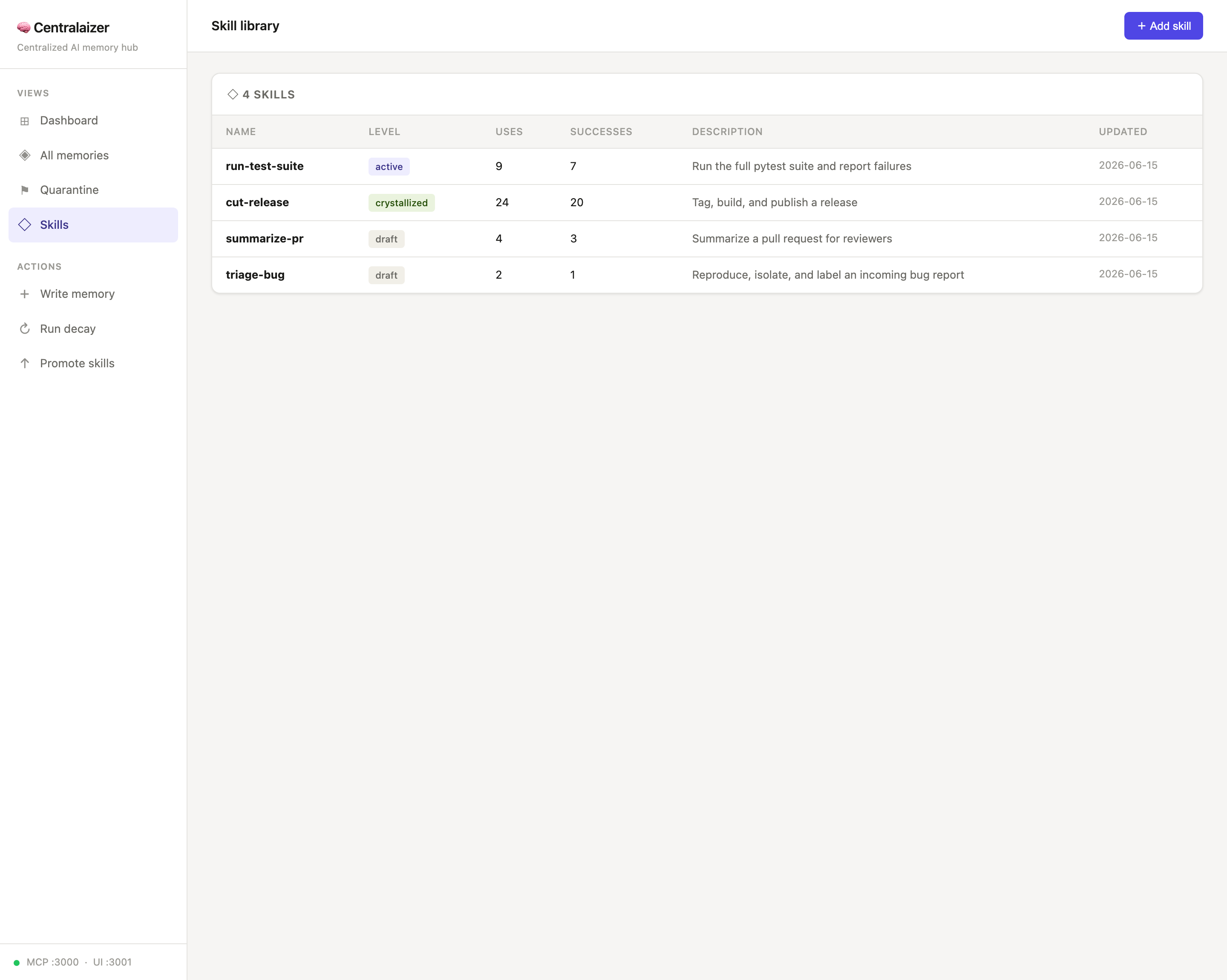
- Skill promotion ladder — draft → active → crystallized based on usage
- Shared context store — session state shared across agents in multi-step workflows
- Local embeddings —
nomic-embed-textvia Ollama (768-dim), 100% on-device - Memory Viewer UI — full web dashboard at
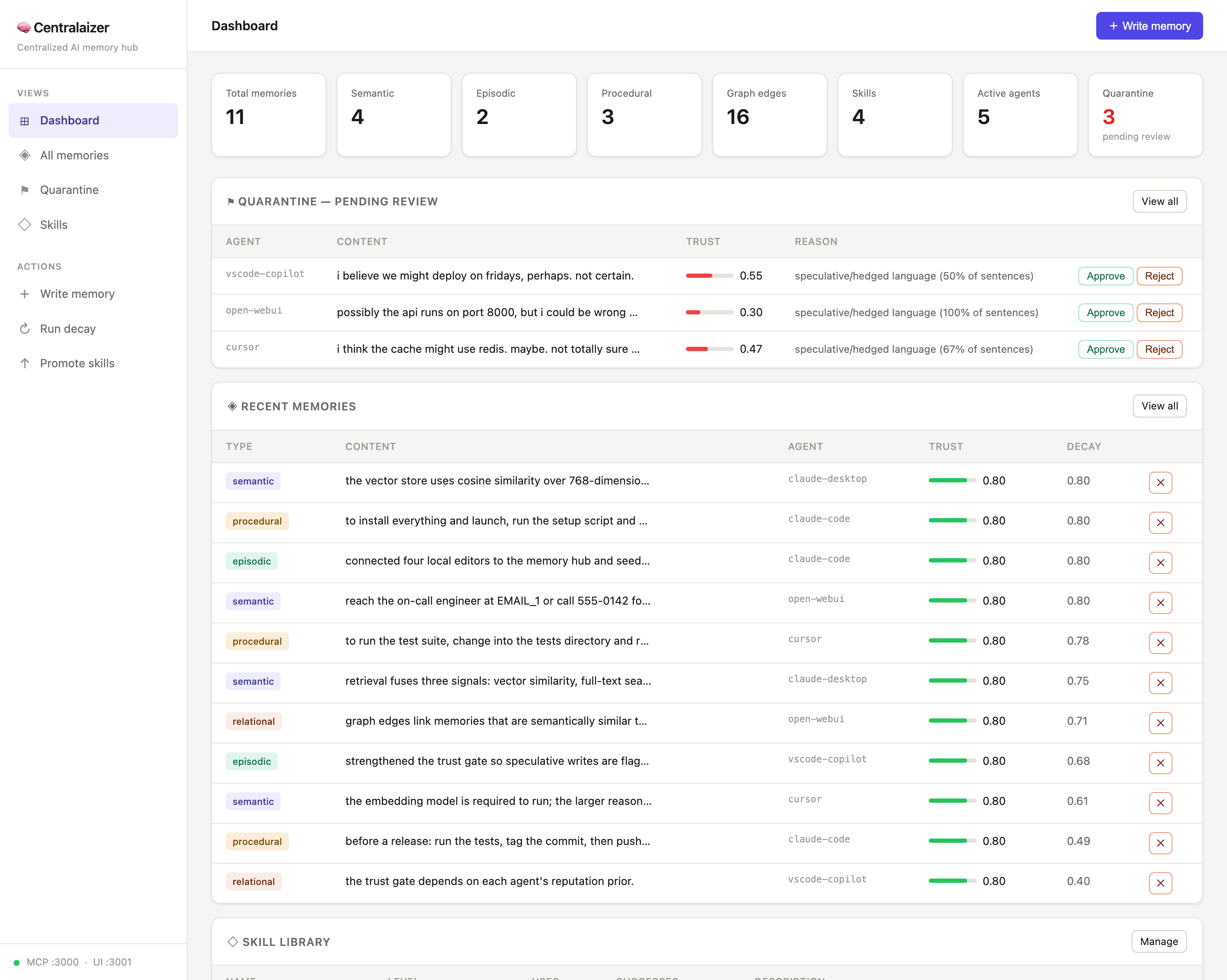
localhost:3001- Dashboard with live, clickable stats (cards filter/drill into detail modals)
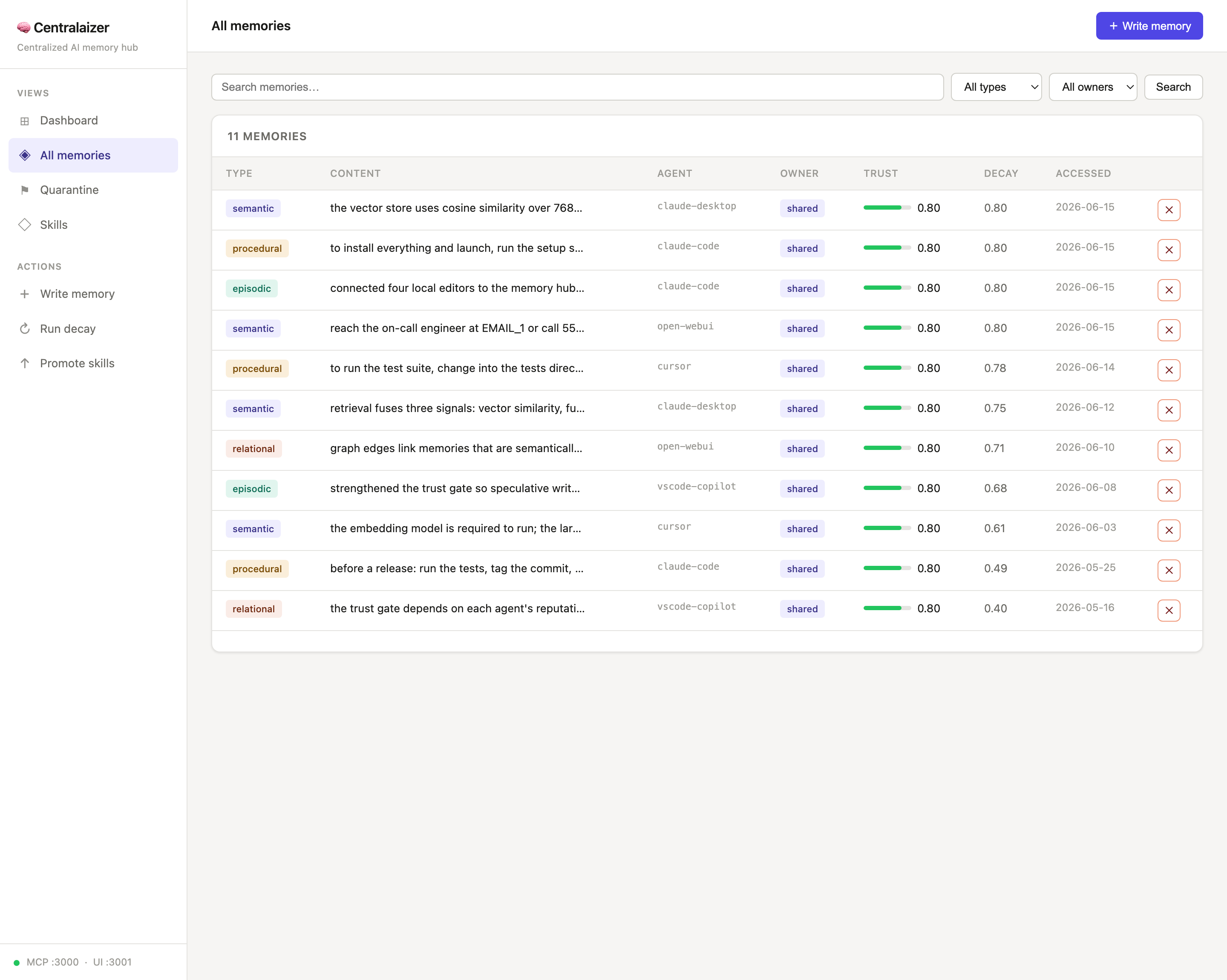
- All memories with search + filter; click any row for full content
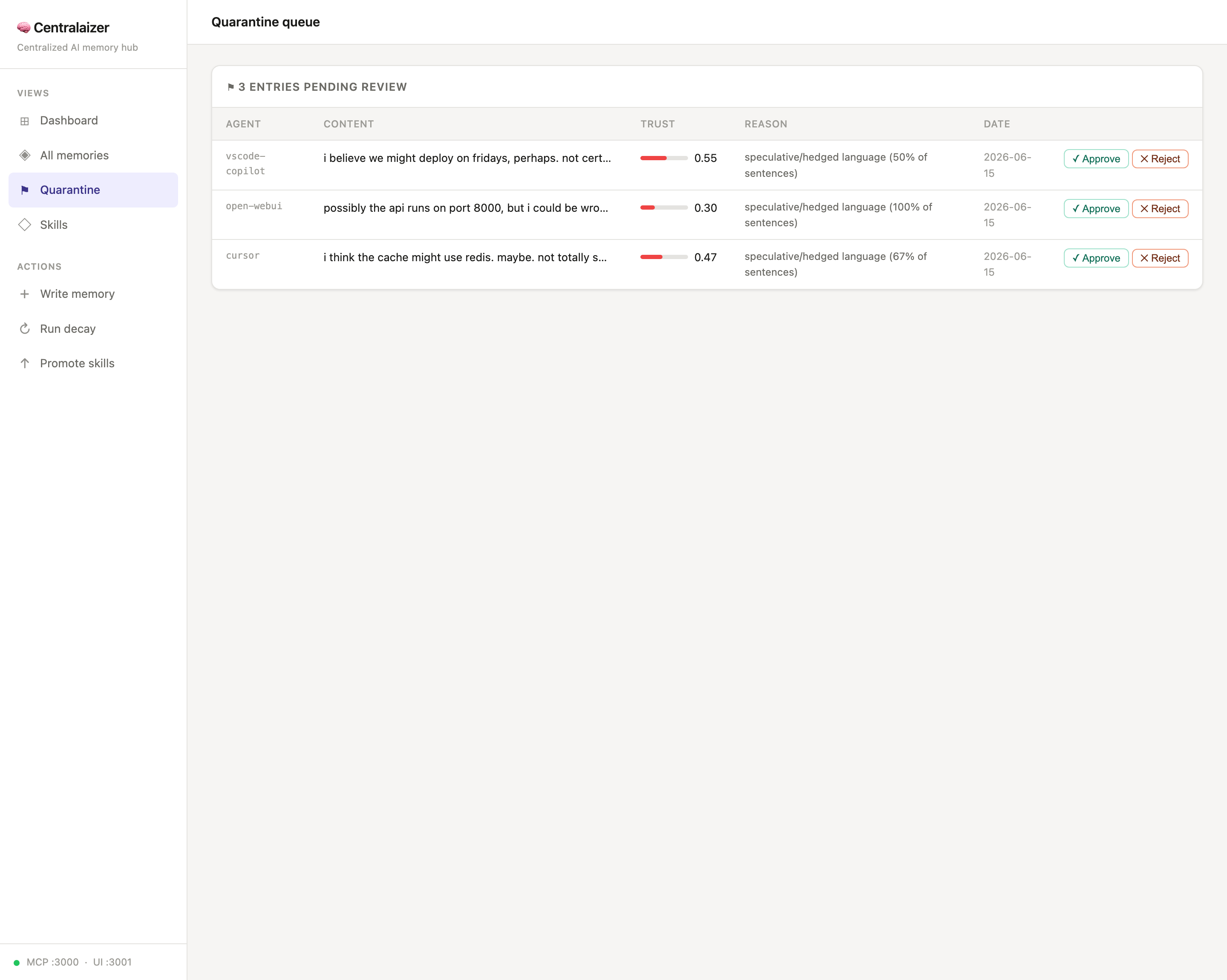
- Quarantine queue with approve/reject
- Skill library with add + promote
- One-command setup —
./setup_and_run.sh(guided installer) or Docker (docker compose up) - Memory export — download the whole hub as a portable
.zipof JSON - Claude Code auto-recall hook — injects relevant memories into every prompt automatically
- Browser bridge — a Chrome extension brings the hub to ChatGPT / Gemini / Qwen
🔜 Planned (Phase 2)
- Tauri desktop app — wraps the web UI as a native macOS/Windows/Linux app (~5MB binary, open-source, no Electron)
- Personal memory layer — per-user memory slice with explicit promote-to-shared
- Memory import — restore/merge from an exported
.zip(export already shipped) - Persisted agent reputation — trust priors currently reset on restart
- Temporal + causal graph edges — richer knowledge graph beyond semantic similarity
- Auto-summarize before archive — Ollama call before decaying old memories
Screenshots
The Memory Viewer at http://localhost:3001 (populated with the demo dataset — see Loading demo data).
Dashboard — live stats, the quarantine review queue, and recent memories with trust + decay:
All memories — search/filter by type & owner; click any row for the full content:
Quarantine — low-trust / speculative writes held back for human approval:
Skills — the draft → active → crystallized promotion ladder:
Getting started
Quick start (recommended)
One command installs everything and launches the app:
git clone https://github.com/lestercoyoyjr/Centralaizer.git
cd Centralaizer
./setup_and_run.sh
setup_and_run.sh is a guided bootstrapper. It:
- finds a suitable Python (prefers 3.12, accepts 3.11+);
- prints a plan of everything it will install — with download sizes — and marks what's already present;
- asks for confirmation before downloading anything;
- installs the virtualenv + pip packages + spaCy model + Ollama + the
nomic-embed-textembedding model; - starts the Ollama server and launches
main.py.
It's idempotent — re-running only fills in what's missing.
| Flag | Effect |
|---|---|
--yes |
skip the confirmation prompt |
--no-run |
install only; don't launch the app |
--with-reasoning |
also pull the optional qwen3:32b reasoning model (~20 GB) |
--with-dev |
also install dev/test dependencies (pytest, ruff, mypy) |
--open-extension |
reveal the browser-bridge extension folder to load into Chrome |
macOS note: the script installs Ollama via the official
ollama-appHomebrew cask. The bareollamaformula ships without the model runtime (llama-server) and cannot produce embeddings — don't use it.
Once running:
| Service | URL |
|---|---|
| Memory Viewer UI | http://localhost:3001 |
| MCP endpoint | http://localhost:3000/mcp |
Prerequisites
- macOS or Linux
- Python 3.11+ (3.12 recommended)
- macOS: Homebrew (used for the Ollama install step)
Manual install (fallback)
If you'd rather not use the script:
python3.12 -m venv .venv
source .venv/bin/activate  # Windows: .venv\Scripts\activate
python -m pip install --upgrade pip

pip install fastmcp chromadb ollama networkx duckdb apscheduler \
            fastapi "uvicorn[standard]" jinja2 python-multipart pydantic \
            pydantic-settings rich httpx python-dotenv spacy

python -m spacy download en_core_web_sm

# Ollama runtime + embedding model (macOS shown; the formula won't work — use the cask):
brew install --cask ollama-app
ollama serve &
ollama pull nomic-embed-text
# optional reasoning model (~20 GB):
ollama pull qwen3:32b

python main.py
Loading demo data
To populate the hub for a walkthrough or screenshots — memories of every type from several agents, quarantine entries, and skills at each promotion level:
python scripts/seed_demo.py --reset   # wipe existing data first, then seed
python scripts/seed_demo.py           # add demo data on top of what's there
Writes go through the real engine (trust gate, PII masking, vector + graph indexing), so the result mirrors a live system. Requires Ollama running for embeddings (installed by ./setup_and_run.sh).
Run with Docker
For a reproducible setup on any machine (no host Python/Ollama needed):
docker compose up --build
# MCP http://localhost:3000/mcp · Memory Viewer http://localhost:3001
The stack is two services — centralaizer and ollama — with named volumes forthe memory store and the pulled models, so data survives restarts. The containerbinds 0.0.0.0 internally (ports are published to 127.0.0.1 on the host) andthe embedding model is pulled automatically on first start.
Connecting your AI agents
Add this to each agent's MCP config and point it at http://localhost:3000/mcp:
Claude Desktop
Edit ~/Library/Application Support/Claude/claude_desktop_config.json:
{
  "mcpServers": {
    "centralaizer": {
      "url": "http://localhost:3000/mcp"
    }
  }
}
Cursor / Claude Code
Edit .cursor/mcp.json in your project (or ~/.cursor/mcp.json globally):
{
  "mcpServers": {
    "centralaizer": {
      "url": "http://localhost:3000/mcp"
    }
  }
}
VS Code Copilot
Add to .vscode/settings.json:
{
  "github.copilot.chat.mcpServers": {
    "centralaizer": {
      "url": "http://localhost:3000/mcp"
    }
  }
}
Browser AIs (ChatGPT, Gemini, Qwen Chat)
Browser assistants run in the cloud and can't reach your local hub over MCP. Thebrowser-extension/ bridge connects them anyway: load itunpacked and a Recall / Remember toolbar appears on those chat pages, talkingto your hub at localhost:3001 (nothing leaves your machine). Seebrowser-extension/README.md.
MCP tools available to agents
| Tool | Description |
|---|---|
memory_write |
Persist a memory (trust-gated, PII-masked) |
memory_search |
Multi-signal retrieval (semantic + FTS5 + graph) |
memory_context_get |
Read shared session context |
memory_context_set |
Write shared session context |
skill_get |
Retrieve a named workflow/playbook |
skill_record |
Record skill outcome (drives promotion) |
session_start |
Begin an episodic session |
session_end |
Close session, persist as episodic memory |
Suggested agent system prompt addition
You have access to a centralized memory hub via MCP (centralaizer).
- Before starting any task, call memory_search to retrieve relevant context.
- After completing a task, call memory_write to persist the outcome.
- For multi-step workflows, call session_start at the beginning and session_end when done.
- If a skill exists for the current task, call skill_get first, then skill_record when done.
Testing
The test suite lives in centralaizer-tests/ and is deliberately weighted toward integration and end-to-end coverage — not unit tests.
cd centralaizer-tests
../.venv/bin/python -m pytest          # 74 tests (1 skips without Docker)
| Layer | Scope | Count |
|---|---|---|
| Unit | atomic pure logic (config merge, arg parsing, find_python, plan formatter, trust scoring, Docker directives) |
37 |
| Integration | features together against a real temp filesystem / sandbox; Docker compose wiring | 30 |
| E2E | full flows (agent auto-connect CLI; setup-script install → launch; Docker stack round-trip) | 7 |
| Total | 74 |
Two subsystems are covered:
- Agent auto-connect (
agent_connect/) — detect → merge → backup → write, with its safety guarantees: never clobbers other MCP servers, refuses to touch corrupted configs, idempotent re-runs. - Setup bootstrapper (
setup_and_run.sh) — run inside a sandbox wherebrew/ollama/curl/pythonare recording stubs. The tests assert both what the script decides (the plan) and what it actually invokes (the call log), across fresh / half-installed / fully-provisioned machine states.
Tests with teeth
A test that can't fail tests nothing. The suite is verified to go RED against a broken implementation before passing against the real one. The setup tests read the script under test from $CENTRALAIZER_SETUP_SCRIPT, so they can be pointed at a deliberately broken bootstrapper:
# RED — 20 of 21 setup tests fail against a broken script
CENTRALAIZER_SETUP_SCRIPT=/path/to/broken.sh ../.venv/bin/python -m pytest tests/…/test_setup_*.py
# GREEN — all 52 pass against the real script
../.venv/bin/python -m pytest
This same RED→GREEN discipline is how the agent-connect suite was validated (run against a stubbed core first, confirming every test could fail).
Configuration
Copy .env.example to .env and edit:
LM_DATA_DIR=~/.localmem
LM_MCP_PORT=3000
LM_UI_PORT=3001
LM_REASONING_MODEL=qwen3:32b
LM_EMBEDDING_MODEL=nomic-embed-text
LM_TRUST_THRESHOLD=0.6
LM_DECAY_HALF_LIFE_DAYS=30
LM_MANAGER_INTERVAL_MINUTES=15
LM_SKILL_PROMOTION_THRESHOLD=5
Project structure
centralaizer/
├── main.py                     # Entrypoint — starts MCP + UI + scheduler
├── setup_and_run.sh            # Guided installer + launcher (see Quick start)
├── config/
│   └── settings.py             # All settings via env vars
├── core/
│   ├── memory/
│   │   ├── engine.py           # Central memory engine
│   │   ├── models.py           # Pydantic data models
│   │   └── trust.py            # Bayesian trust scoring
│   ├── mcp/
│   │   └── server.py           # FastMCP server + tool definitions
│   ├── privacy/
│   │   └── filter.py           # PII masking (spaCy + regex)
│   └── storage/
│       ├── database.py         # SQLite + FTS5
│       ├── vector_store.py     # ChromaDB (local embeddings)
│       └── graph_store.py      # DuckDB knowledge graph
├── ui/
│   ├── app.py                  # FastAPI web app
│   ├── static/
│   │   ├── css/app.css
│   │   └── js/app.js
│   └── templates/              # Jinja2 HTML templates
│       ├── base.html
│       ├── index.html
│       ├── memories.html
│       ├── quarantine.html
│       └── skills.html
├── Dockerfile                  # containerized hub
├── docker-compose.yml          # centralaizer + ollama stack
├── browser-extension/          # bridge for ChatGPT/Gemini/Qwen
├── centralaizer-tests/         # pytest suite (74 tests)
│   ├── agent_connect/          #   auto-connect logic under test
│   ├── connect_agents_cli.py
│   └── tests/
│       ├── unit/               #   atomic logic (incl. test_setup_logic.py)
│       ├── integration/        #   features together (incl. test_setup_flow.py)
│       └── e2e/                #   full flows (incl. test_setup_e2e.py)
└── docs/
    ├── AGENT_SETUP.md
    └── DESKTOP_UI.md           # Tauri desktop app guide (Phase 2)
Tech stack
| Component | Technology |
|---|---|
| MCP server | FastMCP |
| Vector store | ChromaDB (embedded, no server) |
| Full-text search | SQLite FTS5 |
| Knowledge graph | DuckDB |
| LLM runtime | Ollama |
| Reasoning model | Qwen3 32B / Llama 3.3 70B |
| Embedding model | nomic-embed-text |
| Privacy NER | spaCy |
| Web framework | FastAPI + Jinja2 |
| Scheduler | APScheduler |
Author & contributors
Created and maintained by Lester Confido (@lestercoyoyjr).Contributions, issues, and ideas are welcome.
License
MIT — see LICENSE
Status
🚧 Active development — Phase 1 (browser UI) complete. Phase 2 (Tauri desktop app) in progress.


