
AuthMCP Gateway
Secure authentication proxy for Model Context Protocol (MCP) servers




AuthMCP Gateway is a full MCP protocol proxy with centralized authentication, authorization, and monitoring. It transparently proxies all MCP capabilities — tools, resources, prompts, and completions — from multiple backend servers through a single authenticated endpoint.
OAuth + DCR ready: the gateway supports OAuth 2.0 Authorization Code flow with Dynamic Client Registration (DCR), so MCP clients like Codex can self-register and authenticate without manual client provisioning.
📋 Table of Contents
- ✨ Features
- 📸 Screenshots
- 🚀 Quick Start
- ⚙️ Configuration
- 💡 Usage
- 🏗️ Architecture
- 🔌 API Endpoints
- 🔐 Security
- 🛠️ Development
- 📊 Monitoring
- 🔧 Troubleshooting
✨ Features
🔗 Full MCP Protocol Proxy (v1.2.0)
- Tools -
tools/list,tools/callwith intelligent routing (prefix, mapping, auto-discovery) - Resources -
resources/list,resources/read,resources/templates/list - Prompts -
prompts/list,prompts/get - Completions -
completion/completewith ref-based routing - Dynamic Capabilities - queries backends on
initializeand advertises only what they support - Multi-server aggregation - list methods merge results from all backends; read/get/call routes to the correct one
- Protocol version - MCP 2025-03-26
🔐 Authentication & Authorization
- OAuth 2.0 + JWT - Industry-standard authentication flow
- Dynamic Client Registration (DCR) - MCP clients can self-register for OAuth
- User Management - Multi-user support with role-based access
- Backend Token Management - Secure storage and auto-refresh of MCP server credentials
- Rate Limiting - Per-user request throttling with configurable limits
📊 Real-Time Monitoring
- Live MCP Activity Monitor - Real-time request feed with auto-refresh
- Performance Metrics - Response times, success rates, requests/minute
- Security Event Logging - Unauthorized access attempts, rate limiting, suspicious activity
- Health Checking - Automatic health checks for all connected MCP servers
🎛️ Admin Dashboard
- User Management - Create, edit, and manage users
- MCP Server Configuration - Add and configure backend MCP servers
- Token Management - Monitor token health and manual refresh
- Security Events - View and filter security events
- Security Audit - MCP vulnerability scanning
🛡️ Security
- JWT token-based authentication with refresh tokens
- Secure credential storage with encrypted database support
- CORS protection and request validation
- Security event logging and monitoring
- File-based logging - JSON logs for auth & MCP requests with rotation; security events remain in SQLite for audit/queries
📸 Screenshots
🖥️ Dashboard - Real-time Overview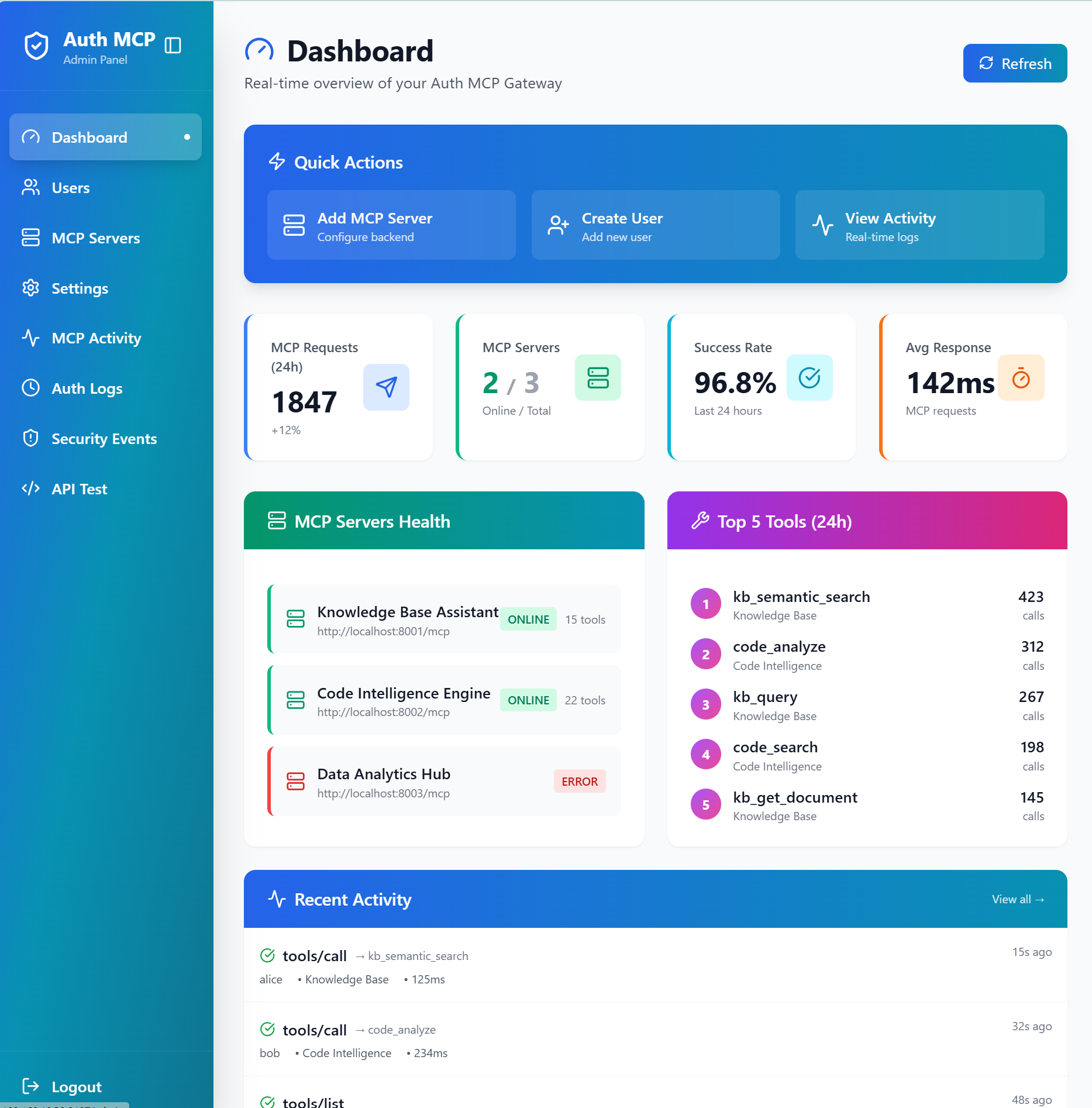
Live statistics, server health monitoring, top tools usage, and recent activity feed
🔧 MCP Servers - Connection Management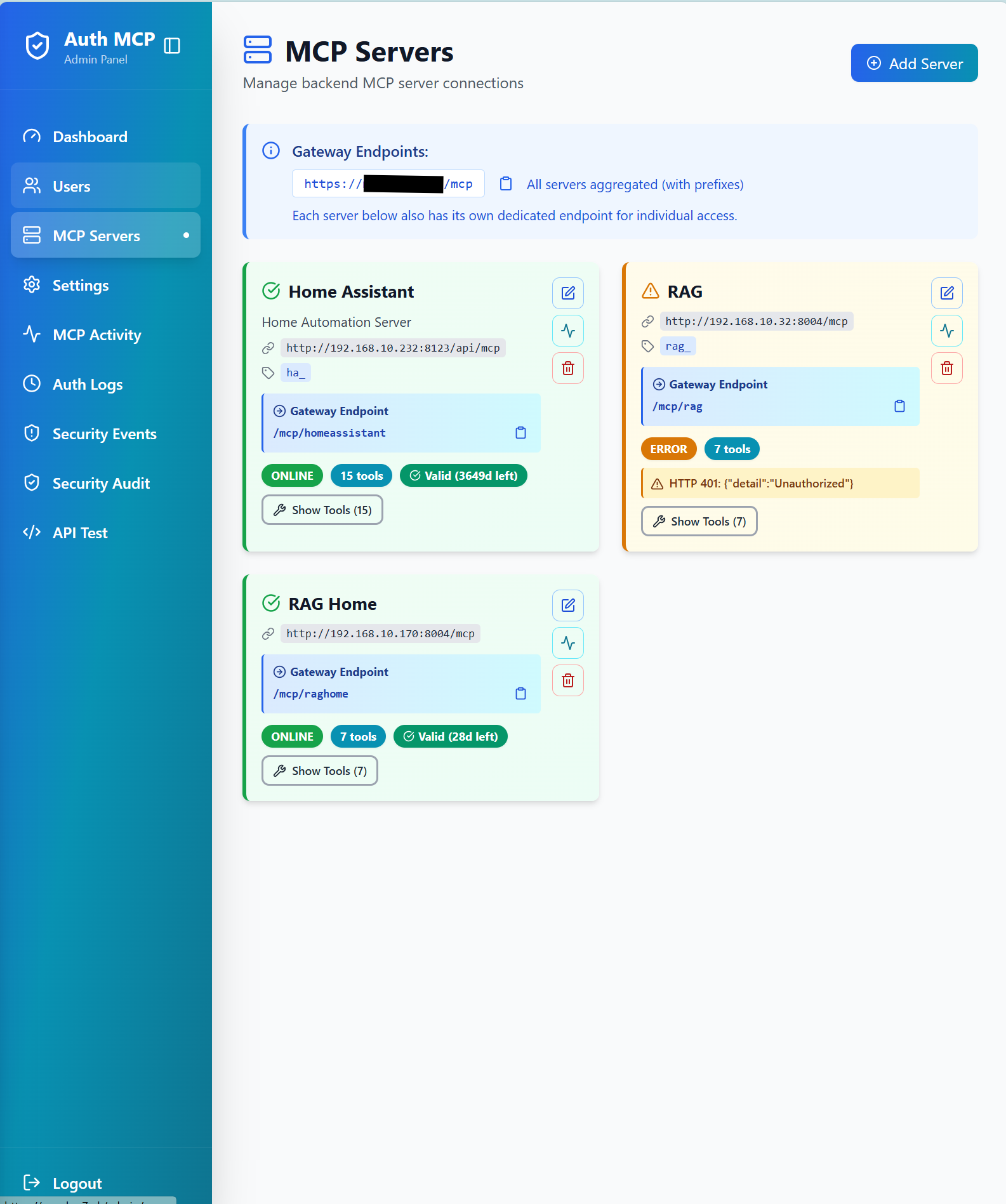
Manage backend MCP server connections with status monitoring and health checks
📊 MCP Activity Monitor - Real-time Request Tracking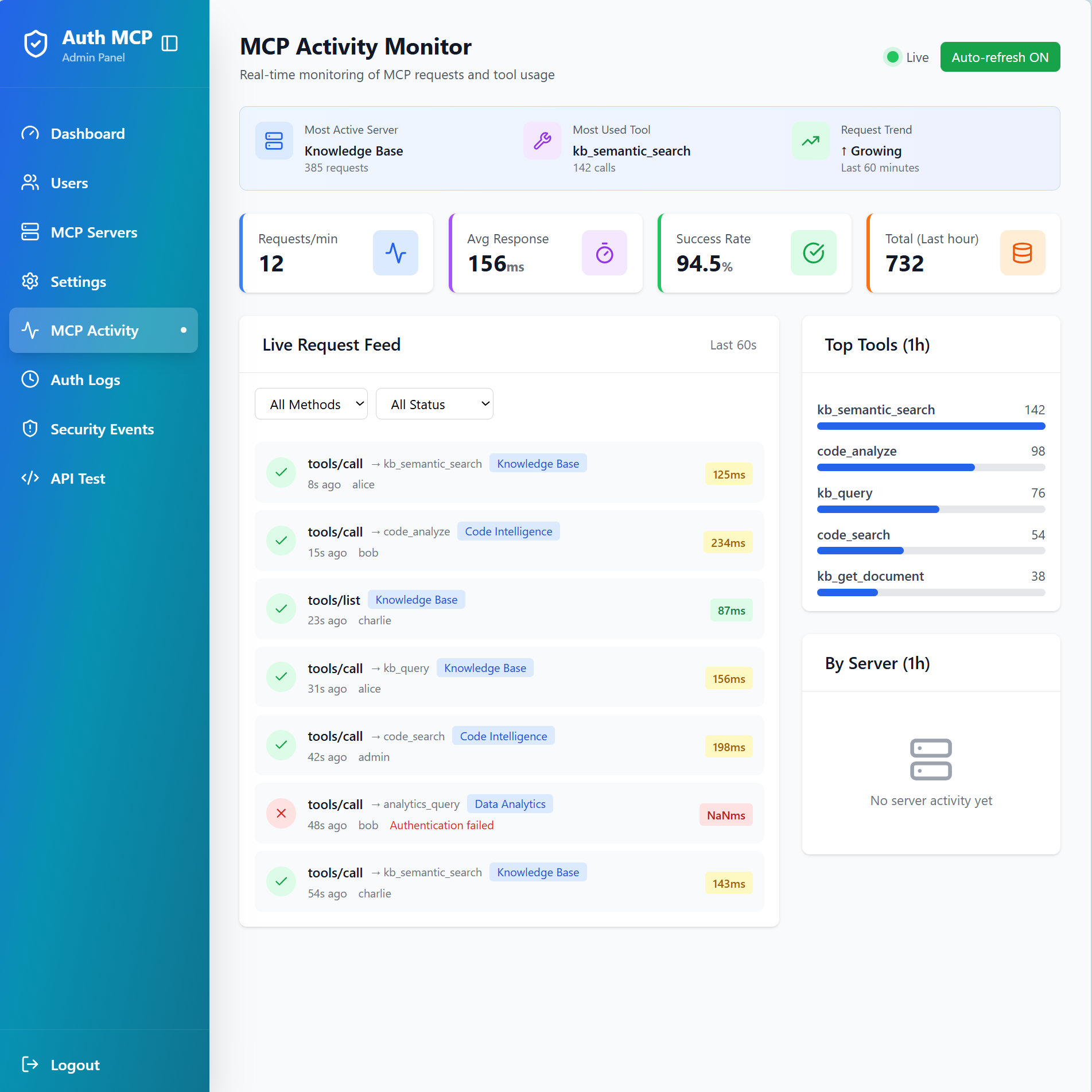
Monitor live MCP requests with detailed metrics, top tools ranking, and request feed
🛡️ Security Events - Threat Detection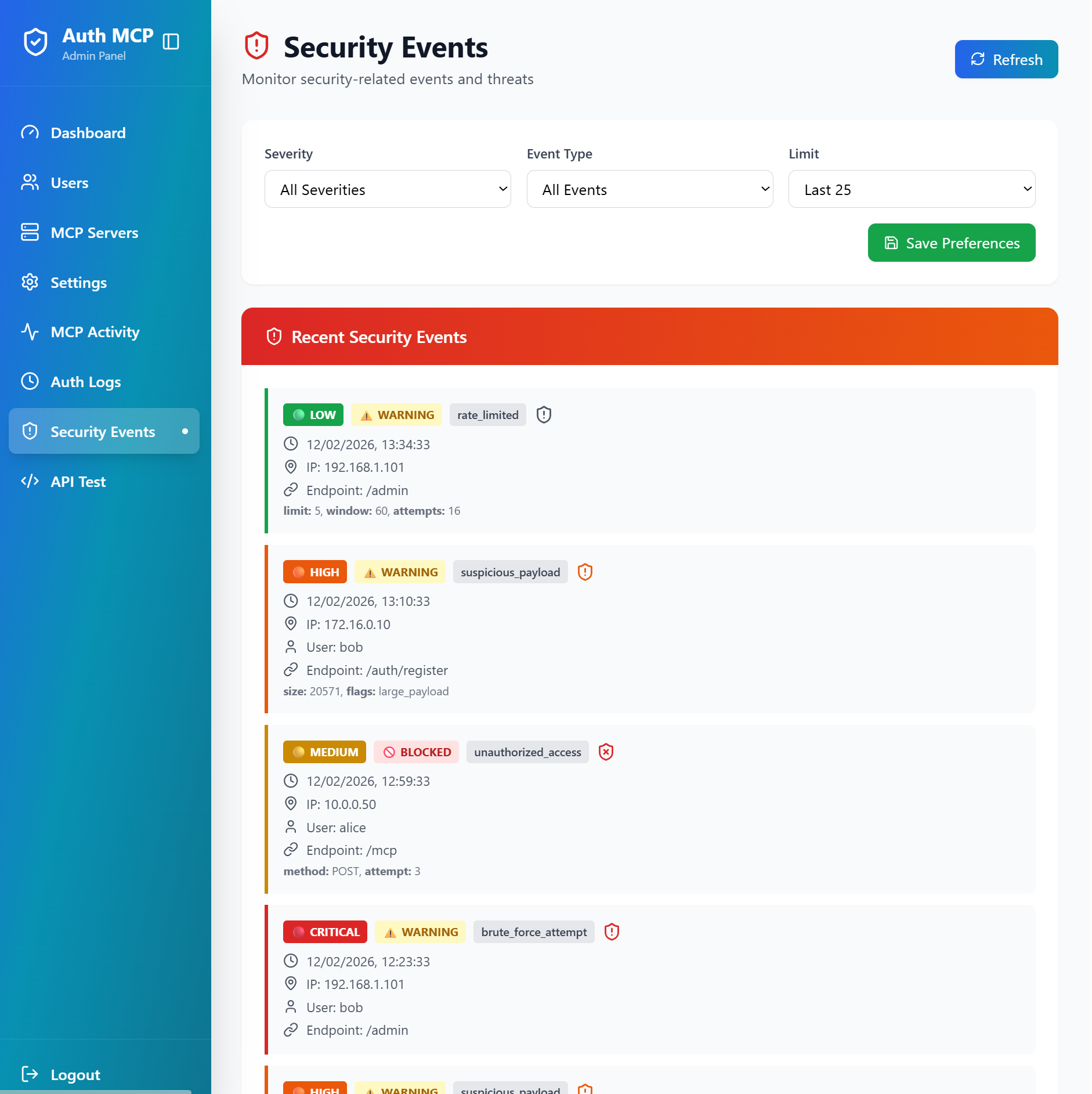
Track security events, rate limiting, suspicious payloads, and unauthorized access attempts
🔒 MCP Security Audit - Vulnerability Scanner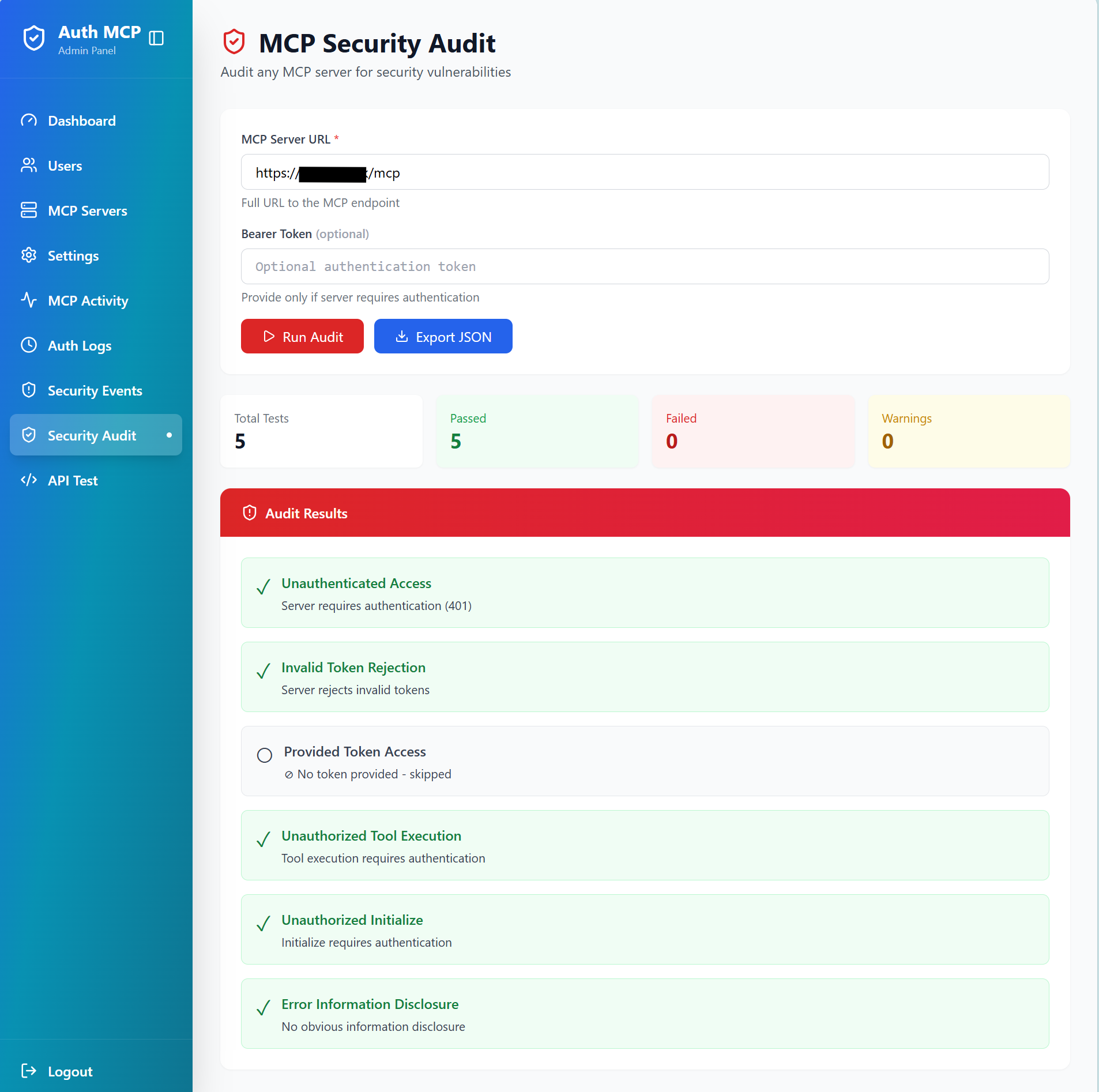
Test any MCP server for security vulnerabilities with comprehensive automated checks
🚀 Quick Start
Option 1: PyPI Package (Recommended)
1. Install:
pip install authmcp-gateway
2. First Run:
authmcp-gateway start
# ✓ Auto-creates .env with JWT_SECRET_KEY
# ✓ Auto-creates data/ directory
# ✓ Initializes database
3. Access Setup Wizard:Open http://localhost:8000/ in your browser to create admin user.
4. Optional - Customize Configuration:
# Edit auto-generated .env or download full example
curl -o .env https://raw.githubusercontent.com/loglux/authmcp-gateway/main/.env.example.pypi

# Common settings to customize in .env:
# PORT=9000                          # Change server port
# PASSWORD_REQUIRE_SPECIAL=false     # Relax password requirements
# LOG_LEVEL=DEBUG                    # More detailed logs

# Restart to apply changes
authmcp-gateway start
Available Commands:
authmcp-gateway start                    # Start server (default: 0.0.0.0:8000)
authmcp-gateway start --port 9000        # Start on custom port
authmcp-gateway start --host 127.0.0.1   # Bind to localhost only
authmcp-gateway start --env-file custom.env  # Use custom config file

authmcp-gateway init-db                  # Initialize database
authmcp-gateway create-admin             # Create admin user via CLI
authmcp-gateway version                  # Show version
authmcp-gateway --help                   # Show all options
Option 2: Docker Compose
Clone and configure:
git clone https://github.com/loglux/authmcp-gateway.git
cd authmcp-gateway
cp .env.example .env
# Edit .env with your settings
Start the gateway:
docker-compose up -dAccess admin panel:
- Open http://localhost:9105/
- Complete setup wizard to create admin user
- Add your MCP servers
⚙️ Configuration
Environment Variables
# Gateway Settings
GATEWAY_PORT=9105              # Host port mapping for Docker (container listens on 8000)
JWT_SECRET_KEY=your-secret-key # JWT signing key (auto-generated if not set)
AUTH_REQUIRED=true             # Enable authentication (default: true)

# Admin Settings
ADMIN_USERNAME=admin           # Initial admin username
ADMIN_PASSWORD=secure-password # Initial admin password
Adding MCP Servers
Via Admin Panel:
- Navigate to MCP Servers → Add Server
- Enter server details:
- Name (e.g., "GitHub MCP")
- URL (e.g., "http://github-mcp:8000/mcp")
- Backend token (if required)
Via API:
curl -X POST http://localhost:9105/admin/api/mcp-servers \
  -H "Authorization: Bearer YOUR_TOKEN" \
  -H "Content-Type: application/json" \
  -d '{
    "name": "GitHub MCP",
    "url": "http://github-mcp:8000/mcp",
    "backend_token": "optional-token"
  }'
💡 Usage
For End Users
Login to get access token:
curl -X POST http://localhost:9105/auth/login \
  -H "Content-Type: application/json" \
  -d '{"username":"your-username","password":"your-password"}'
Use token to access MCP endpoints:
# List tools from all backends
curl -X POST http://localhost:9105/mcp \
  -H "Authorization: Bearer YOUR_ACCESS_TOKEN" \
  -H "Content-Type: application/json" \
  -d '{"jsonrpc":"2.0","id":1,"method":"tools/list"}'

# List resources
curl -X POST http://localhost:9105/mcp \
  -H "Authorization: Bearer YOUR_ACCESS_TOKEN" \
  -H "Content-Type: application/json" \
  -d '{"jsonrpc":"2.0","id":2,"method":"resources/list"}'

# List prompts
curl -X POST http://localhost:9105/mcp \
  -H "Authorization: Bearer YOUR_ACCESS_TOKEN" \
  -H "Content-Type: application/json" \
  -d '{"jsonrpc":"2.0","id":3,"method":"prompts/list"}'

# Ping
curl -X POST http://localhost:9105/mcp \
  -H "Authorization: Bearer YOUR_ACCESS_TOKEN" \
  -H "Content-Type: application/json" \
  -d '{"jsonrpc":"2.0","id":4,"method":"ping"}'
For Administrators
Admin Panel Features:
- Dashboard - Overview of users, servers, and activity
- MCP Activity - Real-time monitoring of all MCP requests
- Security Events - View unauthorized access attempts and suspicious activity
- User Management - Create and manage user accounts
- Token Management - Monitor and refresh backend tokens
🏗️ Architecture
┌──────────────────────────────────────────┐
│      MCP Clients (Claude, Codex, etc.)   │
│      OAuth 2.0 / JWT Authentication      │
└────────────────────┬─────────────────────┘
                     │
┌────────────────────▼─────────────────────┐
│               AuthMCP Gateway            │
│             MCP 2025-03-26 Proxy         │
│                                          │
│  • Full MCP Protocol Proxy               │
│  • Tools / Resources / Prompts           │
│  • OAuth 2.0 + DCR                       │
│  • JWT Auth (HS256/RS256+JWKS)           │
│  • Rate Limiting                         │
│  • Security Logging                      │
│  • Multi-Server Aggregation              │
│  • Health Monitoring                     │
│  • Admin Dashboard                       │
└────────────────────┬─────────────────────┘
                     │
    ┌──────────┬──────────┬──────────┐
    ▼          ▼          ▼          ▼
┌────────┐ ┌────────┐ ┌────────┐ ┌────────┐
│  RAG   │ │WhatsApp│ │ Docs   │ │Custom  │
│  MCP   │ │  MCP   │ │  MCP   │ │  MCP   │
└────────┘ └────────┘ └────────┘ └────────┘
🔌 API Endpoints
Public Endpoints
POST /auth/login- User loginPOST /auth/register- User registration (if enabled)POST /auth/refresh- Refresh access tokenPOST /oauth/register- OAuth dynamic client registration (if enabled)GET /.well-known/oauth-authorization-server- OAuth discovery
Protected Endpoints
POST /mcp- Aggregated MCP endpoint (all servers)POST /mcp/{server_name}- Specific MCP server endpointGET /mcp- Streamable MCP endpoint (SSE/stream clients)GET /auth/me- Current user infoPOST /auth/logout- Logout
Supported MCP Methods
| Method | Description |
|---|---|
initialize |
Dynamic capabilities discovery from backends |
ping |
Health check |
tools/list |
Aggregated tools from all backends |
tools/call |
Routed to correct backend (prefix/mapping/auto-discovery) |
resources/list |
Aggregated resources from all backends |
resources/read |
Routed by URI to owning backend |
resources/templates/list |
Aggregated resource templates |
prompts/list |
Aggregated prompts from all backends |
prompts/get |
Routed by name to owning backend |
completion/complete |
Routed by ref type (prompt/resource) |
logging/setLevel |
Accepted (no-op at gateway level) |
notifications/* |
Gracefully ignored |
Direct tool name (e.g. rag_query) |
Codex-style: routed as tools/call (openai/codex#2264) |
| Unknown namespaced methods | Returns JSON-RPC -32601 Method not found |
Tool Annotations And Safe Retries
For tools/call, the gateway prefers standard MCP tool annotations when deciding whether a tool is read-onlyor safe to retry:
annotations.readOnlyHintannotations.idempotentHintannotations.destructiveHint
Behavior:
- Read-only tools may use safe automatic retry.
- Mutating tools are not retried blindly.
- If a mutating tool is marked idempotent, the gateway preserves or generates
arguments.idempotency_keyand reuses the same key on retry. - If metadata is missing or unclear, the gateway falls back to conservative behavior and disablesautomatic retry for
tools/call.
This keeps the gateway aligned with standard MCP annotations while allowing backend MCP servers toimplement stronger idempotency semantics where needed.
🤖 Codex OAuth (DCR) Login (Manual Callback)
Codex uses OAuth Authorization Code + PKCE and Dynamic Client Registration (DCR). When running in a terminalwithout an auto-launching browser, you must manually open the authorization URL and then call the localhostcallback URL yourself to finish the login.
Steps:
- Add the MCP server in Codex:
codex mcp add rag --url https://your-domain.com/mcp/your-backend
- Codex prints an Authorize URL. Open it in your browser.
- Complete the login (admin/user credentials).
- After successful login you will be redirected to a
http://127.0.0.1:<port>/callback?...URL.Copy that full URL and call it from another terminal:
curl "http://127.0.0.1:<port>/callback?code=...&state=..."
You should see: Authentication complete. You may close this window.
Once completed, Codex shows the MCP server as logged in.
Headless Token Storage (Important)
On headless servers (no desktop environment), Codex cannot access the OS keyring to store OAuth tokens.This causes "Auth required" errors even after a successful login. To fix this, switch to file-based token storage:
# ~/.codex/config.toml
mcp_oauth_credentials_store = "file"
Reference: Codex Config Reference
Without this parameter Codex fails to refresh tokens because it looks for a keyring security service andfails. That forces you to re-login each time again and again following the manual procedure above.After updating the config, restart Codex.
Discovery Compatibility
Some MCP clients probe OpenID discovery using non-standard paths after a successful token exchange. Inaddition to the standard /.well-known/openid-configuration, the gateway also serves the same discoverydocument at /oauth/token/.well-known/openid-configuration as a compatibility alias.
If you are already locked out and see this warning:
⚠ The rag MCP server is not logged in. Run `codex mcp login rag`.
⚠ MCP startup incomplete (failed: rag)
You can refresh tokens with the helper script without going through the manual authentication procedure again:
python3 scripts/codex_refresh_mcp.py rag https://your-domain.com/oauth/token
Codex Multi-Machine Note
If Codex runs on multiple machines, each machine stores its own local tokens. In that case, a login from onemachine can invalidate tokens on another when Enforce Single Session is enabled (one active token per user).Disable Enforce Single Session in the admin settings to avoid forced logouts in multi-machine setups.
🔐 Security
Security Features
- ✅ JWT-based authentication with refresh tokens
- ✅ Rate limiting per user
- ✅ Security event logging
- ✅ MCP request tracking with suspicious activity detection
- ✅ Health monitoring for backend servers
- ✅ CORS protection
- ✅ Secure credential storage
🛠️ Development
Release process: see docs/RELEASE.md.
Local Development
# Clone repository
git clone https://github.com/loglux/authmcp-gateway.git
cd authmcp-gateway

# Create virtual environment
python3 -m venv venv
source venv/bin/activate  # or `venv\Scripts\activate` on Windows

# Install dependencies
pip install -e .

# Run gateway
authmcp-gateway
Running Tests
The suite is split into fast unit tests and slower integration tests(the latter use real SQLite fixtures, ~4.5 s setup per test):
make test        # tests/unit only — ~3 min, run before every release
make test-slow   # tests/integration only
make test-all    # both (full suite)
make test-cov    # full suite + HTML coverage report
Project Structure
authmcp-gateway/
├── src/authmcp_gateway/
│   ├── admin/           # Admin panel routes and logic
│   ├── auth/            # Authentication & authorization
│   ├── mcp/             # MCP proxy and handlers
│   ├── security/        # Security logging and monitoring
│   ├── middleware.py    # Request middleware
│   └── app.py           # Main application
│   ├── templates/       # Jinja2 templates (admin UI)
├── docs/                # Documentation
├── tests/               # Test suite
└── docker-compose.yml   # Docker deployment
📊 Monitoring
Real-Time Dashboard
Access /admin/mcp-activity for:
- Live request feed (updates every 3 seconds)
- Requests per minute
- Average response times
- Success rates
- Top tools usage
- Per-server statistics
Logs
View logs in real-time:
docker logs -f authmcp-gateway
🔧 Troubleshooting
Cannot access admin panel:
- Ensure you've completed the setup wizard at
/setup - Check that cookies are enabled
- Verify JWT_SECRET_KEY is set correctly
MCP server shows as offline:
- Check server URL is correct and reachable
- Verify backend token if required
- View error details in MCP Servers page
401 Unauthorized errors:
- Token may have expired - use refresh token
- Verify Authorization header format:
Bearer YOUR_TOKEN - Check user has permission for the MCP server
For more help, see the troubleshooting and usage sections above.
License
MIT License - see LICENSE file for details.


