
WhatsApp MCP Stream

A WhatsApp MCP server built around Streamable HTTP transport, using Baileys for WhatsApp connectivity, with a web admin UI and bidirectional media flow (upload + download).
Key points:
- Transport: Streamable HTTP at
/mcp - Engine: Baileys
- Admin UI: QR, status, logout, runtime settings, chat history viewer
- Media: upload endpoints +
/mediahosting + MCP download tool
Quick Start (Docker)
# build and run

docker compose build

docker compose up -d
The server will be available at:
- Admin UI:
http://localhost:3003/admin - MCP endpoint:
http://localhost:3003/mcp - Media files:
http://localhost:3003/media/<filename>
DNS on hosts with --iptables=false
On some NAS / hardened hosts (e.g. Synology with dockerd --iptables=false), Docker's embedded DNS proxy (127.0.0.11) has no iptables DNAT rules and refuses connections inside containers.
Fix: copy resolv.conf.example to resolv.conf and add a volume override:
cp resolv.conf.example resolv.conf
Then add to a local docker-compose.override.yml (not committed):
services:
  mcp-whatsapp:
    volumes:
      - ./resolv.conf:/etc/resolv.conf:ro
docker compose up picks up the override automatically.
Runtime Settings
Settings can be edited in the admin UI and are persisted to SETTINGS_PATH (defaults to MEDIA_DIR/settings.json).
Admin UI
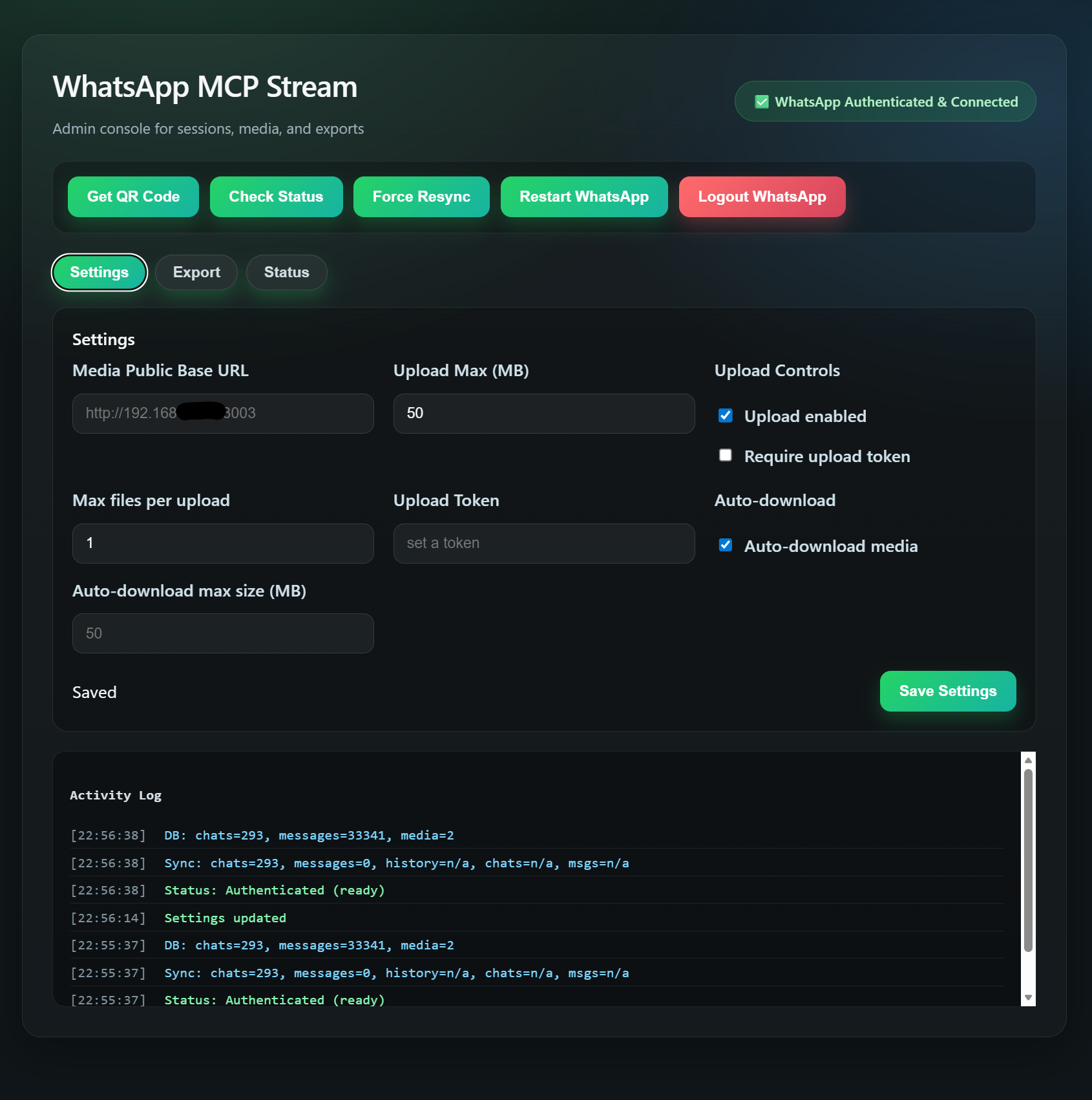 Admin console with runtime settings, QR linking, chat history viewer, export, and status.
Supported settings:
media_public_base_urlupload_max_mbupload_enabledmax_files_per_uploadrequire_upload_tokenupload_tokenauto_download_mediaauto_download_max_mb
Authentication
Built-in authentication is not implemented yet. In production, use a gateway that enforces auth. This project works well behind authmcp-gateway:
https://github.com/loglux/authmcp-gateway
Media Upload API
Base64 JSON:
curl -X POST http://localhost:3003/api/upload \
  -H "Content-Type: application/json" \
  -d {filename:photo.jpg,mime_type:image/jpeg,data:<base64>}
Multipart (recommended for large files):
curl -X POST http://localhost:3003/api/upload-multipart \
  -F "file=@/path/to/file.jpg"
Both return url and (if configured) publicUrl.
Sending Local Files via send_media
The ./files/ directory in the project root is bind-mounted into the container at /app/files. Drop any file there and reference it immediately — no container restart needed:
# On host:
cp report.pdf /path/to/whatsapp-mcp-stream/files/

# In send_media:
media_path: /app/files/report.pdf
For a URL source, pass media_url directly to send_media or stage_media — the server downloads the file itself without base64.
Upload Auth (Optional)
If require_upload_token=true, provide a token with either:
x-upload-token: <token>Authorization: Bearer <token>
MCP Transport
The server exposes Streamable HTTP at /mcp.
Typical flow:
POST /mcpwith JSON-RPCinitialize- Use the returned
mcp-session-idheader for subsequent requests POST /mcpfor tool calls
Note: clients must send Accept: application/json, text/event-stream on initialize.
Smoke Test
Quick regression smoke for MCP tools:
npm run smoke:mcp
Optional custom target:
MCP_BASE_URL=http://localhost:3003 npm run smoke:mcp
MCP Tools
Auth
| Tool | Description |
|---|---|
get_qr_code |
Get the latest WhatsApp QR code as an image for authentication. |
check_auth_status |
Check if the WhatsApp client is authenticated and ready. |
logout |
Logout from WhatsApp and clear the current session. |
Contacts
| Tool | Description |
|---|---|
search_contacts |
Search contacts by name or phone number. |
resolve_contact |
Resolve a contact by name or phone number (best matches). |
get_contact_by_id |
Get contact details by JID. |
get_profile_pic |
Get profile picture URL for a JID. |
get_group_info |
Get group metadata and participants by group JID. |
Chats
| Tool | Description |
|---|---|
list_chats |
List chats with metadata and optional last message. |
get_chat_by_id |
Get chat metadata by JID. |
list_groups |
List group chats only. |
get_direct_chat_by_contact_number |
Resolve a direct chat JID by phone number. |
get_chat_by_contact |
Resolve a contact by name or phone number and return chat metadata. |
analyze_group_overlaps |
Find members that appear across multiple groups. |
find_members_without_direct_chat |
Find group members with no direct chat. |
find_members_not_in_contacts |
Find group members missing from contacts. |
run_group_audit |
Run combined group audit as one routine operation. |
Messages
| Tool | Description |
|---|---|
list_messages |
Get messages from a specific chat. |
search_messages |
Search messages by text (optionally scoped to a chat). |
get_message_by_id |
Get a specific message by ID (jid:id). |
get_message_context |
Get recent messages around a specific message. |
get_last_interaction |
Get the most recent message for a JID. |
send_message |
Send a text message to a person or group. Supports optional idempotency_key. |
Media
| Tool | Description |
|---|---|
send_media |
Send media (image/video/document/audio). Accepts media_path, media_url, or media_content (base64). Supports optional idempotency_key. |
stage_media |
Save a file to the server's media directory and return its local path. Use the returned saved_path in send_media (media_path) — avoids base64 when the source is a URL (server downloads directly), or allows sending the same file to multiple recipients without re-uploading. |
download_media |
Download media from a message. |
Utility
| Tool | Description |
|---|---|
ping |
Health check tool. |
Recovery Notes
This service contains an intentional recovery workaround for Baileys/WhatsApp session-state corruption.
Why it exists:
- In production we observed cases where the container stayed alive and MCP still answered, but the WhatsApp session was functionally broken.
- The most common indicators were Baileys errors like
failed to find key ... to decode mutationandfailed to sync state from version. - In that state, a manual container restart often restored service.
Current behavior:
- On app-state corruption signals, the service first tries a soft recovery with
forceResync(). - If the same class of failure repeats within a time window, it escalates to an internal WhatsApp client restart.
- On disconnects such as
Connection Terminated, the service schedules a disconnect watchdog and escalates to an internal restart if the socket does not return toopenin time. - The reconnect lifecycle is guarded against nested lock deadlocks, so disconnect recovery can complete without requiring a manual container restart.
- Recent production observations show repeated socket disconnects (
428 Connection Terminated,503 Stream Errored) being auto-recovered back toopen. - A dedicated
/healthzendpoint reports503only when the service is genuinely stuck outside the allowed recovery window. - Docker health checks use
/healthz, so the container is restarted only after in-process recovery has had a chance to work.
These recovery mechanisms reduce operator intervention and improve resilience against common WhatsApp/Baileys session failures.
License
MIT
Persistence
Chats and messages are persisted to a local SQLite database stored in the session volume.
Environment variables:
| Variable | Default | Description |
|---|---|---|
DB_PATH |
<SESSION_DIR>/store.sqlite |
SQLite database path for chats/messages persistence. |
WA_EVENT_LOG |
0 |
Enable detailed WhatsApp event logs. |
WA_EVENT_STREAM |
0 |
Write raw Baileys event stream to a file for deep debugging. |
WA_EVENT_STREAM_PATH |
/app/logs/wa-events.log |
File path for the event stream log. |
WA_RESYNC_RECONNECT |
1 |
Enable reconnect safety net after force resync. |
WA_RESYNC_RECONNECT_DELAY_MS |
15000 |
Delay before reconnect after force resync (ms). |
WA_SYNC_RECOVERY_COOLDOWN_MS |
300000 |
Minimum delay between automatic app-state recoveries. |
WA_SYNC_RECOVERY_WINDOW_MS |
900000 |
Time window used to count repeated app-state corruption failures. |
WA_SYNC_SOFT_RECOVERY_LIMIT |
2 |
Number of soft recoveries before escalating to an internal restart. |
WA_READINESS_GRACE_MS |
180000 |
Grace period during recovery/disconnect before /healthz turns unhealthy. |
WA_DISCONNECT_RECOVERY_DELAY_MS |
30000 |
How long to wait after a socket close before the disconnect watchdog forces reconnect/restart. |
WA_DISCONNECT_RECOVERY_RESTART_CODES |
428 |
Comma-separated disconnect status codes that should escalate straight to an internal restart watchdog. |
WA_SEND_DEDUP_WINDOW_MS |
45000 |
Suppress exact duplicate send_message requests to the same JID within this window. |
WA_IDEMPOTENCY_TTL_MS |
86400000 |
How long completed send_message idempotency records are retained in SQLite for safe retries. |
WA_MESSAGE_INDEX_MAX |
20000 |
Max in-memory entries for message index (jid:id -> raw message). |
WA_MESSAGE_KEY_INDEX_MAX |
20000 |
Max in-memory entries for message key index (id -> raw message). |
WA_INITIALIZE_TIMEOUT_MS |
120000 |
Race the WhatsApp client initialise against this deadline; set to 0 to disable. Throws on timeout so recovery can retry instead of hanging. |
WA_AUTO_DOWNLOAD_CONCURRENCY |
3 |
Max parallel auto-downloads. Auto-download runs through an in-process bounded queue so a burst of inbound media cannot saturate the I/O. |
WA_AUTO_DOWNLOAD_QUEUE_MAX |
200 |
Max queued auto-download jobs. Excess is dropped FIFO (oldest first) with a warning log; recent messages stay prioritised. |
MCP_HTTP_ENABLE_JSON_RESPONSE |
1 |
Use direct JSON responses for Streamable HTTP POST requests by default. Set to 0 to force the older SSE-style POST response handling. |
Additional transport diagnostics:
/mcpPOST requests now log request lifecycle events inlogs/mcp-whatsapp.log- this includes request entry, transport dispatch,
transport.handleRequestcompletion, and HTTPfinish/close - use these logs to determine whether latency happens before the response leaves
whatsapp-mcp-streamor after that on the gateway/client side
Chat History API
Browse stored chats and messages via:
GET /api/chats?limit=50&offset=0&q=<search> — paginated chat list, optionally filtered by name.
GET /api/chats/:jid/messages?limit=50&offset=0 — paginated messages for a chat (newest first).
Both endpoints are used by the Chats tab in the admin UI.
Export
Export a chat (JSON + optional downloaded media) via:
GET /api/export/chat/:jid?include_media=true
If include_media=true, the ZIP includes files already downloaded via download_media. It does not fetch missing media from WhatsApp.


