
Email Local MCP
Give your AI agent every one of your mailboxes, without giving anything to acloud service. A local MCP server that letsClaude Code, Claude Desktop, Cursor, VS Code or Windsurf search, read, send,organize and clean up mail across all your accounts at once, over plainIMAP/SMTP. Gmail, iCloud, Fastmail, Microsoft 365, or any IMAP host.
Your mail is read by a program running on your own machine. Nothing is uploaded,proxied, or seen by anyone, including this project.




Pre-1.0. It works and it is in daily use, but tool names and options maystill change between versions.
Install in one line
claude mcp add email-local -- npx -y email-local-mcp
npx -y email-local-mcp add [email protected] --default
That is the whole setup. Restart your agent and ask it to list_accounts.
Note on the examples below.
npxruns the tool without installing abinary, so there is no bareemail-local-mcpcommand on your PATH. Everyexample in this README is written asemail-local-mcp …; if you installedwithnpx, prefix it withnpx -y. A Homebrew orfrom-source install gives you the bare command.
Prefer a menu bar app, a Homebrew install, or no terminal at all? SeeOther ways to install.
What you can actually ask for
Once it is connected, these are ordinary requests:
- "What did I miss this week across all my accounts?"
- "Find the invoice from Acme, any mailbox, and save the PDF to my desktop."
- "Reply to Sarah's last email agreeing to Tuesday, but keep it short."
- "Unsubscribe sweep: trash every promotional email older than a year."
- "Move everything from my accountant into a Tax folder."
The last two touch thousands of messages. They are still one request, becausethe bulk tools work on a whole search result rather than one message at a time.
Is it safe to give an agent your email?
That is the right question to ask, so here is the honest answer in four parts.
1. Your mail never leaves your machine
There is no server run by this project, no account to create, and no telemetry.The engine is a Node process on your computer that opens a direct IMAP/SMTPconnection to your mail provider. The only parties involved are you, yourcomputer, and your provider, exactly as with any desktop mail client.
Your agent does see the messages it is asked to read, because that is the point.That happens on whatever terms you already have with your agent.
2. Your password is not the credential
You never give it your real password. You create an App Password (or sign inwith OAuth), a per-app credential you can revoke at any time withouttouching your account. It is stored only in your operating system's credentialstore:
| Platform | Where credentials live |
|---|---|
| macOS | Keychain |
| Windows | Credential Manager |
| Linux | Secret Service (gnome-keyring / KWallet) |
Never in a config file, never in the repo, never in a log line, and never in aresponse your agent can read back.
3. Nothing outside your machine can reach the server
The always-on HTTP mode is locked down three ways at once, because a local portthat speaks to your mailbox is worth attacking:
- Bound to
127.0.0.1only. Not reachable from your network, let alone theinternet. - A bearer token on every request. Generated on first run and stored withpermissions only you can read.
Originvalidation. This is what stops a malicious website in yourbrowser from quietly talking to the port behind your back, an attack calledDNS rebinding.
4. The destructive things are gated
Deleting mail is irreversible, so it is not treated like reading it:
- Trash is the default.
trash_messageis reversible. Permanent deletion isa separate tool that refuses to run withoutconfirm:true. - Bulk operations preview first.
dryRun:truereports what would beaffected and changes nothing. Anything destructive, or any batch over 100messages, requiresconfirm:true. - Accounts can be read-only. Add one with
--read-onlyand every write isrefused for that account, whatever the agent decides to try.
Full detail, including an App Password's blast radius and how to revoke one, isin SECURITY.md. The code is MIT licensed, so none of the abovehas to be taken on trust.
Add an account
Two ways. Most people want the first.
App Password (simplest)
Create a per-app credential with your provider, then:
email-local-mcp add [email protected] --default
email-local-mcp add [email protected] --provider icloud
email-local-mcp add [email protected] --provider imap --imap-host mail.work.com --smtp-host smtp.work.com
| Provider | Where to create it | Notes |
|---|---|---|
| Gmail | https://myaccount.google.com/apppasswords | Turn on 2-Step Verification first. IMAP is always on. |
| iCloud | https://account.apple.com → Sign-In and Security → App-Specific Passwords | Needs two-factor auth on the Apple Account. |
| Fastmail | Settings → Password & Security → App Passwords | Scope it to IMAP + SMTP. |
| Other IMAP | Your host's control panel | Some hosts require enabling IMAP access explicitly. |
Useful flags: --default (used when a tool omits account), --read-only(refuse every write), --name "Full Name" (the display name recipients see).
OAuth (required for Microsoft 365)
login connects through the provider's own sign-in page, with no App Password.For Microsoft it is the only option, since Exchange Online no longer acceptsbasic auth for IMAP.
email-local-mcp login [email protected]    --provider gmail     --client-id … --client-secret …
email-local-mcp login [email protected]  --provider microsoft --client-id … --tenant contoso.onmicrosoft.com
One piece of setup is yours: you register the OAuth client and pass its id.That is not busywork. Mail scopes are "restricted", so a client id shippedinside a public binary would force this project through Google verification andan annual security assessment, and until it passed, your refresh tokens wouldexpire every week. A client you create yourself has none of those limits andtakes about five minutes. docs/oauth.md walks through bothproviders.
Tokens refresh automatically and live in the same credential store as AppPasswords. email-local-mcp logout <email> disconnects and revokes at theprovider where the provider supports it.
What it can do
Full CRUD across every connected account:
| Kind | Operations |
|---|---|
| Read | list accounts · search · read message · read thread (Gmail) · list labels (Gmail) · fetch attachments |
| Create | send · save draft · create label · add an account |
| Update | add/remove labels · read/unread · star/unstar · archive · move |
| Delete | trash (reversible) · permanent delete (explicit confirm:true) |
| Bulk | one call acts on every message matching a query: mark_all_read · bulk_modify_labels · bulk_move · bulk_trash · bulk_delete · empty_spam · empty_trash |
Every tool takes an optional account (the email address). Omit it to use yourdefault.
Cleaning up in bulk
The bulk tools are query-first. They take{ query?, mailbox?, dryRun?, confirm?, max? } and act on the whole matching setin one pass, rather than one tool call per message. "Trash every promo olderthan a year" is a single call, not four hundred.
dryRun:truepreviews the matched count and a sample, changing nothing.- Destructive or large (>100 message) batches require
confirm:true. - Per-message failures are reported, never hidden.
- Spam and Trash are reachable with the
mailboxparam, e.g.'[Gmail]/Spam'.
For very large sweeps, the removing operations act on up to max messages percall (default 2000) and return { matched, affected, remaining, done }. Ifdone is false, re-run the identical call until it is true. Messages thatwere acted on leave the search scope, so it resumes cleanly and a 10,000 messagecleanup never trips your agent's tool timeout.
Providers
Every provider speaks IMAP/SMTP, so the core (search, read, send, draft, move,archive, trash, delete, attachments, bulk) works everywhere. What differs iswhat the protocol itself exposes:
| Gmail | iCloud · Fastmail · Microsoft 365 · any IMAP host | |
|---|---|---|
| Status | Fully supported | Works, smaller feature set |
| Organizing | Labels, many per message | Folders, one per message |
| Search | Native Gmail syntax (from:x has:attachment older_than:1y) |
Server-side text match only |
| Threads | get_thread |
Not available |
| Add it with | (default) | --provider icloud · --provider fastmail · --provider imap --imap-host … · Microsoft needs login |
list_accounts reports each account's provider, so an agent can tell whichrules apply before it acts. Mixing is the point: a Gmail work account and aniCloud personal account can be connected at once, and every tool takes anoptional account to choose between them.
Other ways to install
The macOS menu bar app (no terminal at any point)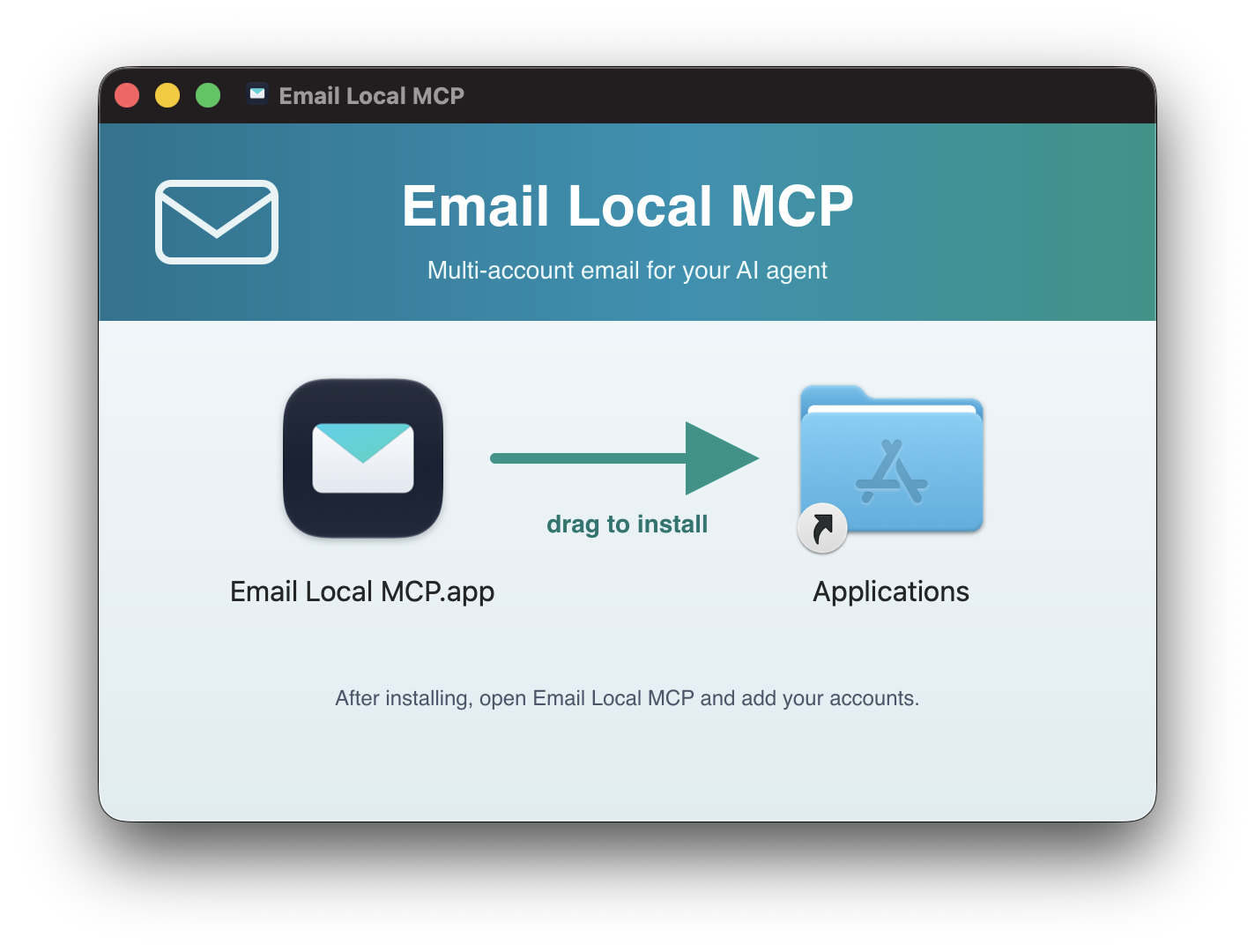
The app supervises the engine and gives you an Add Account window, anInstall into Agents button, and Start at Login.
Download
Email-Local-MCP-<version>-universal.dmgfrom thelatest release.One universal build runs on Apple Silicon and Intel, with Node bundledinside, so there are no prerequisites.Open the DMG and drag Email Local MCP to Applications.
The first launch is blocked. The app is ad-hoc signed and not yetnotarized, so macOS refuses it once. Open System Settings > Privacy &Security, find the "Email Local MCP was blocked" notice, click OpenAnyway, and confirm. macOS remembers.
Advanced: clear the quarantine flag from the terminal insteadxattr -dr com.apple.quarantine "/Applications/Email Local MCP.app"A mail icon appears in the menu bar. Open Add Account and connect amailbox. The first time a password is read, macOS shows a Keychain AlwaysAllow prompt. Click it once. (It re-prompts after each update while buildsare ad-hoc signed; a notarized release will end that.)
That is the last DMG you download. The app updates itself, checking on launch,every 6 hours, and when you open the menu. Updates are cryptographicallyverified against a key pinned inside the app, so only releases signed by themaintainer are ever installed.
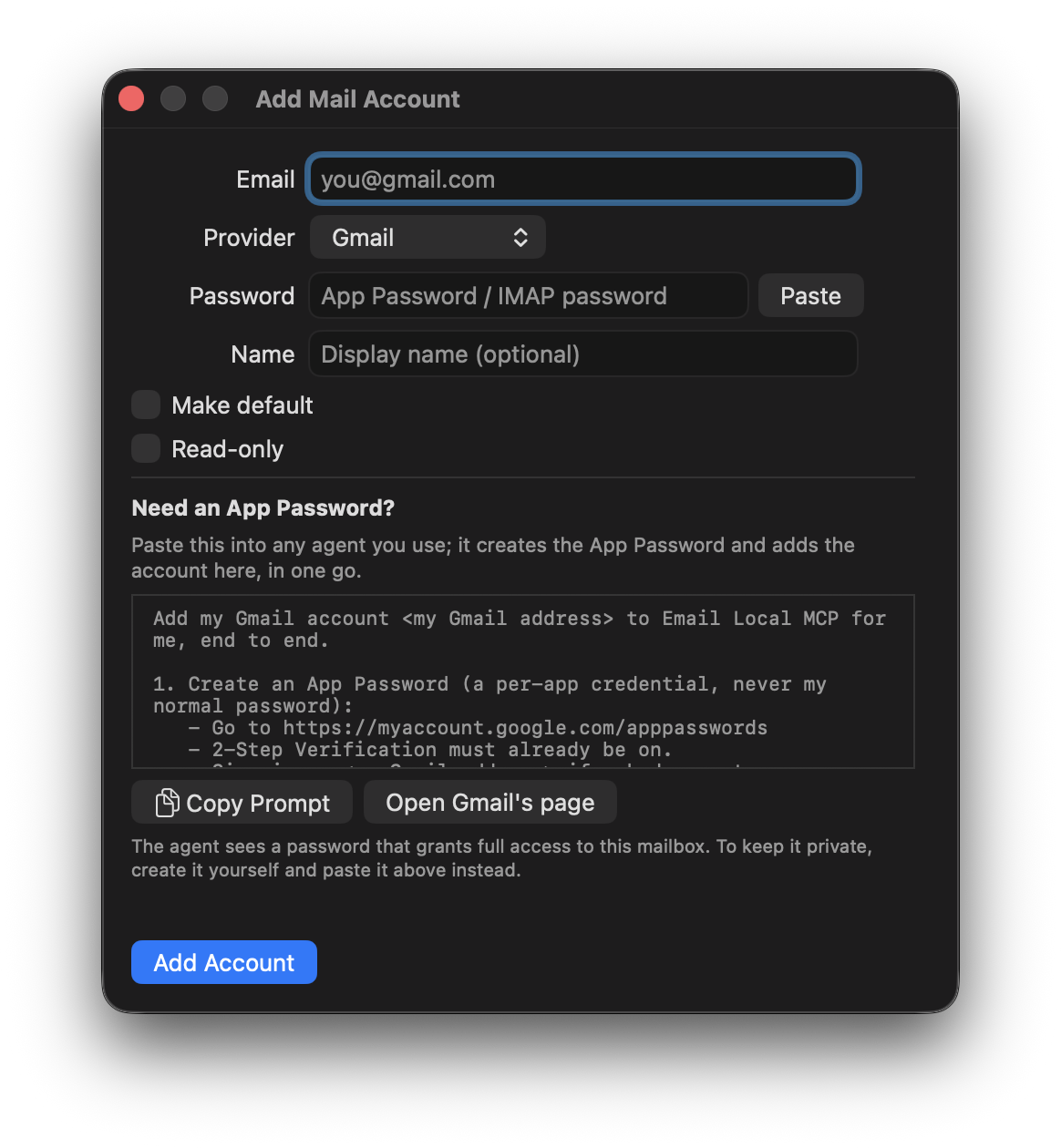
The Add Account window covers Gmail, iCloud, Fastmail, or a custom IMAP host.The App Password never touches the app itself: it is posted once to 127.0.0.1and the engine puts it straight in the Keychain.
brew tap marcinwalendowski/tap
brew install email-local-mcp          # the CLI and MCP server
brew install --cask email-local-mcp   # the menu bar app
They are independent, and most people want the first. brew install with noflag resolves to the formula, so the app genuinely needs --cask.
Then:
claude mcp add email-local -- email-local-mcp
email-local-mcp add [email protected] --default
The cask does not remove the Gatekeeper step described above. Homebrew installsthe app; it does not vouch for it.
On a macOS beta or seed build, brew install of the formula can fail with acomplaint that your Xcode is outdated, naming a version Apple has only releasedas a Beta. That is Homebrew deriving the requirement from the OS version, not aproblem with this formula. Use the cask or npx until a stable Xcode ships.
git clone https://github.com/MarcinWalendowski/email-local-mcp.git
cd email-local-mcp && ./scripts/setup-cli.sh --install-agents
node dist/index.js add [email protected] --default
On Windows, run npm ci && npm run build in place of the setup script. Theengine runs on macOS, Windows and Linux.
Paste this into Claude Code, Cursor, or any coding agent:
Install the Email Local MCP email server for me: run
claude mcp add email-local -- npx -y email-local-mcp
Then restart yourself, confirm it worked by calling list_accounts, and walk me
through adding my first mail account with npx -y email-local-mcp add.
Connect it to your agent
email-local-mcp install (or the app's Install into Agents button) writesthe right config for every agent it detects:
| Agent | Transport | What gets written |
|---|---|---|
| Cursor · Claude Code · VS Code · Windsurf | HTTP | local URL + Authorization: Bearer <token> |
| Claude Desktop | stdio | spawn command (its own engine, same credential store) |
Restart the agent afterwards, then ask it to list_accounts.
Upgrading from a previous name
This project has shipped as gmail-mcp and as anymail-mcp. If you usedeither, your accounts come across on their own the first time you startEmail Local MCP: the registry with its flags, App Passwords, and OAuth refreshtokens. There is nothing to run.
To watch it happen, or to find out why an account did not make it:
email-local-mcp import-legacy          # explicit run, with a report
email-local-mcp import-legacy --force  # look again after it has already run
- Your old data is copied, not moved.
~/.anymail-mcp/and the oldcredential-store items stay where they are. Delete them once you aresatisfied. - It runs once. A marker at
~/.email-local-mcp/legacy-import.jsonrecordsthe run, so an account you delete afterwards stays deleted. If a credentialcould not be read, from a locked Keychain say, the marker is deliberately notwritten and the next start tries again.
Re-registering the MCP server is the one step that is not automatic, since theold spawn command names the old binary.
How it works
Agent (Claude Code / Desktop / Cursor ...)
   │  MCP over stdio or HTTP (127.0.0.1, bearer token)
   ▼
Email Local MCP engine  (local Node process, yours)
   │  one provider per account
   │
   ├─ GmailProvider  ── ImapFlow → imap.gmail.com:993    (+ X-GM-*: labels, threads, raw search)
   │                    Nodemailer→ smtp.gmail.com:465
   │
   └─ ImapProvider   ── ImapFlow → imap.mail.me.com:993  (iCloud / Fastmail / Microsoft / any host)
                        Nodemailer→ smtp.mail.me.com:587   folders, IMAP SEARCH
   ▼
Each account authenticated with its own credential, read from the OS store
GmailProvider extends ImapProvider, so Gmail is the generic IMAP behaviourplus the X-GM-* extensions. Adding a provider means extending ImapProviderand adding a preset. See src/node/providers/.
Why IMAP/SMTP rather than the Gmail HTTP API. Full-CRUD Gmail API accessneeds restricted OAuth scopes, which for personal @gmail.com accounts forcesGoogle app verification plus an annual CASA security assessment, or a 7-daytoken expiry in Testing mode. App Passwords over IMAP sidestep all of it and runfine in a local process. IMAP also needs a long-lived TCP socket, so this couldnot be a serverless function in any case.
The macOS app internals are in app/BUILD.md; the distributionpipeline is in docs/DISTRIBUTION.md.
Roadmap
- Generic IMAP providers: iCloud, Fastmail, and any IMAP host.
- Universal DMG: one macOS app for Apple Silicon and Intel, Node bundled.
- Windows and Linux CLI, using each OS's native credential store.
- OAuth sign-in, which also brings in Microsoft 365 / Outlook.
- Homebrew tap: a formula for the CLI and a cask for the app.
- npm / npx distribution, which is now the one-line install.
- Automatic import of accounts from a previous install.
- Richer search for IMAP providers: map the common Gmail-style operators(
from:,subject:,has:attachment, date ranges) onto IMAP SEARCH, soa query behaves the same across accounts. - More providers: Yahoo.
- A sign-in button in the app, so OAuth does not need the CLI.
- A notarized DMG, so the first launch opens without the Gatekeeper step.
Contributing
See CONTRIBUTING.md. Security reports: SECURITY.md.
License
MIT. See LICENSE.


