
SAP Note Search MCP Server
MCP server for searching SAP Notes/KB articles using SAP Passport authentication and Playwright automation



This Model Context Protocol (MCP) server provides direct access to SAP Notes and Knowledge Base articles through Cursor AI. It uses SAP Passport certificate authentication and Playwright browser automation to retrieve actual note content from SAP's systems.
✨ Features
- 🔍 Direct SAP Note access - Retrieve full note content and metadata
- 🎫 SAP Passport authentication - Secure certificate-based authentication
- 🤖 Playwright automation - Handles complex SAP authentication flows
- 💾 Smart caching - Authentication tokens cached locally
- 🔧 Debug-friendly - Comprehensive logging and troubleshooting options
- 📋 MCP compliant - Works seamlessly with Cursor AI
Live Preview in Cursor
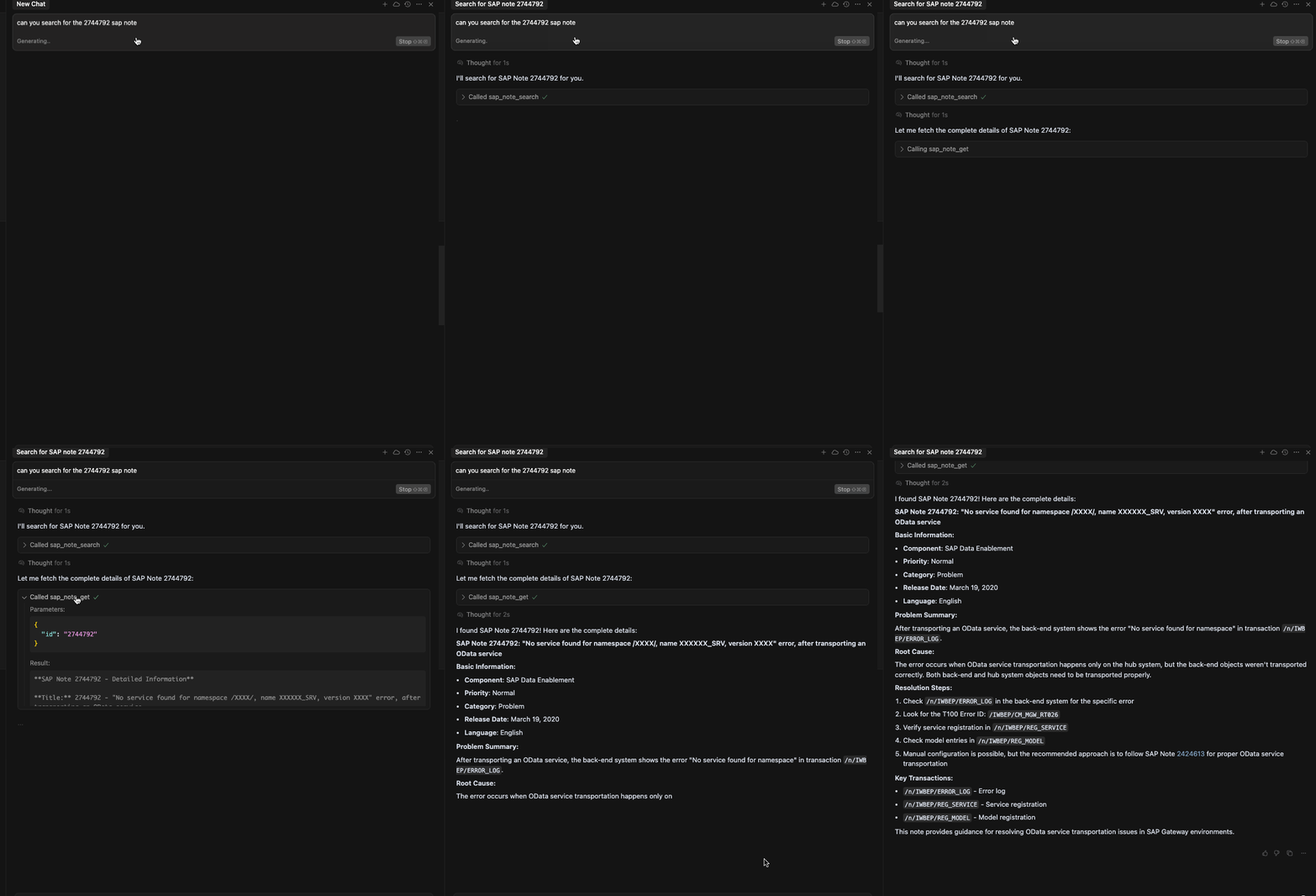
🚀 Quick Start
Prerequisites
- Node.js 18+ - Download here
- SAP Passport Certificate - Your personal .pfx certificate file
- Cursor AI - Download here
Installation
Clone the repository
git clone https://github.com/marianfoo/mcp-sap-notes
cd mcp-sap-notes
Install dependencies
npm installBuild the project
npm run build
Setup
Get your SAP Passport certificate - Only possible for S-User
- Go to SAP Passport
- Create your certificate
- Download the .pfx certificate file
Create certificate directory
mkdir certsCopy your SAP Passport certificate
- Place your
.pfxcertificate file in thecerts/directory - Name it
sap.pfx(or update the path in configuration)
- Place your
Configure environment
cp .env.example .envEdit
.envand add your certificate passphrase:PFX_PATH=./certs/sap.pfx PFX_PASSPHRASE=your_actual_passphrase
Connect to Cursor
Open Cursor settings (
Cmd/Ctrl + ,)Add MCP server configuration to your
settings.json:{ "mcpServers": { "sap-note-search": { "command": "node", "args": ["/full/path/to/sap-note-search-mcp/dist/mcp-server.js"] } } }⚠️ Important: Replace
/full/path/to/sap-note-search-mcpwith the actual full path to your project directory.Restart Cursor - The SAP Note tools will appear in your AI assistant
🎯 Usage Examples
Search for a specific SAP Note
Find SAP Note 2744792
Search by keywords
Search for SAP Notes about "OData gateway metadata error"
Get complete note details
Get the full content of SAP Note 2744792
🛠️ Testing & Development
Test Authentication
npm run test:auth
This tests the SAP Passport authentication flow and verifies your certificate setup.
Test API Access
npm run test:api
This tests the SAP Notes API integration and content extraction.
Test Complete MCP Server
npm run test:mcp
This simulates the complete MCP server workflow.
Run All Tests
npm run test
🐛 Troubleshooting
Certificate Issues
Error: "Certificate file not found"
- Ensure the certificate path in your configuration is correct
- Use full absolute paths in Cursor's
settings.json - Verify the certificate file exists and is readable
Error: "Authentication failed"
- Check your certificate passphrase is correct
- Ensure your SAP Passport certificate is valid and not expired
- Try running with
HEADFUL=trueto see browser authentication
Browser Issues
Error: "Browser launch failed"
# Install Playwright browsers
npx playwright install
Authentication hangs or times out
- Run with debug mode:
HEADFUL=true npm run test:auth - Check your network connection to SAP systems
- Verify your certificate has proper SAP system access
MCP Integration Issues
Tools not appearing in Cursor
- Restart Cursor completely
- Check the MCP server path in
settings.jsonis absolute - Verify the
cwdsetting points to your project directory
Error: "MCP server failed to start"
- Check the console output in Cursor's developer tools
- Ensure all dependencies are installed:
npm install - Verify the build completed successfully:
npm run build
Debug Mode
Enable debug mode for detailed troubleshooting:
# Set environment variables for debugging
export HEADFUL=true
export LOG_LEVEL=debug

# Run tests with visible browser
npm run test:auth
📁 Project Structure
sap-note-search-mcp/
├── src/
│   ├── mcp-server.ts        # Main MCP server
│   ├── auth.ts              # SAP authentication
│   ├── sap-notes-api.ts     # SAP Notes API client
│   ├── types.ts             # TypeScript definitions
│   └── logger.ts            # Logging configuration
├── test/
│   ├── test-auth.js         # Authentication tests
│   ├── test-sap-api.js      # API tests
│   └── test-mcp-server.js   # Complete server tests
├── dist/                    # Compiled JavaScript
├── certs/                   # Certificate directory
├── .env.example             # Environment template
└── README.md               # This file
⚙️ Configuration
Environment Variables
| Variable | Required | Default | Description |
|---|---|---|---|
PFX_PATH |
✅ | - | Path to SAP Passport certificate (.pfx) |
PFX_PASSPHRASE |
✅ | - | Certificate passphrase |
MAX_JWT_AGE_H |
❌ | 12 |
Token cache lifetime (hours) |
HEADFUL |
❌ | false |
Browser visibility (for debugging) |
LOG_LEVEL |
❌ | info |
Logging level (debug, info, warn, error) |
Playwright Configuration
The server automatically installs required Playwright dependencies. For manual installation:
npx playwright install chromium
🔒 Security
- Certificate Security: Your SAP Passport certificate never leaves your machine
- Token Caching: Authentication tokens are cached locally and expire automatically
- No Data Storage: SAP Note content is retrieved on-demand, not stored
- Secure Communication: All SAP API calls use HTTPS with certificate authentication
📋 Available Tools
sap_note_search
Search SAP Notes and KB articles by note ID or keywords.
Parameters:
q(string, required): Query string or Note IDlang(string, optional): Language code ("EN" or "DE"), defaults to "EN"
sap_note_get
Retrieve full content and metadata for a specific SAP Note.
Parameters:
id(string, required): SAP Note ID (6-8 digits)lang(string, optional): Language code ("EN" or "DE"), defaults to "EN"
🤝 Contributing
- Fork the repository
- Create a feature branch:
git checkout -b feature/amazing-feature - Commit your changes:
git commit -m 'Add amazing feature' - Push to the branch:
git push origin feature/amazing-feature - Open a Pull Request


