
OMEGA
The memory system for AI coding agents. Decisions, lessons, and context that persist across sessions.




-brightgreen.svg)

mcp-name: io.github.omega-memory/core
The Problem
AI coding agents are stateless. Every new session starts from zero.
- Context loss. Agents forget every decision, preference, and architectural choice between sessions. Developers spend 10-30 minutes per session re-explaining context that was already established.
- Repeated mistakes. Without learning from past sessions, agents make the same errors over and over. They don't remember what worked, what failed, or why a particular approach was chosen.
OMEGA gives AI coding agents long-term memory and cross-session learning — all running locally on your machine.
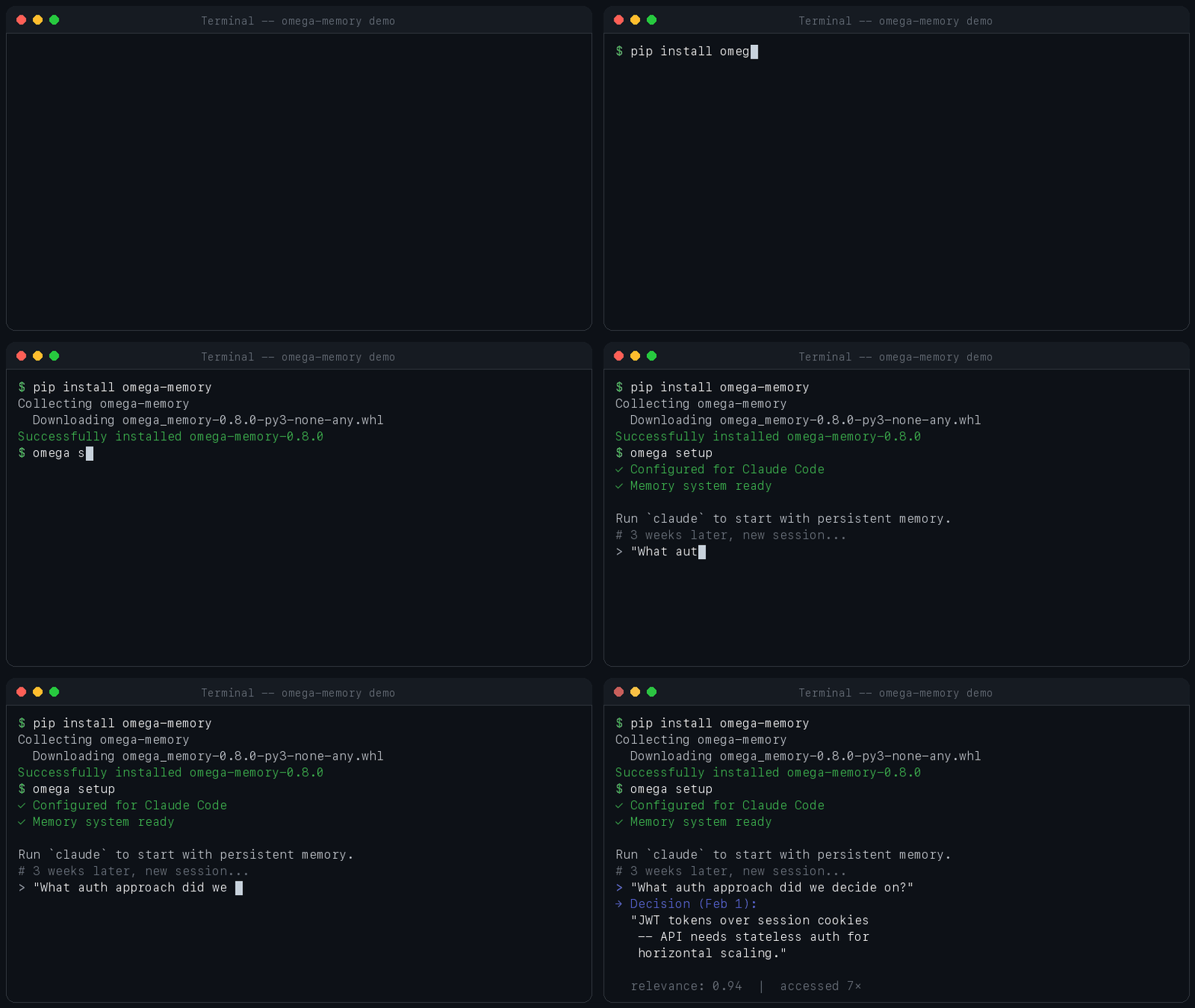
Quick Start
pip install omega-memory    # install from PyPI
omega setup                 # auto-configures Claude Code + hooks
omega doctor                # verify everything works
That's it. Start a new Claude Code session and say "Remember that we always use early returns and never nest more than 2 levels." Close the session. Open a new one and ask "What are my code style preferences?" -- OMEGA recalls it instantly.
Using Cursor, Windsurf, or Zed?
omega setup --client cursor          # writes ~/.cursor/mcp.json
omega setup --client windsurf        # writes ~/.codeium/windsurf/mcp_config.json
omega setup --client zed             # writes ~/.config/zed/settings.json
What Happens Next
After omega setup, OMEGA works in the background. No commands to learn.
Auto-capture — When you make a decision or debug an issue, OMEGA detects it and stores it automatically.
Auto-surface — When you edit a file or start a session, OMEGA surfaces relevant memories from past sessions — even ones you forgot about.
Checkpoint & resume — Stop mid-task, pick up in a new session exactly where you left off.
You can also explicitly tell Claude to remember things:
"Remember that we use JWT tokens, not session cookies"
But the real value is what OMEGA does without being asked.
Examples
Architectural Decisions
"Remember: we chose PostgreSQL over MongoDB for the orders service because we need ACID transactions for payment processing."
Three weeks later, in a new session:
"I'm adding a caching layer to the orders service — what should I know?"
OMEGA surfaces the PostgreSQL decision automatically, so Claude doesn't suggest a MongoDB-style approach.
Learning from Mistakes
You spend 30 minutes debugging a Docker build failure. Claude figures it out:
"The node_modules volume mount was shadowing the container's node_modules. Fixed by adding an anonymous volume."
OMEGA auto-captures this as a lesson. Next time anyone hits the same Docker issue, Claude already knows the fix.
Code Preferences
"Remember: always use early returns. Never nest conditionals more than 2 levels deep. Prefer
constoverlet."
Every future session follows these rules without being told again.
Task Continuity
You're mid-refactor when you need to stop:
"Checkpoint this — I'm halfway through migrating the auth middleware to the new pattern."
Next session:
"Resume the auth middleware task."
Claude picks up exactly where you left off — files changed, decisions made, what's left to do.
Error Patterns
Claude encounters the same ECONNRESET three sessions in a row. Each time OMEGA surfaces the previous fix:
[error_pattern] ECONNRESET on API calls — caused by connection pool exhaustion.
Fix: set maxSockets to 50 in the http agent config.
Accessed 3 times
No more re-debugging the same issue.
Key Features
Auto-Capture & Surfacing — Hook system automatically captures decisions and lessons, and surfaces relevant memories before edits, at session start, and during work.
Persistent Memory — Stores decisions, lessons, error patterns, and preferences with semantic search. Your agent recalls what matters without you re-explaining everything each session.
Semantic Search — bge-small-en-v1.5 embeddings + sqlite-vec for fast, accurate retrieval. Finds relevant memories even when the wording is different.
Cross-Session Learning — Lessons, preferences, and error patterns accumulate over time. Agents learn from past mistakes and build on previous decisions.
Forgetting Intelligence — Memories decay naturally over time, conflicts auto-resolve, and every deletion is audited. Preferences and error patterns are exempt from decay.
Graph Relationships — Memories are linked with typed edges (related, supersedes, contradicts). Traverse the knowledge graph to find connected context.
Encryption at Rest (optional) — AES-256-GCM encrypted storage with macOS Keychain integration.
pip install omega-memory[encrypt]Plugin Architecture — Extensible via entry points. Add custom tools and handlers through the plugin system.
How OMEGA Compares
| Feature | OMEGA | MEMORY.md | Mem0 | Basic MCP Memory |
|---|---|---|---|---|
| Persistent across sessions | Yes | Yes | Yes | Yes |
| Semantic search | Yes | No (file grep only) | Yes | Varies |
| Auto-capture (no manual effort) | Yes | No (manual edits) | Yes (cloud) | No |
| Contradiction detection | Yes | No | No | No |
| Checkpoint & resume tasks | Yes | No | No | No |
| Graph relationships | Yes | No | No | No |
| Cross-session learning | Yes | Limited | Yes | No |
| Intelligent forgetting | Yes | No (grows forever) | No | No |
| Local-only (no cloud/API keys) | Yes | Yes | No (API key required) | Yes |
| Setup complexity | pip install + omega setup |
Zero (built-in) | API key + cloud config | Manual JSON config |
MEMORY.md is Claude Code's built-in markdown file -- great for simple notes, but no search, no auto-capture, and it grows unbounded. Mem0 offers strong semantic memory but requires cloud API keys and has no checkpoint/resume or contradiction detection. Basic MCP memory servers (e.g., simple key-value stores) provide persistence but lack the intelligence layer -- no semantic search, no forgetting, no graph.
OMEGA gives you the best of all worlds: fully local, zero cloud dependencies, with intelligent features that go far beyond simple storage.
Full comparison with methodology at omegamax.co/compare.
Benchmark
OMEGA scores 95.4% task-averaged on LongMemEval (ICLR 2025), an academic benchmark that tests long-term memory across 5 categories: information extraction, multi-session reasoning, temporal reasoning, knowledge updates, and preference tracking. Raw accuracy is 466/500 (93.2%). Task-averaged scoring (mean of per-category accuracies) is the standard methodology used by other systems on the leaderboard. This is the #1 score on the leaderboard.
| System | Score | Notes |
|---|---|---|
| OMEGA | 95.4% | #1 |
| Mastra | 94.87% | #2 |
| Emergence | 86.0% | — |
| Zep/Graphiti | 71.2% | Published in their paper |
Details and methodology at omegamax.co/benchmarks.
Compatibility
| Client | 25 MCP Tools | Auto-Capture Hooks | Setup Command |
|---|---|---|---|
| Claude Code | Yes | Yes | omega setup |
| Cursor | Yes | No | omega setup --client cursor |
| Windsurf | Yes | No | omega setup --client windsurf |
| Zed | Yes | No | omega setup --client zed |
| Any MCP Client | Yes | No | Manual config (see docs) |
All clients get full access to all memory tools. Auto-capture hooks (automatic memory surfacing and context capture) require Claude Code.
Requires Python 3.11+. macOS and Linux supported. Windows via WSL.
Remote / SSH Setup
Claude Code's SSH support lets you run your agent on a remote server from any device. OMEGA makes that server remember everything across sessions and reconnections.
# On your remote server (any Linux VPS — no GPU needed)
pip install omega-memory
omega setup
omega doctor
That's it. Every SSH session — from your laptop, phone, or tablet — now has full memory of every previous session on that server.
Why this matters:
- Device-agnostic memory — SSH in from any device, OMEGA's memory graph is on the server waiting for you
- Survives disconnects — SSH drops? Reconnect and
omega_resume_taskpicks up exactly where you left off - Always-on accumulation — A cloud VM running 24/7 means your memory graph grows continuously
- Team-ready — Multiple developers SSH to the same server? OMEGA tracks who's working on what with file claims, handoff notes, and peer messaging
Requirements: Any VPS with Python 3.11+ (~337 MB RAM after first query). SQLite + CPU-only ONNX embeddings — zero external services.
Architecture & Advanced DetailsArchitecture
               ┌─────────────────────┐
               │    Claude Code       │
               │  (or any MCP host)   │
               └──────────┬──────────┘
                          │ stdio/MCP
               ┌──────────▼──────────┐
               │   OMEGA MCP Server   │
               │   25 memory tools    │
               └──────────┬──────────┘
                          │
               ┌──────────▼──────────┐
               │    omega.db (SQLite) │
               │ memories | edges |   │
               │     embeddings       │
               └──────────────────────┘
Single database, modular handlers. Additional tools available via the plugin system.
MCP Tools Reference
25 memory tools are available as an MCP server. Additional tools can be added via plugins.
| Tool | What it does |
|---|---|
omega_store |
Store typed memory (decision, lesson, error, preference, summary) |
omega_query |
Semantic or phrase search with tag filters and contextual re-ranking |
omega_lessons |
Cross-session lessons ranked by access count |
omega_welcome |
Session briefing with recent memories and profile |
omega_profile |
Read or update the user profile |
omega_checkpoint |
Save task state for cross-session continuity |
omega_resume_task |
Resume a previously checkpointed task |
omega_similar |
Find memories similar to a given one |
omega_traverse |
Walk the relationship graph |
omega_compact |
Cluster and summarize related memories |
omega_consolidate |
Prune stale memories, cap summaries, clean edges |
omega_timeline |
Memories grouped by day |
omega_remind |
Set time-based reminders |
omega_feedback |
Rate surfaced memories (helpful, unhelpful, outdated) |
Plus 11 more tools for health checks, backup/restore, stats, editing, and deletion. See tool_schemas.py for the full list.
CLI
| Command | Description |
|---|---|
omega setup |
Create dirs, download model, register MCP, install hooks |
omega doctor |
Verify installation health |
omega status |
Memory count, store size, model status |
omega query <text> |
Search memories by semantic similarity |
omega store <text> |
Store a memory with a specified type |
omega timeline |
Show memory timeline grouped by day |
omega activity |
Show recent session activity overview |
omega stats |
Memory type distribution and health summary |
omega consolidate |
Deduplicate, prune, and optimize memory |
omega compact |
Cluster and summarize related memories |
omega backup |
Back up omega.db (keeps last 5) |
omega validate |
Validate database integrity |
omega logs |
Show recent hook errors |
omega migrate-db |
Migrate legacy JSON to SQLite |
Hooks
All hooks dispatch via fast_hook.py → daemon UDS socket, with fail-open semantics.
| Hook | Handlers | Purpose |
|---|---|---|
| SessionStart | session_start |
Welcome briefing with recent memories |
| Stop | session_stop |
Session summary |
| UserPromptSubmit | auto_capture |
Auto-capture lessons/decisions |
| PostToolUse | surface_memories |
Surface relevant memories during work |
Storage
| Path | Purpose |
|---|---|
~/.omega/omega.db |
SQLite database (memories, embeddings, edges) |
~/.omega/profile.json |
User profile |
~/.omega/hooks.log |
Hook error log |
~/.cache/omega/models/bge-small-en-v1.5-onnx/ |
ONNX embedding model |
Search Pipeline
- Vector similarity via sqlite-vec (cosine distance, 384-dim bge-small-en-v1.5)
- Full-text search via FTS5 (fast keyword matching)
- Type-weighted scoring (decisions/lessons weighted 2x)
- Contextual re-ranking (boosts by tag, project, and content match)
- Deduplication at query time
- Time-decay weighting (old unaccessed memories rank lower)
Memory Lifecycle
- Dedup: SHA256 hash (exact) + embedding similarity 0.85+ (semantic) + Jaccard per-type
- Evolution: Similar content (55-95%) appends new insights to existing memories
- TTL: Session summaries expire after 1 day, lessons/preferences are permanent
- Auto-relate: Creates
relatededges (similarity >= 0.45) to top-3 similar memories - Compaction: Clusters and summarizes related memories
- Decay: Unaccessed memories lose ranking weight over time (floor 0.35); preferences and errors exempt
- Conflict detection: Contradicting memories auto-detected on store; decisions auto-resolve, lessons flagged
Memory Footprint
- Startup: ~31 MB RSS
- After first query (ONNX model loaded): ~337 MB RSS
- Database: ~10.5 MB for ~242 memories
Install from Source
git clone https://github.com/omega-memory/core.git
cd core
pip install -e ".[dev]"
omega setup
omega setup will:
- Create
~/.omega/directory - Download the ONNX embedding model (~90 MB) to
~/.cache/omega/models/ - Register
omega-memoryas an MCP server in~/.claude.json - Install session hooks in
~/.claude/settings.json - Add a managed
<!-- OMEGA:BEGIN -->block to~/.claude/CLAUDE.md
All changes are idempotent — running omega setup again won't duplicate entries.
Troubleshooting
omega doctor shows FAIL on import:
- Ensure
pip install -e .from the repo root - Check
python3 -c "import omega"works
MCP server not registered:
claude mcp add omega-memory -- python3 -m omega.server.mcp_server
Hooks not firing:
- Check
~/.claude/settings.jsonhas OMEGA hook entries - Check
~/.omega/hooks.logfor errors
Development
pip install -e ".[dev]"
pytest tests/
ruff check src/              # Lint
Uninstall
claude mcp remove omega-memory
rm -rf ~/.omega ~/.cache/omega
pip uninstall omega-memory
Manually remove OMEGA entries from ~/.claude/settings.json and the <!-- OMEGA:BEGIN --> block from ~/.claude/CLAUDE.md.
Star History
Contributing
- Contributing Guide
- Security Policy
- Changelog
- Report a Bug
License
Apache-2.0 — see LICENSE for details.


