
Search MCP
An MCP (Machine Conversation Protocol) demo for keyword search with Elasticsearch and LLM query planning.
Overview
This project demonstrates how to use LLMs to enhance search functionality through:
- LLM-powered query planning
- Query expansion
- Intelligent filtering and categorization
- Result formatting and presentation
The main demo scripts show the full power of combining LLMs with Elasticsearch for e-commerce search:
openai_mcp_search_demo.py- Implementation using OpenAI's function callingclaude_mcp_search_demo.py- Implementation using Claude's tool use capability
Complete Setup Guide
Prerequisites
- macOS or Linux system
- Python 3.10 or higher
- Docker (for Elasticsearch)
- OpenAI API key (for the OpenAI demo)
- Anthropic API key (for the Claude demo)
Step 1: Clone the Repository
git clone <repository-url>
cd search_mcp
Step 2: Install Poetry
Poetry is used for dependency management. If you don't have Poetry installed:
macOS/Linux:
curl -sSL https://install.python-poetry.org | python3 -
Add Poetry to your PATH (add this to your .bashrc or .zshrc):
export PATH="$HOME/.local/bin:$PATH"
Verify installation:
poetry --version
Step 3: Install Dependencies
# Install dependencies without installing the project as a package
poetry install --no-root
Note: We use the
--no-rootflag to avoid package installation issues, as this project is meant to be run directly, not installed as a package.
Step 4: Set Up Elasticsearch
The easiest way to run Elasticsearch is using Docker:
# Pull the Elasticsearch Docker image
docker pull docker.elastic.co/elasticsearch/elasticsearch:8.12.2

# Start Elasticsearch container
docker run -d --name elasticsearch \
  -p 9200:9200 -p 9300:9300 \
  -e "discovery.type=single-node" \
  -e "xpack.security.enabled=false" \
  docker.elastic.co/elasticsearch/elasticsearch:8.12.2
Verify Elasticsearch is running:
curl http://localhost:9200
Step 5: Configure Environment Variables
Create a .env file in the project root:
cp .env.example .env
Edit the .env file and add your OpenAI API key:
# Elasticsearch configuration
ELASTICSEARCH_HOST=http://localhost:9200
ELASTICSEARCH_USER=
ELASTICSEARCH_PASSWORD=
ELASTICSEARCH_INDEX=ecommerce

# OpenAI configuration
OPENAI_API_KEY=your_openai_api_key_here
OPENAI_MODEL=gpt-3.5-turbo
Step 6: Run the Demo
Now you can run either demo:
OpenAI Demo
poetry run python openai_mcp_search_demo.py
Claude Demo
poetry run python claude_mcp_search_demo.py
Each demo will:
- Start the MCP server
- Create a test e-commerce index with sample products
- Demonstrate LLM-powered search queries
- Show detailed step-by-step operation of the search system
How It Works
The demo demonstrates all steps of the search process:
- Starting the MCP server: The server provides tools for searching and indexing data
- Index Creation: Sample e-commerce products are created in Elasticsearch
- Query Planning: LLMs analyze the search query and decide on the best search strategy
- Search Execution: Elasticsearch runs the optimized search
- Result Formatting: Results are extracted and presented in a user-friendly format
Search Flow Architecture
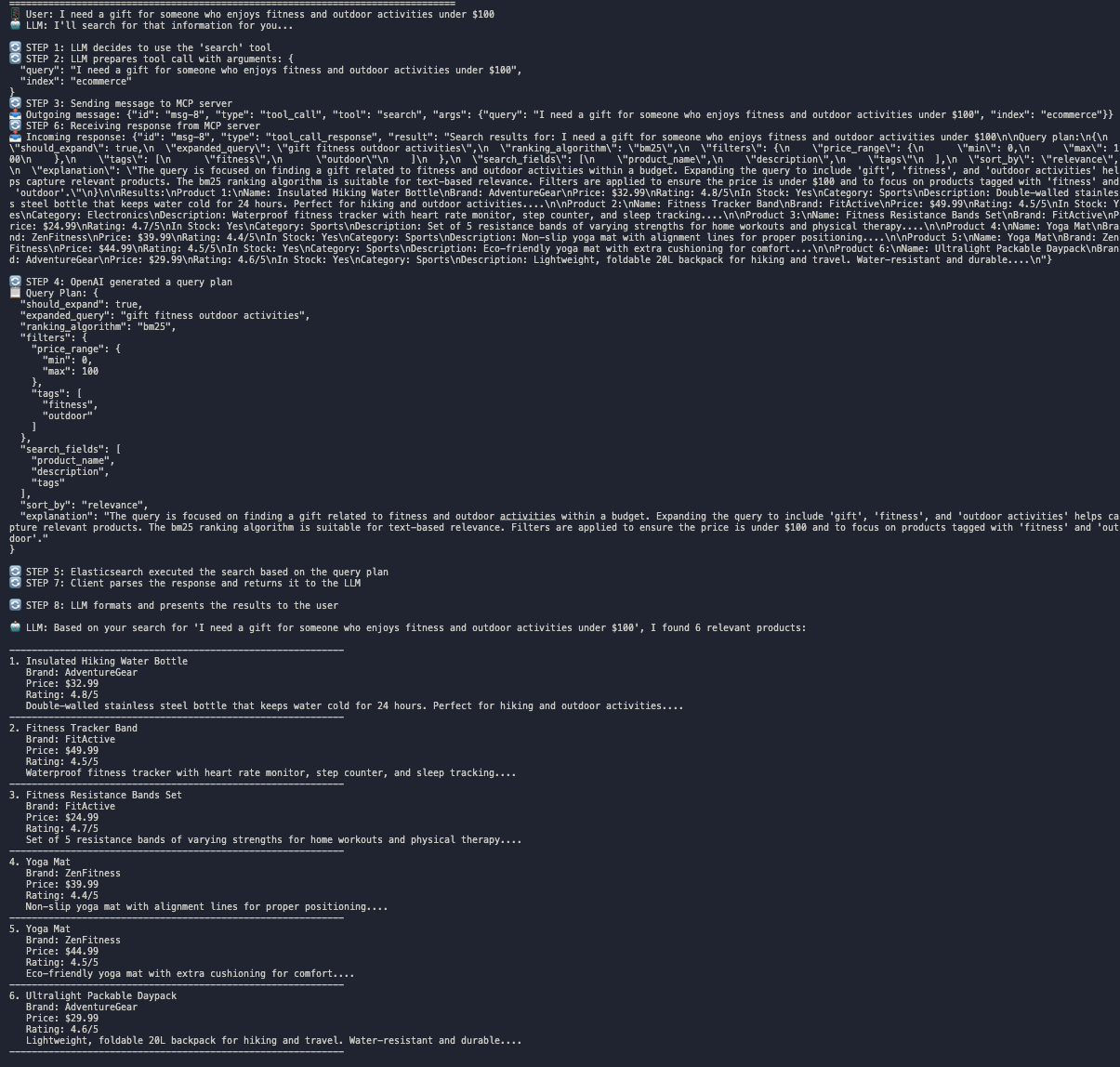
The image above illustrates the complete search flow for a typical query: "I need a gift for someone who enjoys fitness and outdoor activities under $100". The process involves 8 distinct steps:
Step 1: LLM Decision
The LLM analyzes the user query and decides to use the appropriate search tool based on the context.
Step 2: Preparing Arguments
The LLM prepares the necessary arguments (query and index name) to pass to the search tool.
Step 3: Client-Server Communication
The client sends a request to the MCP server with the query and arguments.
Step 4: Query Plan Generation
The MCP server uses OpenAI to generate a query plan for Elasticsearch. This plan includes:
- Whether to expand the query
- Which ranking algorithm to use (e.g., BM25)
- What filters to apply (price range, categories, tags)
- Which fields to search
- How to sort results
- An explanation of the reasoning
Step 5: Elasticsearch Execution
The MCP server executes the search against Elasticsearch based on the query plan.
Step 6: Server Response
The MCP server sends the search results back to the client.
Step 7: Client Processing
The client parses the response and prepares it for the LLM.
Step 8: Result Presentation
The LLM formats and presents the search results to the user in a natural, readable format.
This architecture demonstrates how LLMs can enhance traditional search engines by providing intelligent query planning and natural language understanding, making search results more relevant and easier to understand.
Key Demo Features
The demo scripts simulate several search queries:
- Searches for wireless headphones with noise cancellation
- Finds kitchen products under a certain price with high ratings
- Searches for specific brands
- Identifies ergonomic office furniture
- Finds gifts for specific interests within a budget
Each search showcases different aspects of LLM-powered query planning.
Troubleshooting
Elasticsearch Issues
If you encounter problems with Elasticsearch:
- Check that Docker is running
- Verify Elasticsearch container is up:
docker ps - Restart the container if needed:
docker restart elasticsearch - Check logs:
docker logs elasticsearch
Poetry/Dependency Issues
If you have issues with Poetry:
- Make sure you're using the
--no-rootflag:poetry install --no-root - If you encounter package name errors, check that the package name in
pyproject.tomlmatches the directory structure - Try updating Poetry:
poetry self update - Clear Poetry's cache:
poetry cache clear pypi --all - Update dependencies:
poetry update - If all else fails, delete the
poetry.lockfile and runpoetry install --no-rootagain
OpenAI API Issues
If you encounter OpenAI API errors:
- Verify your API key in the
.envfile - Check you have sufficient API credits
- Try switching to a different model in the
.envfile
Anthropic API Issues
If you encounter Anthropic API errors:
- Verify your Anthropic API key in the
.envfile - Check you have sufficient API credits
- Ensure you're using a supported Claude model
Extensions and Customization
To extend the demo:
- Add more products in
create_ecommerce_test_indexfunction incore.py - Modify the query planning prompt in
generate_query_planfunction - Create new search queries in the example functions
Additional Scripts
Other useful scripts in this project:
run_server.py: Standalone MCP serversearch_mcp_pkg/client.py: Client implementation for connecting to the server
Requirements
- Python 3.10+
- Poetry
- OpenAI API key (for OpenAI demo)
- Anthropic API key (for Claude demo)
- Elasticsearch 8.x


