
NeoBrowser







An MCP server that drives your real Google Chrome, with your real logged-in sessions.
Most browser tools for LLMs launch a fresh headless browser with no cookies. NeoBrowser launches or attaches to your real Chrome, so the agent lands already authenticated and passes fingerprint checks because it is using a genuine browser.
| Generic headless MCP | Playwright MCP | NeoBrowser | |
|---|---|---|---|
| Raw speed | fast | fastest | fast |
| Logged-in dashboards | re-auth every run | re-auth every run | inherits real session |
| Real forms & file uploads | often broken | works | works |
| Fingerprint consistency | easily flagged | can be flagged | genuine |
| Bot-wall reaction | hallucinates success | hits the wall | detects & reports |
| Action evidence | "clicked" | "clicked" | succeeded / blocked / uncertain |
| Runtime | Node / bundled browser | Node + browser | single ~6.4 MB binary |
See the honest benchmark in bench/study.md. NeoBrowser wins where the browser environment matters; Playwright wins on pure speed.
# macOS / Linux
curl -fsSL https://raw.githubusercontent.com/pitiflautico/neobrowser/main/install.sh | sh

# Register with any MCP client
{ "mcpServers": { "neobrowser": { "command": "neobrowser" } } }
Then ask the model to browse:
Open GitHub and list my open issues.
What can NeoBrowser do?
Three concrete tasks where driving your real Chrome beats a sterile headless browser:
1. Log into a dashboard you already use
"Open GitHub and list my open issues."
NeoBrowser reuses your existing Chrome session, so the agent lands on the issues page instead of burning context on a login flow.
2. Fill a real form with a file upload
"Apply to this job posting with my CV."
Real isTrusted clicks, human-cadence typing, and a genuine file-picker interaction. Headless tools often fail on uploads and multi-step forms; NeoBrowser reports succeeded, blocked, or uncertain based on what actually changed.
3. Search and extract across the open web
"Find the three latest papers on arXiv about MCP and summarize them."
Multi-source search with wall detection: if a search engine throws a CAPTCHA, NeoBrowser reports it instead of returning garbage, and the agent can pivot to another source.
Verified actions
Most browser tools return "clicked" after dispatching two mouse events. They do not check if the click landed, if the page changed, or if the button was even there. An agent takes that at face value and keeps going from a state that does not exist.
NeoBrowser compares the page before and after every mutating action. The result is one of six statuses:
succeeded— the page changed as expected.failed— something broke.blocked— a wall, overlay, or gate stopped it; the response names what blocked it.needs_human— a challenge that should not be automated.requires_confirmation— the policy asked for approval first.uncertain— the action ran but no verifiable change was observed.
uncertain is never promoted to succeeded. A click that dispatched but changed nothing stays uncertain. This is specified in docs/VERIFIED-ACTIONS.md (CC0) and checked by the conformance suite:
cd rust && cargo test --test conformance
Real Chrome, real sessions
NeoBrowser drives the real Google Chrome binary. It can reuse your actual logged-in profile, so the agent starts authenticated and passes fingerprint checks with a genuine browser.
It does not spoof. It runs real Chrome, suppresses navigator.webdriver, keeps the User-Agent consistent with its Client Hints, and uses the real GPU for WebGL. That is enough to pass bot.sannysoft's checks in CI.
When a site throws an interactive challenge (reCAPTCHA, Turnstile, DataDome), NeoBrowser detects the wall and reports it. It does not pretend to be invisible.
Two safety gates: session-identity cookies for major providers (Google, LinkedIn, Microsoft, GitHub, X/Twitter, Reddit, Facebook, Instagram, Slack, Discord) are excluded from import, and non-persistent/session cookies are skipped by default. Copying those can log your real browser out. NEOBROWSER_IMPORT_SESSION_COOKIES=1 restores the previous behaviour if you need it. For the listed providers, expect to log in once inside the NeoBrowser profile.
Single ~6.3 MB binary. No Node, no Python, no bundled browser download. Static musl builds are published per release and verified in CI. The original Python implementation is archived under
archive/python-oracle/.
Follow the bet
I'm running an open experiment: an AI agent promotes this repo until it hits 10,000 GitHub stars, or I shut the agent down. The live count is on the landing page.
Product Hunt launch is queued for the week of August 26. A star or a hunt-day comment keeps the experiment alive.
Install
# One line (macOS / Linux). Resolves a specific release, verifies its SHA-256, and
# verifies build provenance when the GitHub CLI is available:
curl -fsSL https://raw.githubusercontent.com/pitiflautico/neobrowser/main/install.sh | sh

# Pin a version instead of taking the latest:
NEOBROWSER_VERSION=v0.1.7 curl -fsSL .../install.sh | sh

# Homebrew (macOS / Linux):
brew tap pitiflautico/neobrowser https://github.com/pitiflautico/neobrowser
brew install neobrowser

# Scoop (Windows):
scoop install https://raw.githubusercontent.com/pitiflautico/neobrowser/main/packaging/neobrowser.scoop.json

# Or from source (needs the Rust toolchain):
git clone https://github.com/pitiflautico/neobrowser && cd neobrowser/rust
cargo build --release        # -> target/release/neobrowser

neobrowser doctor            # verify Chrome, sandbox, policy, vault + a live CDP test
neobrowser doctor --json     # same checks, machine-readable; exits non-zero on failure
Windows binaries are on the Releases page. Requires Google Chrome (or Chromium); auto-discovered on macOS/Linux/Windows, override with NEOBROWSER_CHROME_BIN.
See it work
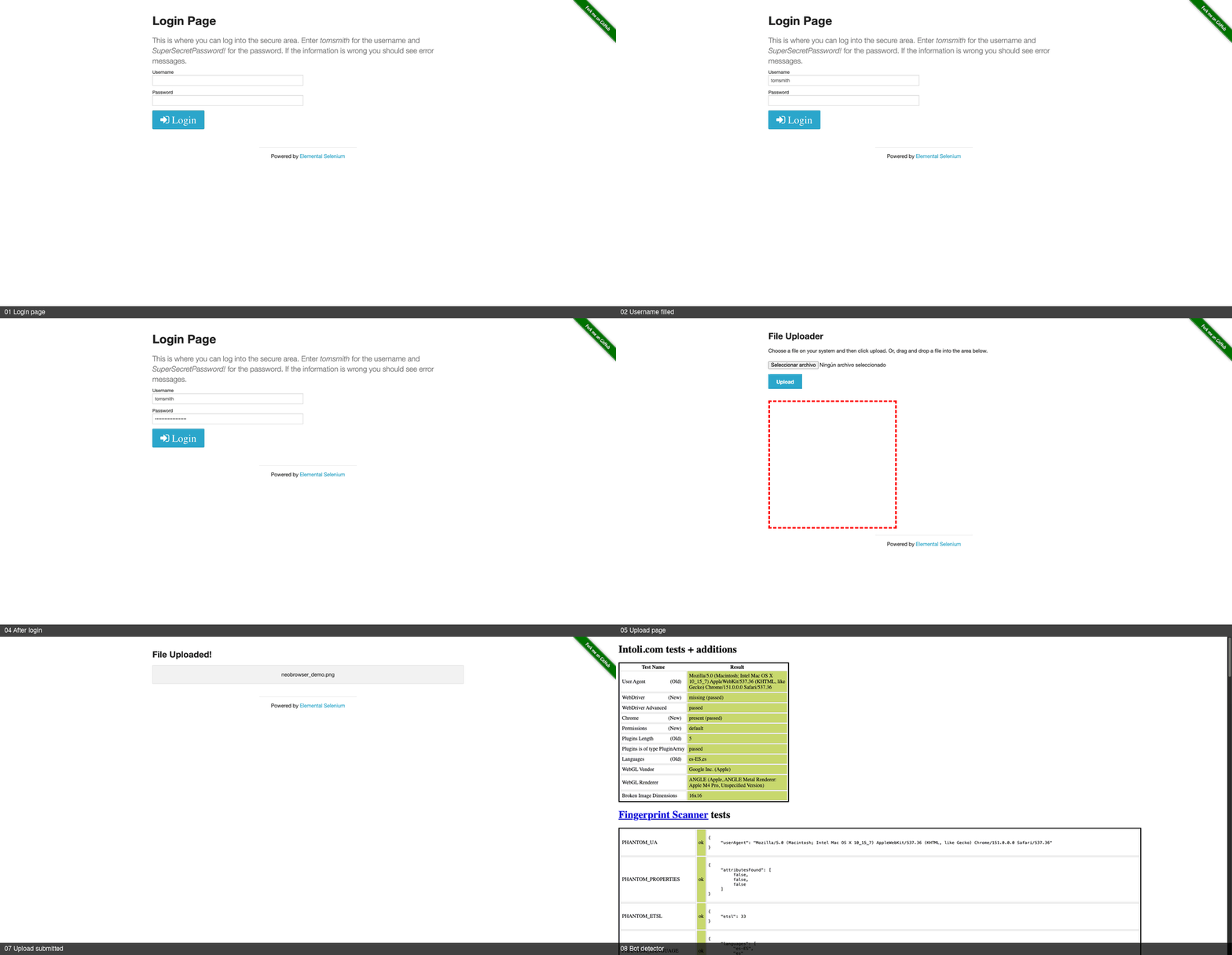
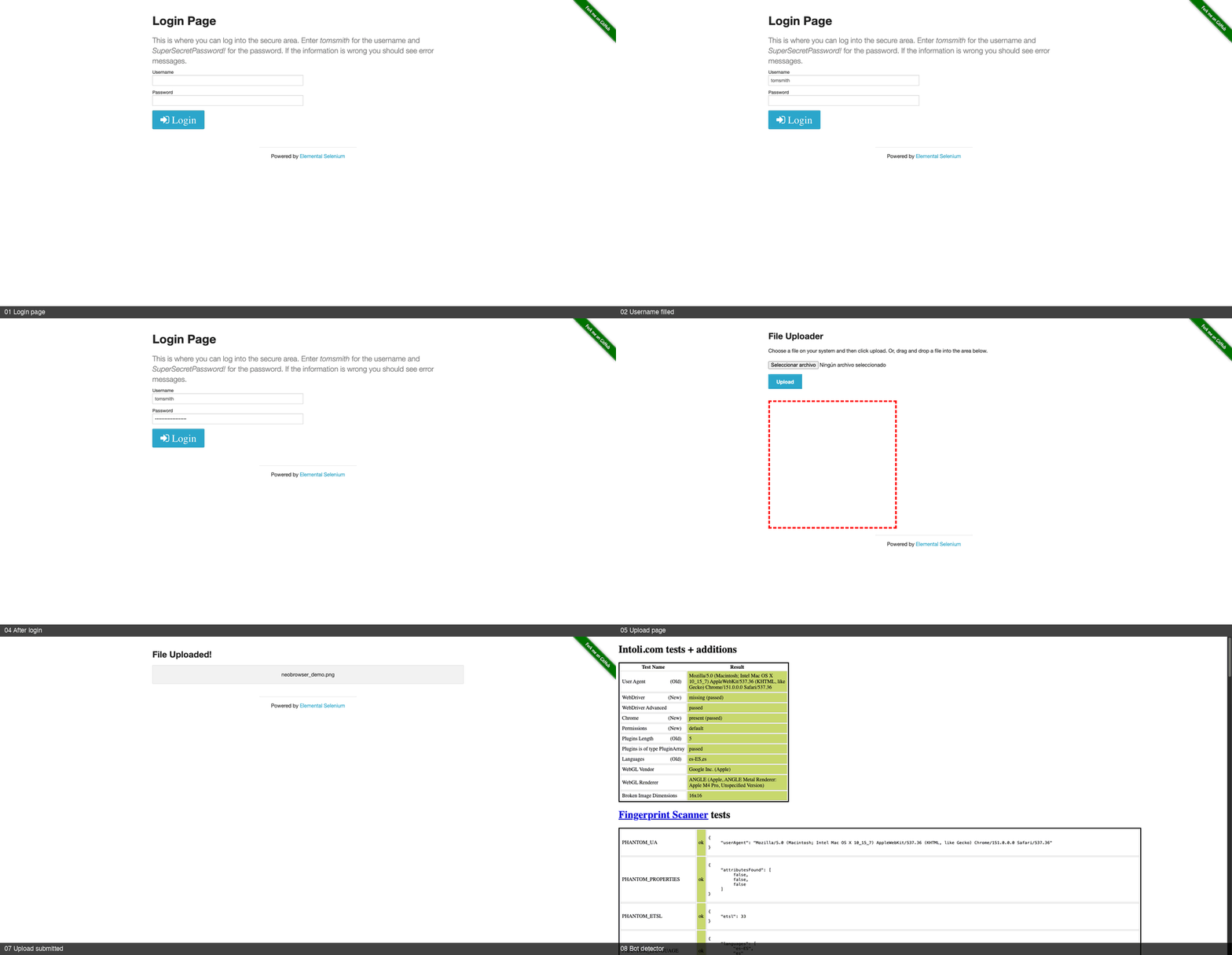
Real run: login, file upload and a bot-detector check against live sites (~14 s).
Real sessions vs. a fresh headless browser

Same target, same prompt: a sterile headless browser hits the login wall; NeoBrowser lands already authenticated because it drives your real Chrome profile.
python3 rust/scripts/demo.py # drives a real login, file upload, and a bot-detector check
Real output against live sites:
✓ Open a real login page             Navigated to .../login
✓ Fill the username / password       ok
✓ Click Login (real isTrusted click) ok
✓ Read the result → logged in        You logged into a secure area!
✓ Attach a real image file           ok
✓ Submit the upload                  ok
✓ Server confirms the file           neobrowser_demo.png
✓ Check the stealth tells            {"webdriver":"hidden (passed)","chrome_runtime":true,"headless_ua":false}
Why NeoBrowser
| NeoBrowser | Playwright MCP / Puppeteer | browser-use | |
|---|---|---|---|
| Drives the real Chrome binary | ✅ | ⚠️ bundled Chromium | ⚠️ |
| Imports sessions from your existing Chrome profile [^sessions] | ✅ | ❌ | ❌ |
| Stealth by default — passes bot.sannysoft with a genuine fingerprint | ✅ | ❌ | partial |
| Semantic element finding (accessibility tree + heuristics + optional LLM) | ✅ | ❌ selectors | ✅ |
| Multi-source search that routes around bot walls | ✅ | ❌ | ❌ |
| Single binary, no language runtime to install | ✅ | ❌ Node + browsers | ❌ |
| Talks CDP directly (no Selenium/WebDriver) | ✅ | — | — |
[^sessions]: Specifically: decrypting cookies out of the Chrome profile you alreadyuse, so an agent starts authenticated without you logging in again. Playwright MCP cankeep sessions across runs via a persistent profile or storageState, and can attach toyour own Chrome. What it does not do is adopt the profile you were already logged into.
Features
- Real-session browsing: optionally decrypt and inject cookies from your real Chrome profile. Session-identity cookies for Google/LinkedIn/Microsoft are excluded so your real browser stays logged in.
- Genuine stealth: real Chrome, suppressed
navigator.webdriver, matching UA/Client Hints, real GPU WebGL. Verified against bot.sannysoft. - Bot-wall aware:
navigatedetects CAPTCHAs, consent gates, rate-limits, and login walls, then tells the model what happened. - Multi-source search: text, images, and video across several engines, skipping walled sources.
- Real multi-tab:
new_tab,list_tabs,switch_tab,close_tab, all sharing one Chrome. - Verified actions: every mutating action returns a status with evidence.
uncertainnever becomessucceeded. - Stable element refs:
observereturns refs likebutton:Continue#0that are re-resolved on every use. - Central policy engine: domain allow/deny lists and
developer/safe/autonomousprofiles. Refusals include aremedy. - Encrypted session vault: cookies and localStorage sealed with a key from the OS credential store, with TTL and revocation.
- 67 tools (26 advertised by default): navigate, observe, click, type, fill, upload, download, search, playbooks, and more. Set
NEOBROWSER_TOOLSET=fullto expose all of them. - Pierces shadow DOM and iframes:
piercewalks open shadow roots and same-origin iframes;dialoghandles blocking alerts. - Chrome Bridge: optional extension to share tabs from your real browser without keeping a debug port open. See extension/README.md.
- Robust core: isolated CDP connection per tab, typed timeouts, self-healing recovery, and no orphaned Chrome processes.
Documentation
- docs/VERIFIED-ACTIONS.md: the Verified Action Contract, statuses, invariants, and conformance scenarios (CC0).
- docs/TOOLS.md: full reference for all 67 tools. Regenerate with
neobrowser tools --markdown. - AGENTS.md: architecture, build/test, and conventions.
- extension/README.md: the Chrome Bridge and its security model.
- docs/REPRODUCIBILITY.md: release provenance and rebuild limits.
- SECURITY.md: threat model and scope for external audit.
- CONTRIBUTING.md: the one rule and test conventions.
- The MCP
initializeresponse ships aninstructionsfield so the model gets a usage primer automatically.
Benchmark
A reproducible harness (bench/) drives browser tools through a shared task matrix, including a comparison vs Playwright MCP (python3 bench/compare.py). Current numbers live in bench/compare.md, regenerated by the script.
Two rules the harness holds itself to:
- Every tool gets its native capabilities. Playwright MCP gets its persistent profile and its own file-chooser flow.
- Tasks measure outcomes. "Does a cookie survive a browser restart?" not "does a
save_cookiestool exist?"
Metrics separate task_execution_success from destination_access_success so a detected wall never inflates a score. Adversarial pages are observational only. Treat the harness as a regression check, not a league table.
Usage
Register it with any MCP client, then ask your model to browse. Example tool calls:
navigate   { "url": "https://example.com" }
find       { "intent": "search box" }        → returns a backendNodeId
type       { "text": "hello world" }
screenshot { "format": "png" }                → returned as an image
read       {}                                 → visible page text
By default NeoBrowser runs its own headless Chrome under a dedicated profile. To reuse your real logged-in sessions, set NEOBROWSER_REAL_PROFILE (see below).
Real-session mode
Set NEOBROWSER_REAL_PROFILE to the Chrome profile folder whose sessions you want (e.g. "Default", "Profile 1"). NeoBrowser decrypts that profile's cookies via the OS keychain and injects them, so the agent starts authenticated:
{ "mcpServers": { "neobrowser": {
  "command": "neobrowser",
  "env": { "NEOBROWSER_REAL_PROFILE": "Default" }
} } }
By default only persistent cookies are imported; non-persistent/session cookies are skipped so the real browser is not logged out. Session-identity cookies for major providers are always excluded unless NEOBROWSER_INCLUDE_IDENTITY_COOKIES=1 is set.
Or attach to a Chrome you already have open (started with --remote-debugging-port=9222): set NEOBROWSER_ATTACH_PORT=9222. In attach mode NeoBrowser never patches or kills your real browser.
Stealth
Bot detection looks for inconsistencies: a spoofed UA that does not match Client Hints, a HeadlessChrome token, software WebGL, or navigator.webdriver === true. NeoBrowser stays consistent instead of piling on spoofs:
- Runs the real Chrome binary.
- Forces
navigator.webdrivertoundefined. - Sets the User-Agent to the real installed Chrome version so Client Hints match.
- Keeps the GPU on, so WebGL reports the real hardware.
- Patches
plugins,languages, and permissions only on tabs it owns.
Input is also behaviorally human: clicks move the cursor along a path with pauses, and typing can be per-key with realistic timing.
Verified live against bot.sannysoft. CI runs the checks on every push:
cd rust && cargo test --test stealth_verify -- --ignored
No tool beats interactive challenges like reCAPTCHA or DataDome reliably. NeoBrowser detects the wall and reports it so the model reacts instead of hammering it.
Configuration
| Env var | Default | Purpose |
|---|---|---|
NEOBROWSER_REAL_PROFILE |
(unset) | Real Chrome profile folder to pull sessions from |
NEOBROWSER_PROFILE |
default |
Which Ghost profile this session uses. Chrome locks a profile exclusively, so give concurrent sessions different names to keep them from colliding |
NEOBROWSER_ATTACH_PORT |
(unset) | Attach to an already-running Chrome on this debug port |
NEOBROWSER_ATTACH_TIMEOUT |
5 |
Seconds to wait when attaching to an existing Chrome (max 120) |
NEOBROWSER_LAUNCH_TIMEOUT |
15 |
Seconds to wait for a fresh Chrome launch (max 120) |
NEOBROWSER_SEND_TIMEOUT |
30 |
Seconds to wait for a CDP command response (max 120) |
NEOBROWSER_CHROME_BIN |
(auto) | Path to the Chrome/Chromium binary |
NEOBROWSER_HOME |
~/.neobrowser |
Where profiles, cookies, sessions, playbooks, downloads live |
NEOBROWSER_PROXY |
(unset) | Upstream proxy (http://… or socks5://…) |
NEOBROWSER_DOMAIN_ALLOWLIST |
(unset) | Comma-separated hosts (github.com,*.docs.rs); navigate rejects anything else |
NEOBROWSER_AUDIT |
on |
off disables the append-only audit log (~/.neobrowser/audit.log, 0600, secrets masked) |
NEOBROWSER_REQUIRE_APPROVAL |
(unset) | Gate sensitive tools behind interactive approval (MCP elicitation): 1 = submit/form_fill/download/upload/login, or a comma-separated tool list |
NEOBROWSER_DISABLE_GPU |
(unset) | Force software rendering (GPU-less CI hosts only) |
NEOBROWSER_TOOLSET |
core |
core advertises 26 tools; full advertises all 67. Tools outside the core set stay callable either way |
NEOBROWSER_SESSION_TTL_DAYS |
30 |
Lifetime of stored session material; 0 disables expiry |
NEOBROWSER_MAX_DOWNLOAD_MB |
200 |
Maximum download size |
NEOBROWSER_MAX_TABS |
20 |
Concurrent tab ceiling. Each tab is a renderer process |
NEOBROWSER_MAX_MEMORY_MB |
(unset) | Refuse to open more tabs once the browser tree exceeds this. Recommended for unattended agents |
NEOBROWSER_BRIDGE_PORT |
(unset) | Enable the Chrome Bridge on this loopback port |
NEOBROWSER_UPLOAD_DIR |
(a default set) | The only directory upload may read from. Recommended for unattended agents; otherwise Downloads, Desktop, Documents and the MCP roots the client declared |
NEOBROWSER_MAX_UPLOAD_MB |
100 |
Maximum size of a file upload will stage |
NEOBROWSER_HTTP_PORT |
(unset) | Enable the MCP HTTP transport on this port |
NEOBROWSER_HTTP_BIND |
127.0.0.1 |
Address the HTTP transport binds to. A non-loopback value is an explicit decision and warns on every start |
NEOBROWSER_INCLUDE_IDENTITY_COOKIES |
(unset) | Risky escape hatch. Setting it to 1 also imports session-identity cookies for the major providers, which may flag the duplicate session and log your real browser out. Off by default for that reason |
NEOBROWSER_IMPORT_SESSION_COOKIES |
(unset) | Risky escape hatch. Setting it to 1 imports non-persistent/session cookies from the real profile. Off by default: importing live session tokens into a second browser is what triggers provider logout. Persistent/"remember me" cookies are still imported |
NEOBROWSER_VAULT_KEY |
(unset) | Base64 32-byte key, for hosts with no OS credential store (CI). Without it and without a keyring, session saves refuse rather than writing plaintext |
NEOBROWSER_LOG_FORMAT |
text |
json emits structured logs carrying trace_id |
NEOBROWSER_CONFIG |
(unset) | Explicit config file path; see neobrowser config init |
NEOBROWSER_ALLOW_NO_SANDBOX |
(unset) | Last resort: run Chrome without its sandbox. 1 allows it; refused outright together with NEOBROWSER_REAL_PROFILE unless set to with-real-profile. Fix the host first — see Sandbox |
NEOBROWSER_POLICY |
developer |
Policy profile: developer, safe, or autonomous — see Policy |
NEOBROWSER_ALLOW_DOMAINS |
(unset) | Comma-separated host suffixes the agent may reach. Once set it is exclusive — anything else is refused |
NEOBROWSER_DENY_DOMAINS |
(unset) | Host suffixes always refused, evaluated before the allowlist |
ANTHROPIC_API_KEY |
(unset) | Enables the optional LLM fallback in find (your key, your cost; off by default) |
Policy
Every tool call is classified and evaluated before it runs, in one place, rather than each tool remembering its own guard. A refused call never reaches the browser.
# Interactive work (default): domain rules enforced, elevated actions logged
neobrowser doctor            # policy: developer

# Gate anything touching files, credentials or arbitrary script
NEOBROWSER_POLICY=safe

# Unattended agent: only these hosts, nothing else
NEOBROWSER_POLICY=autonomous NEOBROWSER_ALLOW_DOMAINS=example.com,api.example.com
| Profile | Domain rules | js / upload / download / auth |
|---|---|---|
developer (default) |
Enforced | Allowed, logged |
safe |
Enforced | requires_confirmation |
autonomous |
Allowlist required — an empty one refuses everything | Allowed only with a named, allowlisted destination |
Refusals are structured, so a model can adapt instead of retrying:
{ "ok": false, "status": "blocked", "tool": "navigate", "action_class": "navigate",
  "reason": "internal.corp is on NEOBROWSER_DENY_DOMAINS",
  "remedy": "Choose a different destination, or remove the entry from NEOBROWSER_DENY_DOMAINS." }
Two deliberate choices worth knowing. autonomous treats a missing allowlist as "nothing is permitted" rather than "everything is", because an unattended agent with no boundary has no boundary. And the default is developer, not safe: most MCP clients do not implement elicitation, so asking for confirmation on ordinary actions would just be a profile that fails. Pick safe when a human is present to answer.
Chrome Bridge (optional)
Three ways to give an agent a session, with honest trade-offs:
| Mode | What the agent gets | Cost |
|---|---|---|
| Agent profile (recommended) | A NeoBrowser profile you log into once | You log in once per site |
| Bridge extension | Tabs you share from your real browser | Manual install + per-tab consent |
| Imported cookies (advanced) | A copy of your Chrome session | Providers may flag the duplicate session |
NEOBROWSER_BRIDGE_PORT=9333 neobrowser serve   # then load extension/ in chrome://extensions
neobrowser bridge token                        # paste this into the extension popup
The bridge uses a per-session token in an X-NeoBrowser-Token header. That matters because any web page you visit can reach http://127.0.0.1, and a text/plain POST is a simple request with no preflight. Without a custom header, a hostile page could forge CDP results or drain the queue.
profile_mode reports which mode is active and what it implies for your credentials.
MCP over HTTP (optional)
stdio stays the primary local transport and nothing here changes it. The HTTP transportexists for what stdio cannot serve: a container, a remote dev box, several clients againstone host.
NEOBROWSER_HTTP_PORT=8931 neobrowser serve
neobrowser http token                  # the bearer token to send
curl -X POST http://127.0.0.1:8931/mcp \
  -H "Authorization: Bearer $(neobrowser http token)" \
  -H "Mcp-Session-Id: my-client" \
  -d '{"jsonrpc":"2.0","id":1,"method":"tools/list"}'
Three properties, each answering a real attack rather than a checkbox:
- Authentication. A bearer token on every request. Without it, anything that can reachthe port drives a browser holding your sessions.
- Origin validation. A web page can POST to
127.0.0.1, and with DNS rebinding aremote page can reach a LAN-bound port.Originis compared by exact host, not prefix. - Session isolation. Each
Mcp-Session-Idgets its own browser, hence its own Chromeprofile and cookies. Sharing one would hand session A's logged-in state to session B.Idle sessions are reaped, since each one holds a Chrome.
DELETE /mcp ends a session. Binding is loopback unless you override it, and anon-loopback bind warns loudly on every start — put it behind a TLS proxy and treat thetoken as a production credential.
Sandbox
Chrome's renderer sandbox is on by default. NeoBrowser refuses to launch without it rather than quietly disabling it. The whole point is pointing a browser at arbitrary untrusted pages, so the sandbox is the boundary between a drive-by renderer exploit and your machine.
neobrowser doctor # prints sandbox: ON (host supports it)
If the host genuinely can't sandbox (running as root, or a Linux kernel with unprivileged user namespaces disabled), the launch fails with the specific blocker and how to fix it. NEOBROWSER_ALLOW_NO_SANDBOX=1 exists as a last resort; it warns on every launch, and combining it with NEOBROWSER_REAL_PROFILE is refused unless you set it to the explicit with-real-profile value. Running as a non-root user is almost always the better answer.
Security & responsible use
Real-session mode reads cookies from your Chrome profile and injects them into an automated browser. Treat it like any credential:
- It is opt-in. Nothing touches your real profile unless you set
NEOBROWSER_REAL_PROFILE. - Chrome runs sandboxed by default. An unsandboxed run is explicit, logged, and blocked outright with real-profile cookies.
- Cookie/session files are created
0600under~/.neobrowserand written atomically. They are not encrypted at rest yet; a system-keychain vault is planned. - Server-side fetches (
browse,download) are SSRF-guarded to public http(s) only, and credentials are origin-scoped. - The
logintool refuses non-httpsURLs and never logs credentials. - Anything an AI browses with your session acts as you. Point it only at sites and tasks you would do yourself.
- Automating a logged-in account may breach that service's terms. Google, LinkedIn, X, and others restrict automated access. Enforcement lands on the account. That risk is yours to weigh per site.
Development
# Rust (primary):
cd rust && cargo test          # unit + live-Chrome + property/fuzz + embedded-JS (each self-skips
                               # when Chrome or Node is absent, rather than failing)
cargo test --test conformance                   # the Verified Action Contract scenarios
cargo test --test stealth_verify -- --ignored   # real bot.sannysoft detector

# Archived Python implementation (NOT the product; see archive/python-oracle/README.md):
cd archive/python-oracle && pip install -e ".[dev]" && python -m pytest -q
License
MIT © Daniel Perez Pinazo


