
Portsmith
Move JS/TS features between repos—with behavior checks and a reviewable patch.



Quick start · First transfer · Coding agents · Examples · Discussions
Found a useful feature in another codebase? Portsmith traces its JS/TS files, stages them in a copy of your app, and checks the integration against behavior you declare. Use your own edits, a coding agent, or an OpenAI-compatible model. Your original repositories stay unchanged.
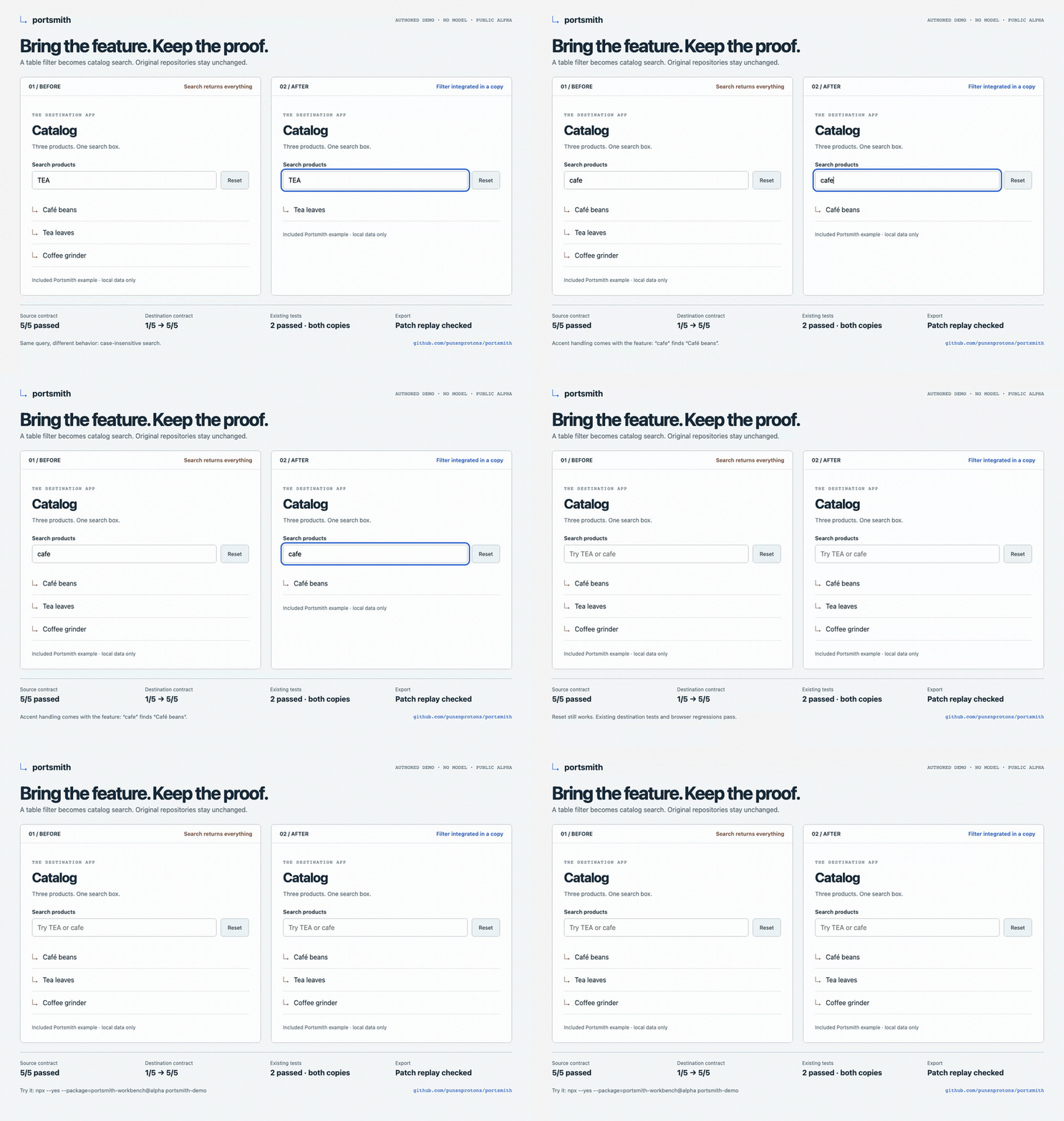
Recorded from the source demo using an included authored proposal, not autonomous AI. The published alpha has the same example behavior with simpler browser styling. Demo details and reproduction · Still image
Try it now
Node 22.19+ (22.x) or 24.11+, plus Git. No API key or signup needed:
npx --yes --package=portsmith-workbench@alpha portsmith-demo
The included example moves table filtering into a catalog app:
Source contract       5/5 passed
Destination before    1/5 passed
Destination after     5/5 passed
Existing tests        pass before and after
Output                a patch + verification report
It creates a fresh .portsmith/demo-* folder in your current directory and prints the patch and report paths. The proposal is authored so you can try the workflow without a model.
For ongoing use:
npm install -g portsmith-workbench@alpha
portsmith doctor --human
portsmith-demo --install-browser
The last command downloads matching Chromium and runs browser interaction checks. Later use portsmith-demo --browser. Minimal Linux hosts may also need npx [email protected] install-deps chromium. Installation and troubleshooting →
What can I use it for?
- Reuse a focused feature: move a filter, parser or transformation into another JS/TS app.
- Review an agent's integration: test the proposed behavior, retain existing tests, then inspect the patch.
- Check a browser workflow: declare interactions such as search and reset, and retain screenshots and traces.
Start with a small feature whose inputs, outputs and destination tests you can name. Walk through a complete transfer →
How it works
Discover → Inspect → Declare behavior → Prepare a copy
                                             ↓
Review patch ← Export ← Verify ← Adapt the integration
Export requires a passing source, a demonstrated destination gap, a passing candidate, completed regressions, unchanged originals and a fresh patch that reproduces the verified candidate. A failure, timeout or skipped test blocks verification. Full verification rules →
Bring your coding agent
Portsmith includes a CLI, MCP server and typed JavaScript API. Connect an MCP host such as Claude Code or Cursor, then ask:
Use Portsmith to find the search feature in
/work/sourceand plan a transfer into/work/app. Show me the behavior contract and dependencies before executing code. Preserve existing tests and export a patch I can review.
Copyable MCP configurations · Agent workflow skill · API reference
For Portsmith's own model-driven adaptation:
portsmith init --out ./portsmith-setup --model YOUR_MODEL_ID
# Copy portsmith-setup/.env.example to .env in that directory; add your key locally.
Then follow the model setup guide. Your key stays in the environment; model use sends selected code to your configured provider. The no-key demo above does not exercise autonomous adaptation.
Scope of this alpha
| Works within declared scope | Limits to know |
|---|---|
| JS/TS file tracing and feature discovery | Lexical leads, not runtime proof or function slicing |
| npm/pnpm setup in fresh copies, including workspaces | Scripts disabled; unknown versions need reviewed declarations |
| Static aliases and explicit Vite/plugin resolution captures | Computed imports and arbitrary bundler assets are unsupported |
| Function contracts, Node/Vitest regressions, declared builds | Only completed declared checks count |
| Chromium interactions, screenshots and traces | No general cross-framework conversion or production guarantee |
Public alpha: 0.6.0-alpha.2. Review every patch. Verification executes repository code on your machine; it is not a security sandbox. Use trusted code and review source licenses. A pass proves the declared cases, not general equivalence. Dependency details · Security
Examples and evidence
Historical controlled transfers include IT-Tools, TodoMVC, drawDB and Mermaid Live Editor. They have authored boundaries and recorded limitations; they are not a general success rate or proof of parity with Rea. Browse the cases →
Rea is an optional analysis evidence adapter. Its findings stay separate from Portsmith's behavior checks. Adapter and comparison scope.
Documentation and contributing
| I want to… | Start here |
|---|---|
| Install or diagnose setup | Setup |
| Understand every step | First transfer |
| Use an agent or a model | MCP / agent setup · Autonomous adaptation |
| Transfer a larger app | Dependency setup · Aliases |
| Declare browser checks | Browser contracts |
| Find commands or API types | CLI reference · API |
| Contribute or report a problem | Contributing · Issues |
git clone https://github.com/punsnprotons/portsmith.git
cd portsmith
npm ci --ignore-scripts
npm run browser:install
npm run check
npm run demo
Architecture · Validation · Release checks · MIT license


