
whoop-ai-mcp






An MCP (Model Context Protocol) server that connects AI assistants like Claude to your WHOOP health and fitness data. Ask questions about your recovery, sleep, workouts, and more — all through natural conversation.
📦 Published on the MCP Registry as
io.github.shashankswe2020-ux/whoop— discoverable by any MCP-compatible client.
Features
- 🏋️ 14 health data tools — recovery, sleep, workouts, cycles, body measurements, profile, weekly summaries, trend analysis, period comparisons, individual record lookups, today's snapshot, and calendar grid
- 📊 4 MCP Resources — ambient health context (latest recovery, sleep, cycle, profile) available without explicit tool calls
- 💬 5 MCP Prompts — guided conversation starters for common health queries
- 📅 Rich natural date expressions — use "last 7 days", "this week", "last 2 weeks", "last 3 months", "this quarter", "last year", "2026-05", and more
- 📈 Built-in analytics — weekly summaries, trend detection (linear regression), and period comparisons computed server-side
- 🔐 Secure OAuth2 — browser-based authentication with automatic token refresh
- 🔄 Resilient — automatic retry on rate limits, token refresh on expiry, auto-pagination, clear error messages
- 💾 Secure token storage — tokens stored at
~/.whoop-mcp/tokens.jsonwith0600permissions - ⚡ Zero config — just add your WHOOP app credentials and go
- 📦 Lightweight — only two runtime dependencies (
@modelcontextprotocol/sdk+zod)
Quick Comparison (WHOOP MCP packages on npm)
Based on npm search results for whoop mcp on 2026-05-30.
| Package | Latest version | Last publish (UTC) | MCP Registry | Runtime deps | npm |
|---|---|---|---|---|---|
| whoop-ai-mcp (this repo) | 0.4.0 | 2026-05-31 | ✅ io.github.shashankswe2020-ux/whoop |
2 | https://www.npmjs.com/package/whoop-ai-mcp |
| whoop-mcp-unofficial | 0.4.5 | 2026-05-29 | — | 5 | https://www.npmjs.com/package/whoop-mcp-unofficial |
| @nchemb/whoop-mcp | 0.2.0 | 2026-04-27 | — | 4 | https://www.npmjs.com/package/@nchemb/whoop-mcp |
| @scom82/whoop-mcp | 0.1.0 | 2026-05-17 | — | 1 | https://www.npmjs.com/package/@scom82/whoop-mcp |
| whoop-mcp-server | 0.0.5 | 2026-03-13 | — | 2 | https://www.npmjs.com/package/whoop-mcp-server |
| whoop-mcp | 0.1.2 | 2026-03-11 | — | 2 | https://www.npmjs.com/package/whoop-mcp |
| @roebot0/whoop-mcp | 1.0.0 | 2026-04-06 | — | 3 | https://www.npmjs.com/package/@roebot0/whoop-mcp |
| @alacore/whoop-mcp-server | 1.0.1 | 2025-10-09 | — | 2 | https://www.npmjs.com/package/@alacore/whoop-mcp-server |
Why this package stands out
- Published to npm and the official MCP Registry (via
mcpNamemetadata) - Most feature-rich standalone server: 14 tools + 4 resources + 5 prompts + analytics + auto-pagination
- Only 2 runtime dependencies (lightest footprint among full-featured options)
- No external infrastructure required (no SQLite, no Express, no relay servers)
Deep comparison ratings (WHOOP MCP packages on npm)
Evidence basis: npm registry metadata + npm-hosted README signals + package manifest fields (dependencies, repository, mcpName) collected on 2026-05-30.
Scoring dimensions (0–5):
- Security & resilience (35%): documented OAuth, token refresh, retry/backoff, secure token file permissions (
0600), no shared relay - Freshness (25%): recency of latest npm publish
- Docs & verification signals (25%): README coverage for OAuth, testing, changelog/release notes, and MCP Inspector usage
- Discoverability & portability (15%): MCP Registry metadata (
mcpName), repository metadata present, lean runtime dependency count, no external infra required
Ratings are documentation/metadata-driven and are not a source-code security audit.
| Package | Security & resilience | Freshness | Docs & verification | Discoverability | Overall | Key differentiator / gap vs whoop-ai-mcp |
|---|---|---|---|---|---|---|
| whoop-ai-mcp (this repo) | 5.0/5 | 5.0/5 | 5.0/5 | 5.0/5 | 5.0/5 | Baseline — MCP Registry, 2 deps, analytics, no external infra |
| whoop-mcp-unofficial | 4.5/5 | 5.0/5 | 4.0/5 | 3.5/5 | 4.3/5 | Strong feature set (20+ tools, SQLite cache, privacy modes); heavier deps (5: express, better-sqlite3, cors); no mcpName; part of "Delx Wellness" ecosystem |
| @nchemb/whoop-mcp | 3.0/5 | 4.0/5 | 3.5/5 | 2.5/5 | 3.2/5 | Unique shared OAuth relay (no dev app needed); local SQL queries; capped at 10 test users; 4 deps; no mcpName |
| whoop-mcp-server | 3.8/5 | 3.0/5 | 2.5/5 | 3.3/5 | 3.1/5 | No mcpName; no Inspector/changelog signal; older publish cadence |
| @scom82/whoop-mcp | 2.0/5 | 4.5/5 | 2.0/5 | 2.0/5 | 2.5/5 | Requires self-hosted FastAPI backend (whoop-web); not standalone; 1 dep but external infra needed |
| @roebot0/whoop-mcp | 2.5/5 | 4.0/5 | 1.3/5 | 1.7/5 | 2.4/5 | No 0600 docs; no mcpName; no explicit testing/changelog signal |
| @alacore/whoop-mcp-server | 2.5/5 | 2.0/5 | 2.5/5 | 3.3/5 | 2.5/5 | Older publish cadence; no mcpName; retry/backoff not documented |
| whoop-mcp | 0.0/5 | 3.0/5 | 0.0/5 | 3.3/5 | 1.3/5 | OAuth/refresh/retry not documented; no mcpName |
🎥 Video Walkthrough
Watch a detailed walkthrough of setting up and using whoop-ai-mcp with Claude Desktop:
Covers: creating a WHOOP Developer App, configuring Claude Desktop, OAuth authentication, and querying your health data through natural conversation.
Prerequisites
- A WHOOP account with an active membership
- A WHOOP Developer App — create one at developer.whoop.com
- Set the redirect URI to
http://localhost:3000/callback
- Set the redirect URI to
- Node.js >= 20
Get a WHOOP
Don't have a WHOOP yet? Here's how to get started:
- 🛒 Buy a WHOOP on Amazon — WHOOP peak on Amazon
- 🔗 Join WHOOP directly — whoop.com/membership
Quickstart (MCP Registry)
This server is published on the official MCP Registry. MCP clients that support the registry can discover and install it automatically:
Server name: io.github.shashankswe2020-ux/whoop
You can also browse it via the registry API:
curl "https://registry.modelcontextprotocol.io/v0.1/servers?search=io.github.shashankswe2020-ux/whoop"
Quickstart (Claude Desktop)
Add this to your Claude Desktop configuration file:
macOS: ~/Library/Application Support/Claude/claude_desktop_config.jsonWindows: %APPDATA%\Claude\claude_desktop_config.json
{
  "mcpServers": {
    "whoop": {
      "command": "npx",
      "args": ["whoop-ai-mcp"],
      "env": {
        "WHOOP_CLIENT_ID": "your_client_id",
        "WHOOP_CLIENT_SECRET": "your_client_secret"
      }
    }
  }
}
Replace your_client_id and your_client_secret with the credentials from your WHOOP Developer App.
On first launch, a browser window will open for you to authorize access to your WHOOP data. After authorizing, tokens are cached locally and refresh automatically.
Then ask Claude something like:
"How am I doing today?"
"Show me my sleep data from the last 3 days"
"What workouts did I do this month?"
"Is my HRV trending up or down?"
"Give me a weekly health summary"
"Show me my recovery calendar for last 2 weeks"
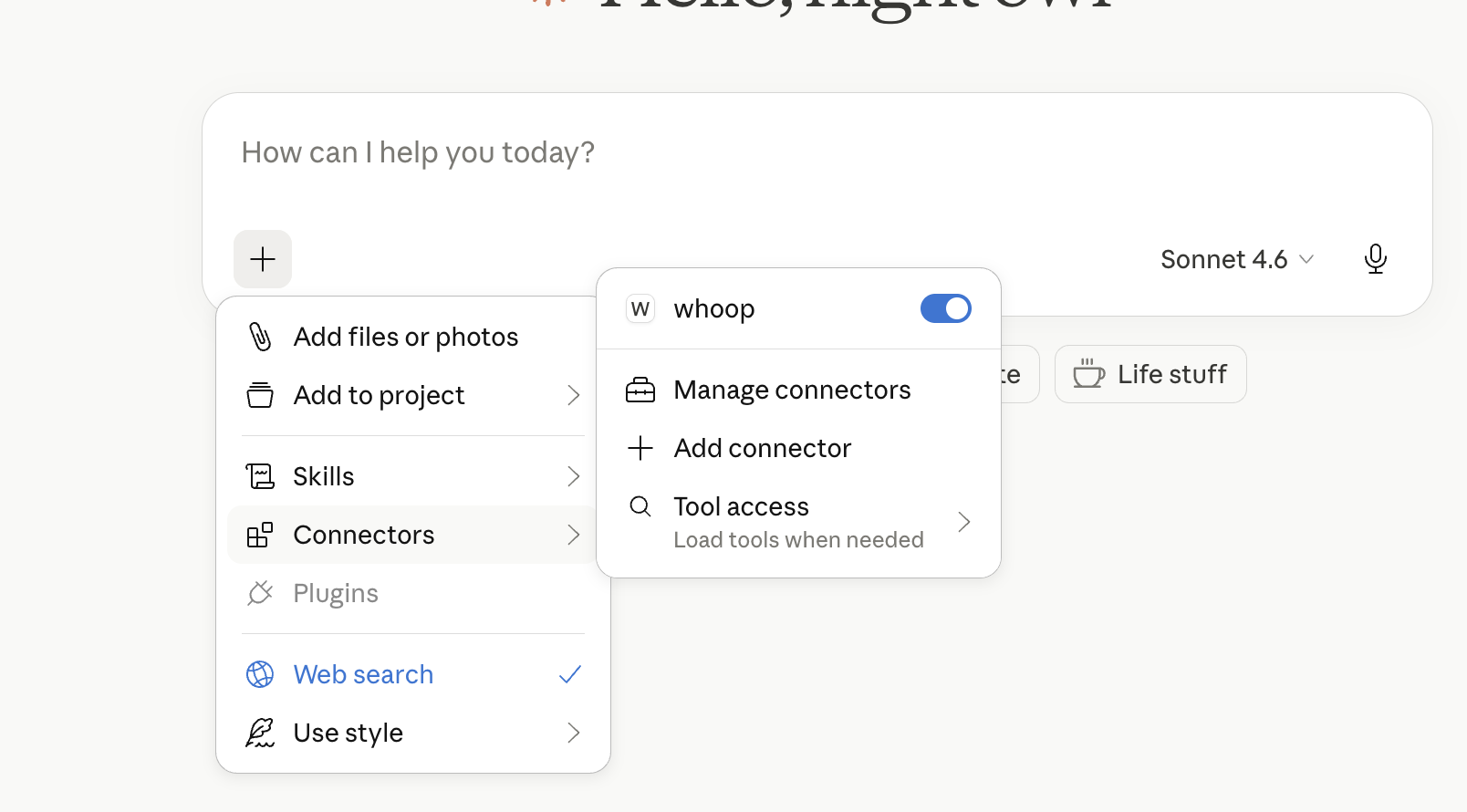
whoop-mcp connected in Claude Desktop:
Chatting with WHOOP data through Claude:
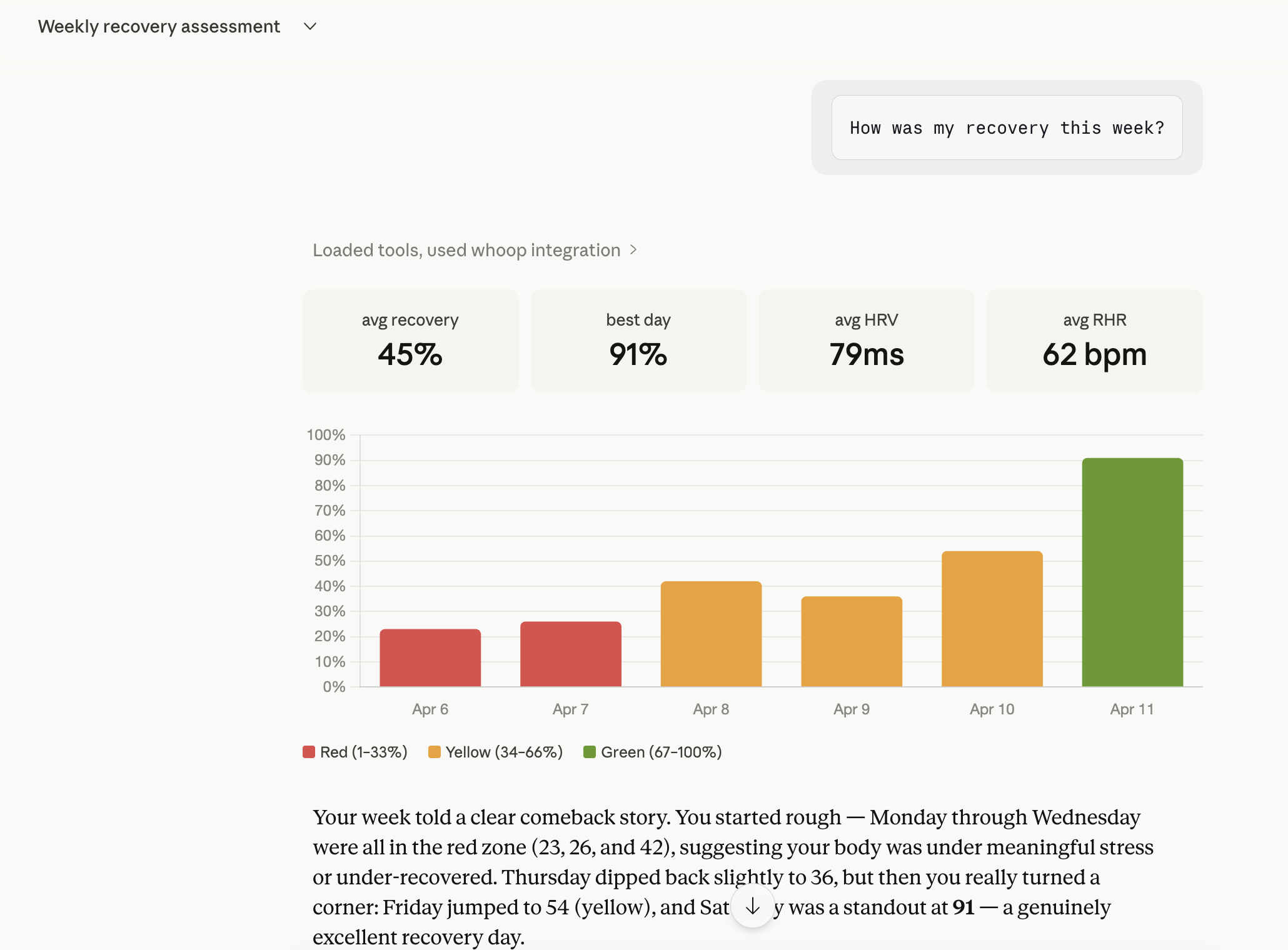
Weekly Health Report demo (Claude Desktop):


Installation
Via npx (recommended)
No installation needed — Claude Desktop runs it automatically with the config above.
Global install
npm install -g whoop-ai-mcp
From source
git clone https://github.com/shashankswe2020-ux/whoop-mcp.git
cd whoop-mcp
npm install
npm run build
Setup wizard (whoop-ai-mcp setup)
For a guided installation that writes the Claude Desktop config (or prints theclaude mcp add command for Claude Code) and verifies your WHOOP credentialsin one go:
npx whoop-ai-mcp setup
Flags:
--client=claude-desktop(default) writes/mergesclaude_desktop_config.jsonwith an automatic.bakbackup.--client=claude-codeprints the equivalentclaude mcp addcommand.--verifyruns the OAuth flow end-to-end and fetches your profile to confirmeverything is wired correctly before exiting.--client-id/--client-secretskip the interactive prompts (useful forscripts; secrets entered interactively are masked).
If WHOOP_CLIENT_ID and WHOOP_CLIENT_SECRET are already exported in yourshell, the wizard uses them automatically — no prompts. Combine with--verify to do a one-shot config-correctness check:
WHOOP_CLIENT_ID=... WHOOP_CLIENT_SECRET=... npx whoop-ai-mcp setup --verify
If the Claude Desktop config file already contains a whoop MCP entry froma previous setup, the wizard short-circuits — it reads the existingcredentials, prints Existing whoop entry found in <path>, and eitherverifies them (with --verify) or exits without rewriting the file. Tooverwrite an existing entry, pass explicit --client-id / --client-secretflags.
Precedence: --client-id / --client-secret flags > existing claude-desktopconfig > WHOOP_CLIENT_ID / WHOOP_CLIENT_SECRET env vars > interactiveprompts.
Example session:
shashankmishra@Shashanks-MacBook-Pro ~ % npx whoop-ai-mcp setup --client=claude-desktop
WHOOP MCP — Setup Wizard
------------------------

WHOOP Client ID (from https://developer.whoop.com): xxxxxxxx-xxxx-xxxx-xxxx-xxxxxxxxxxxx
WHOOP Client Secret (input hidden): ****************************************************************

Claude Desktop config written: /Users/shashankmishra/Library/Application Support/Claude/claude_desktop_config.json
Previous config backed up to: /Users/shashankmishra/Library/Application Support/Claude/claude_desktop_config.json.bak
Restart Claude Desktop to load the new server.
Re-running against an already-configured Claude Desktop install (existingwhoop entry in claude_desktop_config.json) short-circuits to averification-only flow — no prompts, no rewrite:
shashankmishra@Shashanks-MacBook-Pro ~ % whoop-ai-mcp setup --verify
WHOOP MCP — Setup Wizard
------------------------

Target client (claude-desktop / claude-code) [claude-desktop]:
Existing whoop entry found in /Users/shashankmishra/Library/Application Support/Claude/claude_desktop_config.json.

Verifying credentials with WHOOP...
Cached tokens expired, attempting refresh...
Token refresh successful.
OAuth flow complete. Fetching profile...
Profile OK: {"user_id":35253045,"email":"[email protected]","first_name":"Shashank","last_name":"Mishra"}

Existing config verified — no changes made.
Configuration
Environment Variables
| Variable | Required | Description |
|---|---|---|
WHOOP_CLIENT_ID |
Yes | Your WHOOP Developer App client ID |
WHOOP_CLIENT_SECRET |
Yes | Your WHOOP Developer App client secret |
Set these in your Claude Desktop config (see Quickstart) or as shell environment variables:
export WHOOP_CLIENT_ID=your_client_id
export WHOOP_CLIENT_SECRET=your_client_secret
Creating a WHOOP Developer App
- Go to developer.whoop.com
- Create a new application
- Set the Redirect URI to
http://localhost:3000/callback - Set the Privacy Policy URL (required by WHOOP) — you can use
https://github.com/shashankswe2020-ux/whoop-mcpor your own URL - Enable the following scopes:
read:profileread:recoveryread:sleepread:workoutread:cyclesread:body_measurement
- Copy the Client ID and Client Secret
Tools
get_profile
Get the authenticated user's basic profile — name and email.
Parameters: None
get_body_measurement
Get the user's body measurements — height, weight, and max heart rate.
Parameters: None
get_recovery_collection
Get recovery scores for a date range. Returns HRV, resting heart rate, SpO2, and skin temp for each day.
Parameters:
| Parameter | Type | Required | Description |
|---|---|---|---|
start |
string | No | ISO 8601 or relative expression ("today", "last 7 days", "this week"). |
end |
string | No | ISO 8601 or relative expression. Defaults to now. |
limit |
number | No | Max records to return (1–25). Defaults to 10. |
nextToken |
string | No | Pagination token from a previous response. |
get_sleep_collection
Get sleep records for a date range. Returns sleep stages, duration, respiratory rate, and performance scores.
Parameters:
| Parameter | Type | Required | Description |
|---|---|---|---|
start |
string | No | ISO 8601 or relative expression ("today", "last 7 days", "this week"). |
end |
string | No | ISO 8601 or relative expression. Defaults to now. |
limit |
number | No | Max records to return (1–25). Defaults to 10. |
nextToken |
string | No | Pagination token from a previous response. |
get_workout_collection
Get workout records for a date range. Returns strain, heart rate zones, calories, and sport type.
Parameters:
| Parameter | Type | Required | Description |
|---|---|---|---|
start |
string | No | ISO 8601 or relative expression ("today", "last 7 days", "this week"). |
end |
string | No | ISO 8601 or relative expression. Defaults to now. |
limit |
number | No | Max records to return (1–25). Defaults to 10. |
nextToken |
string | No | Pagination token from a previous response. |
get_cycle_collection
Get physiological cycles for a date range. Returns strain, calories, and heart rate data per cycle.
Parameters:
| Parameter | Type | Required | Description |
|---|---|---|---|
start |
string | No | ISO 8601 or relative expression ("today", "last 7 days", "this week"). |
end |
string | No | ISO 8601 or relative expression. Defaults to now. |
limit |
number | No | Max records to return (1–25). Defaults to 10. |
nextToken |
string | No | Pagination token from a previous response. |
get_sleep_by_id
Get a single sleep record by ID. Returns sleep stages, duration, respiratory rate, and performance scores.
Parameters:
| Parameter | Type | Required | Description |
|---|---|---|---|
id |
string | Yes | The sleep record ID. |
get_workout_by_id
Get a single workout record by ID. Returns strain, heart rate zones, calories, and sport type.
Parameters:
| Parameter | Type | Required | Description |
|---|---|---|---|
id |
string | Yes | The workout record ID. |
get_cycle_by_id
Get a single physiological cycle by ID. Returns strain, calories, and heart rate data.
Parameters:
| Parameter | Type | Required | Description |
|---|---|---|---|
id |
number | Yes | The cycle record ID. |
get_weekly_summary
Get a summarized health report for a given week — average recovery, HRV, RHR, sleep duration and quality, workout count and strain, plus recovery trend direction.
Parameters:
| Parameter | Type | Required | Description |
|---|---|---|---|
week_start |
string | No | ISO 8601 or relative expression ("last week", "this week"). Defaults to most recent Monday. |
compare_periods
Compare health metrics between two time periods — shows improvement or regression in recovery, sleep, and strain.
Parameters:
| Parameter | Type | Required | Description |
|---|---|---|---|
period_a_start |
string | Yes | ISO 8601 start of the first period. |
period_a_end |
string | Yes | ISO 8601 end of the first period. |
period_b_start |
string | Yes | ISO 8601 start of the second period. |
period_b_end |
string | Yes | ISO 8601 end of the second period. |
get_trend
Analyze a health metric trend over time — detects direction (improving/declining/stable), variability, and anomalies using linear regression.
Parameters:
| Parameter | Type | Required | Description |
|---|---|---|---|
metric |
string | Yes | One of: recovery, hrv, rhr, sleep_duration, sleep_performance, strain. |
days |
number | No | Number of days to analyze (7–90). Default: 30. |
get_today
Get today's complete health snapshot — recovery score, last night's sleep, current strain, and last workout in one call. Perfect for "how am I doing today?" questions.
Parameters: None
Returns: Recovery score with zone, sleep breakdown (hours, stages, performance), current strain, last workout (sport + strain), and a human-readable summary.
get_calendar
Get a day-by-day grid of recovery, sleep, and strain for a date range. Perfect for weekly/monthly overviews.
Parameters:
| Parameter | Type | Required | Description |
|---|---|---|---|
days |
number | No | Number of days to show (1–90). Default: 7. |
start |
string | No | Start date — ISO 8601 or relative expression ("last 14 days", "this month"). Defaults to N days ago. |
Returns: Per-day grid with recovery score + zone (green/yellow/red), sleep hours, sleep performance, and strain. Includes period averages.
Supported Date Expressions
All collection tools and get_calendar accept natural language date expressions (case-insensitive):
| Expression | Example Result |
|---|---|
"today" |
Today's UTC day boundaries |
"yesterday" |
Yesterday's UTC day boundaries |
"last N days" (1–365) |
N days back from today |
"last N weeks" (1–52) |
N×7 days back from today |
"last N months" (1–12) |
N calendar months back |
"this week" |
Monday to today |
"last week" |
Previous Monday–Sunday |
"this month" |
1st of month to today |
"last month" |
Full previous month |
"this quarter" |
Quarter start (Jan/Apr/Jul/Oct) to today |
"last quarter" |
Full previous quarter |
"last year" |
Jan 1–Dec 31 of previous year |
"YYYY-MM" (e.g., "2026-05") |
Full calendar month |
| ISO 8601 | Pass-through (e.g., "2026-03-15T00:00:00Z") |
Resources
MCP Resources provide ambient health context — AI assistants can read your current health state without explicit tool calls.
| Resource URI | Description | Cache TTL |
|---|---|---|
whoop://v2/user/recovery/latest |
Most recent recovery score, HRV, RHR | 5 min |
whoop://v2/user/sleep/latest |
Most recent sleep record | 5 min |
whoop://v2/user/cycle/latest |
Current physiological cycle (strain) | 5 min |
whoop://v2/user/profile |
User profile (name, email) | 1 hr |
Privacy: Resources expose the same data available through tools — they simply make it accessible as ambient context. No additional WHOOP scopes are required. Data is cached in-memory with short TTLs and invalidated on token refresh.
To disable resources: set WHOOP_MCP_DISABLE_RESOURCES=1.
Prompts
Pre-built conversation starters that guide you into useful health queries:
| Prompt | Description |
|---|---|
weekly_health_review |
Comprehensive review of recovery, sleep, and workouts (accepts optional days arg) |
sleep_analysis |
Analyze recent sleep patterns and quality |
recovery_trend |
How is recovery trending? HRV, RHR, recovery score analysis |
workout_recap |
Summarize recent workouts, strain, and training load |
health_check |
Quick health status using cached resource data |
Authentication
whoop-ai-mcp uses OAuth2 Authorization Code flow with PKCE:
- First run: A browser window opens for you to authorize with WHOOP
- Token caching: Access and refresh tokens are saved to
~/.whoop-mcp/tokens.json - Auto-refresh: When the access token expires, it's automatically refreshed using the stored refresh token
- Re-authentication: If the refresh token expires, you'll be prompted to authorize again
Token files are stored with 0600 permissions (user-only read/write).
Troubleshooting
"Missing required environment variable: WHOOP_CLIENT_ID"
Your WHOOP credentials aren't set. Add them to your Claude Desktop config or set them as environment variables. See Configuration.
"Network error: Unable to reach the WHOOP API"
Check your internet connection. The WHOOP API must be reachable at https://api.prod.whoop.com.
"WHOOP API returned 429"
You've hit the rate limit. The server retries automatically with exponential backoff (up to 3 attempts). If this persists, reduce the frequency of your requests.
"WHOOP API returned 401"
Your access token has expired. The server attempts an automatic refresh. If that fails, delete ~/.whoop-mcp/tokens.json and restart to re-authenticate:
rm ~/.whoop-mcp/tokens.json
Browser doesn't open during authentication
If the browser doesn't open automatically, check the terminal output for the authorization URL and open it manually.
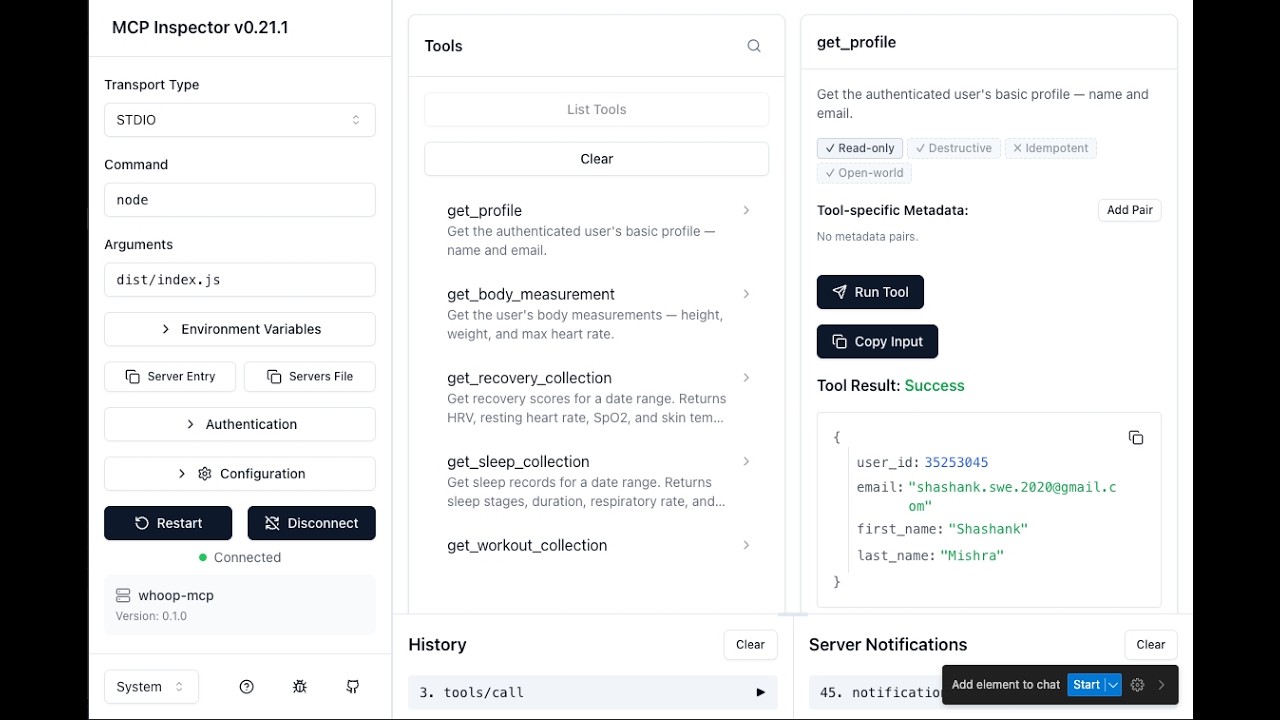
Testing with MCP Inspector
You can interactively test the server using the MCP Inspector — a browser-based tool for exploring and invoking MCP tools.
WHOOP_CLIENT_ID=your_client_id \
WHOOP_CLIENT_SECRET=your_client_secret \
WHOOP_REDIRECT_URI=http://localhost:3000/callback \
npx @modelcontextprotocol/inspector node dist/index.js
Then open http://localhost:6274 in your browser. The Inspector connects to the server, lists all available tools, and lets you invoke them with custom parameters.
OAuth grant access screen (first-run authorization):

Testing get_profile tool in MCP Inspector:

Deployment (Docker + Cloud Hosting)
The HTTP transport (MCP_TRANSPORT=http) makes this server suitable for remotehosting so that web/mobile MCP clients (e.g. claude.ai connectors) can connectto your personal WHOOP data over the network. A production-readyDockerfile is included.
Security warning. When running over HTTP you are exposing your WHOOP databehind a single bearer token. Use a strong random
MCP_AUTH_TOKEN(openssl rand -hex 32), only deploy behind TLS, restrictMCP_ALLOWED_ORIGINS, and treat the host as a personal-use deployment — nota multi-tenant service.
Image characteristics
- Multi-stage build on
node:22-alpine(compressed pull size ~58 MB;uncompressed ~258 MB — the floor is set by the Node.js runtime itself). - Runs as the unprivileged built-in
nodeuser (UID 1000). tinias PID 1 for clean signal forwarding (graceful shutdown).- Health check uses Node's native
fetchagainst/health— nocurl/wgetbaked into the image. - All configuration is supplied at runtime via env vars; no secrets are bakedinto image layers.
Build & run locally
docker build -t whoop-mcp .

# Smoke test (runs node, prints "ok", exits)
docker run --rm whoop-mcp node -e "console.log('ok')"

# Run the HTTP server
docker run --rm -p 3000:3000 \
  -e MCP_AUTH_TOKEN="$(openssl rand -hex 32)" \
  -e WHOOP_CLIENT_ID="your-client-id" \
  -e WHOOP_CLIENT_SECRET="your-client-secret" \
  -e MCP_ALLOWED_ORIGINS="https://claude.ai" \
  whoop-mcp

# Health check
curl http://localhost:3000/health
Required env vars (HTTP mode):
| Variable | Required | Default | Notes |
|---|---|---|---|
MCP_TRANSPORT |
no | http |
Image default; override with stdio or both if needed. |
MCP_AUTH_TOKEN |
yes | — | Bearer token clients must send. Generate ≥32 random bytes. |
WHOOP_CLIENT_ID |
yes | — | From your WHOOP developer app. |
WHOOP_CLIENT_SECRET |
yes | — | From your WHOOP developer app. |
MCP_PORT |
no | 3000 |
Listen port. |
MCP_HOST |
no | 0.0.0.0 |
Listen interface. |
MCP_ALLOWED_ORIGINS |
no | (none) | Comma-separated CORS allowlist. |
MCP_TRUST_PROXY |
no | 0 |
Set 1 when behind a reverse proxy (Fly/Railway). |
LOG_LEVEL |
no | info |
debug/info/warn/error. |
LOG_FORMAT |
no | json |
json for prod, pretty for local dev. |
MCP_CONNECTOR_PASSWORD |
no | — | If set (≥12 chars), enables the OAuth 2.1 connector for claude.ai web/mobile. Requires PUBLIC_URL + ALLOWED_REDIRECT_URIS. |
PUBLIC_URL |
no | — | Public https:// origin used as OAuth issuer. |
ALLOWED_REDIRECT_URIS |
no | — | Comma-separated exact-match list of OAuth redirect URIs. |
MCP_JWT_SECRET |
no | (HKDF) | Override JWT signing key. Defaults to HKDF derivation from MCP_AUTH_TOKEN. |
MCP_OAUTH_CLIENT_ID |
no | whoop-mcp-connector |
OAuth client identifier advertised by the connector. |
Fly.io
Fly.io deploys directly from the Dockerfile and gives you afree TLS-terminated public URL.
# One-time: install flyctl, sign in, and create the app from this repo's Dockerfile
brew install flyctl
fly auth login
fly launch --no-deploy --copy-config --name whoop-mcp-<your-suffix>

# Set secrets (these are encrypted and injected as env at runtime — never baked in)
fly secrets set \
  MCP_AUTH_TOKEN="$(openssl rand -hex 32)" \
  WHOOP_CLIENT_ID="..." \
  WHOOP_CLIENT_SECRET="..." \
  MCP_TRUST_PROXY=1

# Deploy
fly deploy
fly status
fly logs
In your generated fly.toml, make sure the HTTP service points at port 3000and that force_https = true is set under [[http_service]]. Fly handlesTLS termination, so MCP_TRUST_PROXY=1 is required for accurate client IPsin logs and rate-limit decisions.
Railway
Railway auto-detects the Dockerfile.
- Create a new project from this GitHub repo (or
railway upfrom a clone). - In Variables, add
MCP_AUTH_TOKEN,WHOOP_CLIENT_ID,WHOOP_CLIENT_SECRET, andMCP_TRUST_PROXY=1. - Under Settings → Networking, generate a public domain. Railwayterminates TLS for you.
- Deploy. Health check path:
/health.
Other platforms
The image is a stock OCI artifact and runs anywhere Docker does — Render, CloudRun, Kubernetes, Hetzner, etc. The only platform-specific knob isMCP_TRUST_PROXY=1 whenever you sit behind a TLS-terminating proxy.
Connecting from claude.ai (OAuth 2.1 connector)
Claude Desktop and Claude Code can use the static MCP_AUTH_TOKEN bearerdirectly. The claude.ai web/mobile clients expect an OAuth 2.1 connectorwith PKCE — set the three env vars below and the server mounts the connectorautomatically on the same port as /mcp:
fly secrets set \
  MCP_CONNECTOR_PASSWORD="$(openssl rand -base64 24)" \
  PUBLIC_URL="https://whoop-mcp-<your-suffix>.fly.dev" \
  ALLOWED_REDIRECT_URIS="https://claude.ai/api/mcp/auth_callback"
MCP_CONNECTOR_PASSWORD(≥12 chars) — the human-facing password you'll typeinto the claude.ai connector dialog. Treat it like any other shared secret.PUBLIC_URL— the publichttps://origin claude.ai will reach. Used asthe OAuth issuer (e.g.https://example.com→ metadata at/.well-known/oauth-authorization-server).ALLOWED_REDIRECT_URIS— comma-separated exact-match allowlist. Forclaude.ai the value ishttps://claude.ai/api/mcp/auth_callback.- Optional:
MCP_JWT_SECREToverrides the JWT signing key (defaults to anHKDF derivation fromMCP_AUTH_TOKEN);MCP_OAUTH_CLIENT_IDoverrides theadvertised client id (defaultwhoop-mcp-connector).
In claude.ai → Settings → Connectors → Add custom connector, point it atPUBLIC_URL/mcp and supply MCP_CONNECTOR_PASSWORD when prompted.
Development
Setup
git clone https://github.com/shashankswe2020-ux/whoop-mcp.git
cd whoop-mcp
npm install
Commands
| Command | Description |
|---|---|
npm run build |
Build TypeScript |
npm test |
Run tests (Vitest) |
npm run typecheck |
Type check (tsc --noEmit) |
npm run lint |
Lint (ESLint) |
npm run lint:fix |
Lint + auto-fix |
npm run format |
Format (Prettier) |
npm run dev |
Run in dev mode (tsx) |
Project Structure
src/
├── index.ts              # Entry point — auth, client, server, stdio
├── server.ts             # MCP server + tool/resource/prompt registration
├── auth/
│   ├── oauth.ts          # OAuth2 Authorization Code flow
│   ├── token-store.ts    # Secure token persistence
│   └── callback-server.ts # Local OAuth callback server
├── api/
│   ├── client.ts         # HTTP client with retry + refresh
│   ├── pagination.ts     # Auto-pagination utility (fetchAllPages)
│   ├── types.ts          # WHOOP API response types
│   └── endpoints.ts      # API URL constants
├── resources/
│   └── index.ts          # MCP Resource handlers (4 resources)
├── tools/
│   ├── get-profile.ts
│   ├── get-recovery.ts
│   ├── get-sleep.ts
│   ├── get-workout.ts
│   ├── get-cycle.ts
│   ├── get-body-measurement.ts
│   ├── get-sleep-by-id.ts
│   ├── get-workout-by-id.ts
│   ├── get-cycle-by-id.ts
│   ├── get-weekly-summary.ts   # Analytical: weekly health report
│   ├── compare-periods.ts      # Analytical: period comparison
│   ├── get-trend.ts            # Analytical: trend detection
│   ├── get-today.ts            # Composite: today's snapshot
│   ├── get-calendar.ts         # Grid: multi-day calendar view
│   ├── date-utils.ts           # Relative date expression parser
│   ├── stats-utils.ts          # Statistics (mean, median, regression)
│   └── collection-utils.ts
├── prompts/
│   └── index.ts                # MCP Prompt handlers (5 prompts)
└── resources/
    └── index.ts                # MCP Resource handlers (4 resources)
Releases & npm Package
This project is published on npm as whoop-ai-mcp.
npm install -g whoop-ai-mcp
Or run directly with npx:
npx whoop-ai-mcp
Release Process
- Update the version in
package.jsonand add a new entry inCHANGELOG.md - Commit the changes:
git commit -am "Release vX.Y.Z" - Tag the release:
git tag vX.Y.Z - Push the commit and tag:
git push origin main vX.Y.Z - The Release workflow automatically creates a GitHub Release with notes extracted from the changelog
- The npm publish workflow automatically publishes the new version to npm
Changelog
See CHANGELOG.md for a full list of changes in each release.
Privacy notes for analytical tools
The analytical tools — get_weekly_summary, get_trend, andcompare_periods — return pre-computed statistical summaries derived fromyour underlying recovery / sleep / cycle / workout records. No new healthdata is exposed beyond what the per-record collection tools already return(get_recovery_collection, get_sleep_collection, etc.), but theaggregated form is more concentrated and easier to scan over time. Inparticular, the anomalies array returned by get_trend flags days thatdeviate from your personal baseline — such days may correlate withillness, injury, travel, or lifestyle changes.
If you connect this MCP server to a remote AI assistant (rather than alocal one), be aware that those summaries will be sent to that assistantin the same way any other tool result is. All data continues to flow onlybetween the WHOOP API, this MCP server running on your machine, and theassistant you explicitly invoke — there is no third-party telemetry.
Contributing
See CONTRIBUTING.md for development workflow, coding conventions, and the project's Copilot agent/skill configuration.
License
MIT


