
Fast Code Search for Agents
Quickstart • Agent Integration • MCP Server • CLI • Rust Library • Benchmarks
SIFS indexes a repo in 6.5 ms, answers queries in 0.376 ms, and hits NDCG@10 = 0.8641, beating every other tool on the benchmark, including the 137M-parameter CodeRankEmbed Hybrid. It runs as a CLI, a Rust crate, or a local MCP server. No GPU, no API keys, no external services.
Quickstart
cargo install --locked sifs
sifs search "authentication flow" --source /path/to/project
sifs search "parse JWT claims" --source /path/to/project --mode bm25 --offline --limit 10
sifs find-related src/auth/session.rs 42 --source /path/to/project --limit 8
The default mode is hybrid (semantic + BM25). Omit --source to search thecurrent directory, or pass a local path or Git URL explicitly.
Agent Integration
SIFS is CLI-first for agents. Install a project instruction snippet or localskill so Codex, Claude Code, OpenClaw, Hermes, and generic skill-aware agentsknow to use SIFS before broad file reads:
sifs agent print --target codex --artifact snippet
sifs agent install --target codex --artifact snippet --file AGENTS.md --dry-run --json
sifs agent install --target codex --artifact snippet --file AGENTS.md
sifs agent doctor --target codex --json
The generated guidance tells agents to use MCP tools only when they are visiblein the current session, and to fall back to shell commands such assifs search, sifs list-files, sifs get, and sifs agent-context --jsonotherwise.
Full integration reference: docs/agent-integration.md.
Features
- Fastest in class. 6.5 ms cold index, 0.376 ms warm query, 0.0012 ms for cached repeats. Pure Rust, all on CPU.
- State-of-the-art quality. NDCG@10 of 0.8641 across 63 repositories and 19 languages. Ahead of CodeRankEmbed Hybrid (0.8617) and Semble (0.8544).
- Three search modes.
hybridfor most queries,semanticfor natural language,bm25for symbols and identifiers. Switch per query. - Fully offline. BM25 mode loads nothing — no tokenizers, no model files, no network. Hybrid and semantic modes work offline once the model is cached locally.
- MCP server. Drop-in tool for Claude Code, Codex, Cursor, and any other MCP-compatible agent. Sources are indexed on demand and can be refreshed explicitly after files change.
- Agent skills and snippets. Print, install, inspect, and remove CLI-firstSIFS guidance with
sifs agent. - Local and remote. Pass a local path or a Git URL with
--source. - Discover the machine-readable command contract with
sifs agent-context --json. - Save source/search defaults in profiles and record local feedback when agentshit friction.
- Generate agent skills/snippets and run benchmark diagnostics for quality andlatency checks.
Install
# crates.io
cargo install --locked sifs

# Homebrew
brew install tristanmanchester/tap/sifs

# From source
cargo build --release
target/release/sifs search "authentication flow" --source .
Keep installed binaries current with:
sifs update --check
sifs update --dry-run
sifs update
sifs update delegates to Cargo or Homebrew only when the current executable isrecognized as being owned by that package manager. For copied, development, orambiguous binaries, it prints manual next actions instead of mutating anunrelated install.
The sifs-benchmark and sifs-embed diagnostic binaries require the diagnostics feature:
cargo build --release --features diagnostics --bins
Run the test suite after changing indexing, chunking, ranking, model loading, or MCP behavior:
cargo test
MCP Server
SIFS installs itself as a local stdio MCP server in two commands:
sifs daemon install-agent
sifs mcp install --client all
This installs a reusable MCP server instead of pinning the config to onerepository. Agent clients can ask SIFS to search the current project, and toolcalls can pass source when they need a specific local checkout or Git URL.
To pin the server to a single source:
sifs mcp install --client all --source /path/to/project
sifs mcp install --client codex --source /path/to/project
sifs mcp install --client claude --scope local --source /path/to/project
You can also start the server directly. Without --source it uses the serverprocess working directory as the default source. Passing --source pins theserver to that source, so MCP clients can call search and find_relatedwithout sending a source on every tool call.
sifs mcp
sifs mcp --source /path/to/project
The installer calls the client CLIs when they're available:
codex mcp add sifs -- /absolute/path/to/sifs mcp
claude mcp add-json sifs '{"type":"stdio","command":"/absolute/path/to/sifs","args":["mcp"],"env":{}}' --scope local
If a client CLI isn't available, sifs mcp install --dry-run prints the config to paste manually.
Codex (~/.codex/config.toml):
[mcp_servers.sifs]
command = "/absolute/path/to/sifs"
args = ["mcp"]
startup_timeout_sec = 20
tool_timeout_sec = 60
Claude Code (.mcp.json in your project):
{
  "mcpServers": {
    "sifs": {
      "type": "stdio",
      "command": "/absolute/path/to/sifs",
      "args": ["mcp"],
      "env": {}
    }
  }
}
Only check a project-scoped .mcp.json into repositories you trust — it grants read access to local paths passed in tool calls.
To debug the daemon directly:
sifs daemon run --replace-existing-socket
sifs daemon ping
sifs daemon status --json
CLI
# Search the current directory
sifs search "where is authentication handled"

# Search a local project with hybrid ranking
sifs search "parse oauth callback" --source /path/to/project --mode hybrid --limit 10

# Use model-free offline BM25 search
sifs search "SessionToken" --source /path/to/project --mode bm25 --offline --limit 10

# Search a remote Git repository
sifs search "stream upload backpressure" --source https://github.com/owner/project

# Find code related to a known location
sifs find-related src/auth/session.rs 42 --source /path/to/project --limit 8
Use --json, --jsonl, or --format for structured output. Use--language, --filter-path, and --context-lines when an agent needsnarrower results.
Use profiles for repeated agent sessions:
sifs profile save current --source /path/to/project --mode bm25 --offline --json
sifs search "mcp startup" --profile current --json
Index caches live in platform cache directories by default (~/Library/Caches/sifs on macOS, ${XDG_CACHE_HOME:-~/.cache}/sifs on Linux). Override with --cache-dir, disable with --no-cache, or opt into a repo-local .sifs/ cache with --project-cache.
Full CLI reference: docs/cli.md.
Rust Library
use sifs::{SearchMode, SearchOptions, SifsIndex};

fn main() -> anyhow::Result<()> {
    let index = SifsIndex::from_path("/path/to/project")?;
    let results = index.search_with(
        "where is authentication handled",
        &SearchOptions::new(5).with_mode(SearchMode::Hybrid),
    )?;

    for result in results {
        println!("{} {}", result.chunk.location(), result.score);
    }

    Ok(())
}
For BM25-only indexes that never touch semantic state, use SifsIndex::from_path_sparse. For remote repos, use SifsIndex::from_git. Full API docs, model policy, filters, and chunk-level construction: docs/library.md.
How It Works
SIFS walks a repo using .gitignore-aware file selection, splits files into code chunks, builds a sparse BM25 index, and keeps semantic state lazy until a semantic or hybrid query actually needs it.
bm25 — sparse lexical search. Good for identifiers, symbols, and exact terms. No model files required.
semantic — embedding similarity using minishlab/potion-code-16M through a local Model2Vec loader. The model tensors and tokenizer files are read directly into the Rust process; nothing leaves the machine after the initial download.
hybrid — the default. Semantic and BM25 rankings are fused with reciprocal rank fusion, then reranked. Symbol-like queries lean on BM25; natural-language questions keep more semantic weight.
- Query-aware mode weighting. Symbol queries (
Foo::bar,getUserById) get more BM25 weight. Natural-language queries stay balanced. - Definition boosts. A chunk that defines the queried symbol (
class,fn,def) ranks above chunks that only reference it. - Identifier stemming. Query tokens are stemmed and matched against identifier stems, so
parse configboosts chunks containingparseConfig,ConfigParser, orconfig_parser. - File coherence. When multiple chunks from the same file match, the file is boosted so results reflect file-level relevance rather than a single out-of-context snippet.
- Noise penalties. Test files,
compat//legacy/shims, example code, and.d.tsstubs are down-ranked so canonical implementations surface first.
Use sifs model pull or sifs model fetch to pre-download the default model. Use sifs doctor to confirm semantic search is ready for offline use.
Benchmarks
Benchmarks run across 63 pinned open-source repositories, 19 languages, and 1,251 annotated search tasks.
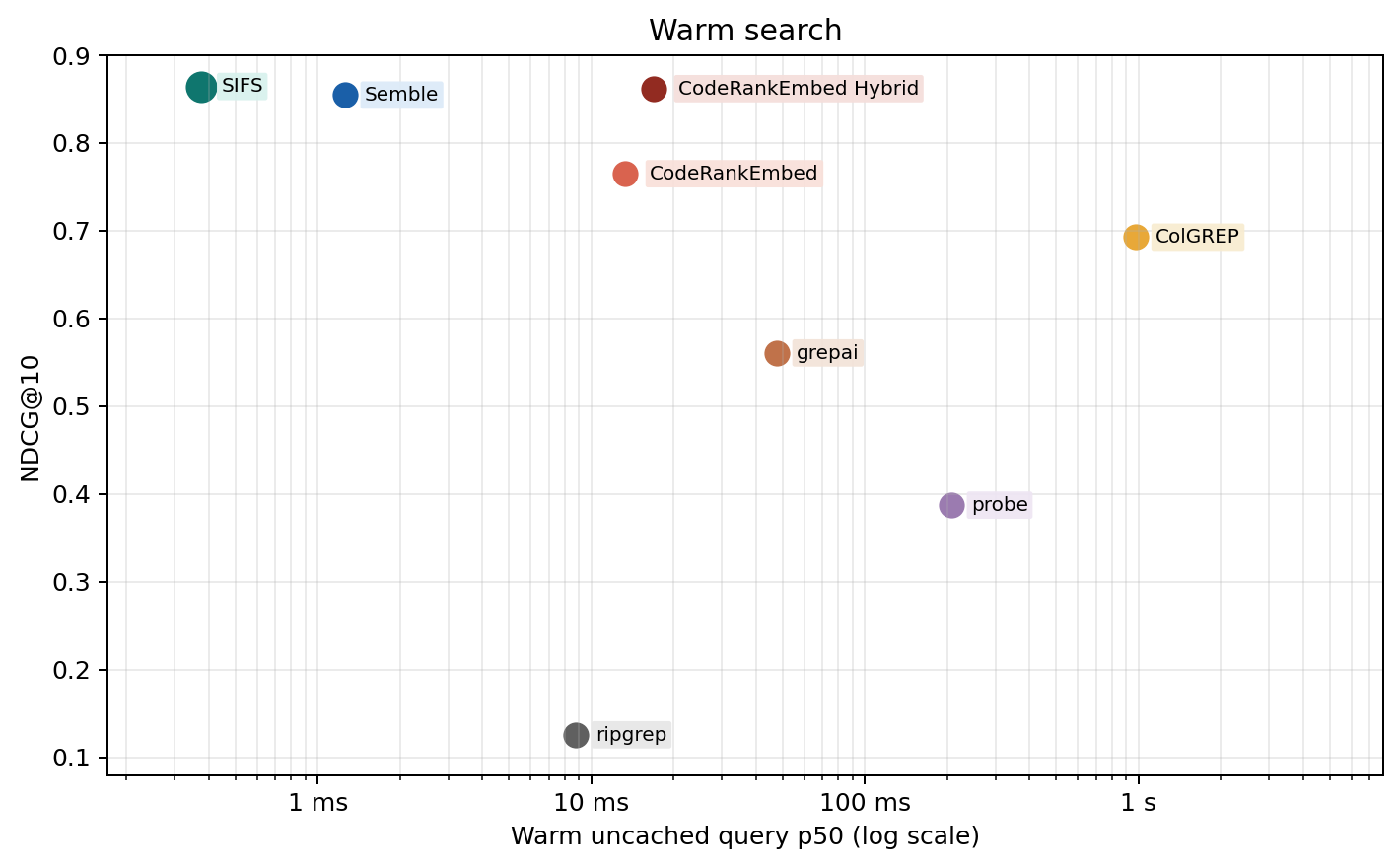
| Method | NDCG@10 | Cold index | Warm query | Cached repeat |
|---|---|---|---|---|
| SIFS | 0.8641 | 6.5 ms | 0.376 ms | 0.0012 ms |
| CodeRankEmbed Hybrid | 0.8617 | 57.3 s | 16.9 ms | n/a |
| Semble | 0.8544 | 439.4 ms | 1.3 ms | n/a |
| CodeRankEmbed | 0.7648 | 57.3 s | 13.3 ms | n/a |
| ColGREP | 0.6925 | 3.9 s | 979.3 ms | n/a |
| grepai | 0.5606 | 35.0 s | 47.7 ms | n/a |
| probe | 0.3872 | — | 207.1 ms | n/a |
| ripgrep | 0.1257 | — | 8.8 ms | n/a |
SIFS reports three timing fields to avoid mixing up caching effects:
cold_index_ms— fresh index, no cachewarm_uncached_query_ms— normal query after index exists (use this for comparisons)warm_cached_repeat_query_ms— repeated identical query in the same process
Quality by query type
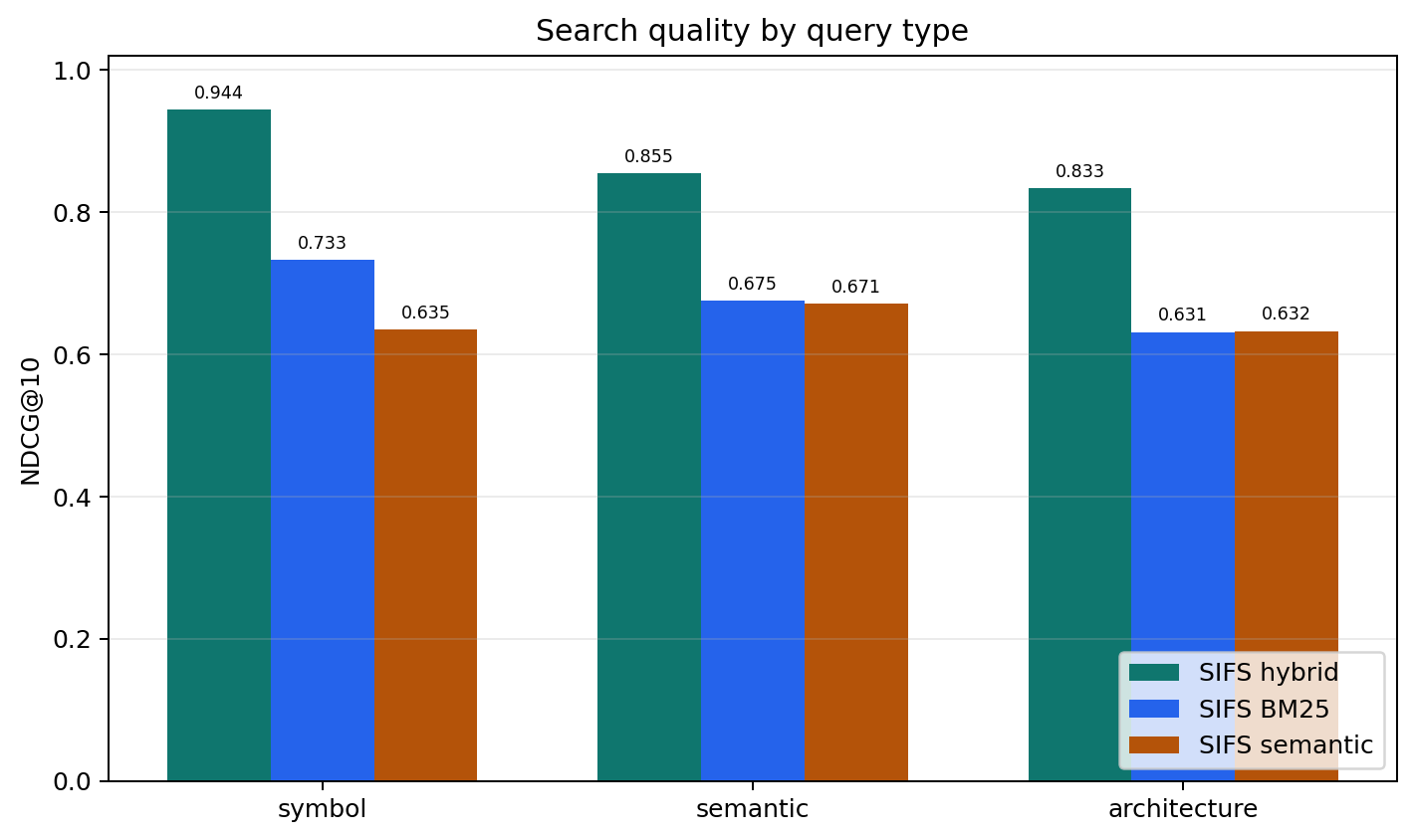
SIFS is strongest on symbol queries but holds up well on semantic and architecture questions too.
| Query type | NDCG@10 |
|---|---|
| symbol | 0.9437 |
| semantic | 0.8551 |
| architecture | 0.8313 |
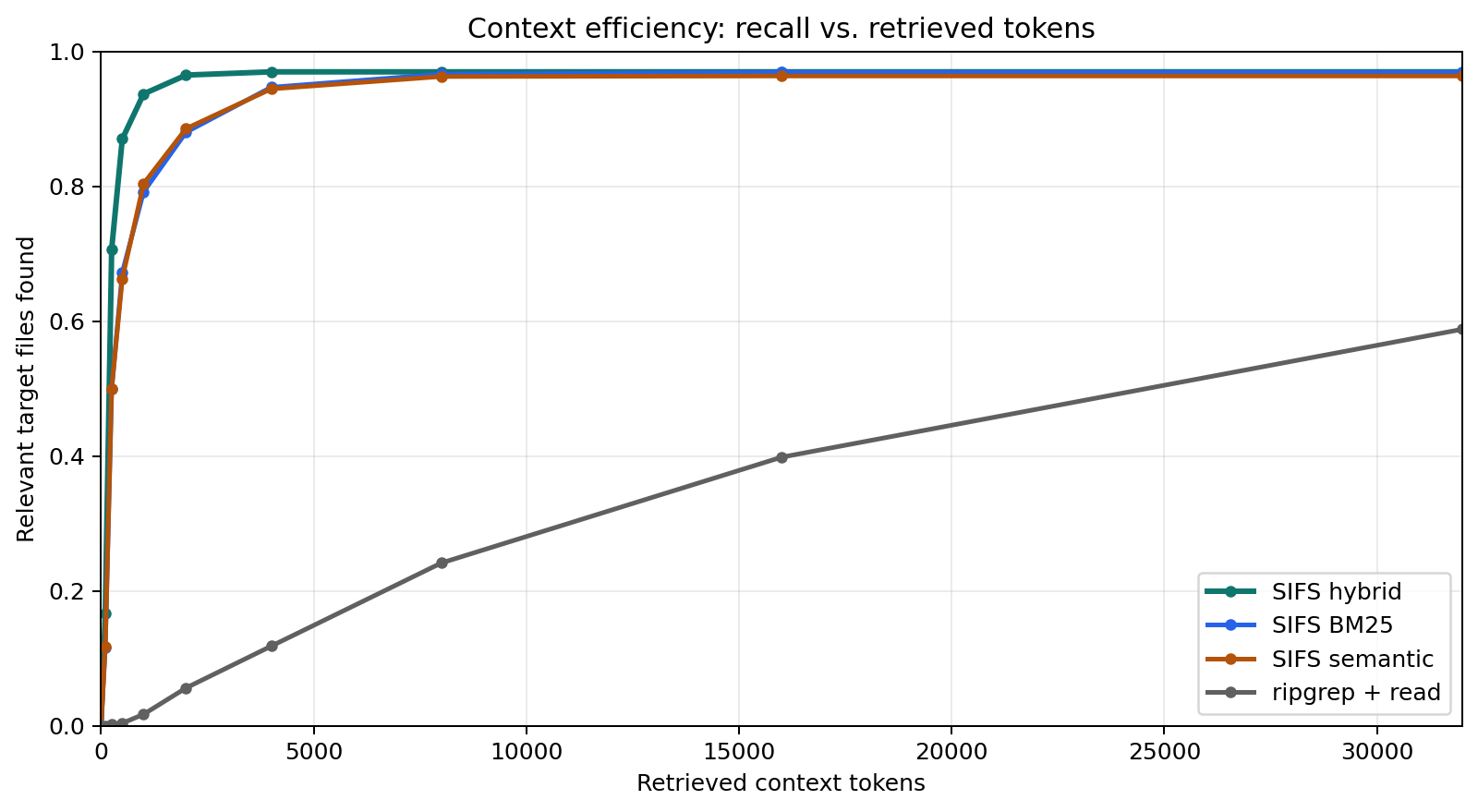
Context efficiency
The chart below tracks how quickly annotated relevant files enter an agent's context as retrieved chunks are added to the prompt budget.
Full methodology, per-language breakdown, ablations, and benchmark artifacts: docs/benchmark-report.md.
File Coverage
SIFS indexes code files by default, skipping generated files, dependency directories, and caches. It uses the ignore crate, so .gitignore files, Git excludes, global ignores, and hidden files behave exactly like familiar developer search tools.
Recognized extensions: Python, JavaScript, TypeScript, Go, Rust, Java, Kotlin, Ruby, PHP, C, C++, C#, Swift, Scala, Elixir, Dart, Lua, SQL, Bash, Zig, Haskell, Markdown, YAML, TOML, JSON.
Text-like documents (Markdown, YAML, TOML, JSON) are available through library options.
Documentation
- CLI usage — every command and flag
- Rust library —
SifsIndex, search modes, filters, indexing options - MCP server — stdio protocol and tool schemas
- Agent-native scorecard — agent-facing contract and readiness evidence
- Benchmarking — quality, latency, embedding, and smoke benchmarks
- Architecture — file selection, chunking, embedding, sparse search, dense search, hybrid ranking
License
MIT


