
Conduit
One local gateway for all your MCP servers, shared by every AI client, with far fewer tokens.



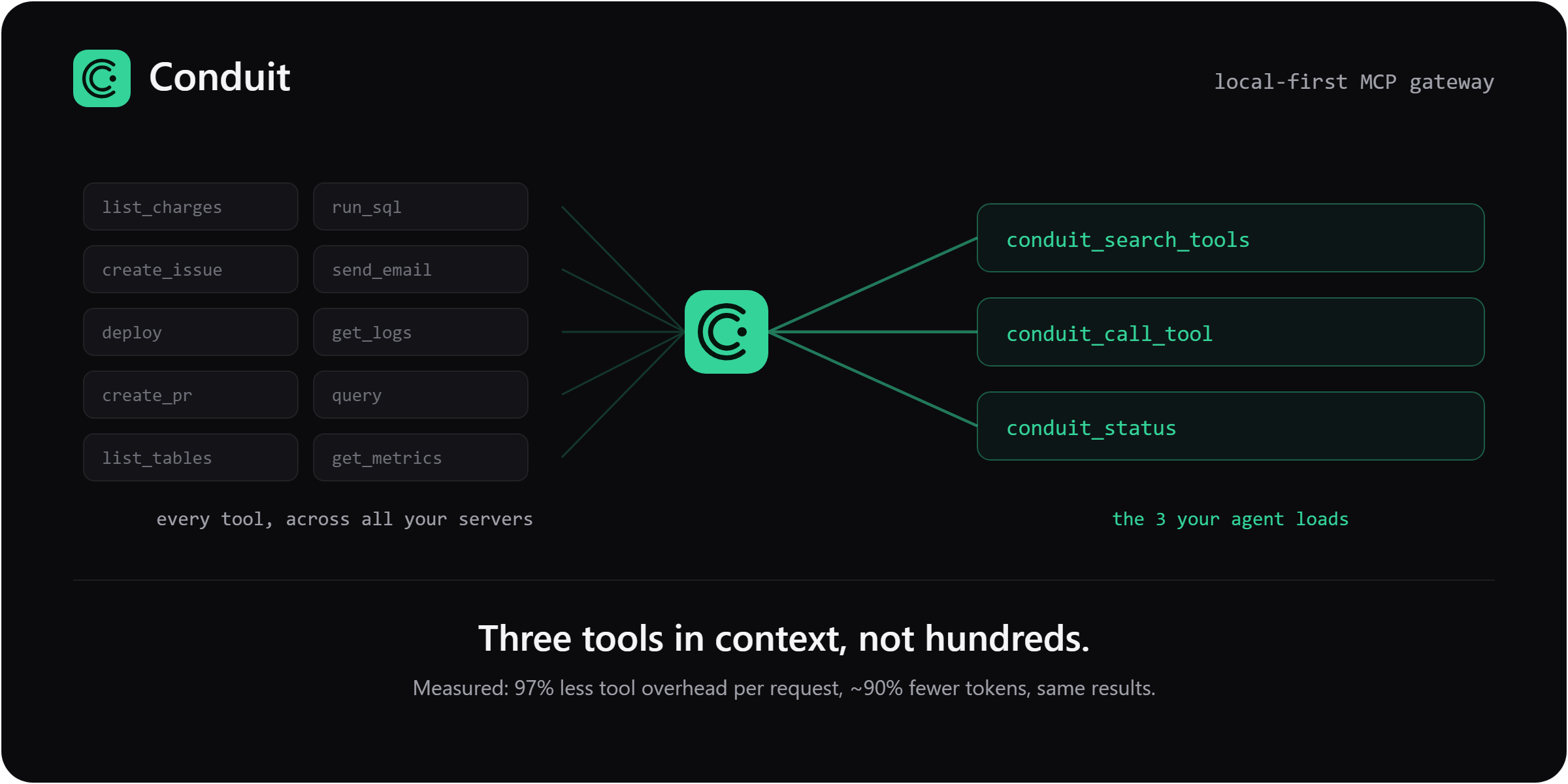
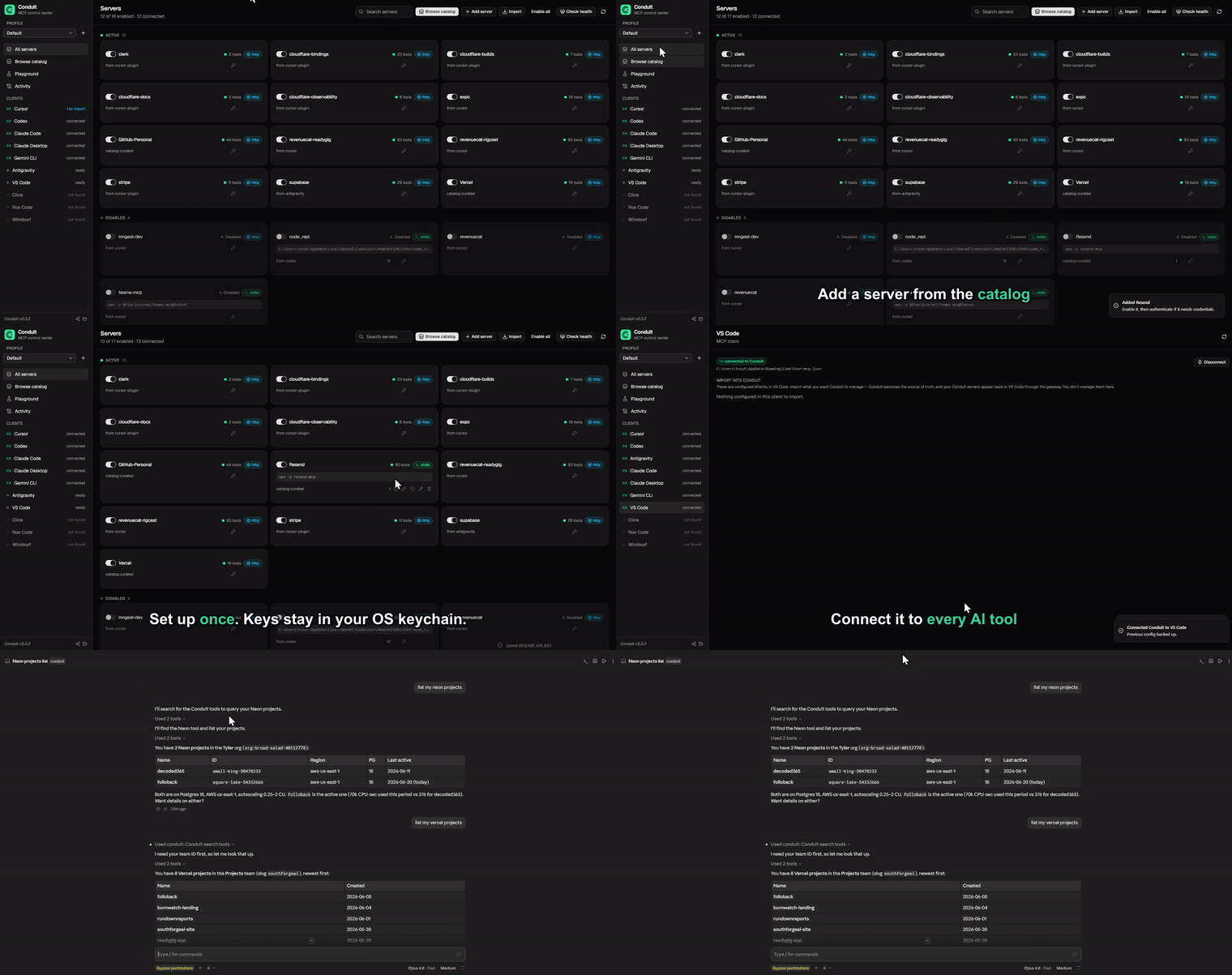
Conduit is a local MCP (Model Context Protocol) gateway. You set up andauthenticate each server once, and every AI client (Claude, Cursor, Codex, andthe rest) points at Conduit and shares them, so you stop configuring the sameservers separately in each app.
It also fixes what those servers cost your agent. Every MCP server you connectdumps all of its tools into context on every single request, and it adds up fast:just 3 servers (62 tools) cost ~24,000 tokens of definitions before you've askedanything. Conduit advertises 3 meta-tools the agent searches on demand instead,so it pays ~660 tokens.
Measured on a frontier model: up to 91% fewer total tokens at the same tasksuccess (graded for correct answers, not just completion), plus 97% lesstool-definition overhead on every request, rising to 99.6% on a real 415-toolcatalog (see BENCHMARK.md). That holds whether you run one AI toolor five, on cloud models (where tokens are your bill) or local ones (where tool defseat your context window).
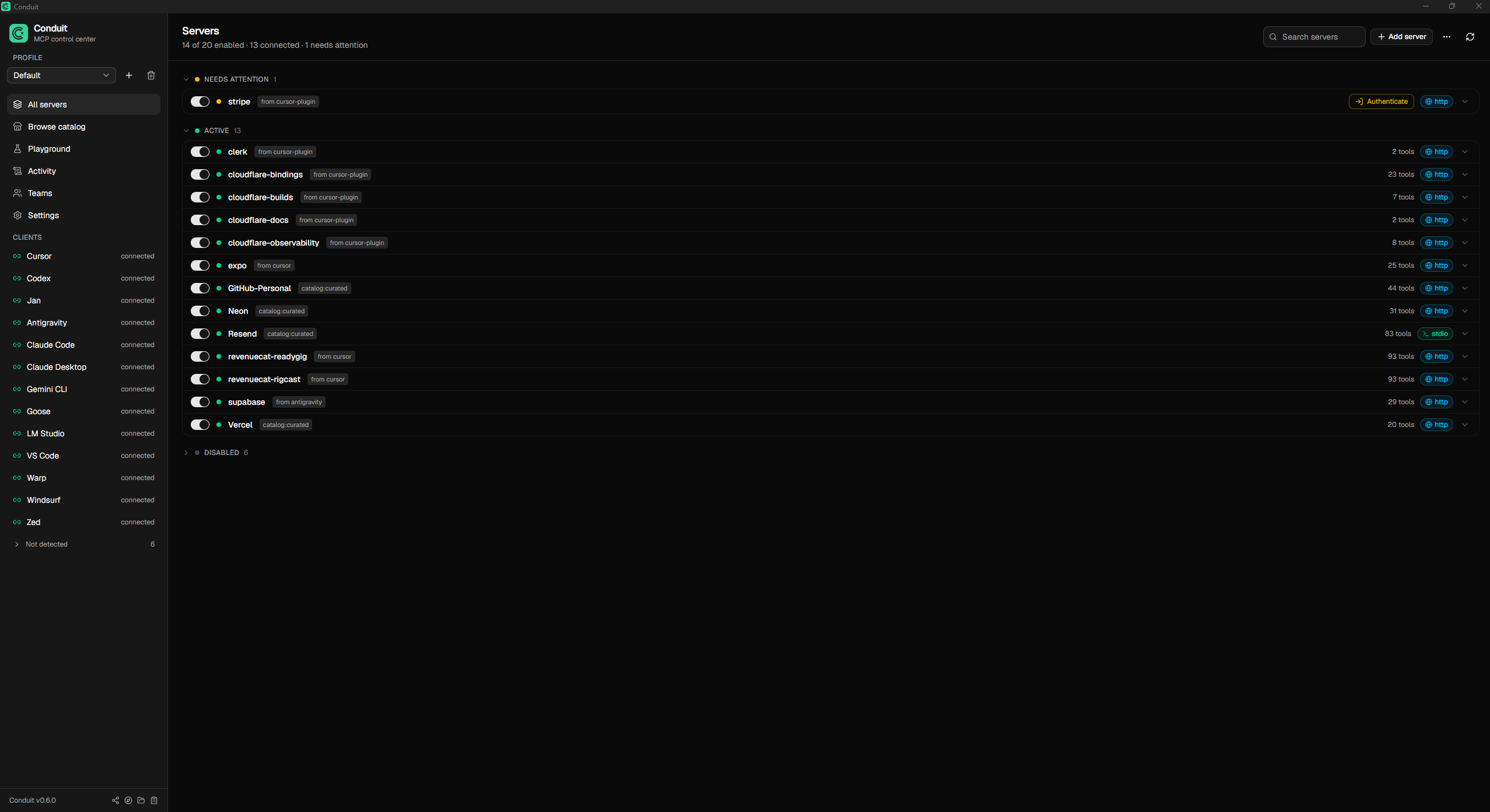
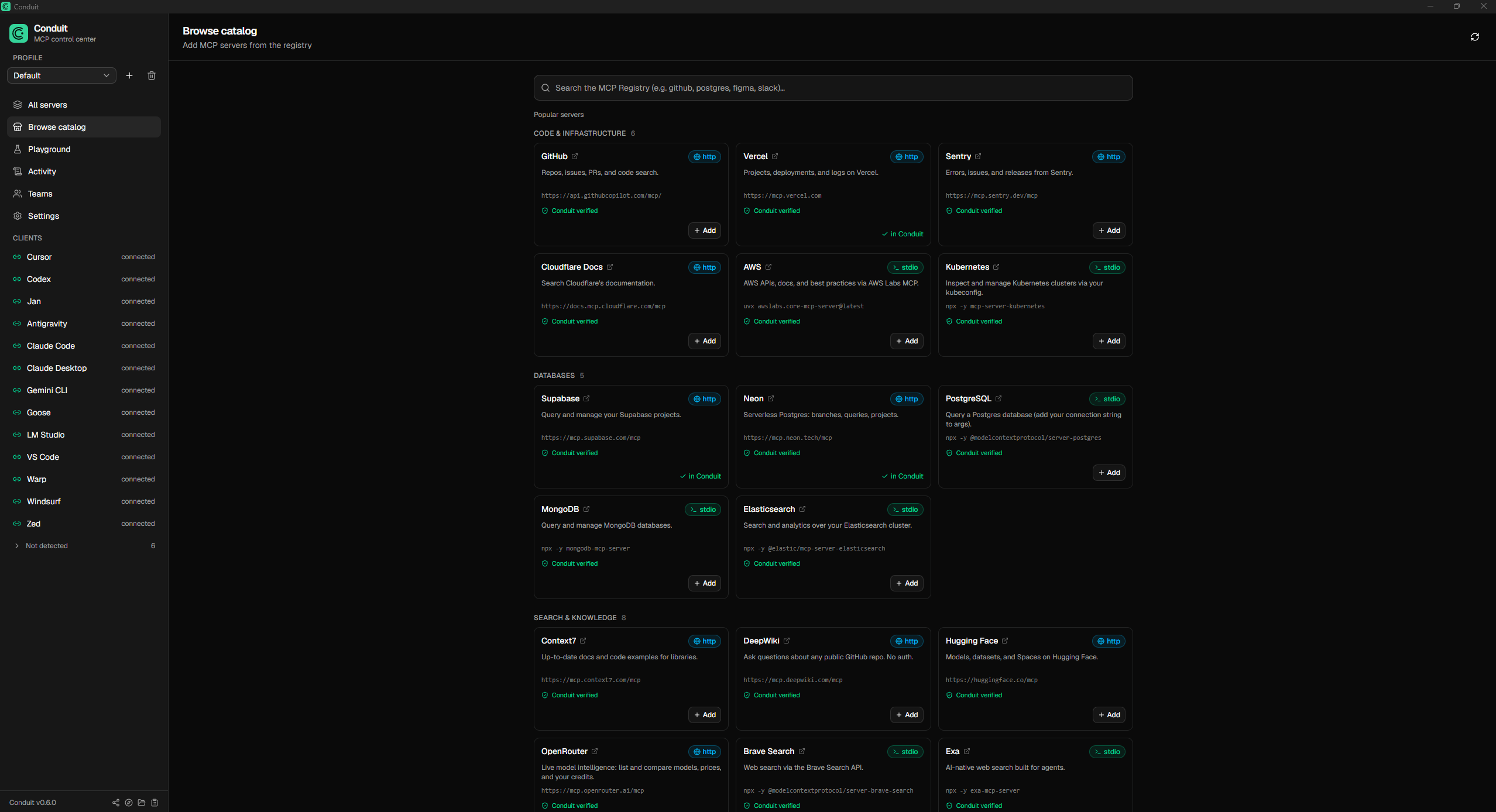
Screenshots
| Servers | Catalog | Activity |
|---|---|---|
 |
 |
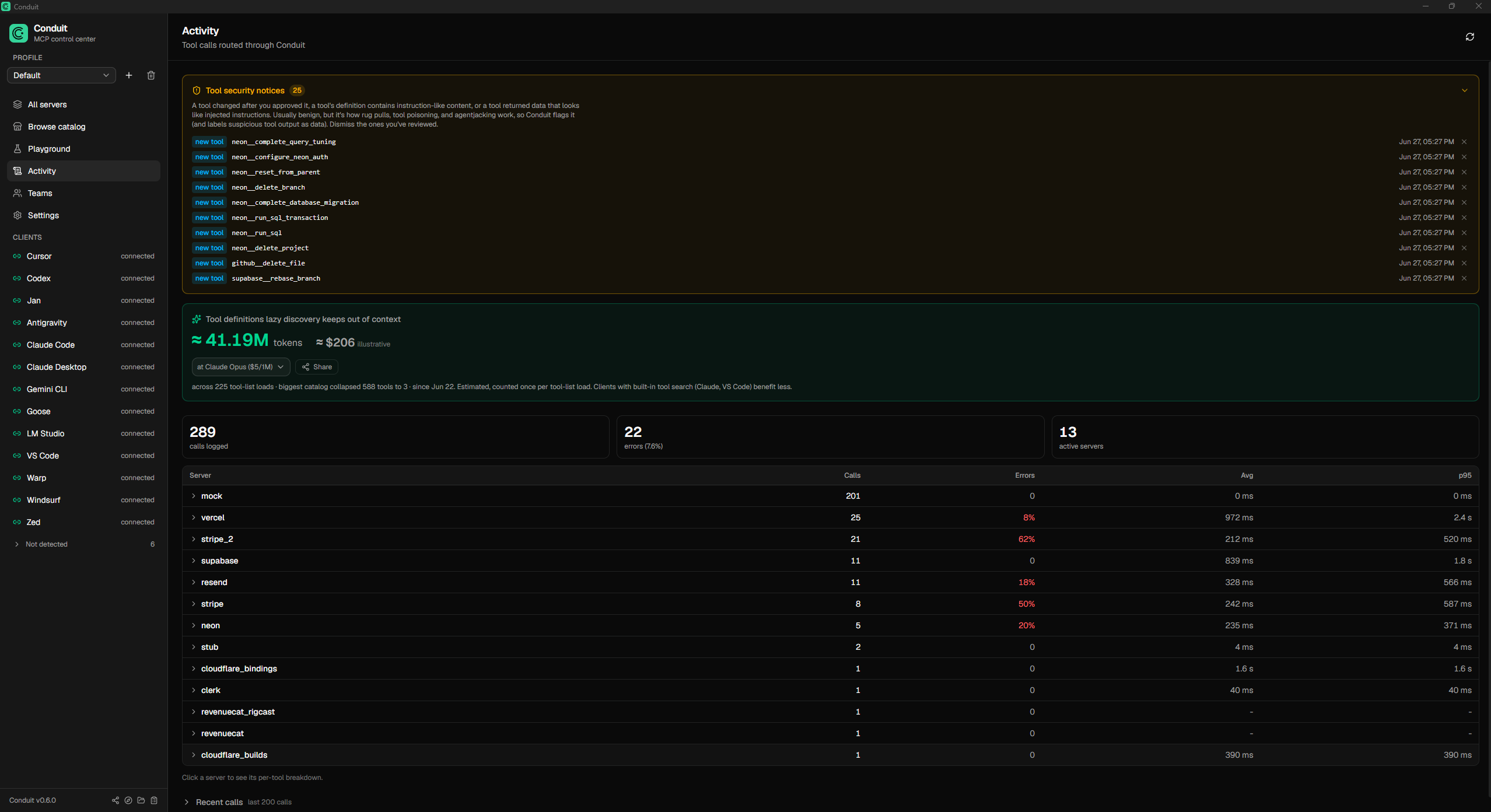 |
Why
Every MCP server you connect dumps its full tool list into your agent's context onevery request, and most AI clients also want their own separate configuration. So youpay a token tax on every call and reconfigure the same servers in every app. Conduitfixes both.
Fewer tokens
- ~90% fewer tokens. In lazy-discovery mode the gateway advertises three meta-tools(
conduit_status,conduit_search_tools,conduit_call_tool) instead of the fullcatalog, and the agent searches and calls on demand, so context stays flat no matterhow many servers you connect. Benchmarked, graded for correct answers: up to 91% fewertotal tokens at the same task success, 97% less tool-definition overhead per request,99.6% at a real 415-tool catalog (BENCHMARK.md). Askconduit_statusfor what it has saved you so far. - Search by intent, not just keywords.
conduit_search_toolsranks by relevanceacross every server, and no tool is ever hidden, any server's full set is one callaway. Optional semantic re-ranking (a local or hosted embeddings endpoint) surfacesparaphrased needs like "charge a card"; off by default, pure lexical otherwise.
One setup, every client
- Set up once, use everywhere. Each client points at one gateway. Add andauthenticate a server a single time and it appears in every client.
- Per-agent scoping. Give each client only the servers it should see. A codingagent literally cannot call a billing tool that isn't in its profile.
- Obvious auth. OAuth or API key, stored once in the OS keychain, a single click perserver. Newly-authed servers propagate to connected clients without a restart.
- No secrets in client configs. Clients only ever say "talk to Conduit." Keys livein the OS keychain and are injected at runtime.
- A catalog to grow. Add popular servers from a curated list of 40+, or search theofficial MCP Registry, then authenticate through the same flow.
Security, because the gateway is on the path
- Tool integrity (rug-pull + poisoning detection). Conduit fingerprints each toolwhen you connect a server and flags it if the definition later changes or a serverquietly adds one (a "rug pull"), or if a description or schema carries injection-likecontent ("tool poisoning"). Detection only, on by default, entirely local(details).
- Content defense (anti-agentjacking). When a tool returns untrusted content (aSentry error, a web page, an issue body) with injection-like instructions, Conduitflags it and marks it as external data, not instructions, the separation that bluntsindirect prompt injection. Never blocks, on by default(details).
- Governance and audit. Toggle any tool on or off, or hide every destructive toolfrom every client with one switch. Every call is recorded with per-server latency anderror rates.
Control and extras
- Agent control, on your terms. Optionally let an agent enable or disable serversthrough the gateway (
conduit_enable_server/conduit_disable_server), reflected inthe app live. Off by default, and the destructive-tool switch always stays yours. - Full MCP, not just tools. Tools, resources, and prompts are all proxied.
- Test before you wire it up. A built-in playground invokes any tool with a formgenerated from its schema, so you can confirm a server works without configuring aclient first.
- Diagnostics in one click. Bundles your version, OS, a secrets-stripped serversummary, and the recent gateway log, ready to paste into a bug report.
How it works
Conduit has two pieces:
- The desktop app (Tauri + React) where you manage servers, profiles,credentials, and which clients are connected.
- The gateway binary (
conduit-gateway) that each AI client launches overstdio. It reads Conduit's registry, connects to the enabled downstream servers(stdio or remote HTTP/SSE), and routes tool calls to the right one. Tool namesare namespaced per server (stripe__list_charges) so they never collide.
AI client (Cursor / Claude / Codex / Antigravity / ...)
        │  stdio MCP
        ▼
  conduit-gateway  ──reads──►  registry.json + OS keychain
        │  routes tools/calls
        ▼
  downstream MCP servers (Stripe, Supabase, GitHub, ...)
The registry is the shared source of truth; the gateway watches it and rebuildslive, so toggles and new credentials take effect without restarting the client.If a connected server changes its own tool set mid-session, Conduit picks that upand refreshes too.
Supported clients
Conduit auto-detects these 19 AI clients, installs the gateway into each with oneclick, and can import a client's existing servers. It writes the config file shownbelow for you, so you never have to edit these by hand.
| Client | Config file | Format |
|---|---|---|
| Claude Desktop | <config>/Claude/claude_desktop_config.json |
JSON (mcpServers) |
| Claude Code | ~/.claude.json |
JSON (mcpServers) |
| Cursor | ~/.cursor/mcp.json |
JSON (mcpServers) |
| VS Code | <config>/Code/User/mcp.json |
JSON (servers) |
| Windsurf | ~/.codeium/windsurf/mcp_config.json |
JSON (mcpServers) |
| Codex | ~/.codex/config.toml |
TOML (mcp_servers) |
| Antigravity | ~/.gemini/config/mcp_config.json |
JSON (mcpServers) |
| Gemini CLI | ~/.gemini/settings.json |
JSON (mcpServers) |
| Cline | <config>/Code/User/globalStorage/saoudrizwan.claude-dev/settings/cline_mcp_settings.json |
JSON (mcpServers) |
| Roo Code | <config>/Code/User/globalStorage/rooveterinaryinc.roo-cline/settings/mcp_settings.json |
JSON (mcpServers) |
| Warp | ~/.warp/.mcp.json |
JSON (mcpServers) |
| Amazon Q | ~/.aws/amazonq/mcp.json |
JSON (mcpServers) |
| Kiro | ~/.kiro/settings/mcp.json |
JSON (mcpServers) |
| Zed | ~/.config/zed/settings.json |
JSON (context_servers) |
| LM Studio | ~/.lmstudio/mcp.json |
JSON (mcpServers) |
| Jan | <data>/Jan/data/mcp_config.json |
JSON (mcpServers) |
| BoltAI | ~/.boltai/mcp.json |
JSON (mcpServers) |
| Goose | ~/.config/goose/config.yaml |
YAML (extensions) |
| Hermes | ~/.hermes/config.yaml |
YAML (mcp_servers) |
<config> is your OS application-config dir (%APPDATA% on Windows, ~/Library/Application Support on macOS, ~/.config on Linux); <data> is the data dir (~/.local/share on Linux, the same as <config> elsewhere). Zed and Goose paths vary slightly by OS; Conduit resolves the right one automatically.
Open WebUI and other HTTP/OpenAPI consumers
The gateway speaks HTTP/OpenAPI natively, so Open WebUI (and any OpenAPI toolclient) connects straight to Conduit, no bridge or proxy. Flip on Settings ->Integrations -> Open WebUI / HTTP endpoint in the app (or runconduit-gateway --http 8765), then add http://localhost:8765 as an OpenAPItool server. See docs/openwebui.md. The same endpoint servesany HTTP/OpenAPI MCP consumer (n8n, LibreChat, custom agents).
Configuration
Lazy discovery, the destructive-tool block, and agent control are global settings,stored in the registry and toggled in the app's Settings view, so they apply to everyclient (lazy discovery is on by default). Per-client behavior is set via env vars on thegateway entry, written for you when you connect a client:
CONDUIT_PROFILE=<name>- scope this client to one profile's servers. Unset =the active profile.CONDUIT_DISCOVERY=lazy|full- optional per-client override of the global lazysetting. Rarely needed; the gateway reads the registry default otherwise.CONDUIT_REGISTRY=<path>- override the registry file location. Defaults to astable per-user path so packaged and unpackaged clients agree.CONDUIT_RESULT_BUDGET=<bytes>- cap oversized tool results at this many bytes(0 disables it). Optional; off by default.CONDUIT_HTTP=<port>(with optionalCONDUIT_HTTP_HOST, default127.0.0.1,andCONDUIT_HTTP_TOKENfor the required bearer token) - run the gateway inHTTP/OpenAPI mode instead of stdio, for Open WebUI and other OpenAPI clients (seeabove). The in-app Settings -> Integrations toggle sets these for you, and thegateway refuses a non-loopback bind without a token.
Semantic search (optional). Lazy discovery ranks tools lexically by default. Point itat any /v1/embeddings endpoint (LM Studio, Ollama, or a cloud provider) to blend inembedding similarity for paraphrased queries: CONDUIT_SEMANTIC=on,CONDUIT_EMBED_ENDPOINT, CONDUIT_EMBED_MODEL, plus optional CONDUIT_EMBED_KEY(endpoint auth) and CONDUIT_EMBED_BLEND. Seedocs/specs/semantic-search.md.
Multiple accounts for the same service. Credentials belong to a server, not aprofile. To use, say, a work and a personal GitHub, add GitHub twice as twoservers ("GitHub (work)", "GitHub (personal)"), authenticate each with its ownaccount, and enable one in each profile. A client scoped to the work profile(CONDUIT_PROFILE) then only ever sees the work account. Tool names arenamespaced per server, so the two never collide even in the same profile.
Install
Prebuilt installers are published on theReleases page. Conduit runs onWindows and macOS (both builds are code-signed; macOS is also notarized), withLinux in beta. On Linux, prefer the .deb (it links your system's WebKitGTK and isthe most reliable package); the AppImage is a portable, no-root fallback butcan clash with very new or virtualized graphics stacks (see Troubleshooting). Torun from source, see Development below.
Both the Windows and macOS installers are code-signed (macOS is alsonotarized). macOS installs cleanly through Gatekeeper. On Windows the installer issigned with your validated publisher name (no "unknown publisher"), but because ituses a standard certificate rather than EV, SmartScreen reputation still builds withdownloads, so an early install may still show "Windows protected your PC", clickMore info -> Run anyway to continue. The Linux packages are unsigned, as istypical. See docs/SIGNING.md for details.
Updating and uninstalling on Linux. There is no graphical uninstaller, use theterminal. The package name is conduit.
# Update to a newer version: just install the new .deb, it upgrades in place.
sudo apt install ./Conduit_0.6.0_amd64.deb

# Uninstall (keeps your config + saved secrets).
sudo apt remove conduit

# Uninstall and wipe app config too (secrets in the keyring stay).
sudo apt purge conduit
If you used the AppImage, there's nothing to uninstall, just delete the.AppImage file. (On Windows use Add or Remove Programs; on macOS dragConduit.app to the Trash.)
Development
Requires Node and the Rust toolchain.
npm install
npm run tauri dev      # run the desktop app
Other useful commands:
cargo test --manifest-path src-tauri/Cargo.toml   # Rust unit tests (lib + gateway)

# Build the gateway binary. Required when running from source: AI clients spawn
# this binary directly, so without it a connected client reports "not found".
# (Packaged releases bundle it, so installed users never need this.)
npm run build:gateway

# Build a Windows installer (NSIS) with the gateway bundled.
npm run tauri:bundle
The frontend is typechecked with npx tsc --noEmit.
Troubleshooting
- OAuth opens a blank page (macOS). The OAuth flow redirects back to a local
http://127.0.0.1callback. Safari can silently block that redirect, so thesign-in page renders blank. Set Chrome or Brave as your default browser (orpaste an access token instead). Complete one attempt at a time, an abandonedattempt keeps the callback port reserved for a few minutes and can cause a"state mismatch" on the next try. - A client reports the gateway "was not found" (running from source). Buildthe gateway binary once:
cd src-tauri && cargo build --bin conduit-gateway.npm run tauri devbuilds the app but not this separate binary; packagedreleases bundle it, so installed users never hit this. - Repeated macOS keychain prompts / "could not read secret from the keychain"in dev. An unsigned dev build gets an unstable code-signing identity, so thekeychain re-prompts or denies reads. A signed release fixes this; it is adev-only artifact.
- "could not read/store secret" on Linux. Secret storage uses the freedesktopSecret Service (libsecret), provided by GNOME Keyring, KWallet, or similar. Aheadless box or a session without a running keyring daemon has nowhere to storesecrets. Run Conduit in a desktop session, or install and unlock a keyring(e.g.
gnome-keyring). - macOS keychain prompt the first time the gateway runs. When a client spawnsthe gateway and it reads a saved key, macOS asks for keychain access ("Conduitwants to use ..."). Click Always Allow once and it won't ask again. (The appand the gateway are separate signed binaries today; a future release will sharekeychain access so this prompt goes away.)
- VS Code: the conduit server doesn't start automatically. VS Code may requireyou to click Start Server on the conduit MCP entry the first time, that's VSCode's own MCP handling, not Conduit. After that it reconnects on its own.
- Linux: the AppImage won't launch / no window (
EGL_BAD_PARAMETER). TheAppImage bundles its own libraries, which can clash with a very new orvirtualized graphics stack (e.g. VMware'svmwgfxdriver, where the default EGLdisplay fails). Use the.debinstead, it links your system's WebKitGTK andis the more reliable Linux package. If you must use the AppImage, tryEGL_PLATFORM=surfaceless ./Conduit_*.AppImage, or in a VM enable 3Dacceleration. (This is a packaging/GPU issue, not a Conduit bug; the.debworkswhere the AppImage doesn't.)
Status
Conduit is in active development. Working end to end: thegateway, lazy discovery, per-agent scoping, OAuth/key auth with live propagation,the catalog, client import/migrate, per-tool and destructive-tool governance, a globalSettings view, tool-integrity and content-defense detection, an audit log withlatency/error stats, resources + prompts proxying, and a tool playground. Seedocs/ROADMAP.md for what is done and planned.
Known issues
- Linux only, glib
VariantStrItersoundness (RUSTSEC-2024-0429).Tauri's Linux webview stack pulls inglib0.18 transitively (wry → webkit2gtk → gtk 0.18 → glib 0.18). The fix only exists inglib0.20+, and the gtk-0.18binding line, which is what Tauri 2 uses on Linux, hard-pinsglib = "^0.18", sothe patched release cannot be selected without moving the whole webview stack. Thebug is a soundness/null-deref crash (not remote code execution), is confined to thewebview binding layer (Conduit never callsVariantStrIter), and does not affectthe Windows or macOS builds. We are tracking the upstream move to a glib-0.20 stackand will apply a[patch.crates-io]backport if Linux crashes surface before then.
License
MIT. The gateway and local manager are free and open source under anopen-core model; planned team/enterprise features (shared/hosted gateway,RBAC/SSO, policy, audit export, secret-vault integrations) are a separate paidlayer.


