Stream Deck MCP
Tell your AI what kind of Stream Deck you want. Get back a fully authored profile — buttons, icons, colors, dials, and the shell scripts behind them.
streamdeck-mcp is the bridge: an MCP server that reads and writes Elgato Stream Deck profiles directly, in the format the desktop app already uses. Themed decks, per-project layouts, app-specific control boards — built in a single prompt instead of an hour in the GUI. Works with Claude Desktop, Claude Code, Cursor, Codex, and any MCP-compatible client.
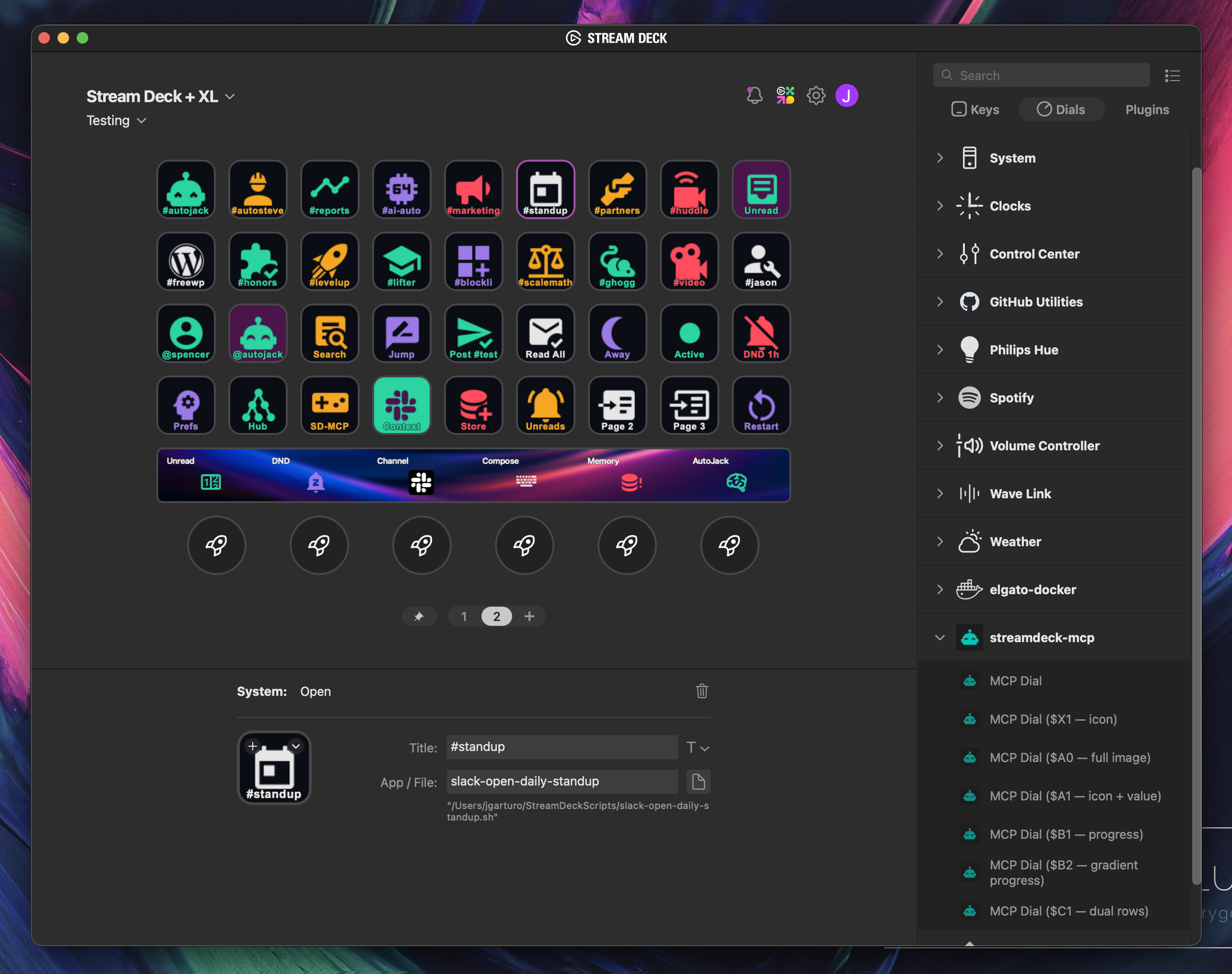
Asked Claude Desktop for "a Slack control board" — got back this profile. Buttons, icons, colors, and dials all authored in one shot via the MCP server.
What you can build
The decks aren't generic. When other MCP servers are loaded — Slack, Home Assistant, OBS, GitHub, Hue, the ones you already use — your AI queries them first to discover your channels, your devices, your scenes, then authors a deck around what's actually there. Icons render to match (~7,400 Material Design Icons bundled offline, or freeform text), so every button looks like it belongs. No Stream Deck SDK, no plugin authoring — just shell scripts and a prompt.
A few worth trying:
"Make me a control board for Slack."→ Queries your Slack MCP for channels, status, and unread state. Generates one channel-jump button per channel you actually use, status toggles (Active / Away / DND), a Read-All, and dials for unread counts. The screenshot above is one such result.
"A hello-kitty-themed Home Assistant dashboard for the living room."→ Pulls Home Assistant entities scoped to the living room area, then lays them out in pastel kawaii — scenes on row one, lights on row two, media on row three. Palette and icon style follow the theme.
"OBS control panel based on my actual scenes and audio inputs."→ Queries OBS for scenes, sources, and audio devices. Generates scene-switch buttons with the right transitions, source toggles, and dials for per-input gain on the touch strip.
"A dev deck for this repo in Nordic colors."→ Reads your project's scripts (npm, Make, just — whatever's there), recent PRs via the GitHub MCP, and the local docs structure. Drops shell-script buttons for the most-used commands, PR/CI jumps, and a Nordic-palette icon set.
"A 'Friday demo' deck: open Zoom, mute Slack, set Hue to 'focus', start a screen recording."→ Composes across whatever MCPs you have loaded. Writes one shell script per action to
~/StreamDeckScripts/and wires them to a single page with custom icons.
Same pattern every time: ask, your AI inventories your hardware and your other MCPs, plans the layout, generates icons, writes the profile files, restarts the Elgato app. Iteration is free — tweak the prompt, get a different deck.
How it works
- Install the MCP server in your AI client (snippets below).
- Install the designer skill in Claude Code, or invoke the
design_streamdeck_deckMCP prompt in any other client. - Ask for a deck. Your AI calls
streamdeck_read_profilesto inventory the hardware, plans the layout, generates icons (~7,400 Material Design Icons bundled offline, or freeform text), writes the profile files, and restarts the Elgato app so the device picks up the changes.
Install
The packaged entrypoint is streamdeck-mcp, run via uvx. It edits the desktop app's ProfilesV3 files when present and falls back to ProfilesV2.
Cursor

Or paste into ~/.cursor/mcp.json:
{
  "mcpServers": {
    "streamdeck": {
      "command": "uvx",
      "args": ["streamdeck-mcp"]
    }
  }
}
Claude Desktop
Paste into ~/Library/Application Support/Claude/claude_desktop_config.json (macOS) or %APPDATA%\Claude\claude_desktop_config.json (Windows), then restart Claude Desktop:
{
  "mcpServers": {
    "streamdeck": {
      "command": "uvx",
      "args": ["streamdeck-mcp"]
    }
  }
}
Claude Code
claude mcp add streamdeck -- uvx streamdeck-mcp
OpenAI Codex
Add to ~/.codex/config.toml:
[mcp_servers.streamdeck]
command = "uvx"
args = ["streamdeck-mcp"]
Other MCP clients
Anything that speaks MCP over stdio works the same way — point it at uvx streamdeck-mcp. The JSON snippet above is the canonical shape.
Note for Linux users
The default profile writer needs the Elgato Stream Deck desktop app, which is macOS- and Windows-only. On Linux, use the legacy USB-direct server instead — see Legacy USB mode below.
The streamdeck-designer skill
streamdeck-mcp ships with an Agent Skill that teaches Claude (in Claude Code) how to plan, theme, and author full decks end-to-end. The skill covers:
- Hardware inventory — always calls
streamdeck_read_profilesfirst, then matches authoring style to your model. - Palette + typography planning — 8 theme archetypes (kawaii, retrowave, brutalist, nordic, terminal, nature, minimal, corporate) with ready palettes and per-strategy icon-color guidance.
- Dials + touchstrip — decision tree for + / + XL encoder layouts (
$X1/$A0/ …). - Integration recipes — per-service patterns for Hue, OBS, Spotify, Home Assistant, Twitch, shell, browser. Credentials live in
~/StreamDeckScripts/.env, never baked into scripts. - Starter recipes — streamer/hello-kitty (+ XL), dev/Nordic (XL), music/retrowave (Original) as adaptation shapes.
Install the skill (Claude Code)
uvx --from streamdeck-mcp streamdeck-mcp-install-skill
The skill is copied to ~/.claude/skills/streamdeck-designer/. Restart Claude Code (or start a new session) and it auto-loads when your request matches a deck-design intent. Re-run with --force to upgrade after a version bump.
Other MCP clients
Clients that don't load Claude Code skills (Claude Desktop, Cursor, Codex, …) get a condensed mirror via the design_streamdeck_deck MCP prompt. Most clients expose it as a slash command or prompt picker — invoke it before describing the deck you want, and pass the user's intent via the intent argument if your client supports it.
Tools
| Tool | What it does |
|---|---|
streamdeck_read_profiles |
Lists desktop profiles and page directories from the active ProfilesV3 or ProfilesV2 store |
streamdeck_read_page |
Reads a page manifest and returns simplified button details plus the raw manifest |
streamdeck_write_page |
Creates a new page or rewrites an existing page manifest |
streamdeck_create_icon |
Generates a PNG icon from a Material Design Icons name (e.g. mdi:cpu-64-bit) or from text — provide one or the other, not both. shape="button" (72×72, default) for keypad keys and dial faces; shape="touchstrip" (200×100) for + / + XL touch strip backgrounds. ~7,400 MDI icons are bundled offline; unknown names return close-match suggestions |
streamdeck_create_action |
Creates an executable shell script in ~/StreamDeckScripts/ and returns an Open action block |
streamdeck_restart_app |
Restarts the Stream Deck desktop app after profile changes (macOS only — raises on other platforms) |
streamdeck_install_mcp_plugin |
Installs the bundled streamdeck-mcp Stream Deck plugin into the Elgato Plugins directory. streamdeck_write_page auto-installs it the first time an encoder needs it, so direct use is rarely required |
Editing workflow
The Elgato desktop app keeps every profile in memory and rewrites the on-disk manifests from that snapshot when it quits — so any edit made while the app is running is wiped the next time it closes. The profile writer enforces a quit → write → relaunch cycle:
- Ensure the Elgato app is not running, or pass
auto_quit_app: truetostreamdeck_write_pageto have it quit the app for you (AppleScript first,killallfallback). - Make as many
streamdeck_write_pagecalls as you need — the app stays quit between them. - Call
streamdeck_restart_appwhen you're done. The device re-reads the manifests on launch and your changes appear.
streamdeck_write_page raises StreamDeckAppRunningError when the app is running and auto_quit_app isn't set, so you can't accidentally write changes that get silently discarded.
Platform support. The running-app guard, auto_quit_app, and streamdeck_restart_app are macOS-only. On Windows the Elgato app still clobbers manifests on close, so you'll need to quit it manually before authoring and relaunch it after — auto_quit_app: true is silently a no-op on non-macOS, and streamdeck_restart_app errors.
If your Elgato app lives somewhere other than /Applications/Elgato Stream Deck.app, set STREAMDECK_APP_PATH to the bundle path.
Under the hood
ProfilesV3is preferred when present (page UUIDs map cleanly to directories).ProfilesV2is still supported, but existing pages should be targeted bydirectory_idorpage_indexbecause Elgato uses opaque directory names there.- Native action objects are accepted directly by
streamdeck_write_page, alongside convenience fields likepath,action_type,plugin_uuid, andaction_uuid. - Generated icons live in
~/.streamdeck-mcp/generated-icons/. Generated shell scripts live in~/StreamDeckScripts/. - The bundled streamdeck-mcp plugin is installed into the Stream Deck Plugins directory (e.g.,
~/Library/Application Support/com.elgato.StreamDeck/Plugins/on macOS,%APPDATA%\Elgato\StreamDeck\Plugins\on Windows). It's a minimal shell whose only job is to declare encoder support so per-instanceEncoder.Icon/Encoder.backgroundwrites survive an Elgato app restart.
Legacy USB mode
The original USB-direct server is preserved for backwards compatibility — useful when you'd rather have the MCP server own the hardware directly (Linux, headless setups, or environments where the Elgato app isn't running). It exposes a different tool surface focused on direct hardware control:
streamdeck_connect, streamdeck_info, streamdeck_set_button, streamdeck_set_buttons, streamdeck_clear_button, streamdeck_get_button, streamdeck_clear_all, streamdeck_set_brightness, streamdeck_create_page, streamdeck_switch_page, streamdeck_list_pages, streamdeck_delete_page, streamdeck_disconnect.
Run via:
uvx --from streamdeck-mcp streamdeck-mcp-usb
In a client config, keep "command": "uvx" and use "args": ["--from", "streamdeck-mcp", "streamdeck-mcp-usb"].
Development
git clone https://github.com/verygoodplugins/streamdeck-mcp.git
cd streamdeck-mcp
uv venv && uv pip install -e ".[dev]"
uv run pytest tests/ -v
uv run ruff check .
To audit this repo against the shared Very Good Plugins MCP standards:
../mcp-ecosystem/scripts/audit-server.sh .
Support
For issues, questions, or suggestions:
Built with 🧡 by Very Good Plugins