
DealWatch



Compare the aisle before you commit to one cart.
DealWatch turns “which grocery URL is actually the right target?” into one product-shaped loop: compare candidate URLs first, keep cross-store context alive, then carry the right row into a watch task or compare-aware watch group with proof, effective-price history, and alert state attached.
The public boundary stays strict on purpose: DealWatch is local-first, compare-first, and evidence-first. It is not a hosted SaaS, not a generic shopping chatbot, and not an autonomous buying agent. AI helps explain compare, watch-group, and recovery decisions, but deterministic product truth still leads.
Try the Sample Compare · See the Proof · Run Local Quick Start · Releases Specialist route: Builder Route
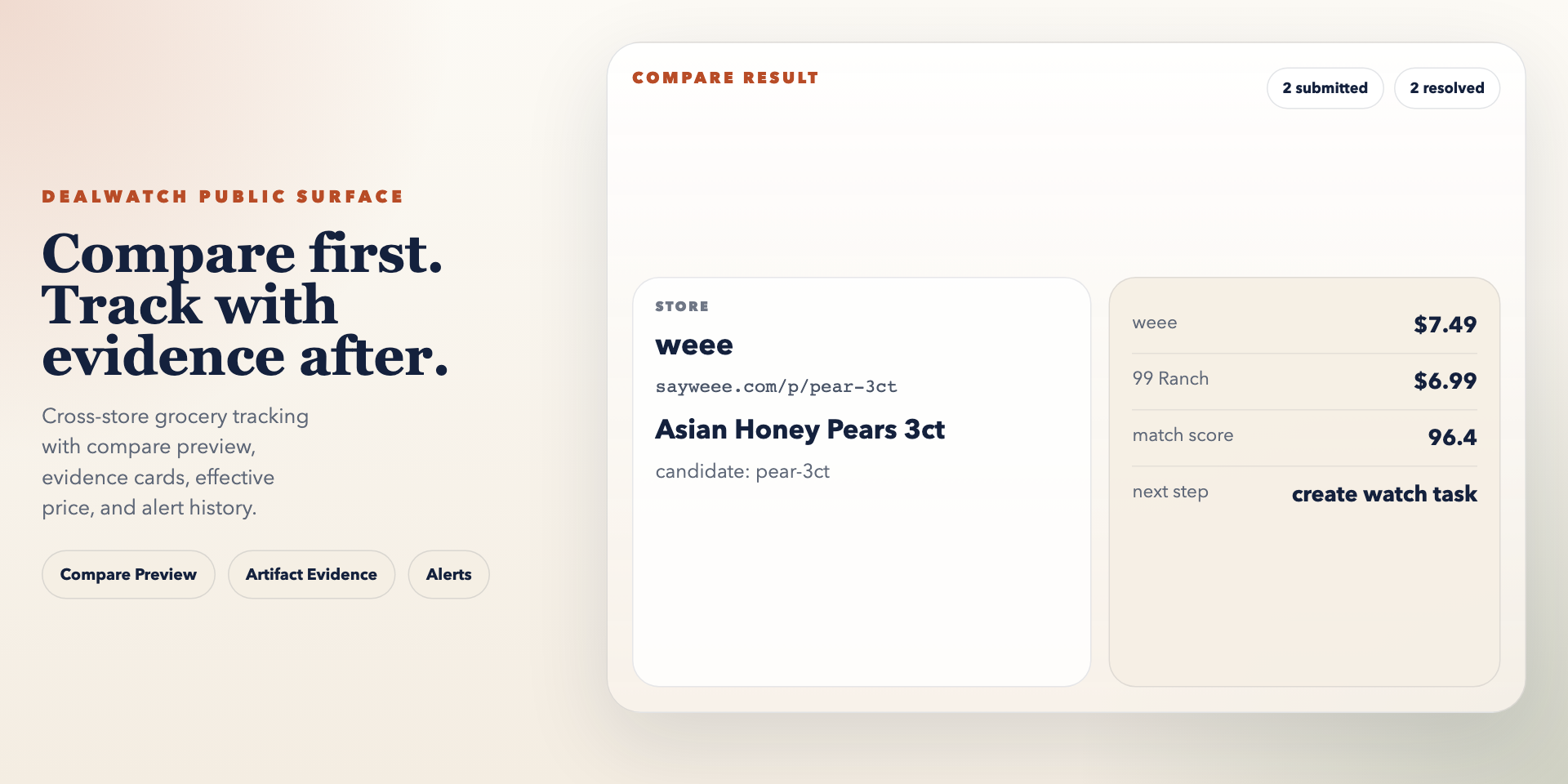
The first public screen below is the actual Compare Preview evidence surface, using the same read-only sample fixture linked from the public site.
Start Here
Recommended first path for most visitors:
Compare Preview->Proof->Quick StartBuildersonly after the product story is already clear and you specifically need theread-only agent/client surface
Choose the first door that matches your real goal:
Compare Preview: start here when you want the fastest truthful product tour before you install anything.Quick Start: use this path when you are ready to turn the sample product tour into the local runtime for your own grocery URLs.Builders: use this specialist path when you want the honest read-only MCP/API route for Codex, Claude Code, OpenHands, OpenCode, OpenClaw, and similar builder clients, with repo-owned distribution assets available after the route is clear.
If you need the next most useful follow-up after that first door:
Proof: open this when you want the claim-to-evidence map behind the public story.Comparison: open this when you want the shortest "why this is not a generic price tool" answer.
Public Entry Points
Most visitors should follow one short sequence:
Compare Previewto understand the product shapeProofto verify the claims and boundariesQuick Startwhen you want your own URLs in the local runtimeBuildersonly when your real job is wiring an agent/client against the read-only decision surface
Three First-Run Doors
- Compare PreviewStart with the sample compare page when you want to see the compare-first intake and AI-assisted explanation story before any local setup.
- Quick StartUse the public quick-start page when you want to move from the sample compare preview and proof trail into the local API, worker, and WebUI runtime.
- BuildersUse the public builders page when you want the shortest honest read-only MCP/API path for Codex, Claude Code, OpenHands, OpenCode, OpenClaw, and similar builder clients after the product story is already clear, with repo-owned distribution assets available after the route is clear.
Deeper References
- ProofUse the proof page when you want the claim-to-evidence map for AI explanation, recovery guidance, read-only MCP safe access, and recommendation boundaries.
- ReleasesFollow the stable GitHub releases surface for the newest notes instead of relying on hand-copied version text inside docs pages.
- Decision MemoUse
docs/roadmaps/dealwatch-decision-memo.mdwhen you need the post-archive strategic SSOT before turning copy, roadmap, or implementation questions back into open debate. - DistributionUse
DISTRIBUTION.mdwhen you want the shortest truthful ready-vs-live ledger for GitHub Pages, release, package metadata, builder bundles, and registry/listing-prep status. - IntegrationsUse
INTEGRATIONS.mdwhen you want the shortest truthful front desk for the builder pack, native bundle candidates, and current read-only consumption surfaces before diving into the full integration handbook. - Builder Starter PackUse
docs/integrations/README.mdwhen you want repo-owned example payloads, local onboarding order, starter prompts, config recipes, a copyable builder skill card, and per-client guidance for Claude Code, Codex, OpenHands, OpenCode, OpenClaw, and similar builder workflows that should stay inside the current read-only / local-first boundary. - Cline InstallUse
llms-install.mdwhen you want the shortest reviewer-facing Cline install path, the exactcline_mcp_settings.jsonentry, and the local-stdio boundary without reading the whole integration handbook first. - Native Plugin BundlesUse
plugins/dealwatch-builder-pack/README.md,.claude-plugin/marketplace.json, andmarketplace.jsonwhen you want the repo-owned Claude Code and Codex package artifacts that now back the builder story. They are package candidates, not official listings. - Chrome CompanionUse
browser-extension/README.mdwhen you want the repo-owned Chrome companion package, listing notes, and bundle build/verify scripts that leave only the Chrome Web Store dashboard submission step outside the repo. - Builder Machine FrontdoorUse
site/llms.txt,site/data/builder-client-catalog.json,site/data/builder-client-starters.json,site/data/builder-starter-pack.json, andsite/data/builder-client-configs.jsonwhen an agent wants machine-readable public pointers before it starts the local runtime. Think of them as:catalog = index,client starters = prompt/skill mirror,starter pack = contract map, andall-clients bundle = full payload. - Builder Distribution / SEO SurfacesUse
site/builders.html,site/llms.txt,site/sitemap.xml,site/feed.xml, andassets/social/social-preview-1280x640.pngwhen you want the repo-owned builder pack, mixed live-vs-submitted distribution truth, and crawlable SEO surfaces without pretending every host listing is already accepted or that a hosted control plane exists.
Builder Start Here
If you are here as a developer or agent-builder, start with the smallest honest loop instead of reading the whole repo sideways.
1. Read the public builder route in order
- Start with
site/builders.htmlfor the human path: what this read-only surface is, where to start, and what it still does not claim. - Then read the machine-readable mirrors in the same order:
site/data/builder-client-catalog.jsonsite/data/builder-client-starters.jsonsite/data/builder-starter-pack.jsonsite/data/builder-client-configs.json
2. Read the contract and repo-native examples
- Read
docs/roadmaps/dealwatch-api-mcp-substrate-phase1.mdfor the stable vs deferred vs internal-only split. - Then open
docs/integrations/README.mdfor repo-native examples, prompt starters, config recipes, the builder skill card, and local onboarding flows for Claude Code, Codex, OpenHands, OpenCode, OpenClaw, and similar builder clients. - If you need the platform-native package layer for the platforms that already support it, open
plugins/dealwatch-builder-pack/README.mdafter the builder pack. Today that native bundle layer exists for Claude Code and Codex only.
3. Use the local runtime export path
PYTHONPATH=src uv run python -m dealwatch.mcp client-starters --json
PYTHONPATH=src uv run python -m dealwatch builder-starter-pack --json
PYTHONPATH=src uv run python -m dealwatch builder-client-config --all --json
PYTHONPATH=src uv run python -m dealwatch builder-client-config codex --json
PYTHONPATH=src uv run python -m dealwatch.mcp list-tools --json
PYTHONPATH=src uv run python -m dealwatch.mcp client-config --all --json
PYTHONPATH=src uv run python -m dealwatch.mcp client-config --client codex --json
PYTHONPATH=src uv run python -m dealwatch server
PYTHONPATH=src uv run python -m dealwatch.mcp serve --transport stdio
Think of these as the front-desk actions at the end of the same route:
client-starters --jsonprints the repo-owned per-client starter registry, so the route can move from catalog into startersbuilder-starter-pack --jsonprints the repo-owned builder contract straight from the root CLI, so the route can move from starters into packbuilder-client-config --all --jsonprints the full all-clients config bundle in one read, so the route can move from pack into bundlebuilder-client-config <client> --jsonprints one copyable per-client config export straight from the root CLI once you are already inside the local runtime lanelist-tools --jsonshows the shipped read-only MCP registry for the same local runtime laneclient-config --all --jsonprints the MCP-side all-clients config bundle for the same route mapclient-config --client <client> --jsonprints the same export from the MCP CLI for one concrete client- the API server opens the HTTP read surface
GET /api/runtime/builder-starter-packreturns the repo-owned builder contract, starter docs, and per-client prompt mapGET /api/runtime/builder-client-config/{client}returns one direct client-config export without making the caller read the file tree firstGET /api/runtime/builder-client-configsreturns the all-clients config bundleserve --transport stdiois the local MCP handoff for builder clients
4. Keep the builder boundary honest
- DealWatch is not a hosted multi-tenant builder platform today.
- The current MCP layer is read-only first.
- The current repo does not ship a formal SDK.
- If your plan needs durable writes, owner bootstrap, maintenance, cleanup, or provider webhooks, you are already outside the current builder promise.
What The AI Layer Actually Means
DealWatch is not a shopping chatbot and not a generic autonomous agent.
Today, AI is used to strengthen three real product surfaces:
- AI-assisted compare explanationExplain why submitted URLs look like the same item, where the compare basket is risky, and whether the safer next step is a single watch or a compare-aware watch group.
- AI-assisted watch-group decision explanationExplain why the current winner beats the runner-up without replacing the deterministic basket decision.
- AI-assisted recovery guidanceTurn health and failure evidence into more readable operator guidance without replacing deterministic recovery anchors.
What AI does not do yet:
- it does not replace the compare or winner-selection logic
- it does not automatically repair the runtime
- it does not yet claim autonomous
Buy / Waitcoverage beyond the local Compare Preview advisory slice
Core Wins
- Compare before you commit: validate cross-store product URLs with normalized candidates, score breakdowns, and visible match reasons before you create a long-lived watch task.
- Keep compare context alive: turn strong compare candidates into a watch group so the system can keep reranking the best current option instead of forgetting the alternatives after intake.
- Keep regional context on the task: the watch task keeps the ZIP code you chose during intake, so later runs stay tied to the same market context.
- Carry compare evidence forward: the selected compare fingerprint is preserved with the task instead of disappearing after the handoff form.
- Save compare evidence before you commit: compare results can now be turned into local runtime evidence packages so you can review or share the proof without pretending there is a hosted public compare service.
- Ship recommendation where the evidence is still visible: the local Compare Preview runtime now exposes a deterministic-first recommendation card with abstention, basis, uncertainty, and evidence refs while keeping
buy_now, task/group parity, and builder/MCP expansion outside the current contract. - Explain decisions without turning into a chatbot: optional AI explainers summarize compare decisions, watch-group decisions, and recovery guidance, but deterministic product truth still stays authoritative.
- Grow stores without guessing the contract: the settings surface now doubles as a store onboarding cockpit so maintainers can read capability truth, runtime enablement, and onboarding commands in one place.
- Expose product truth to agents safely: a thin read-only MCP server plus stable read-oriented API surfaces can now expose compare, watch, runtime, notification, and store cockpit truth to Claude Code, Codex, OpenHands, OpenCode, OpenClaw, and similar agent clients without opening maintenance or legacy danger paths.
- Track effective price, not just sticker price: review listed price together with cashback-adjusted price.
- Review runs, health, and alerts from one place: use the WebUI to inspect task history, delivery events, backoff state, task health, runtime readiness, and the current needs-attention queue.
Store Support Truth
DealWatch now treats store support like shelf labels instead of hallway folklore.
In plain English:
- some stores are on the full current product path
- some store discovery lanes still stay intentionally narrow without downgrading the supported product path
- some URLs can still enter compare review as limited-support evidence rows without pretending they are live watch targets
| Store lane | Current truth | What that honestly means |
|---|---|---|
weee |
official_full |
compare intake, single watch task, compare-aware watch group, recovery, and cashback all sit inside the current product path |
ranch99 |
official_full |
full current product-path support under the same compare-first contract |
target |
official_full |
full current product-path support under the same compare-first contract |
safeway |
official_full |
the current compare/task/group/recovery/cashback product path is repo-locally covered, while discovery still stays manual-product-url-only instead of pretending broad crawl maturity |
walmart |
official_full |
the current compare/task/group/recovery/cashback product path is repo-locally covered, while discovery still stays manual-product-url-only and broader marketplace maturity remains deferred |
| unknown host / unsupported path | limited support |
the URL can stay in compare review and repo-local compare evidence, but it must not pretend to be live watch state, cashback tracking, or notification delivery |
The canonical capability truth for this lives in:
src/dealwatch/stores/manifest.py- the Store Onboarding Cockpit in the WebUI settings surface, which exposes the manifest-backed matrix together with the runbook-backed onboarding contract
docs/runbooks/store-onboarding-contract.mdas the canonical onboarding/runbook prose that the cockpit parses and surfaces
Why DealWatch Exists
Most price trackers stop at a single product URL, so cross-store comparison still happens by hand.
Most manual workflows also split the job into separate tools: one place to compare links, another place to monitor prices, and yet another place to think about cashback or alerts.
DealWatch exists to collapse that loop into one product flow: compare first, then create a watch task or compare-aware watch group, then track listed price, effective price, health, and alert history from the same control cabin.
Quick Start
Choose the door that matches your real goal before you start typing commands:
- If you only want the first truthful product tour, stay on
Compare Preview. - If you want the local runtime for your own grocery URLs, use this Quick Start path.
- If you are wiring a read-only builder client, jump back to
Builders.
1. Try the sample compare preview before you install anything
Sample compare preview: load a fixed public fixture, inspect match reasons, and keep the whole experience read-only.- The sample compare preview is static on purpose. It saves no data and does not pretend to be a hosted SaaS.
2. Move into local runtime only after the sample makes sense
3. Run the fastest local stack when you want to compare your own URLs
./scripts/quickstart_stack.sh
Then open http://127.0.0.1:5173/#compare.
This is the same transition the public site now makes explicit:
Compare Preview= first product proofQuick Start= local runtimeBuilders= read-only agent/client wiring
4. Use the manual setup only if you want each process in its own terminal
./scripts/bootstrap.sh
cp .env.example .env

PYTHONPATH=src uv run python -m dealwatch maintenance --dry-run
PYTHONPATH=src uv run python -m dealwatch server
PYTHONPATH=src uv run python -m dealwatch worker

cd frontend
nvm use
corepack enable
pnpm install --frozen-lockfile
pnpm dev --host 0.0.0.0
Canonical CLI entrypoints stay under python -m dealwatch bootstrap-owner,python -m dealwatch server, python -m dealwatch worker, andpython -m dealwatch maintenance.
5. Try these sample URLs once the local stack is up
https://www.sayweee.com/zh/product/Asian-Honey-Pears-3ct/5869
https://www.99ranch.com/product-details/1615424/8899/078895126389
https://www.target.com/p/utz-ripples-original-potato-chips-7-75oz/-/A-13202943
If PostgreSQL fails to recover cleanly after an interrupted Docker run, reset the local quickstart state with docker compose down -v --remove-orphans before starting the stack again.
6. Runtime hygiene and repo-local cleanup
DealWatch keeps the repo-local runtime namespace intentionally small:
.runtime-cache/for product runtime evidence.runtime-cache/operator/for repo-owned operator evidence and debug bundles.legacy-runtime/for the deprecated SQLite bridge.pnpm-store/for the canonical repo-local pnpm store
Use the same path labels consistently:
runtime evidence:.runtime-cache/logsand.runtime-cache/runsoperator evidence: preserved maintainer bundles under.runtime-cache/operatordependency rebuildable:.venv,.pnpm-store, andfrontend/node_modulesdisposable generated:build/,frontend/dist, and.pytest_cachetool-local ignore-only:.serena/for local MCP/code-navigation cache that should stay ignored and outside DealWatch cache governance
Start with the footprint audit when you want a repo-owned size snapshot before reclaiming anything:
python3 scripts/audit_runtime_footprint.py
python3 scripts/audit_runtime_footprint.py --format json
Use the product maintenance command when you want the repo to prune old runtime logs, reports, and watch-task run artifacts without touching shared machine caches:
PYTHONPATH=src uv run python -m dealwatch maintenance --dry-run
PYTHONPATH=src uv run python -m dealwatch maintenance --apply
The runtime maintenance contract now also enforces a repo-owned lightweight cache budget:
CACHE_BUDGET_BYTES=4294967296by default (4 GiB)- the budget covers
.runtime-cache/**plus~/.cache/dealwatch/** ~/.cache/dealwatch/browser/chrome-user-data/**is a protected persistent browser workspace and is excluded from TTL/cap cleanup- it does not include
.venv,.pnpm-store,frontend/node_modules,.legacy-runtime, or shared machine caches
Use the repo-local rebuildables cleanup script when you explicitly want to reclaim local dependency copies or temporary operator artifacts:
python scripts/cleanup_local_rebuildables.py --dry-run
python scripts/cleanup_local_rebuildables.py --apply
python scripts/cleanup_local_rebuildables.py --apply --heavy
The old scripts/clean.py emergency reset is now a hard-stop refusal. It no longer deletes anything because wide-delete cleanup can wipe protected browser identity and runtime evidence. Use the canonical cleanup entrypoints above instead.
The canonical pnpm store is repo-local at .pnpm-store. frontend/.pnpm-store is now considered drift and should not reappear after install.build/ is treated as disposable generated output and now belongs to the default repo-local rebuildables cleanup path.
When you want the second-wave operator-artifacts cleanup, use:
python3 scripts/cleanup_operator_artifacts.py --dry-run
python3 scripts/cleanup_operator_artifacts.py --apply
This keeps only the latest gif-frames* PNG directory under .runtime-cache/operator/ and preserves JSON/txt/patch/history/release evidence.
Shared-layer and machine-wide paths remain outside the repo cleanup execution boundary:
.serena/is a local MCP/tool cache namespace; keep it ignored, but do not count it toward DealWatch cache budgets or cleanup ledgers~/.cache/uvis a shared-layer package cache~/.cache/pre-commitis a shared-layer hook environment cache~/.cache/node/corepackis a shared-layer Node/corepack cache~/Library/Caches/ms-playwrightis a shared-layer browser cache~/.npmis a shared-layer package cache- macOS user temp trees outside the repo are not repo-native cleanup targets
- Docker global caches, images, and volumes are not DealWatch repo cleanup targets
Do not mislabel shared-layer reclaim as repo reclaim.
Host / process safety is part of the same hygiene contract:
- DealWatch never uses
killall,pkill, broadkill -9,osascript,System Events, or direct raw signal helpers to clean up the host. - Browser/session recovery must stay on repo-owned entrypoints and ownership checks, not on global desktop automation.
./scripts/launch_dealwatch_chrome.shalso refuses to open another DealWatch Chrome lane when the machine already has more than six browser instances.- Run
python3 scripts/verify_host_process_safety.pybefore asking CI to trust a change that touches runtime, browser, scripts, tests, or workflows.
7. Optional AI explainers and recovery copilot
DealWatch now supports an optional AI explain layer on top of deterministic compare, group, and recovery evidence.
Think of this as readable captions on top of the control cabin, not a robot grabbing the wheel. AI helps explain the state; it does not replace the state or turn DealWatch into a general-purpose agent.
Keep these rules in mind:
USE_LLM=falseremains the default and keeps the product on deterministic-only mode.- AI cards are optional explainers. They do not replace
decision_explain,recommended_action,health_status, or winner selection. - If the provider is disabled, misconfigured, rate-limited, or unavailable, the product still works and the UI falls back to deterministic summaries.
Example .env settings:
USE_LLM=true
LLM_API_KEY=...
AI_PROVIDER=openai_compatible
AI_MODEL=gpt-4.1-mini
AI_BASE_URL=https://api.openai.com/v1
AI_TIMEOUT_SECONDS=8.0
AI_COMPARE_EXPLAIN_ENABLED=true
AI_GROUP_EXPLAIN_ENABLED=true
AI_RECOVERY_COPILOT_ENABLED=true
If you want local contract coverage without a remote provider, you can also set AI_PROVIDER=fake. That path is meant for deterministic testing and local validation, not for claiming a real remote AI provider is live.
When you want the smallest honest Switchyard-backed slice, keep the DealWatch envelope contract in place and swap only the provider supply path:
USE_LLM=true
AI_PROVIDER=switchyard_service
AI_BASE_URL=http://127.0.0.1:4317
AI_SWITCHYARD_PROVIDER=gemini
AI_SWITCHYARD_LANE=byok
AI_MODEL=gemini-2.5-flash
AI_COMPARE_EXPLAIN_ENABLED=true
That slice is intentionally narrow:
- it only changes where the AI explanation power comes from
- it does not move compare, recommendation, or operator business truth into Switchyard
- it does not imply hosted auth, SDK maturity, or consumer-compat guarantees
7.5 Browser debug lane for maintainers
The product mainline still uses storage_state_<zip>.json.
The browser debug lane is a separate maintainer-only path for real browser attach, diagnosis, and support bundles:
PYTHONPATH=src uv run python -m dealwatch probe-live
PYTHONPATH=src uv run python -m dealwatch diagnose-live
PYTHONPATH=src uv run python -m dealwatch support-bundle
Think of this lane as the repair bay, not the main shipping road:
- the mainline stays lightweight and hermetic
- the debug lane answers “which browser/session did we actually attach to?”
login_requiredis a diagnosis state, not an automatic stop sign- the emitted debug JSON/support bundles redact local filesystem roots and drop page-title fields before they are printed or preserved
- the old shared-root contract is deprecated for
dealwatch; do not keep it under the default macOS Chrome profile root - the long-term DealWatch browser contract is a dedicated root at
~/.cache/dealwatch/browser/chrome-user-data - the preferred long-term mode is
CHROME_ATTACH_MODE=browseragainst one dedicated Chrome instance with a stable CDP listener - the first move into the dedicated root can still require one fresh manual sign-in, because stores can treat the migrated DealWatch workspace as a newly trusted browser
- once that dedicated root has been re-authenticated, prefer reusing the same Chrome instance; in this repository's current live verification, Target / Safeway / Walmart / Weee all report
account_page_logged_inwhen the dedicated lane already has the canonical account tabs open, while a fresh temporary probe can still be stricter if that tab set is missing - when no current page exists yet, maintainers can pair the complete profile contract with
CHROME_START_URLto bootstrap a throwaway page without pretending this proves a real authenticated profile
One-time migration and long-term launch now use repo-owned entrypoints:
# First, fully quit any real Google Chrome process still using the default
# macOS Chrome profile root.
python3 scripts/migrate_dealwatch_chrome_profile.py --dry-run
python3 scripts/migrate_dealwatch_chrome_profile.py --apply
python3 scripts/check_runtime_env.py --target startup --env-file .env
./scripts/launch_dealwatch_chrome.sh
python3 scripts/open_dealwatch_account_pages.py --env-file .env
PYTHONPATH=src .venv/bin/python scripts/report_dealwatch_login_state.py --env-file .env --json
The launch helper now behaves like a repo-owned browser concierge instead of a bare port opener:
- it writes a local identity tab under
.runtime-cache/browser-identity/index.html - it opens that
file://identity tab as the human-facing left-most anchor for the canonical DealWatch browser lane - it ensures canonical account/order pages for Target / Safeway / Walmart / Weee exist in the same dedicated Chrome instance
- it reuses the existing dedicated browser instead of second-launching the same root when the instance is already alive
The optional human-facing identity env overrides are:
DEALWATCH_BROWSER_IDENTITY_LABELDEALWATCH_BROWSER_IDENTITY_ACCENT
The login-state reporter intentionally stays lightweight and reports each store as one of:
homepage_logged_inaccount_page_logged_inreauth_required
Use that report when you need to answer "did the browser keep the session?" without relying on a quick visual guess.The reporter now reuses matching existing account tabs first and only falls back to a temporary canonical probe when no matching tab exists, so the current live lane does not get downgraded just because a fresh redirect path is stricter than the page already open in the dedicated DealWatch browser.
8. Store onboarding cockpit and thin MCP
Wave 4 adds two maintainer/platform surfaces:
- Store Onboarding CockpitThe settings page now exposes a capability matrix, runtime binding status, official support tiers, onboarding checklist, verification commands, and source-of-truth refs for live stores.Current machine-readable tier truth is:
weee,ranch99,target,safeway, andwalmartareofficial_fullfor the current product path, while Walmart still staysdefault_enabled=falseandmanual-product-url-onlyfor discovery. - Thin read-only MCP serverDealWatch can now expose product truth to an MCP client without re-implementing business logic or exposing high-risk operator actions.
The first MCP cut is intentionally read-only. It exposes:
compare_previewlist_watch_tasksget_watch_task_detaillist_watch_groupsget_watch_group_detailget_runtime_readinessget_recovery_inboxlist_notificationsget_notification_settingslist_store_bindingsget_store_onboarding_cockpit
Deliberately not exposed in Wave 4:
maintenance- cleanup scripts
- legacy SQLite bridge commands
- bootstrap-owner
- webhook handling
- store toggle mutations
- run-now task/group mutations
- maintainer-only browser debug commands such as
probe-live,diagnose-live, andsupport-bundle
That boundary is intentional. Think of this server as a read-only observation window, not a universal remote with every destructive button exposed.
To inspect the registered MCP tools locally:
PYTHONPATH=src uv run python -m dealwatch.mcp list-tools --json
To run the local-first MCP server over stdio:
PYTHONPATH=src uv run python -m dealwatch.mcp serve --transport stdio
9. Builder Starter Pack
If you are wiring a developer tool or agent client against DealWatch, start with the smallest honest loop:
PYTHONPATH=src uv run python -m dealwatch server
PYTHONPATH=src uv run python -m dealwatch.mcp list-tools --json
PYTHONPATH=src uv run python -m dealwatch.mcp serve --transport stdio
Then read these in order:
docs/roadmaps/dealwatch-api-mcp-substrate-phase1.mddocs/integrations/README.md
This pack is for developers and agent-builders who want to wire Claude Code, Codex, OpenHands, OpenCode, OpenClaw, or a similar client to DealWatch truth without over-reading the current boundary.
It deliberately does not promise:
- write-side MCP
- a formal SDK
- hosted multi-tenant auth
- generic remote control-plane maturity
- maintainer-only browser debug commands as builder APIs
If you want repo-native builder examples instead of only command references, continue with:
docs/integrations/README.mddocs/integrations/prompt-starters.mddocs/integrations/skills/README.mddocs/integrations/skills/dealwatch-readonly-builder-skill.mdsite/builders.html
Good Fit / Not A Fit
- Good fitPeople or small teams who want a local-first way to compare grocery product URLs before tracking them, care about effective price instead of only sticker price, and want one product-shaped loop instead of separate scripts.
- Not a fitUsers expecting a hosted SaaS, a generic chat bot, autonomous buy/wait coverage across every surface on day one, broad merchant coverage on day one, or zero local setup.
Proof, Not Claims
- Compare-first intake
POST /api/compare/previewis the real first product step behind the public story. - One product loop, not disconnected demosCompare Preview, watch task creation, task detail, and notification settings still point to one product story instead of four separate screenshots.
- Runtime and release truth have authority surfacesRuntime truth stays in the runtime contract, public proof stays on the proof page, and release truth stays in the GitHub Releases surface instead of being hand-copied into every public page.
- Repo-side closeout stays separate from live deployment truth
docs/roadmaps/dealwatch-repo-side-closeout.mdrecords what the current working tree proves today. It should not be read as proof that Render or any live environment is already re-verified end to end. - Dated hard-cut overlay stays separate from current closeout ledgers
docs/roadmaps/dealwatch-closeout-overlay-2026-04-06.mdis the dated hard-cut audit record. Keep using the repo-side and live-truth ledgers for current truth, and only open the dated overlay when you need the original April 6 snapshot. - Post-archive strategy has its own contract
docs/roadmaps/dealwatch-decision-memo.mdrecords the locked strategic boundaries after the archive deep-read, including local-first posture, read-only MCP boundary, systematic i18n requirement, and recommendation defer order. - Live truth has its own closeout ledger
docs/roadmaps/dealwatch-live-truth-closeout.mdrecords what the currently reachable public and deployment surfaces prove today, including any remaining external blockers.
Deep proof lives in:
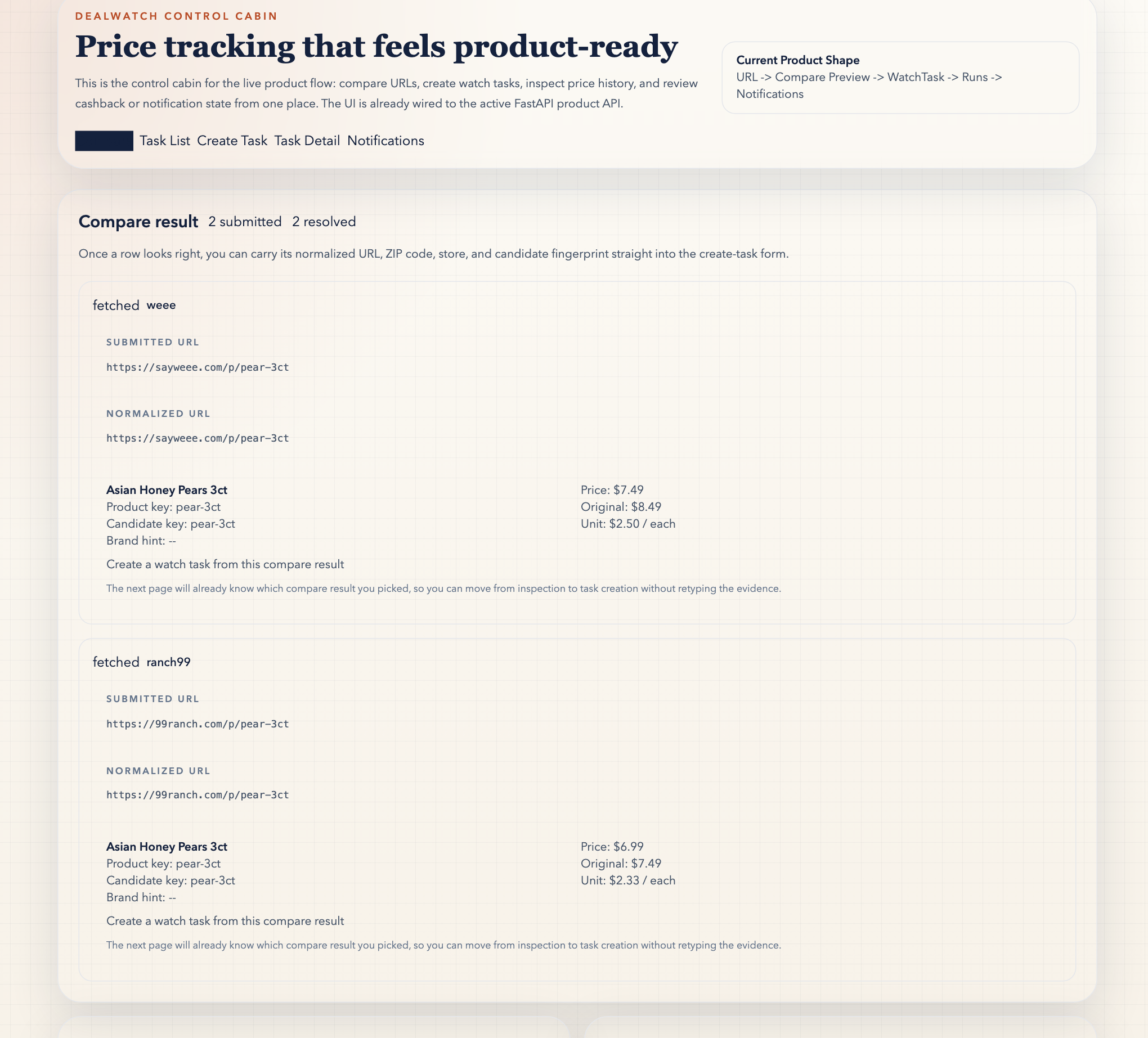
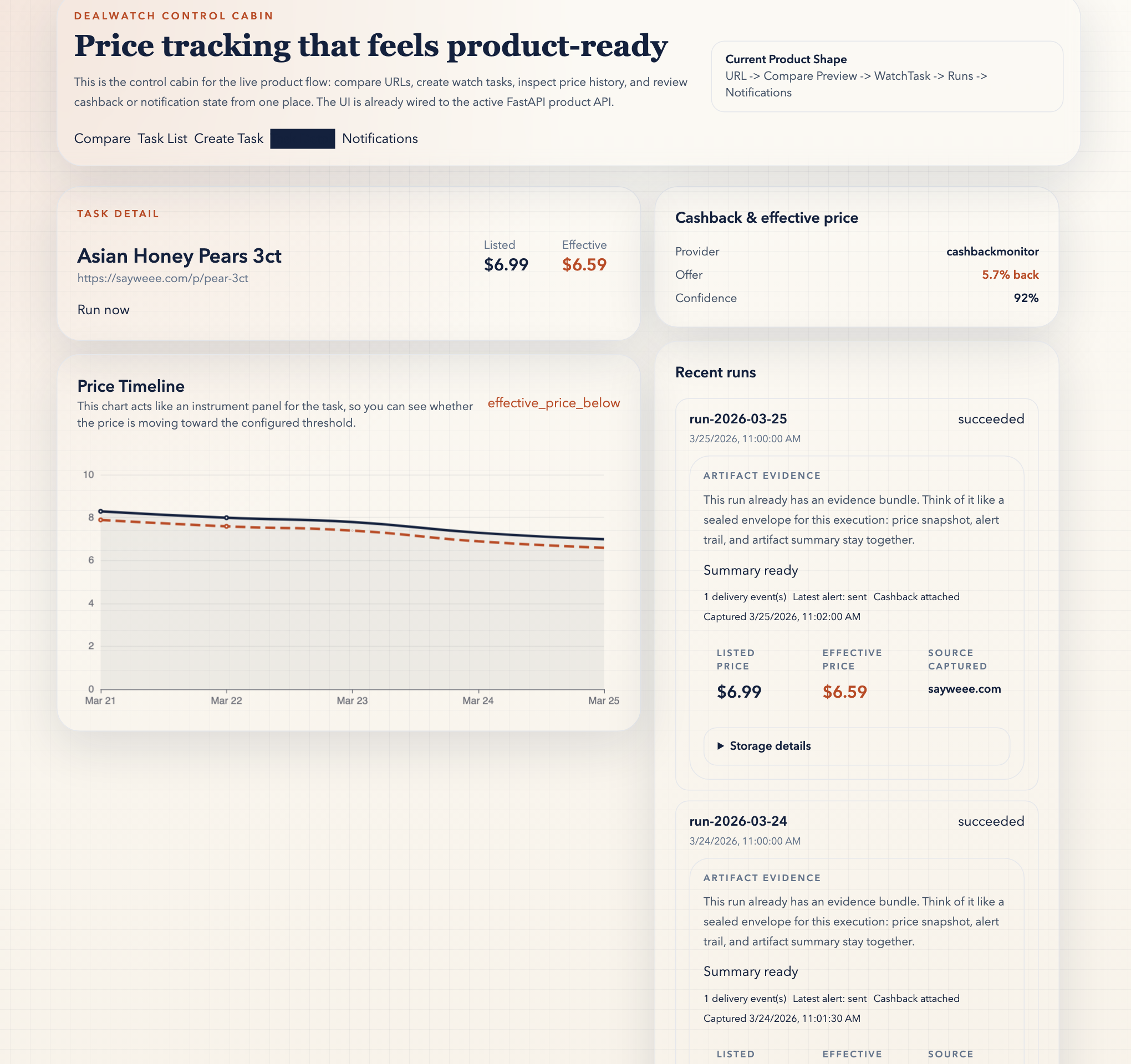
| Compare Preview | Task Detail | Notifications |
|---|---|---|
|
 |
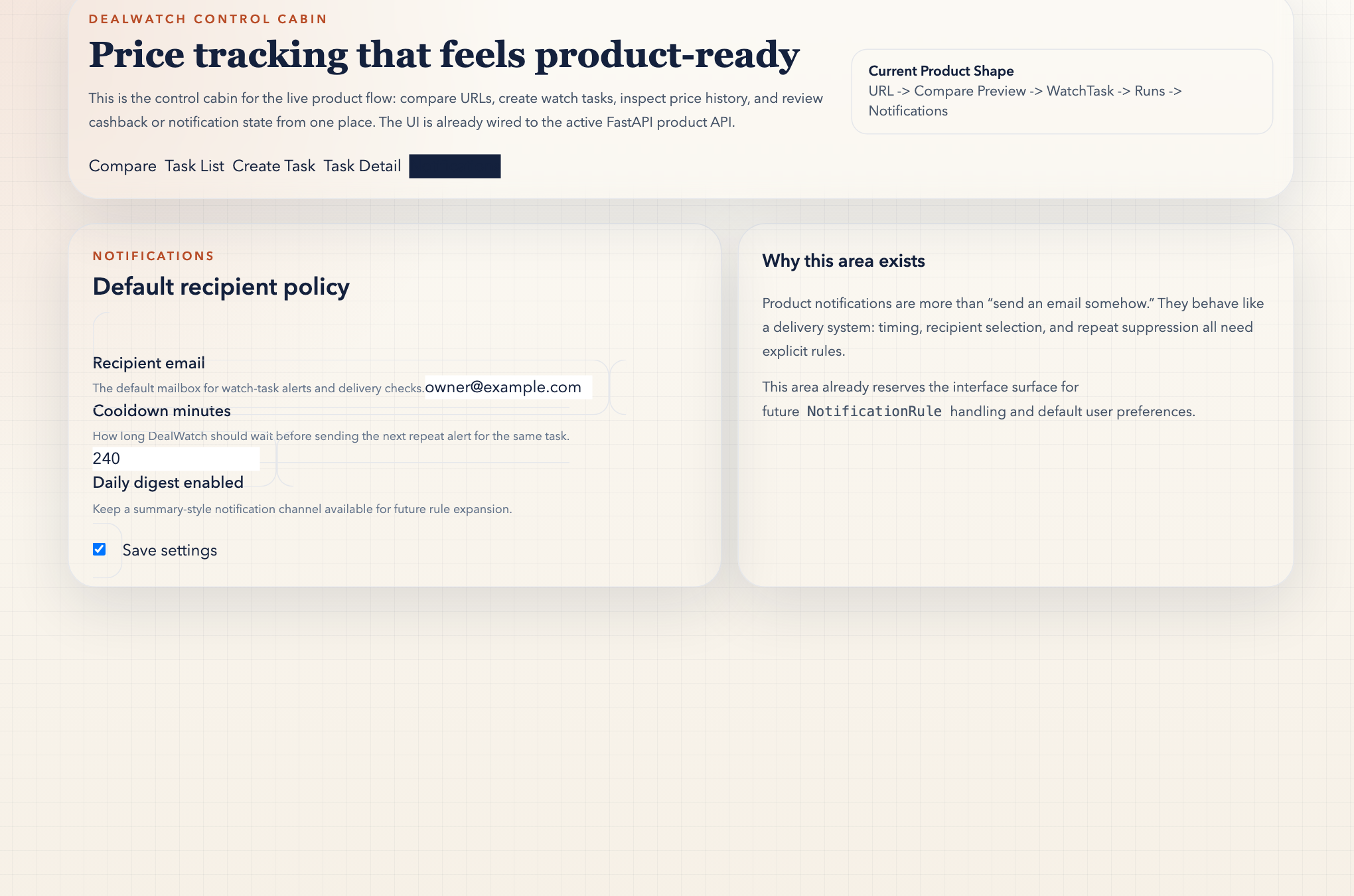 |
| Start with normalized URLs, candidate keys, and match scores before you save durable state. | Review the run evidence bundle, price timeline, cashback, and delivery trail from the same task detail surface. | Confirm the alert policy and recipient defaults that control what happens after a successful run. |
The current product runtime now also supports compare-aware watch groups, task health / backoff signals, a runtime readiness view, a needs-attention / recovery inbox, a clearer watch-group decision summary, optional AI explanation layers, read-only MCP safe access, and local compare evidence packages inside the local WebUI. The public sample compare page remains static and read-only; it explains the first step, but the long-lived group, recovery, and operator-readiness flows still belong to the real product runtime.
Release Notes
Read the newest public release notes at Latest Release, and use Releases when you want the full history.
If you want a lightweight reason to keep DealWatch on hand, leave a Star now so the next release, proof update, or sample compare improvement is easy to find again.
Roadmap
- Stronger compare-aware watch groups so cross-store candidates stay alive after intake instead of collapsing into a single URL too early, with clearer winner-vs-runner-up explanation.
- Clearer task health, recovery, delivery lifecycle, and evidence history so operators can trust long-lived monitoring and understand what still needs intervention.
- Stronger compare confidence and matching signals.
- Systematic i18n for product-facing WebUI and public Pages, instead of scattered bilingual literals.
- More live stores with the same product-shaped compare-first intake.
- Richer public docs and guided setup through the GitHub Pages surface.
- More first-run shortcuts so evaluation feels faster than stack assembly.
Trust And Help
- English is the canonical collaboration languageEnglish is the canonical collaboration language for tracked docs, CI diagnostics, contribution flow, and repository governance.
- Product-facing bilingual work must use systematic i18nIf WebUI or public Pages grow into bilingual surfaces, they must move through one shared i18n substrate instead of adding scattered bilingual literals page by page.
- Product source of truth is PostgreSQLProduct source of truth is PostgreSQL via
DATABASE_URL. - SQLite remains a one-way import bridgeSQLite remains a one-way import bridge from
.legacy-runtime/data/dealwatch.db. - GitHub Pages is the current public surfaceThe current public read path is
local-first + GitHub Pages.render.yamlremains an optional deployment blueprint, not a guaranteed live runtime promise. - Current GitHub public entryDealWatch is published from the current GitHub public entry:
https://github.com/xiaojiou176-open/dealwatch - Secret scanning is enforced in CISecret scanning is enforced in CI, and local scans remain recommended developer-side protection.
- Maintainer verification shortcuts
PYTHONPATH=src uv run python -m dealwatch maintenance --dry-run,./scripts/test.sh -q, andpnpm -C frontend buildare the compact local baseline trio. Add./scripts/smoke_product_hermetic.shplus the public-surface verifiers only when you need deeper manual confidence.
Verification Lanes
DealWatch is now a Heavy / Dual-runtime repository with browser and external-proof surfaces.That means the repo keeps plenty of checks, but they do not all belong in the same default localpath.
pre-commitRunpre-commit run --all-filesfor the fast hygiene gate: host/process safety, sensitivesurface checks, and staged secret scanning.pre-pushLet the managed hook enforcegit diff --check,actionlint, and the repo-local guard railsbefore the branch leaves your machine.hostedGitHub Actions owns the required checks onmain:governance,test,frontend,product-smoke,CodeQL,secret-hygiene,Dependency Review,workflow-hygiene, andtrivy.nightlyScheduled maintenance and security intake belong here: nightly Dependabot intake plus scheduledCodeQL. Treat this layer as continuous background maintenance, not as the default local path.manualUse./scripts/smoke_product_hermetic.sh,python3 scripts/verify_remote_github_state.py,python3 scripts/verify_public_demo_interaction.py, browser debug-lane probes, and any liveplatform checks only when the task actually needs them.distributionUsepython3 scripts/verify_browser_extension_surface.pyandpython3 scripts/build_browser_extension_bundle.pywhen you are preparing the Chrome companion package for manual store upload without changing thedefault local baseline.- SecuritySecurity reports must stay private. Start with
SECURITY.md. - SupportProduct usage questions and reproducible defects route through
SUPPORT.md. - ContributingContributing guidelines and verification expectations live in
CONTRIBUTING.md.


