
jamovi MCP
English | 简体中文
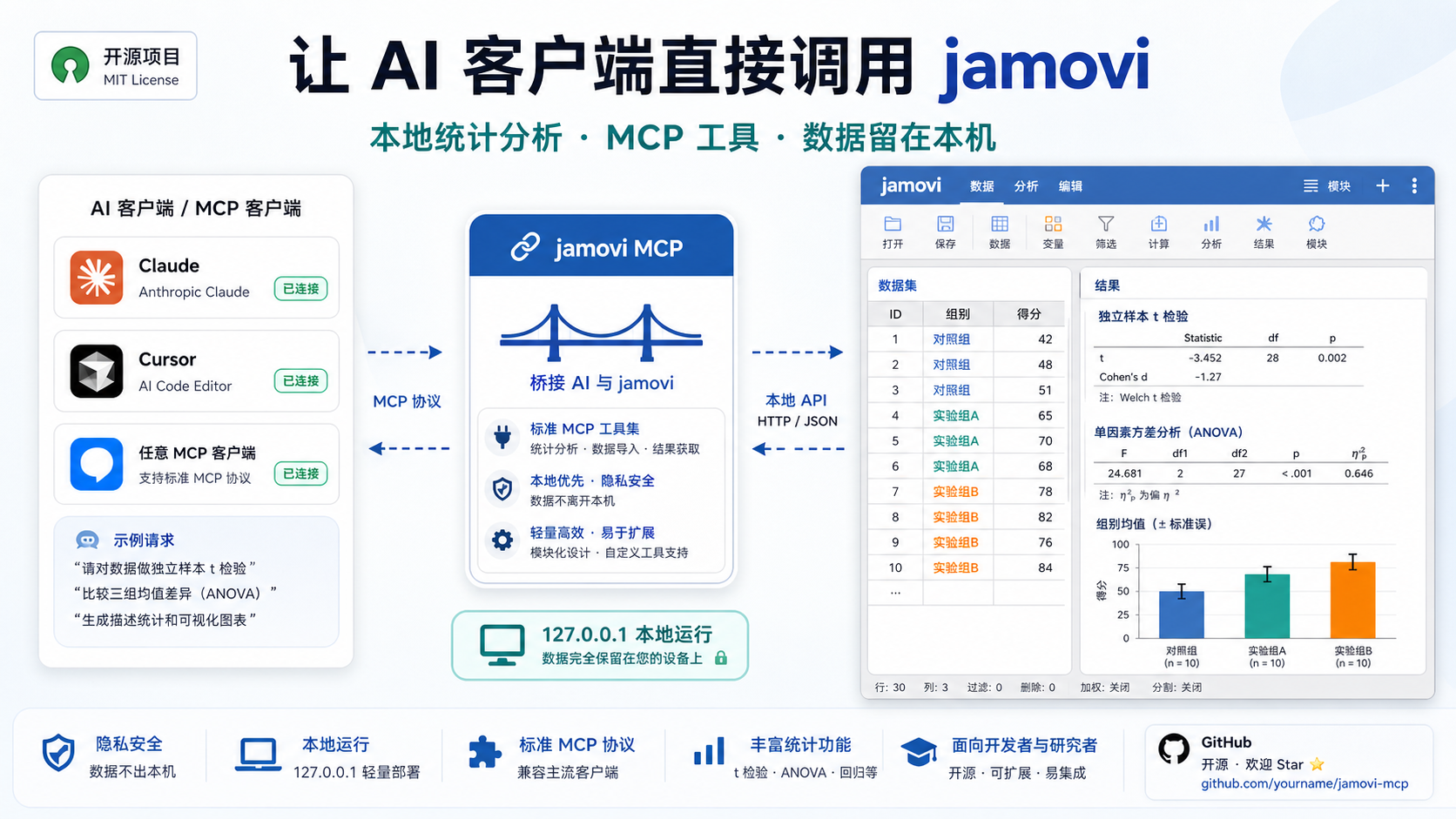
A local stdio MCP server that lets Claude, Cursor, and other MCP clients control jamovi.
Open datasets, inspect schemas, edit cells, run statistical analyses, export results, and save .omv files through a local jamovi engine.
Fastest Setup
Copy this into your MCP client config:
{
  "mcpServers": {
    "jamovi": {
      "command": "uvx",
      "args": [
        "--from",
        "git+https://github.com/yjm110517/jamovi-mcp.git",
        "jamovi-mcp"
      ]
    }
  }
}
Restart your MCP client, then call jamovi_open with an absolute local data file path.
This is the recommended setup for normal users. You do not need to clone this repository, install a local lib/ directory, or hardcode a machine-specific Python path.
Requirements
- Windows
- jamovi installed locally
uvxavailable to the MCP client- A Python 3.12+ runtime available through
uvxor your local Python setup
jamovi itself is required because this MCP starts a local jamovi engine process. Python does not need to be installed in any specific directory.
jamovi Version Discovery
By default, no JAMOVI_HOME configuration is required. The server scans standard Windows install locations such as Program Files and uses the newest valid jamovi* installation it finds.
Only set JAMOVI_HOME when jamovi is installed in a non-standard location or when you want to pin a specific version:
{
  "mcpServers": {
    "jamovi": {
      "command": "uvx",
      "args": [
        "--from",
        "git+https://github.com/yjm110517/jamovi-mcp.git",
        "jamovi-mcp"
      ],
      "env": {
        "JAMOVI_HOME": "C:\\Path\\To\\jamovi"
      }
    }
  }
}
JAMOVI_HOME must point to the jamovi installation directory that contains Frameworks and Resources.
Example Workflow
You can ask your MCP client to:
Open
survey.csv, show the variables, read the first 10 rows, run a t-test, and save the project asanalysis.omv.
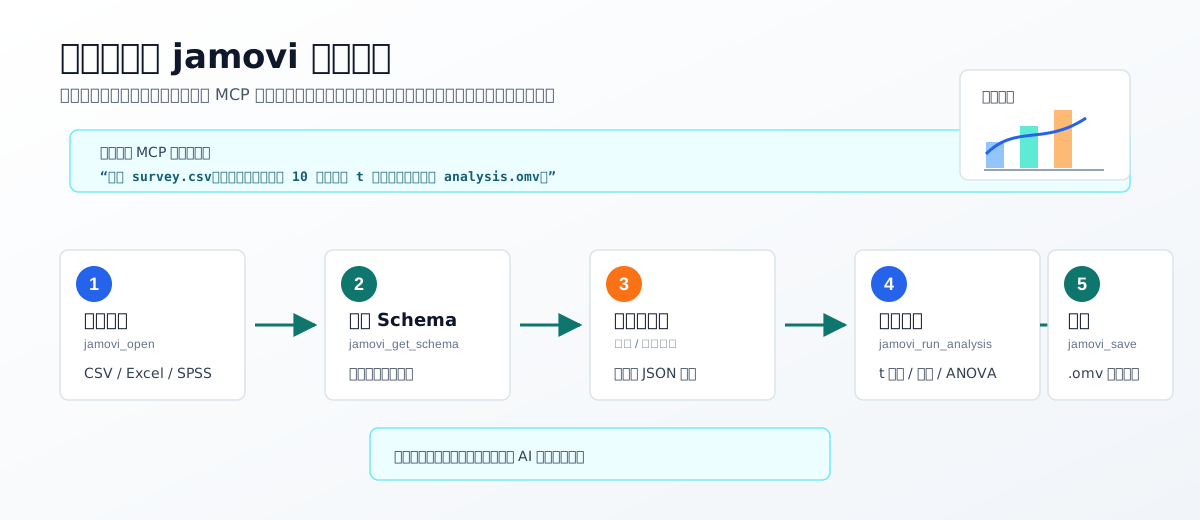
Typical tool sequence:
jamovi_openjamovi_get_schemajamovi_get_datajamovi_run_analysisjamovi_save
MCP Tools
This server exposes 10 MCP tools.
| Tool | Purpose | Main arguments |
|---|---|---|
jamovi_open |
Open a local data file in jamovi. | file_path |
jamovi_get_schema |
Read dataset metadata, columns, types, levels, and row counts. | None |
jamovi_get_data |
Read a rectangular data range as row-major JSON rows. | row_start, row_count, column_start, column_count |
jamovi_set_data |
Set one dataset cell. | row, column, value |
jamovi_list_analyses |
List analyses discovered from installed jamovi modules. | None |
jamovi_get_analysis_options |
Read the option schema for one analysis. | ns, name |
jamovi_run_analysis |
Run an analysis against the active dataset. | ns, name, options, analysis_id |
jamovi_get_analysis |
Fetch results for a previously run analysis. | analysis_id |
jamovi_export_results |
Export analysis results as text or HTML. | analysis_id, fmt |
jamovi_save |
Save the active dataset as an .omv file. |
file_path, overwrite |
Usage Examples
Open a CSV file:
{
  "file_path": "C:\\Users\\you\\data\\example.csv"
}
Read the active dataset schema:
{}
Read the first 10 rows and first 3 columns:
{
  "row_start": 0,
  "row_count": 10,
  "column_start": 0,
  "column_count": 3
}
Set a single cell value:
{
  "row": 0,
  "column": 1,
  "value": 10
}
Save the active dataset:
{
  "file_path": "C:\\Users\\you\\data\\output.omv",
  "overwrite": true
}
Run an analysis:
{
  "ns": "jmv",
  "name": "ttestIS",
  "options": {
    "vars": ["score"],
    "students": true
  },
  "analysis_id": 2
}
Architecture
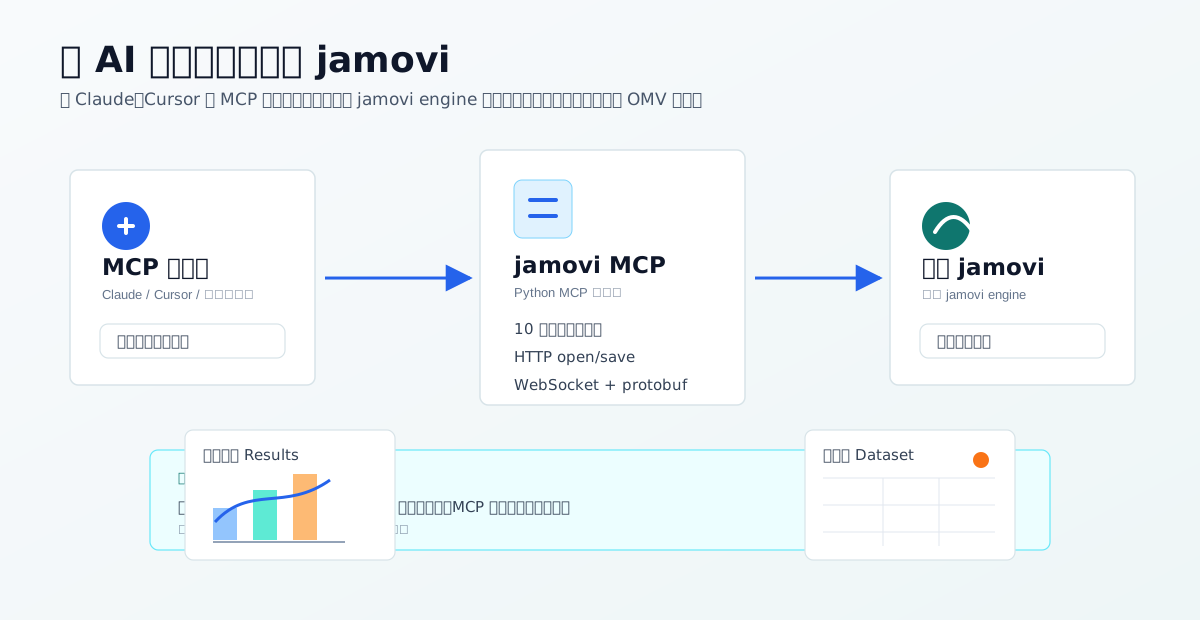
flowchart LR
    Client["MCP Client"] --> Stdio["stdio MCP transport"]
    Stdio --> Server["jamovi_mcp.server"]

    Server --> ToolMap["Tool dispatcher"]
    ToolMap --> FileTools["tools.files"]
    ToolMap --> DataTools["tools.data"]
    ToolMap --> AnalysisTools["tools.analysis"]

    FileTools --> Connection["JamoviConnection"]
    DataTools --> Connection
    AnalysisTools --> Connection

    Server --> Engine["EngineManager"]
    Engine --> Config["config.py"]
    Config --> Discovery["JAMOVI_HOME or Program Files discovery"]
    Config --> EnvConf["bin/env.conf parsing"]
    Discovery --> JamoviInstall["Local jamovi installation"]
    EnvConf --> JamoviInstall

    Engine --> JamoviServer["jamovi.server subprocess"]
    JamoviInstall --> JamoviServer

    Connection --> HTTP["HTTP open/save endpoints"]
    Connection --> WS["WebSocket + protobuf coms"]
    HTTP --> JamoviServer
    WS --> JamoviServer

    AnalysisTools --> Registry["analyses.py registry"]
    Registry --> Modules["Resources/modules YAML"]
    Modules --> JamoviInstall
At startup, EngineManager selects a jamovi installation through config.py, builds the process environment from jamovi's own bin/env.conf, and launches jamovi.server. The MCP server connects to that local engine through JamoviConnection. File operations use jamovi's HTTP routes, while dataset and analysis operations use WebSocket messages encoded with the bundled protobuf definitions.
Compatibility
Verified locally:
- Windows
- Python 3.12
- jamovi
2.6.19.0
Designed compatibility:
- Any jamovi installation with the same
Frameworks,Resources,bin/env.conf, HTTP routes, WebSocket API, and protobuf message contract. - Optional version selection through
JAMOVI_HOME. - Automatic newest-version selection when multiple
jamovi*directories are installed under standard Program Files locations.
Known limitation:
- If a future jamovi release changes
jamovi.proto, the WebSocket request types, or the HTTP open/save routes, this MCP may need an adapter update and regenerated protobuf code.
Troubleshooting
uvx is not found
Install uv so your MCP client can run uvx, then restart the MCP client. If you do not want to use uvx, use the development install below and configure the installed jamovi-mcp command instead.
jamovi-mcp requires Python 3.12 or newer
Your MCP client is using an older Python runtime. With uvx, make sure uv can use Python 3.12+. If you manage Python yourself, point the MCP command to a Python 3.12+ executable:
{
  "command": "C:\\Path\\To\\Python\\python.exe",
  "args": ["-m", "jamovi_mcp"]
}
This is an advanced fallback. It is not the recommended setup and the path will differ on every computer.
Invalid JAMOVI_HOME
JAMOVI_HOME must point to the jamovi installation directory that contains Frameworks and Resources.
Example:
{
  "env": {
    "JAMOVI_HOME": "C:\\Path\\To\\jamovi"
  }
}
jamovi is installed but not detected
Set JAMOVI_HOME explicitly in the MCP client config. This is also recommended when testing a specific jamovi version.
File open or save fails
Use absolute Windows paths and make sure the user running the MCP client has permission to read or write that location. For save operations, pass "overwrite": true if the target file already exists.
Analysis tools return unexpected results
First call jamovi_list_analyses, then jamovi_get_analysis_options for the target analysis. jamovi analysis option schemas are module-specific and can differ between versions or installed modules.
Development Install
Normal users should use the uvx MCP config above. Clone the repository only if you want to develop or test the code locally.
git clone https://github.com/yjm110517/jamovi-mcp.git
cd jamovi-mcp
py -3.12 -m pip install -e .
If your system does not have the Windows Python launcher, use any Python 3.12+ executable instead:
python -m pip install -e .
Run tests:
py -3.12 -m pytest -q
Start the MCP server directly:
py -3.12 -m jamovi_mcp
Important source areas:
src/jamovi_mcp/server.py: MCP server and tool registration.src/jamovi_mcp/engine.py: jamovi engine subprocess lifecycle.src/jamovi_mcp/config.py: jamovi install discovery and environment setup.src/jamovi_mcp/connection.py: HTTP, WebSocket, and protobuf communication.src/jamovi_mcp/tools/: MCP tool implementations.src/jamovi_mcp/analyses.py: analysis registry built from jamovi module YAML files.tests/: unit tests for data conversion, save handling, config, and engine env setup.
Do not commit lib/ or other local dependency target directories. Install dependencies through pyproject.toml.
Security Notes
This MCP starts a local jamovi process and reads or writes local files whose paths are provided through MCP tool calls.
- The engine is started locally and connected through
127.0.0.1. - File paths are supplied by the MCP client/user.
- Do not expose this server to untrusted clients.
- Do not pass sensitive data files to an MCP client you do not trust.
- Do not commit private local config, access tokens, API keys, or datasets.
Roadmap
- Add GitHub Actions CI.
- Add broader integration tests across more jamovi versions.
- Improve structured parsing for analysis result payloads.
- Add more explicit typed response schemas for each MCP tool.
- Document common jamovi analysis recipes.
Contributing
Pull requests are welcome. Please keep changes focused, run the test suite before submitting, and include tests for behavior changes.
For compatibility work, include the jamovi version, Windows version, and Python version used for testing.
Repository Contents
Files that should be committed:
README.mdREADME.zh-CN.mdLICENSE.gitignorepyproject.tomldocs/src/tests/
Files and directories that should not be committed:
lib/.pytest_cache/.ruff_cache/__pycache__/- local CSV/OMV/log/tmp files
- private local config, tokens, and API keys
License
MIT


