
screencast-desktop




A Claude Code plugin that lets an agent operate a Windows application and turn thatsession into a finished demo video — where the camera starts zooming toward each clickhalf a second before the click happens.
- Drive the desktop with vision in the loop. Every action returns a fresh screenshotin the same reply, so the agent works look → act → look instead of writing a scriptblind. Controls are found by name through Windows UI Automation; Electron apps thatexpose no control tree fall back to screenshots and coordinates (or to their DOM overCDP, when a debugging port is open).
- Record a window, not a screen. Capture goes through Windows Graphics Capture, boundto a window handle, so the desktop behind the app never enters the frame and it does notmatter which monitor or GPU the window lives on.
- The video is built from an event log, not from the footage. Every click, every typedstring and the full cursor path are timestamped as they happen. Camera moves are computedfrom that log.
- Screen Studio-grade finish, generated: eased camera pushes and pans, a drawn cursorwith a soft shadow, click ripples, motion blur, rounded corners on a gradient backdrop,vignette and grain — plus dead-air removal that collapses the agent's own thinking time.
- Narration that lands on the beat. Optional ElevenLabs voice-over, generated beforethe run so the click falls inside the sentence describing it.
- A fuller montage layer, one script away. Title and outro cards, captions, and a completesound design pass — click track, camera whooshes, landing impacts, closing riser, duckedmusic bed, loudness normalisation — live in
cinematic.py,sfx.pyandsfx_bank.py. Theyare driven byserver/make_showcase.pyrather than by thedesktop_rendertool; seeKnown limitations. - Re-render for free. Rendering never touches the application: change the zoom cap, thenarration or the effects and rebuild the same take as often as you like.
Why it's different
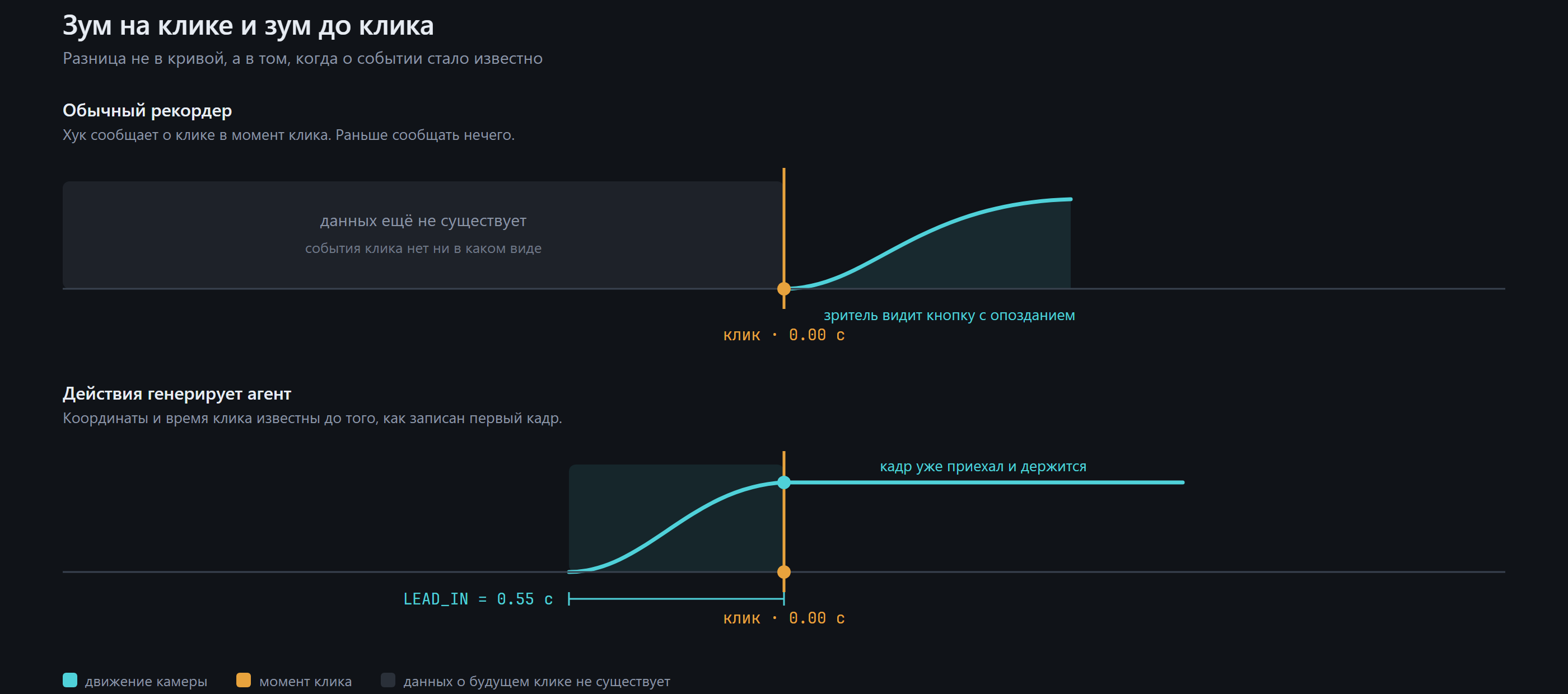
Every screen recorder that does "auto zoom" — Screen Studio and its Windows imitators —works the same way: it records first, then goes back through mouse hooks or the footageitself to guess where the interesting moments were. That ordering has a hard consequencenobody can engineer around: the zoom cannot begin before the click, because at the momentof the click the recorder has only just learned that a click is coming. The best it can dois start moving on the click and arrive shortly after. Human editors do the opposite — theylead the viewer in, so the eye is already at the button when it is pressed.
Here the agent generates the actions, so the coordinates and the timings are known before asingle frame is composited. The camera can be given a lead-in (LEAD_IN = 0.55 s inserver/camera.py), so by the time the button is pressed the shot has already arrived andsettled. The same foreknowledge buys three more things a post-hoc tool cannot have:
- No pumping. Consecutive clicks in the same region are merged into one steady shotinstead of the camera zooming in and out on every list item.
- Narration that fits. The speech is generated before the run (
voice.plan()), its realduration is measured withffprobe, and the agent's pauses are set from those numbers — sothe click lands inside the sentence that describes it, with no manual nudging. Recordingfirst and narrating afterwards always ends with the voice saying "I click Save" a secondafter Save was already clicked. - A machine-readable record of what happened.
desktop_describe_takereads a take backas a numbered procedure ("3. [12.4s] click Multiply by") — a better artifact than a pile ofscreenshots, and enough to write a reusable skill from.
Where this sits among the neighbours
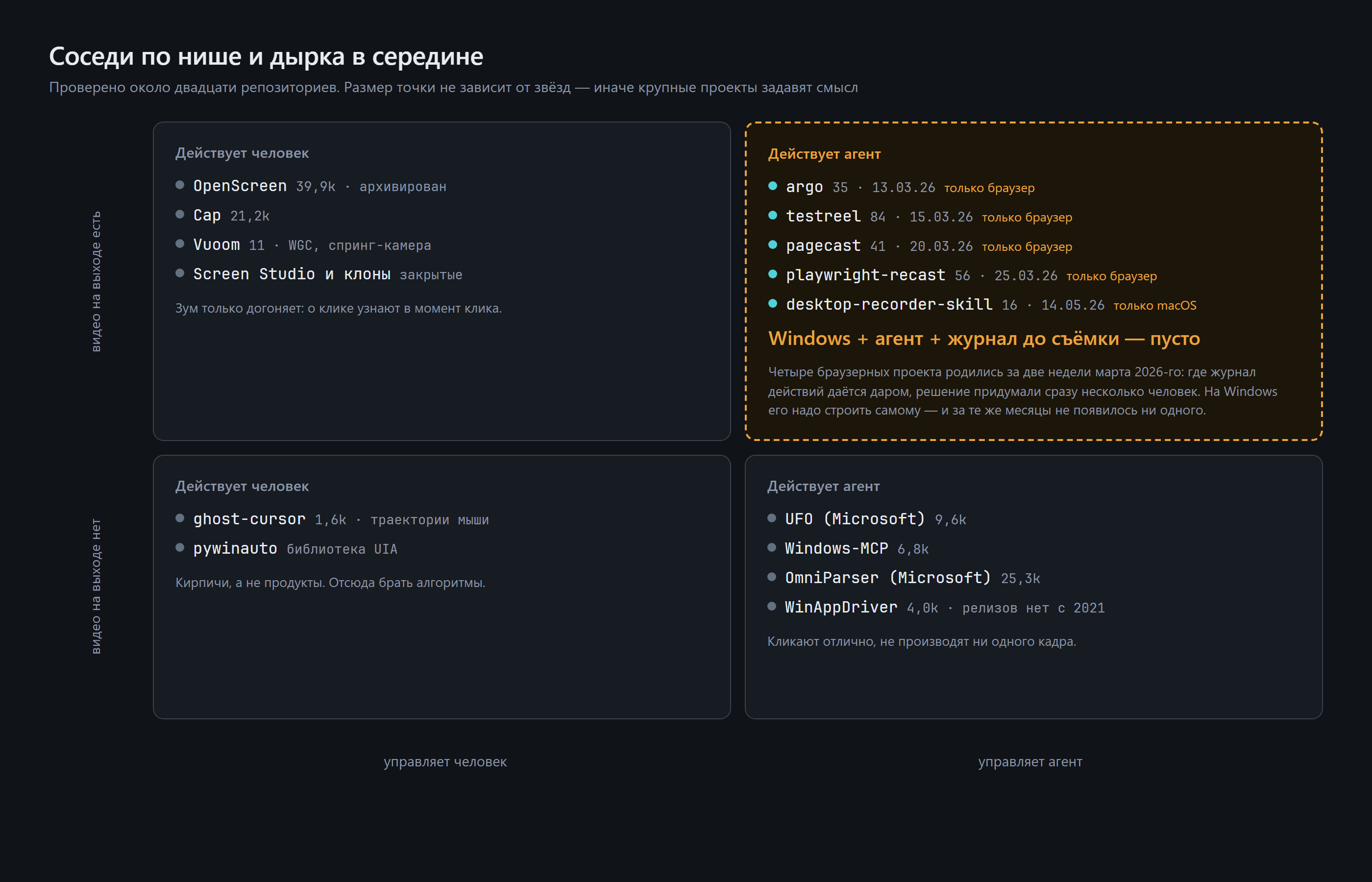
The idea is not obscure — it is just hard to reach on Windows. Four browser-sideprojects implementing "edit from the action log" appeared within two weeks of March2026 (argo, testreel, pagecast, playwright-recast), because Playwright hands you thelog for free. On Windows the log has to be built alongside the input driver, and in thesame five months nothing appeared: the recorders have no agent, and the agents produceno frames.
Requirements
| OS | Windows 11 (developed and tested there). Windows 10 2004+ has the two OS features the plugin leans on — Windows Graphics Capture and the built-in WinRT OCR — but is untested. |
| Python | 3.10 or newer (the mcp SDK requires it); developed on 3.13. tkinter must be present — it ships with the standard python.org installer. |
| ffmpeg | A full build, on PATH, with ffprobe alongside it. winget install Gyan.FFmpeg. Stripped-down builds are missing filters the audio mix needs. |
| GPU | An NVIDIA card with NVENC. Both the capture writer and the compositor currently ask for h264_nvenc by default; libx264 code paths exist but nothing selects them automatically yet — see Known limitations. |
| Claude Code | Any recent version with plugin support. |
| ElevenLabs API key | Optional. Without it everything works, the video is simply silent. |
Python packages
Pulled from the imports of every module in server/:
pip install mcp pillow opencv-python numpy windows-capture uiautomation
| Package | Used by | Needed for |
|---|---|---|
mcp |
desktop_server.py |
the MCP server itself (FastMCP) |
pillow |
desktop_server.py, cinematic.py |
screenshots, title cards and captions (Unicode text — OpenCV's putText cannot draw Cyrillic at all) |
opencv-python |
composer.py, cinematic.py, privacy.py |
frame compositing, camera warp, motion blur |
numpy |
compositor, sfx.py, wgc.py |
frame and audio buffers |
windows-capture |
wgc.py, doctor.py |
Windows Graphics Capture bindings |
uiautomation |
desktop_server.py, ui.py |
desktop_snapshot control tree |
websocket-client |
electron.py |
optional — only for desktop_dom*, which talks CDP to Electron apps |
No package is needed for the privacy scan: it reads the screen with the OCR that ships withWindows, driven through PowerShell.
Installation
1. Get the plugin
git clone https://github.com/JHamidun/screencast-desktop.git
2. Register it in Claude Code
The repository is its own marketplace (.claude-plugin/marketplace.json), so point ClaudeCode at the clone and install from there:
/plugin marketplace add <path-to-clone>
/plugin install screencast-desktop
.mcp.json registers both servers with ${CLAUDE_PLUGIN_ROOT}-relative paths, so nothingneeds a global install and the clone can live anywhere.
3. Run setup
/screencast-desktop:setup
That runs server/doctor.py, which checks the things that break silently:
- DPI awareness — a process that has not declared itself DPI-aware is told the screen is2560×1440 when it is really 3840×2160, and every click misses by the scaling factor.
- Monitor layout — coordinates are shared across all screens and go negative onsecondary monitors.
- ffmpeg and available encoders.
- Window capture, for real — it captures ~25 frames and checks they are not all identical.
- Narration — whether a key is present and whether the configured voice id still existson the account (a deleted voice otherwise fails with a bare 404).
It writes machine.json with what it found.
4. Fetch the UI Automation binary
The windows-ui server is an external binary — sbroenne/mcp-windows(MIT). It is deliberately not vendored into this repository: it is ~60 MB, it is someoneelse's project, and pinning a copy here would only ship a stale one. Download it on demand:
python server/fetch_ui_binary.py # --force to re-download
The script resolves the latest GitHub release, verifies the archive against the SHA256SUMS.txtpublished with it, and refuses to install anything on a mismatch. It lands in bin/, which iswhere .mcp.json expects it.
5. Confirm both servers are up
claude mcp list # expect: screencast, windows-ui
Quick start
Record a demo of the Windows Calculator. The /screencast-desktop:record command walks theagent through this, but here is what it actually does, with the real tool names.
1 — Stage the window. Put it on a secondary monitor if there is one, so it does not sit ontop of your work:
desktop_monitors()
desktop_place_window(window="Calculator", monitor=1, fit=0.7)
Read the reply. Applications are not obliged to become the size they are told — a UWP windowasked for 2380×1490 here came back 3967×2426 and hung off the screen. desktop_place_windowmeasures the result, corrects it, and says outright whether the window fits.
2 — Check the frame for anything private.
desktop_screenshot(window="Calculator")
desktop_privacy_check(window="Calculator")
The check reports, it does not block: it OCRs the frame and flags card numbers, API keys, emailaddresses, phone numbers and personal names. Turn on Do Not Disturb before you record.
3 — Rehearse. Walk the route with the real tools and confirm from the returned screenshotsthat you are hitting what you think you are hitting. Nothing is being recorded yet:
ui_snapshot(windowHandle=…)          # windows-ui: controls by name — try this first
desktop_snapshot(window="Calculator")# or the built-in UIA walk, which returns e1, e2, … refs
desktop_click(ref="e7")
4 — Reset the app. A search box left open from the rehearsal ends up in the take.
5 — Record the real one.
desktop_record_start(window="Calculator")
desktop_click(ref="e12")                 # every click from here is logged for the camera
desktop_type("128")
desktop_click(ref="e19")
desktop_record_stop()
desktop_record_stop reports the duration, the frame count and how many clicks made it intothe log, then tells you the out_dir to render.
6 — Render, then look at it.
desktop_render(out_dir="%USERPROFILE%/screencasts/take-143502", max_zoom=2.0)
desktop_render_status(out_dir="…")       # rendering runs in a child process
Open the file and check with your eyes: did the camera arrive where it should, are there blackbars at any edge, is the cursor visible. A wrong coordinate produces a technically valid file inwhich the camera looks at nothing. If it is off, re-run desktop_render with different settings —the application is not launched again and the screen is not re-recorded.
Tool reference
screencast server — desktop_monitors, desktop_windows, desktop_screenshot,desktop_snapshot, desktop_dom, desktop_dom_launch, desktop_click, desktop_type,desktop_key, desktop_move_mouse, desktop_scroll, desktop_focus, desktop_launch,desktop_place_window, desktop_privacy_check, desktop_record_start, desktop_record_stop,desktop_render, desktop_render_status, desktop_describe_take.
desktop_click, desktop_type, desktop_key, desktop_scroll, desktop_focus anddesktop_launch all take see="shot" (default) or see="none" — the second saves context whenyou already know what the screen looks like.
windows-ui server (exposed subset) — ui_snapshot, ui_find, ui_click, ui_type,ui_select, ui_read, ui_wait, window_management, app.
How it works
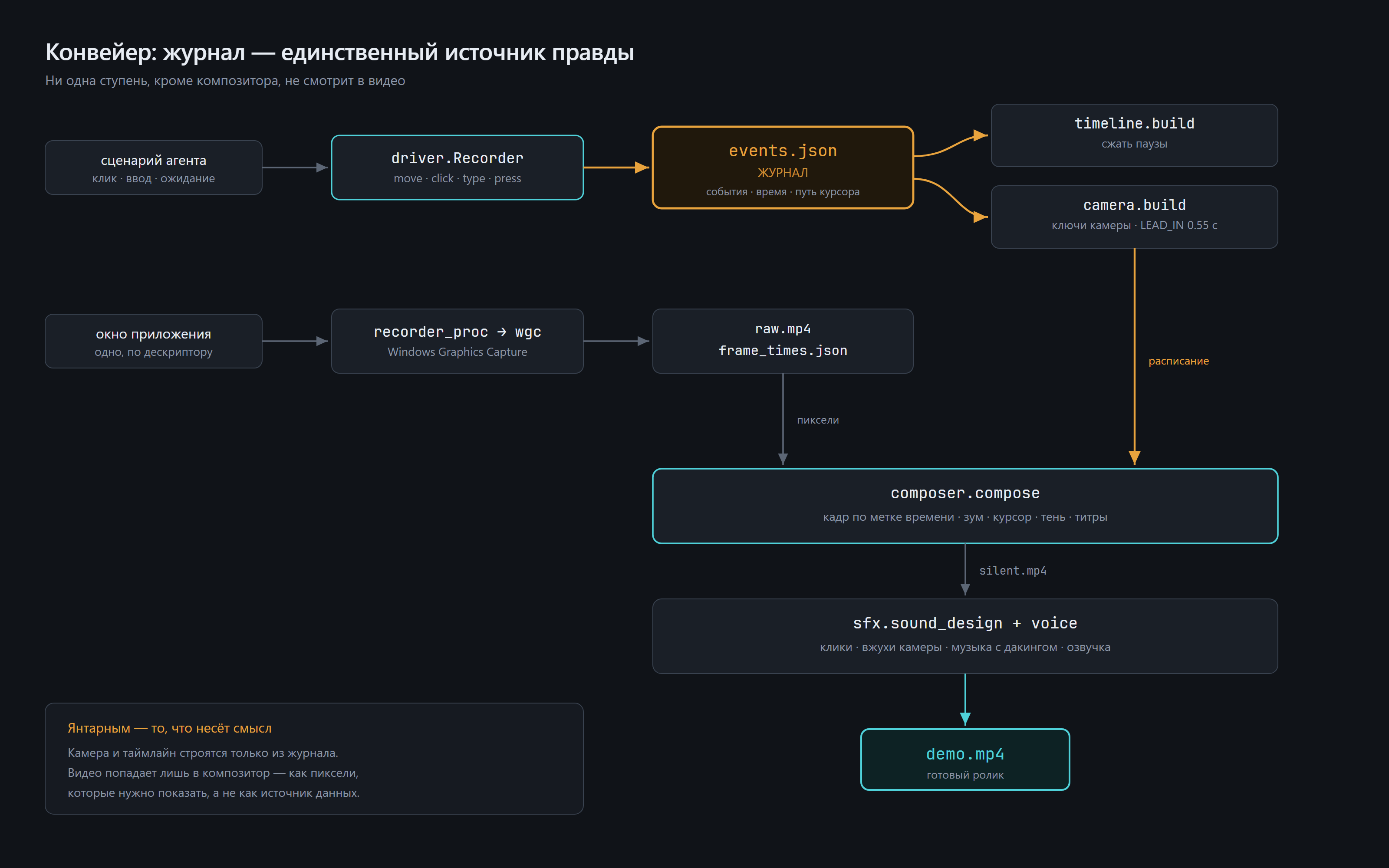
The same thing in text, for anyone reading this in a terminal:
  AGENT                                                   server/
  ─────                                                   ───────
  desktop_click / desktop_type / …                        desktop_server.py
        │                                                 (MCP, FastMCP)
        ├──► real SendInput: cursor eased to the target,  driver.py
        │    clicked, keys sent                           ── moves + clicks
        │                                                    the real desktop
        │
        ├──► EVENT LOG  t, kind, x, y, label, dur         driver.py → events.json
        │    + the sampled cursor path (track)               ◄── the ground truth
        │
        └──► screenshot back to the agent in the same reply

  desktop_record_start                                    recorder_proc.py (child process)
        └──► Windows Graphics Capture, bound to the HWND  wgc.py
             ├─ frames arrive only when the picture       ── writer thread re-sends
             │  changes …                                    the last frame on a
             └─ … so a writer thread feeds ffmpeg at a       fixed clock
                constant rate, logging the true
                wall-clock time of every frame
                                                          → raw.mp4 + frame_times.json

  desktop_render                                          render_proc.py (child process)
        │
        ├─ 1. TIMELINE   collapse the dead air            timeline.py
        │      keep 1.1 s before and 1.5 s after every
        │      action, squeeze the gaps to 0.55 s
        │
        ├─ 2. CAMERA     event log → keyframes            camera.py
        │      lead-in 0.55 s BEFORE each click,
        │      nearby clicks merged into one shot,
        │      pan instead of pumping in and out
        │
        ├─ 3. COMPOSITOR one affine matrix per frame      composer.py
        │      recording on a gradient backdrop, rounded     + cinematic.py
        │      corners, drop shadow, drawn cursor, click     (vignette, grain;
        │      ripples, motion blur, breathing idle,          title cards and
        │      vignette, grain                                captions available)
        │                                                 → silent.mp4
        │
        └─ 4. SOUND      optional narration               voice.py
               ElevenLabs TTS mixed onto the cut          → demo.mp4

  make_showcase.py — the fuller montage, run as a script rather than a tool:
        the same four stages plus title/outro cards, captions, and the whole
        sound design pass (clicks, whooshes, impacts, riser, ducked music bed,
        loudness normalisation)                           sfx.py + sfx_bank.py
Two design decisions explain most of the file layout:
Capture and render run in child processes. Importing the capture library or OpenCV insidethe MCP server process wedges it, and a render takes minutes, which no tool call should holdopen. recorder_proc.py and render_proc.py exist for that reason alone. They communicatethrough files (started.json, stop, render.log), and both are started with stdin=DEVNULL —a child that inherits the server's stdin starts eating the JSON-RPC requests meant for the server.
Frames are matched by timestamp, not by index. If the machine falls behind, source frame Nis not at N/fps. frame_times.json carries the real capture time of every frame, and thecompositor looks frames up through it — which is what keeps the camera on the clicks when themachine stutters.
Configuration
Render
desktop_render(out_dir, name="demo.mp4", max_zoom=2.0, narration="") — narration takes a JSONlist of {"text": …, "at": seconds}.
Everything else is a module constant, edited in place:
| Constant | File | Default | What it does |
|---|---|---|---|
LEAD_IN |
camera.py |
0.55 |
seconds the camera starts moving before the event |
MAX_ZOOM / MIN_ZOOM |
camera.py |
2.0 / 1.0 |
zoom range; above 2× a 4K source starts upscaling |
ZOOM_IN_DUR / ZOOM_OUT_DUR |
camera.py |
0.85 / 0.7 |
push and pull durations |
HOLD_AFTER |
camera.py |
1.05 |
minimum hold on a shot that carries information |
MERGE_GAP / MIN_GROUP_ZOOM |
camera.py |
3.6 / 1.7 |
how aggressively nearby clicks become one shot |
KEEP_BEFORE / KEEP_AFTER |
timeline.py |
1.1 / 1.5 |
seconds kept at full speed around each action |
IDLE_KEEP / MIN_GAP |
timeline.py |
0.55 / 1.4 |
what a collapsed pause is shortened to |
OUT_W × OUT_H |
composer.py |
1920×1080 |
output resolution |
PADDING |
composer.py |
0.90 |
fraction of the frame the un-zoomed recording fills |
CORNER_R, CURSOR_PX, SHADOW_DROP |
composer.py |
22, 58, 26 |
rounded corners, cursor height, shadow offset (output px) |
SHUTTER_ANGLE |
composer.py |
200.0 |
motion blur; 360 = shutter open the whole frame |
vignette_strength / grain_amount |
composer.compose() |
0.20 / 0.045 |
film look |
breathe |
composer.compose() |
True |
sub-pixel drift on long static shots, so held frames do not look frozen |
desktop_record_start(window, out_dir="", fps=30) defaults to ~/screencasts/take-HHMMSS.
If max_zoom is not given, camera.build() picks a cap itself so at least 70 % of the window'sheight stays in frame — a tall narrow window fitted into a 16:9 frame is already small, andforcing 2× there crops away the part that gives the action its meaning. (On the Calculator it cutoff the display showing the result.)
Narration
Set ELEVENLABS_API_KEY in the environment or in a .env file in the plugin root(KEY=value, one per line — the file is git-ignored). Optionally pin a voice withELEVENLABS_VOICE_ID; with none set, the first voice on the account is used.Model: eleven_multilingual_v2. Point SCREENCAST_ENV_FILE elsewhere if you keepyour keys somewhere else.
voice.resolve_voice() checks configured ids against the account's actual voice roster beforeusing one, because a deleted voice otherwise fails with an unexplained 404.
Without a key nothing breaks. doctor.py reports it as a warning, not a failure, anddesktop_render produces a silent video — which is also what it produces with a key when nonarration argument is passed.
The sound design layer degrades rather than dies without a key: sfx_bank.build() needsElevenLabs to generate the palette, but sfx_bank.build_synthetic() synthesises the samefamilies offline with numpy (the *_syn1.wav / *_syn2.wav files), and sfx.click_samples()falls back to synth_click() when no sample assets are found. So an offline machine still getsclicks, whooshes and impacts — it only loses the voice.
Known limitations
Honest list. These are real, currently true, and mostly things that were hit duringdevelopment. What is planned about them, in priority order with the measurementsbehind each item, is in ROADMAP.md.
- The
desktop_rendertool renders less than the codebase can. It callscomposer.compose()withoutintro,outroorcaptions, and it mixes narration only —no click track, no whooshes, no music bed. Everything else is implemented and working, butcurrently reachable only throughserver/make_showcase.py, which is a script with its ownhard-coded take path and beat list. Wiring those parameters through the tool is the mostobvious open task in this repository. - No drag. There is no drag or drag-and-drop tool. Mouse-down and mouse-up are alwaysemitted at the same position, so anything requiring a press-move-release gesture — sliders,reordering, canvas drawing, resizing by grip — is out of reach.
- Key presses are not written to the event log.
desktop_keysends the keystroke but doesnot log it, so the camera never reacts to keyboard-only steps and they do not appear indesktop_describe_take. Clicks and typed text (desktop_type) are logged; individual keypresses are not. - UWP windows must be addressed by their frame window. Windows Graphics Capture takes atop-level window handle. For a UWP/Store app that is the visible
ApplicationFrameWindow—the innerCoreWindowis not a usable capture target. In practice: resolve the app by itsvisible window title (which is what the tools do) and do not try to reach past it. desktop_screenshotis a crop of the screen, not a window capture. It grabs the screenregion the window occupies. Anything overlapping the window — another window, a notificationtoast, a tooltip — appears in the screenshot. (The recording does not have this problem: WGCcaptures the window itself.) Make sure the target window is on top before you trust a screenshot.- Electron apps expose almost nothing to UI Automation. Measured on Windows 11: a typical Electron app returns2 to 6 named elements — window wrappers, not interfaces. Fall back to screenshots andcoordinates, or use
desktop_domwhen a debugging port is available.desktop_dom_launchopensa second copy of the app with a separate profile, which is not signed in. - NVENC is effectively required. Both
wgc.WindowRecorderandcomposer.compose()default toh264_nvenc.libx264paths are implemented anddoctor.pydetects the right encoder intomachine.json, but nothing wires that choice through automatically yet. On a machine withoutNVENC you have to pass the encoder yourself. - Large files. Film grain is applied per frame, which defeats inter-frame compression — ashort demo is heavier than the same footage without grain. Set
grain_amount=0if size mattersmore than the look. - A take is capped at 15 minutes.
recorder_proc.pystops itself, so a forgotten recordingcannot run forever. - Windows only, and only the interactive desktop. SendInput, UI Automation, WGC and the WinRTOCR are all Windows APIs; none of this works over an unattended session, in a service, or on alocked screen.
- The window is a live application. State survives between takes — a search box left open froma rehearsal turned a typed word into "githubgithub". Reset the app before the clean take.
- The privacy check reports, it does not block. Matching is literal; a name in a menu is not aleak, and OCR misses things. Look at the frame yourself before publishing.
Credits and licenses
- sbroenne/mcp-windows (MIT) — the
windows-uiMCP server that does UI Automation. Not vendored here; downloaded on demand byserver/fetch_ui_binary.py, checksum-verified against the release's ownSHA256SUMS.txt. - ffmpeg — capture encoding, the audio mix and
ffprobedurationmeasurement. Called as an external binary; not bundled. Licensing depends on the build youinstall (LGPL or GPL). - Sound bank. The
.wavfiles underserver/sfx_bank/are generated, not sampled:server/sfx_bank.pybuilds them once from prompt recipes through the ElevenLabssound-generation API and caches them, and every candidate is screened by measurement (a "click"whose peak is 200 ms in is rejected however good it sounds). A second family of files —*_syn1.wav,*_syn2.wav— is synthesised entirely offline insfx_bank.build_synthetic()withnumpy, so a machine with no API key still gets sound design. No third-party sample library isredistributed here. PointSCREENCAST_SFX_DIRat your own sample folder andsfx.pywillprefer those clicks and music beds over the shipped bank; with nothing set it usesserver/sfx_bank/, and with nothing found it synthesises. No hard dependency either way. - ElevenLabs — optional, for narration and for building the soundbank. Bring your own key; the plugin ships no audio generated from anyone's voice.
- Fonts — titles and captions use Segoe UI, which ships with Windows, with Arial as afallback. No font files are redistributed.
- Model Context Protocol Python SDK (MIT) — the serverframework.
The plugin's own code is released under the MIT License. See LICENSE.
Contributing
Issues and pull requests are welcome. A few things that make review quick:
- Windows only. Test on a real desktop; there is no CI that can click buttons for you.
- Run the doctor first (
python server/doctor.py) and paste its output into a bug report —most problems here are environmental (DPI scaling, monitor layout, missing encoder) and thedoctor names them directly. - If it broke silently, say so in a comment. This codebase is full of notes explaining why aline is the way it is, because nearly every one of them is a failure that looked like success:identical frames that pass for a recording, a camera drifting off the edge, an empty event logproducing a video with no zoom at all. Keeping those notes is deliberate.
- Changes to camera or timeline constants need a before/after clip. They are judgement callsabout how the result looks, and no test can settle them.


