
Heym
AI-Native Workflow Automation Platform
Build, visualize, and run intelligent AI workflows — without writing code. Drag-and-drop canvas · LLM & Agent nodes · RAG pipelines · Multi-agent orchestration · MCP support







What Is Heym?
Heym is an AI-native automation platform built from the ground up around LLMs, agents, and intelligent tooling. Wire together AI agents, vector stores, web scrapers, HTTP calls, and message queues on a visual canvas — then deploy instantly via Docker.
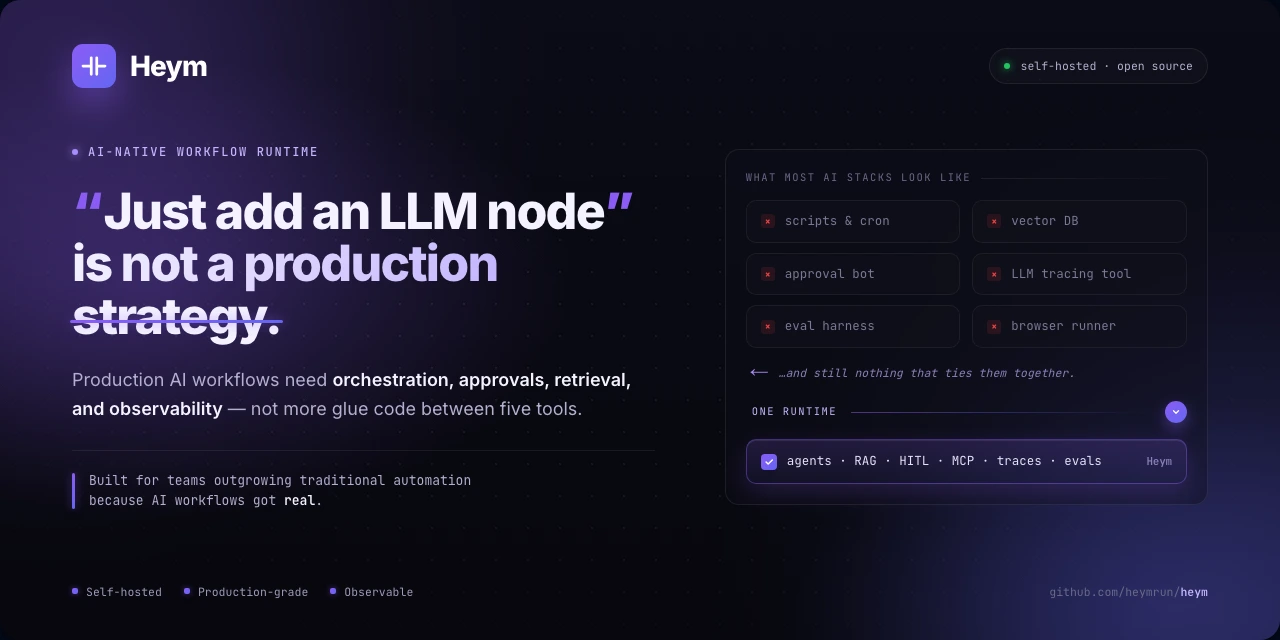
Unlike platforms that started as classic trigger-action automation and layered AI on later, in Heym AI is the execution model.
Explore the product site at heym.run.
No Enterprise Gatekeeping
Many automation platforms turn essential production features into upgrade pressure: global variables, execution history and search, insights, AI Builder / Motherboard capabilities, observability, audit-style logs, team controls, scaling, or customer-facing portals.
Heym takes the opposite position. These are core workflow primitives, not enterprise bait. They ship in the free self-hostable product because serious AI automation should be inspectable, shareable, observable, and deployable from day one without any kind of weird production run limits.
Our enterprise offering is for commercial licensing, deployment help, dedicated support, and additional security layers. It is not a strategy for hiding core workflow and AI-native capabilities behind a sales call, now or later.
Product Demos
The demos below illustrate an agent–subagent layout instead of a purely step-by-step, single-thread agent chain. For a request like “How do I get from Berlin to Frankfurt?” and “What should I eat there?”, subagents can work on those parts in parallel. That tends to finish faster, keeps each model turn focused (less context bloat), and avoids pressuring one model to produce two large, unrelated answers in a single reply.
You can still answer with two separate LLM calls (one per question) or run several calls in sequence and merge the results in a final step—those patterns work—but for this kind of multi-part ask they are usually slower than parallel subagents behind an orchestrator.
Watch Heym Tutorials
Generate Workflows from Natural Language
Describe the agents, orchestration pattern, and user-facing result you want; Heym builds the workflow on the canvas.
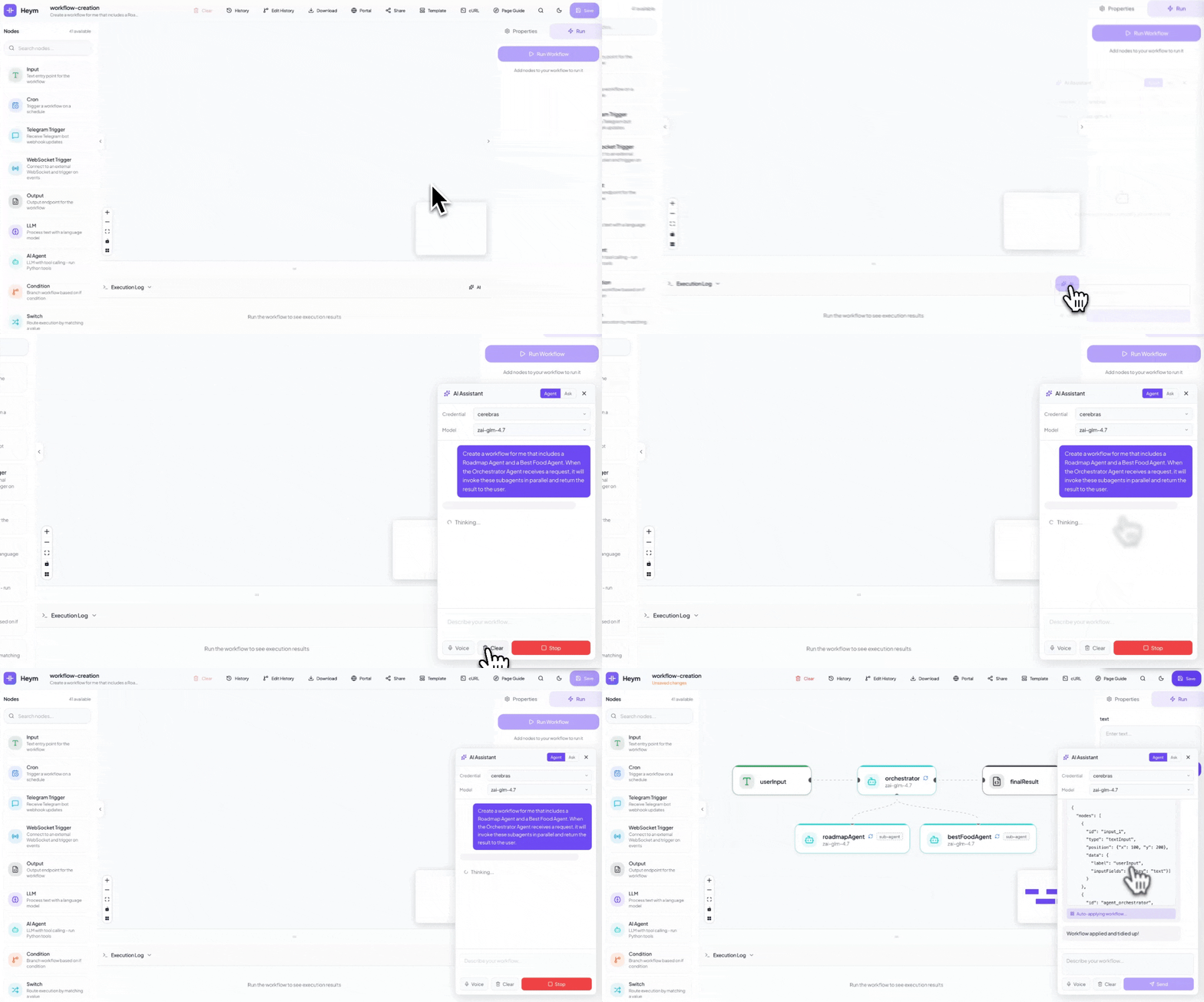
Example prompt
Create a workflow for me that includes a Roadmap Agent and a Best Food Agent. When the Orchestrator Agent receives a request, it will invoke these subagents in parallel and return the result to the user.
Runing Workflows
Execute the workflow directly from the canvas and inspect each step as results move through the graph.
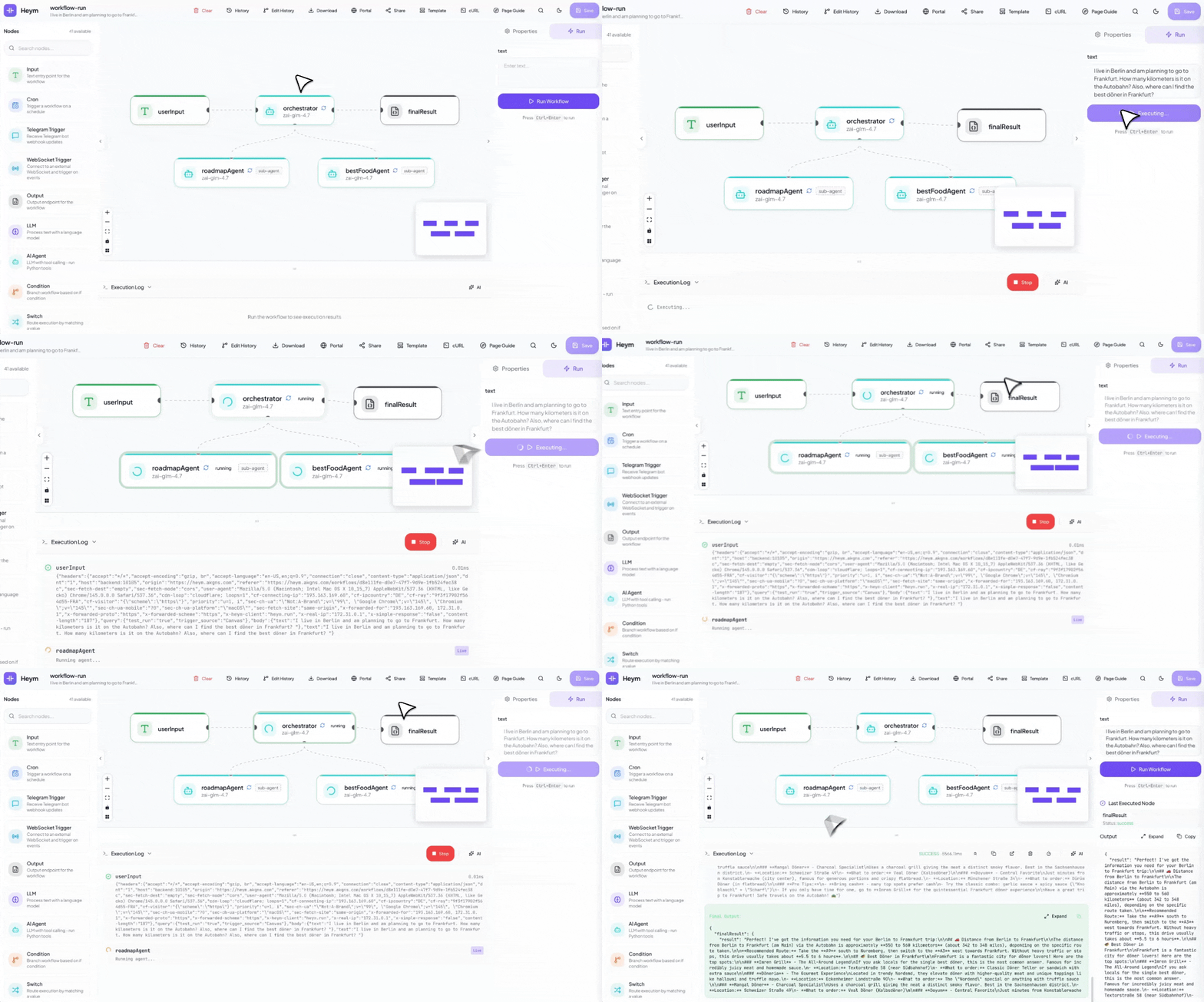
Create Skills for Agents
Create agent skills from natural language, preview the generated SKILL.md, and attach them to the agent.
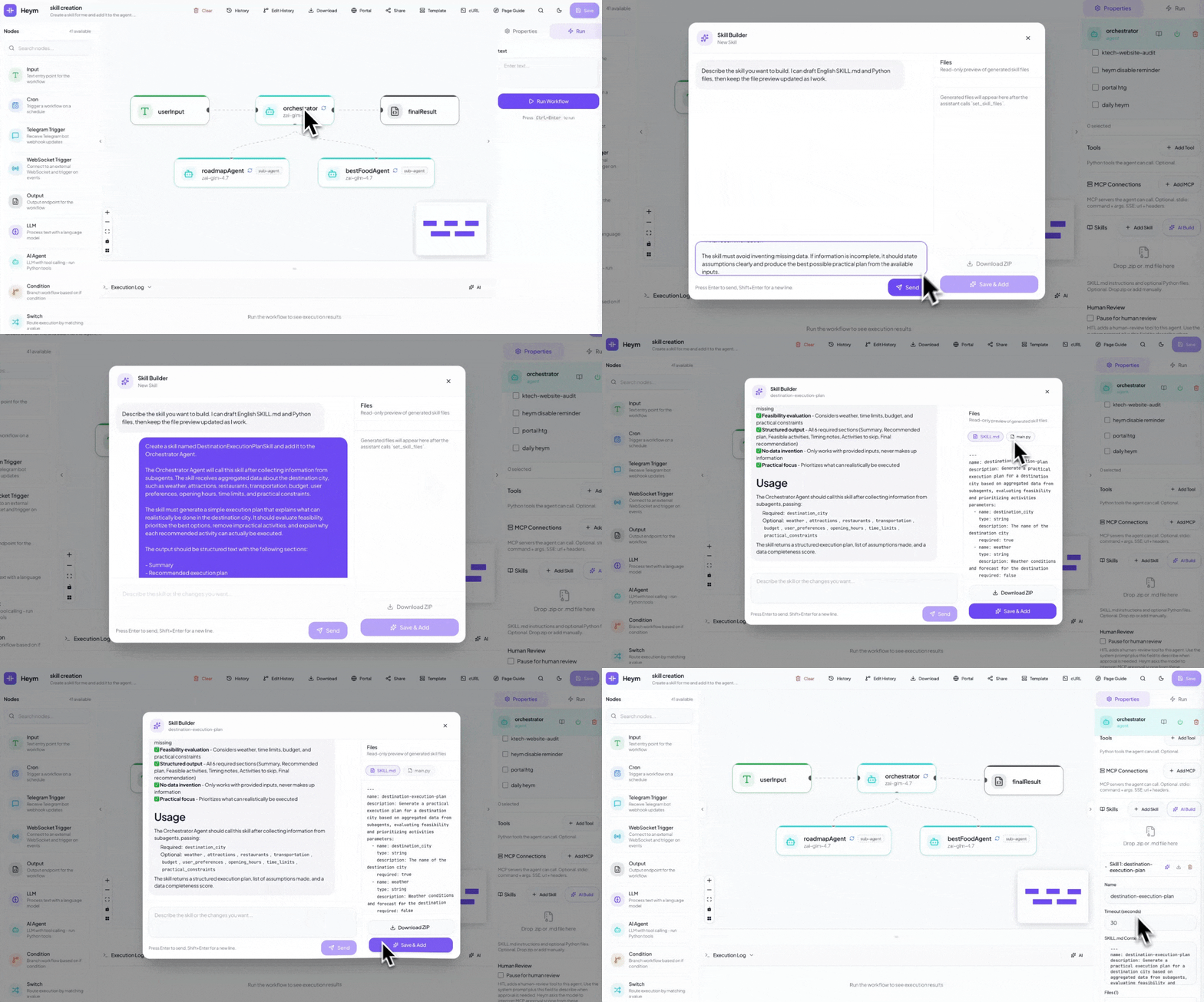
Example prompt
Create a skill for me and add it to the agent. The Orchestrator Agent will call this skill after receiving information from the subagents, and the skill will create a simple execution plan explaining what can actually be done in the destination city.
Call Workflows from Chat
Turn a workflow into a chat experience so users can invoke the orchestration with a natural request.
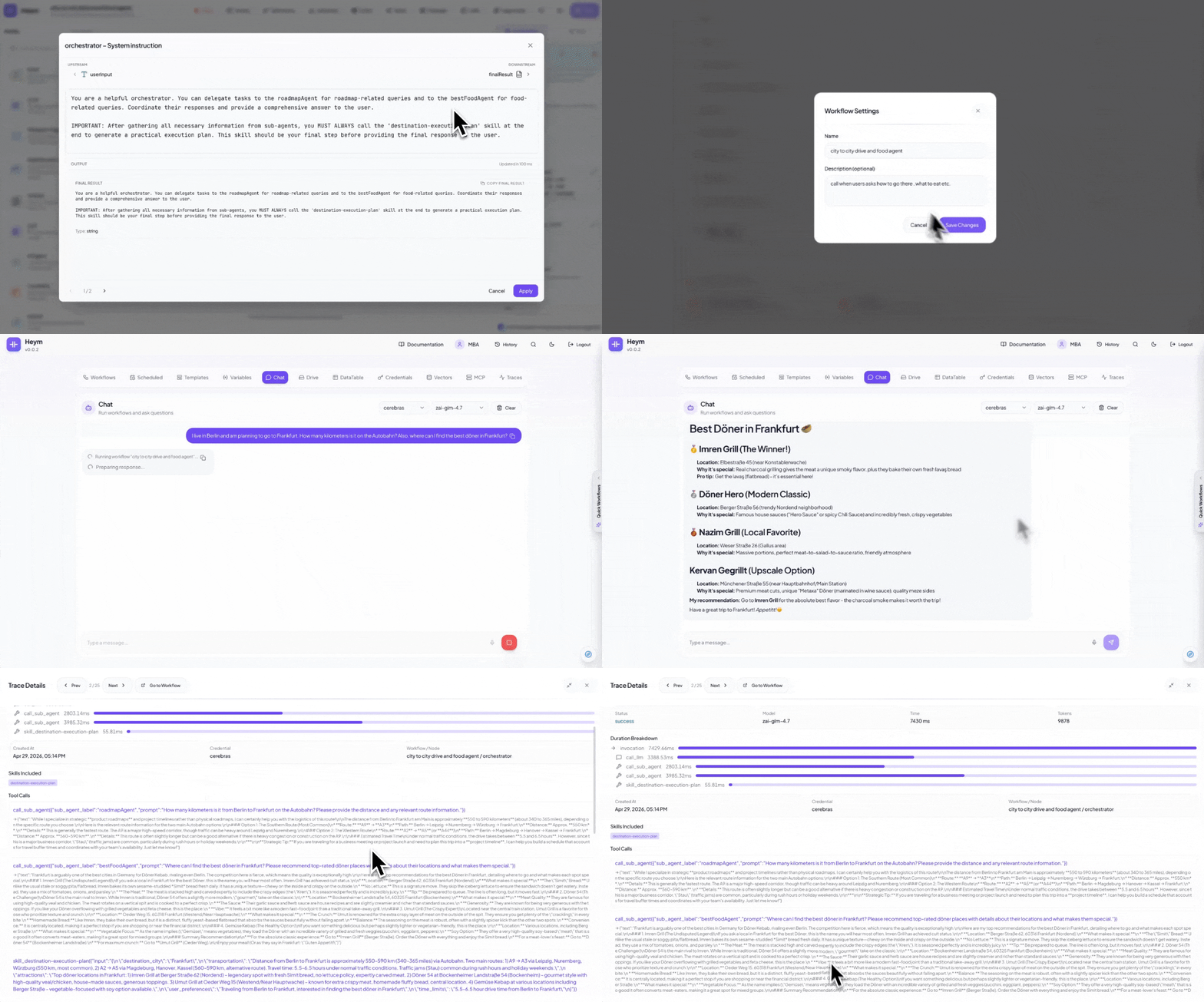
Example prompt
I live in Berlin and am planning to go to Frankfurt. How many kilometers is it on the Autobahn? Also, where can I find the best doner in Frankfurt?
📸 Screenshots
| Login — Workflow canvas preview in the background | Dashboard — Manage workflows, credentials, vector stores, and teams |
| Workflow Canvas — Nodes connected and selected, with the properties panel open | Node Config — LLM node with model, prompt, and expression fields |
✨ Key Capabilities
- Visual Workflow Editor — Drag-and-drop canvas powered by Vue Flow with 30+ node types
- AI Assistant — Describe what you want in natural language (or voice) and the assistant generates and wires nodes on the canvas automatically
- Chat with Docs — Ask context-aware questions directly from the documentation header while the current article path is prioritized in the prompt
- AI Skill Builder — Create new Agent skills or revise existing ones from a modal chat with live
SKILL.mdand Python file previews - LLM & Agent Nodes — First-class LLM node and a full Agent node with tool calling, canvas node tools, Python tools, MCP connections, skills, optional persistent memory (per-node knowledge graph with background extraction), and LLM Batch API mode with live status branches for supported providers
- Multi-Agent Orchestration — One agent orchestrates named sub-agents and sub-workflows, all wired visually
- Human-in-the-Loop (HITL) — Pause agent execution to request user approval or input before proceeding
- Guardrails — Content filtering, NSFW protection, and multilingual safety checks on LLM and Agent nodes
- Built-In RAG — Insert documents and run semantic search against managed QDrant vector stores in two nodes
- MCP Support — Connect Agent nodes to any MCP server as a client; expose your workflows as an MCP server for Claude, Cursor, and other clients
- Portal — Turn any workflow into a public chat UI at
/chat/{slug}with streaming responses and file uploads - Webhook SSE Streaming — Generate ready-to-run cURL commands for
/executeor/execute/stream, with per-node start messages and live node event output in the terminal - Data Tables — Manage structured data directly in the dashboard and reference it from workflows
- Templates — Start from pre-built workflow templates to get up and running quickly
- Parallel Execution — Independent nodes run concurrently based on the graph structure, no configuration needed
- Auto Heal — Playwright selectors break? AI automatically detects and fixes them at runtime
- LLM Fallback — Automatic model fallback when the primary LLM fails or is unavailable
- Reasoning Support — Configure reasoning effort and temperature per Agent node for fine-grained control
- Command Palette — Ctrl+K for instant search, navigation, and workflow actions
- Evals — Define test suites and run them against any workflow with one click
- LLM Traces — Full observability for every agent call: requests, responses, tool calls, and timing
- Self-Hosted — Your data, your infrastructure
Full Feature Set
For a complete list of all features with short descriptions, see Full Feature Set. It covers Getting Started, every node type, reference topics (Expression DSL, workflow structure, webhooks, SSE streaming, AI Assistant, Chat with Docs, Portal, security, etc.), and all dashboard tabs (Workflows, Templates, Variables, Chat, Credentials, Vectorstores, MCP, Traces, Analytics, Evals, Teams, Logs and more).
🎯 Why Heym?
| Capability | Heym | n8n | Zapier | Make.com |
|---|---|---|---|---|
| Built-in LLM node | ✅ | ✅ | ✅ | ✅ |
| LLM Batch API + status branches | ✅ | partial¹⁵ | ❌¹⁵ | partial¹⁵ |
| AI Agent node (tool calling) | ✅ | ✅ | ✅ | ✅ |
| Agent persistent memory (knowledge graph) | ✅ | limited¹¹ | limited¹¹ | limited¹¹ |
| Multi-agent orchestration | ✅ | ✅ | limited | limited |
| Human-in-the-Loop (HITL) | ✅ | ✅⁵ | limited⁶ | limited⁷ |
| LLM Guardrails | ✅ | ✅⁸ | ✅⁸ | limited⁸ |
| Automatic context compression | ✅ | ❌ | ❌ | ❌ |
| Built-in RAG / vector store | ✅ | ✅ | limited¹ | plugin² |
| WebSocket read / write | ✅ | limited¹² | ❌¹³ | ❌¹⁴ |
| Natural language workflow builder | ✅ | limited³ | ✅ | ✅ |
| MCP (Model Context Protocol) | ✅ | ✅ | ✅ | ✅ |
| Skills system for agents | ✅ | ❌ | ❌ | ❌ |
| Auto Heal (Playwright) | ✅ | ❌ | ❌ | ❌ |
| Data Tables | ✅ | ✅ | ✅ | ❌ |
| Workflow Templates | ✅ | ✅ | ✅ | ✅ |
| LLM trace inspection | ✅ | limited⁴ | ❌ | ✅ |
| Built-in evals for AI workflows | ✅ | ✅ | ❌ | ❌ |
| Parallel DAG execution | ✅ | limited⁹ | ❌ | ❌ |
| Self-hostable, source-available | ✅ CC+MIT | ✅ fair-code¹⁰ | ❌ | ❌ |
| Expression DSL for dynamic data | ✅ | ✅ | limited | ✅ |
- Zapier Agents support "Knowledge Sources" (upload docs, connect apps) but no user-exposed vector store or control over embeddings/chunking
- Make.com has Pinecone and Qdrant modules but no native one-click RAG node — you assemble the pipeline manually
- n8n's AI Workflow Builder is cloud-only beta with monthly credit caps, not available for self-hosted
- n8n shows intermediate steps (tool calls, results) but full prompt/response tracing requires third-party tools like Langfuse
- n8n pauses AI tool calls for review through chat, email, and collaboration channels, but it is centered on tool approval rather than snapshotting and editing the whole execution state
- Zapier Human in the Loop supports approvals and data collection inside Zaps, but it doesn't resume from a captured agent/runtime snapshot the way Heym checkpoints do
- Make Human in the Loop is available as an Enterprise app with review requests and adjusted/approved/canceled outcomes, but it is plan-limited and less tightly coupled to agent state
- n8n ships a dedicated Guardrails node, Zapier ships AI Guardrails across its AI products, and Make documents agent rules plus review flows but not a comparable standalone guardrails feature, so Make is marked limited
- n8n executes sequentially by default; parallel execution requires sub-workflow workarounds
- n8n uses the Sustainable Use License — free to self-host for internal use, commercial redistribution restricted
- First-class per-agent knowledge graph with prompt injection and post-run LLM merge is uncommon; other platforms typically rely on external vector DB or manual memory patterns, hence limited
- n8n's official docs cover HTTP Webhook and HTTP Request nodes plus Code/custom/community extensibility, but I couldn't find a first-party WebSocket trigger/send node, so n8n is marked limited
- Zapier's official docs cover inbound webhooks and outbound webhook/API requests over HTTP only, not native WebSocket trigger or send steps
- Make's official docs cover Webhooks modules and HTTP(S) request modules, but I couldn't find a native WebSocket trigger or send module
- As of April 22, 2026, n8n's official docs document HTTP batching and loop/wait patterns rather than a native LLM batch-status branch, Zapier's official ChatGPT app docs list no triggers and only a generic API Request beta, and Make's official OpenAI integration page exposes batch actions like create/watch completed but not a first-class status-branching LLM node, so n8n/Make are marked partial and Zapier is marked unavailable for this specific pattern
🚀 Quick Start
git clone https://github.com/heymrun/heym.git
cd heym
cp .env.example .env
./run.sh

# OR — with .env file
git clone https://github.com/heymrun/heym.git
cd heym
cp .env.example .env
docker run --env-file .env \
  -p 4017:4017 \
  -v /var/run/docker.sock:/var/run/docker.sock \
  -v "$(pwd)/data/files:/app/data/files" \
  ghcr.io/heymrun/heym:latest

# OR — minimal, no .env file
docker run \
  -e ENCRYPTION_KEY=$(python3 -c "import secrets; print(secrets.token_hex(32))") \
  -e SECRET_KEY=$(python3 -c "import secrets; print(secrets.token_hex(32))") \
  -e DATABASE_URL=postgresql+asyncpg://postgres:[email protected]:6543/heym \
  -p 4017:4017 \
  -v /var/run/docker.sock:/var/run/docker.sock \
  -v "$(pwd)/data/files:/app/data/files" \
  ghcr.io/heymrun/heym:latest
Open the editor in your browser at port 4017 in either setup.For direct docker run setups, the data/files mount keeps Drive uploads and skill-generated files available across container restarts.
cp .env.example .env
./deploy.sh              # Build and deploy all services
./deploy.sh --down       # Stop services
./deploy.sh --logs       # View logs
./deploy.sh --restart    # Restart services
Set
ALLOW_REGISTER=falsein.envto lock down registration in production.
🗺️ Platform Overview
| 🧠 Heym Platform | ||
|---|---|---|
| ⚡ Workflow Editor Vue Flow canvas Drag-and-drop nodes AI Assistant (chat-to-workflow) Voice input Expression DSL Edit history · Download · Share | 🤖 AI Engine LLM Node + Batch API mode AI Agent Node (tool calling) Persistent memory graph (agents) Multi-agent orchestration RAG / QDrant vector store MCP Client & Server Skills system | 🌐 Integrations HTTP · Slack · Send Email Redis · RabbitMQ Crawler (FlareSolverr) Playwright browser automation Grist spreadsheets Drive file management Cron · Webhooks |
| 🔍 Observability LLM Traces (requests, tool calls) Evals (AI test suites) Execution History Analytics · Logs | 👥 Teams & Auth JWT Auth Team management Credentials store & sharing Global variables Folder organization | 💬 Portal Publish workflows as chat UIs Public URL: /chat/{slug} Optional authentication File upload support Streaming responses |
🧩 Node Library
30+ nodes across six categories:
| Category | Nodes |
|---|---|
| Triggers | Input (Webhook), Cron, RabbitMQ Receive, Error Handler |
| AI | LLM, AI Agent, Qdrant RAG |
| Logic | Condition, Switch, Loop, Merge |
| Data | Set, Variable, DataTable, Execute (sub-workflow) |
| Integrations | HTTP, Slack, Send Email, Redis, RabbitMQ Send, Grist, Drive.. |
| Automation | Crawler, Playwright |
| Utilities | Wait, Output, Console Log, Throw Error, Disable Node, Sticky Note |
🧠 AI-Native Features
AI Assistant
Describe what you want in plain text or via voice — the assistant generates nodes and edges and applies them to the canvas instantly. No other automation platform ships a natural-language workflow builder that works directly inside the editor.
When a workflow already contains Agent skills, the assistant sends only each skill's SKILL.md into the builder context. Large .py files and binary attachments stay out of the prompt so workflow editing remains reliable even with complex skills loaded on the canvas.
AI Skill Builder
Inside the Agent node's Skills section, use AI Build to create a new skill or the inline sparkle action to revise an existing one. The modal streams a chat conversation, previews generated SKILL.md and .py files live, and saves them back through the same ZIP ingestion path used by manual skill uploads.
Multi-Agent Orchestration
Build orchestrator/sub-agent pipelines visually. One agent delegates tasks to named sub-agents or sub-workflows — composing complex behavior without custom orchestration code. Configure reasoning effort and temperature per agent for fine-grained control.
Human-in-the-Loop (HITL)
Pause agent execution at any point to request user approval, clarification, or input before proceeding. Build workflows where AI proposes and humans decide — combining automation speed with human judgment.
n8n, Zapier, and Make now offer native review or approval flows too. Heym's edge is agent-directed checkpoints with public review URLs, edit-and-continue, and full execution-state resume.
Guardrails
Apply content filtering, NSFW protection, and multilingual safety checks on LLM and Agent node outputs. Define rules in the node configuration — unsafe responses are caught before reaching downstream nodes.
n8n and Zapier now ship native AI safety tooling as well. Heym's edge is that guardrails live directly on the LLM and Agent nodes, support multilingual policy checks, and flow naturally into the workflow's existing error-handling paths.
MCP (Model Context Protocol)
As a client: Agent nodes connect to any external MCP server and gain all its tools automatically.As a server: Your Heym workflows are exposed as an MCP server at /api/mcp/sse — callable from Claude Desktop, Cursor, or any MCP client.
Skills System
Skills are portable capability bundles — a SKILL.md instruction file plus optional Python tools. Drop a .zip or .md onto an Agent node, or use AI Build to draft and iterate on skills from chat. Reuse and share across workflows and teams.
Built-In RAG Pipeline
Upload PDFs, Markdown, CSV, or JSON to a managed vector store. Then wire a RAG node into any workflow for semantic search — results flow directly into your LLM or Agent node.
Input → RAG (search) → LLM (answer with context) → Output
Auto Heal
Playwright browser automation nodes detect broken selectors at runtime and use AI to automatically find the correct replacement — no manual maintenance when the target page changes.
Parallel Execution
Independent nodes run concurrently based on the graph structure. Use the Merge node to synchronize parallel branches. No configuration needed — the graph defines the execution order.
🔍 Observability
LLM Traces
Full visibility into every agent call: request and response payloads, tool call names and results, per-call timing, and skills passed to the model.
Evals
Define test cases with expected outputs. Run the entire suite with one click. Review pass/fail, actual vs expected, and historical run data. Ship AI workflows with confidence.
💬 Portal
Turn any workflow into a public chat interface at /chat/{slug}. Optional per-user authentication, streaming responses, file uploads, and multi-turn conversation history. Ship internal tools and customer-facing chatbots — no frontend code required.
📝 Expression DSL
Reference and transform data between nodes with a clean syntax:
$input.text                         // Trigger input
$nodeName.field                     // Any upstream node output
$global.variableName                // Persistent global variable
$now.format("YYYY-MM-DD HH:mm")    // Date/time formatting
$UUID                               // Random unique ID
$range(1, 10)                       // Generate number range
$input.items.filter("item.active")  // Array filtering
$input.users.map("item.email")      // Array mapping
upper($input.text)                  // String helpers
Expressions work in every field — prompts, HTTP headers, conditions, email bodies, Redis keys, and more.
🔐 Node-Level Error Handling
Every node supports retry on failure and error branching:
Input ──→ HTTP ──→ Output
               └─── error ──→ Error Handler
- Retry — automatically re-run a failed node with configurable attempts and backoff
- Error branch — route failures to a dedicated path instead of stopping the workflow
- Error context — access
$nodeName.errorin downstream nodes
🏗️ Tech Stack
| Layer | Technology |
|---|---|
| Frontend | Vue.js 3 + TypeScript (strict) + Vite + Bun |
| UI Components | Shadcn Vue + Tailwind CSS |
| Canvas | Vue Flow |
| State Management | Pinia |
| Backend | Python 3.11+ + FastAPI + UV |
| Database | PG 16 + SQLAlchemy 2.0 (async) |
| Auth | JWT (access + refresh) + bcrypt |
📁 Project Structure
heym/
├── frontend/src/
│   ├── components/     # Canvas, Nodes, Panels, Credentials, Evals, MCP, Teams
│   ├── views/          # DashboardView, EditorView, ChatPortalView
│   ├── stores/         # Pinia (workflow, auth, folder)
│   ├── services/       # API clients
│   └── docs/content/   # In-app documentation (Markdown)
├── backend/app/
│   ├── api/            # Routes: workflows, auth, mcp, portal, evals, traces…
│   ├── models/         # Pydantic schemas + SQLAlchemy models
│   ├── services/       # Executor, LLM, RAG, agent engine
│   └── db/             # Database configuration
├── alembic/            # Database migrations
├── docker-compose.yml
├── run.sh              # Local development launcher
├── check.sh            # Project validation script
└── deploy.sh           # Docker production deployer
⚙️ Environment Variables
| Variable | Description | Default |
|---|---|---|
DATABASE_URL |
Optional database connection string override | auto-built from POSTGRES_* |
POSTGRES_HOST |
Database host used when DATABASE_URL is empty |
localhost |
POSTGRES_PORT |
Database port used when DATABASE_URL is empty |
6543 |
SECRET_KEY |
JWT signing key | — |
BACKEND_PORT |
Backend server port | 10105 |
FRONTEND_PORT |
Frontend server port | 4017 |
ALLOW_REGISTER |
Enable user registration | true |
🛠️ Development
Prerequisites: Bun ≥ 1.0 · Python ≥ 3.11 · UV · Docker
# Start all services (recommended)
./run.sh
./run.sh --no-debug    # INFO logging instead of DEBUG
Or start each service manually:
# Start database only
docker-compose up -d postgres

# Backend
cd backend && uv sync && uv run alembic upgrade head
uv run uvicorn app.main:app --reload --port 10105

# Frontend (separate terminal)
cd frontend && bun install && bun run dev
Validation (lint + typecheck + tests):
./check.sh # Run all checks — required before pushing
Or run individually:
cd frontend && bun run lint && bun run typecheck
cd backend  && uv run ruff check . && uv run ruff format .
📄 License
This project is licensed under the Commons Clause applied to the MIT License. In other words, Heym is source-available rather than OSI-open-source. See the LICENSE file for details.
TL;DR: You are free to use, modify, distribute, and self-host this software — but you may not sell it or offer it as a paid service. Commercial licensing is available for teams that need those rights.
💬 Community
Join our Discord to connect with the community, ask questions, share workflows, and stay up to date:

🏢 Enterprise
Commercial use, enterprise licensing, and professional support are available.
What we offer:
- Workflow automation infrastructure & deployment
- Custom feature development on Heym
- Debugging, troubleshooting & solution support
- Priority support & SLA guarantees
📧 Contact: [email protected]
Built with ❤️ using Vue.js, FastAPI, and a lot of LLM tokens.
⭐ Star this repo · 🐛 Report a bug · 💡 Request a feature


