
Waveform MCP
An MCP server that gives an LLM agent control over Tracktion Waveform. Ask Claude to write a song, balance a mix, or render to MP3 — and watch Waveform do it.
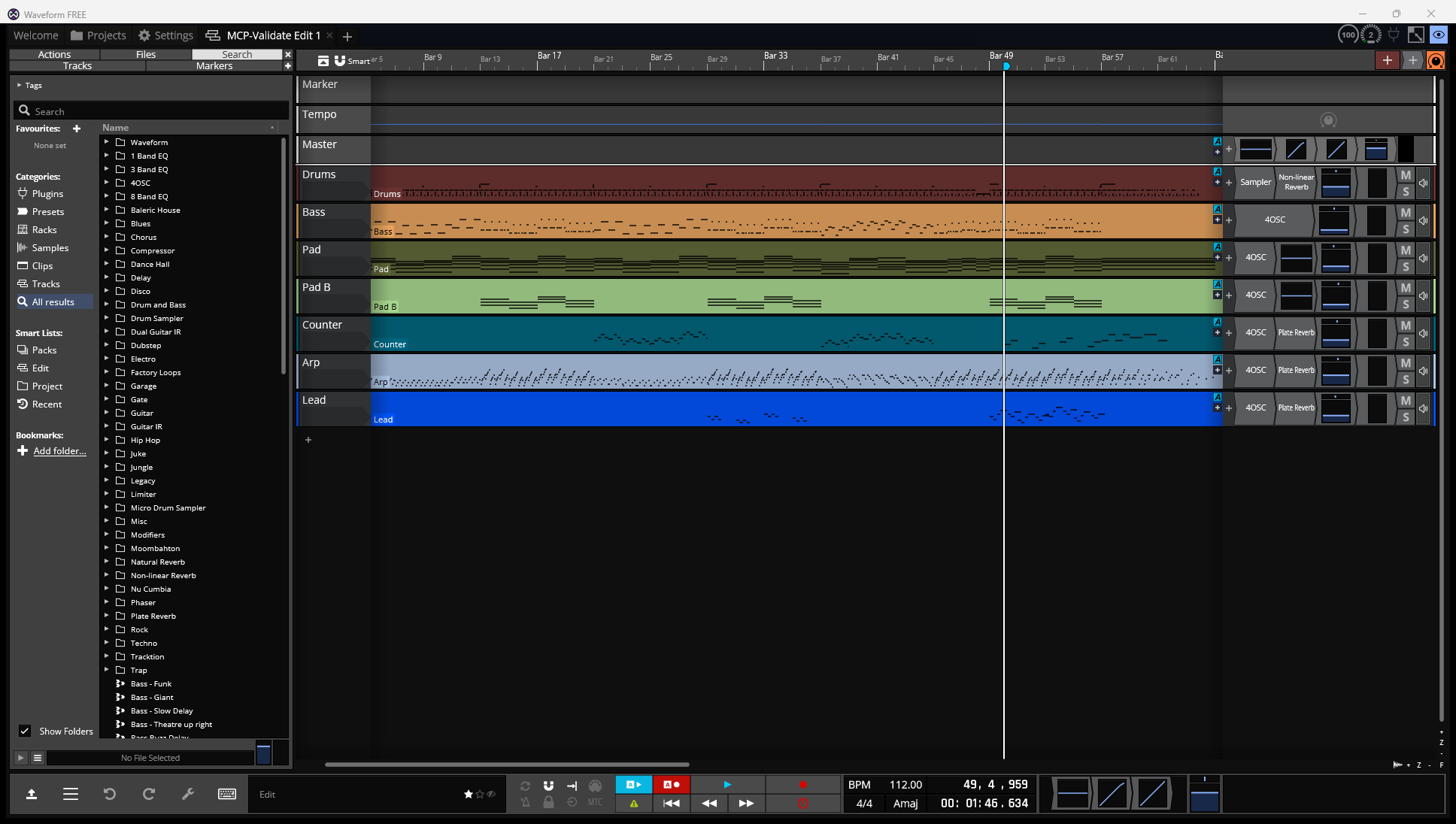 A 64-bar synthwave instrumental composed via MCP tool calls — drums, bass, two pads, counter, arp, lead. Section markers, tempo automation, sidechain pump, plate reverb, clip-level fades, full master chain.
What this gives you
- 107 MCP tools across edit lifecycle, tracks, MIDI, audio clips, plugins, automation, music theory, mix balance, render, loop library, VST discovery, schema capture, and Waveform UI control
- Two end-to-end composers —
compose_lofi_trackandcompose_synthwave_track— that write fully-arranged, mixed, and rendered songs - One ambient composer —
compose_rainstorm— for rain + wind + thunder soundscapes - A music-theory knowledge layer — scales, chord progressions, cadences, song forms, voice-leading rules, mix-balance reference levels per genre
- Verified round-trip between the in-memory model and Waveform's
.tracktioneditXML - Clip-level fades, gain, offset, automation curves — proven primitives the LLM can use to iterate musically
- Reliable workflow loop —
compose → write → reload via File → Revert to saved → listen → tweak
Status
Working end-to-end on Windows + Waveform 13. macOS / Linux paths exist for content discovery (presets, loop library, VST list) but Windows-only UI control via UIA / pywinauto for now.
Built and tested through ~30 hours of human-in-the-loop iteration with Claude. Both composers have been rendered to MP3 multiple times and the user has signed off on the resulting tracks.
Quick start
Install
cd "C:\path\to\waveform MCP"
python -m venv .venv
.venv\Scripts\Activate.ps1
pip install -e .
Wire to Claude (Code, Desktop, or any MCP client)
~/.claude.json or your client's MCP config:
{
  "mcpServers": {
    "waveform": {
      "command": "waveform-mcp"
    }
  }
}
Try it
Open Waveform, then ask Claude:

  "Use compose_synthwave_track to make a synthwave song,
   save it to my Documents/Waveform folder, and reload it
   in Waveform so I can hear it."
The LLM calls compose_synthwave_track → waveform_revert_to_saved and you press play. Then iterate: "turn down the bass" → the LLM updates MIX_BALANCE["synthwave"]["bass"] and reloads.
Architecture
Four layers, each with a clear contract:
┌──────────────────────────────────────────────────────────────┐
│  LLM (Claude / any MCP client)                               │
└────────────────────────────┬─────────────────────────────────┘
                             │ MCP stdio
┌────────────────────────────▼─────────────────────────────────┐
│  MCP server (server.py) — 107 tools                          │
└────────────────────────────┬─────────────────────────────────┘
                             │
              ┌──────────────┼──────────────┐
              ▼              ▼              ▼
      ┌──────────────┐ ┌──────────┐ ┌──────────────┐
      │ Edit model   │ │ Knowledge│ │  Waveform    │
      │ (in-memory)  │ │  (data)  │ │  UI control  │
      ├──────────────┤ ├──────────┤ ├──────────────┤
      │ Tracks       │ │ Scales   │ │ pywinauto +  │
      │ Clips        │ │ Chords   │ │ UIA + ffmpeg │
      │ Notes        │ │ Forms    │ │              │
      │ Plugins      │ │ Mix      │ │ Menu invoke  │
      │ Automation   │ │ Velocity │ │ Revert       │
      │ Markers      │ │ Rhythm   │ │ Render→MP3   │
      └──────┬───────┘ └──────────┘ └──────┬───────┘
             │                             │
             ▼                             ▼
   ┌──────────────────┐          ┌────────────────────┐
   │ xml_writer.py    │          │ Waveform 13        │
   │ xml_reader.py    │ ◀──────▶ │ (the running app)  │
   │ ↓ .tracktionedit │          └────────────────────┘
   └──────────────────┘
Key design choice: The model is not a 1:1 of the Tracktion ValueTree — it's the shape the LLM wants to work with, projected onto the XML on save and projected back on load. This makes tools simple (audio_clip_import(track_id, file_path, start_beats, length_beats, fade_in_beats, ...)) instead of forcing the LLM to think in JUCE-internals.
Tool catalog
Edit lifecycle (edit.py)
edit_create · edit_open · edit_save · flush · edit_summary · edit_inspect · undo · narrate
Tracks + mix (tracks.py)
track_add · track_remove · mix_set · mix_apply_reference · send_add · marker_add · tempo_set · key_set
mix_apply_reference(track_id, genre, role) looks up the dB target from a curated mix-balance table (MIX_BALANCE[genre][role]) — the "kick is the anchor, bass 5-6 dB under" reference distilled into a callable.
MIDI (midi.py)
midi_clip_add · midi_notes_add · midi_notes_clear · midi_clip_quantize
Audio clips (audio.py, clips.py)
audio_clip_import (with gain_db, fade_in_beats, fade_out_beats, offset_in_source_beats)clip_list · clip_set · clip_move · clip_resize · clip_duplicate · clip_remove
Plugins (plugins.py, preset_library.py)
plugin_list · plugin_add · plugin_set_param · plugin_removeplugin_add_reverb (plate / natural / non-linear with sensible defaults)plugin_add_drum_kit (Sampler-backed, one SOUND per pad)plugin_add_modifier (LFO / envelope / sidechain — schema TBD on full Waveform support)plugin_discover (parses knownPluginList64.settings to list installed VSTs)waveform_preset_list · waveform_preset_read · waveform_plugin_types
Automation (automation.py)
automation_add · automation_envelope · automation_clear · automation_list
Targets: pan and plugin/<plugin_id>/<param>. Volume target is disabled at the API level — Waveform's volume plugin doesn't honor our <AUTOMATIONCURVE> schema and silences the track. Use mix_set/mix_apply_reference for static levels and clip_set(fade_in_beats|fade_out_beats) for fades. (The MCP refuses target="volume" with a clear error pointing to alternatives.)
Music theory knowledge (music_theory.py, music_theory_data.py)
17 query tools: theory_scale · theory_modes · theory_diatonic_chords · theory_chord_progression · theory_cadences · theory_song_form · theory_section · theory_genre · theory_arrangement_layers · theory_velocity · theory_rhythm · theory_voice_leading_rules · theory_heuristics · theory_surprise_devices · theory_borrowed_chords · theory_mix_balance · theory_search
The data behind these:
- 13 scales (major modes, harmonic minor, pentatonic, blues, etc.)
- 25+ chord progressions (axis_pop, ii_V_I, andalusian, lament_bass, …)
- Cadences, song forms, sections with role/density/dynamic profiles
- 14 genres with typical BPM, key tendencies, instruments, hallmark progressions
- Velocity / rhythm maps (swing ratios, accent bumps, ghost-note ranges)
- 13 songwriting heuristics (rule-of-3, contrast-required, surprise quota, …)
- 7 surprise devices (truck-driver modulation, deceptive cadence, …)
- Mix balance reference table — 7 genres × 14 roles, fully annotated
Composers (composer.py)
compose_lofi_track— 32-bar lofi with drums, bass, keys, pad, melody, counter; section-aware velocity envelopes; tempo automation; lofi master chaincompose_synthwave_track— 64-bar synthwave with 7 tracks; 9-section form (intro/verse/chorus/verse/chorus/bridge/buildup/chorusFinal/outro); per-section bass feels (half-time / 8th-pump / walking); section-keyed arp themes; sidechain-style filter pump; section markers; clip fadescompose_rainstorm— ambient soundscape with rain + wind + lowpassed-distant thunder; per-clip gain randomization; offset trim; track FX
Render (render.py, waveform_workflows.py)
waveform_render_export · waveform_render_to_mp3 (uses bundled ffmpeg + libmp3lame)
Waveform UI control (waveform_workflows.py)
waveform_new_project · waveform_save · waveform_revert_to_saved (the iteration loop unlocker) · waveform_close_active_tab · waveform_active_tab · waveform_project_loaded · waveform_menu_invoke · waveform_add_track · waveform_select_track · waveform_insert_clip_on_track · waveform_build_skeleton
App lifecycle (waveform_app.py)
waveform_locate · waveform_status · waveform_launch · waveform_focus · waveform_quit · waveform_settings_dir
Loop library (loops.py)
loop_search (by tempo / bars / name) · loop_drop (auto-length, fit-to-tempo)
Schema capture (schema_capture.py)
schema_snapshot_current_edit · schema_diff_snapshots · schema_list_snapshots
Low-level UI / desktop (win_input.py, desktop.py)
18 primitives for window management, UIA inspection, key/click sending, screenshots.
Layout
waveform-mcp/
├── src/waveform_mcp/
│   ├── server.py                  MCP server entry (stdio)
│   ├── model.py                   Edit / Track / Clip / Note / AutomationLane dataclasses
│   ├── xml_writer.py              Edit → .tracktionedit
│   ├── xml_reader.py              .tracktionedit → Edit
│   ├── audio_convert.py           ffmpeg-backed MP3→WAV cache for Sampler sources
│   ├── music_theory_data.py       SCALES, PROGRESSIONS, GENRES, MIX_BALANCE, ...
│   ├── events.py                  event bus + JSONL log
│   ├── diff.py                    Edit-diff for change events
│   ├── tools/
│   │   ├── edit.py                Edit lifecycle
│   │   ├── tracks.py              Tracks + mix balance
│   │   ├── midi.py                MIDI clips/notes
│   │   ├── audio.py               Audio clip import
│   │   ├── clips.py               Clip mutators (move, resize, duplicate, set)
│   │   ├── plugins.py             Plugin add + reverb / drum kit / modifier helpers
│   │   ├── automation.py          Automation lanes (pan + plugin params)
│   │   ├── preset_library.py      Factory preset browser
│   │   ├── loops.py               Loop library search + drop
│   │   ├── render.py              Render stubs
│   │   ├── waveform_app.py        App lifecycle
│   │   ├── waveform_workflows.py  UI workflows (revert, render-to-mp3, etc.)
│   │   ├── desktop.py             Generic desktop primitives
│   │   ├── win_input.py           Windows UIA + keystroke primitives
│   │   ├── schema_capture.py      Hand-fixture capture for schema reverse-engineering
│   │   ├── music_theory.py        Theory query tools
│   │   ├── composer.py            compose_lofi_track, compose_synthwave_track, compose_rainstorm
│   │   └── common.py              @op decorator (apply + diff + event)
│   └── preview/
│       ├── app.py                 FastAPI + websocket
│       └── static/                HTML / JS piano-roll
├── tests/
├── docs/
│   ├── img/synthwave_arrangement.png
│   ├── ARCHITECTURE.md
│   ├── EVENT_SCHEMA.md
│   └── EDIT_MODEL.md
├── pyproject.toml
└── README.md
The iteration loop that actually works
After many false starts, here's the loop that lets the LLM and the user collaborate on a track without restarting Waveform every cycle:
1. Compose / mutate            → composer.compose_*  or clip_set / mix_apply_reference
2. Save to disk                → edit_save / flush  (writes .tracktionedit)
3. Reload in Waveform          → waveform_revert_to_saved
                                  (File → Revert to saved state, auto-confirms popup)
4. User listens                → "turn the arp up"
5. Update MIX_BALANCE or run a clip mutator
6. → goto 2
The killer move was discovering Waveform's File → Revert to saved state menu item: it forces the open Edit to reload from disk, which is what makes external mutation visible without closing/reopening the project. waveform_revert_to_saved automates that path with retry.
Mix balance reference
mix_apply_reference reads from a curated table of "kick is the anchor; bass 5-6 dB under; lead similar to bass; pad/arp 6-9 dB under lead; ambience deepest" — distilled across genre tutorials, mastering blogs, and tuned-by-ear iterations:
MIX_BALANCE["synthwave"] = {
    "drums": -7, "kick": -6, "snare": -10, "hat": -16,
    "bass": -25, "sub_bass": -28,           # background-level texture
    "lead": -15, "pad": -19, "arp": -8,     # arp-driven mix
    "counter": -14, ...
}
Composers call tracks.mix_apply_reference({track_id, genre, role}) once per track. Tweak the table once, every composer rebalances.
Sources informing the table:
- Mastering The Mix — How To Balance Kick And Bass
- Mastering The Mix — How To Mix Bass Synth
- eMastered — Balance All The Elements
Known limitations
- Track-volume
AUTOMATIONCURVEis disabled. Waveform'svolumeplugin doesn't honor our curve schema and silences the affected track. The MCP refuses the target with a clear error and points to working alternatives (clip fades, multiple clips with per-clip gain, staticmix_set). - Plugin modifier matrix is exploratory.
plugin_add_modifierwrites a generic modmatrix shape; needs a hand-edited fixture to confirm the per-plugin schema before LFO modulation works reliably for 4OSC and friends. - Headless render not built yet.
waveform_render_to_mp3drives Waveform's UI export — works, but requires Waveform to be running. A C++ helper linkingtracktion_engineis the eventual fix. - Linux/macOS UI control absent. Content discovery (presets, loop library, VST list) is OS-aware; UI automation is Windows-only.
Building blocks for next iterations
- Capture a real Waveform fixture for
<AUTOMATIONCURVE paramID="volume">so volume automation can be re-enabled - C++ headless render helper on
tracktion_engine - Drum Sampler / Micro Drum Sampler real fixture (currently fall back to plain Sampler)
- Sidechain modifier capture
- Clip Launcher (v13) support
- Linux UI control via
xdotool/wmctrlonce UIA is no longer the only path
License
GPL-3.0-or-later (matches tracktion_engine if/when the C++ render helper links to it).


