
memgrep
Grep your memory. memgrep gives your coding agents a global, searchable, fully local memory of every chat you've ever had with them, across every project and every tool, plus embedded semantic search you can build into your own apps.
- Your context survives beyond chats. Agent sessions die; what you learned in them shouldn't. memgrep ingests chat history from Cursor, Claude Code, and Kiro into one memory, and serves it back to any MCP-capable agent mid-task.
- Fully local. Embeddings run on-device via Transformers.js (Hugging Face models, ONNX/WASM). No API keys, no cloud, no data leaving your machine. That matters, because your chat history contains your code.
- Real infrastructure, zero servers. SQLite for records, hnswlib HNSW for fast approximate nearest-neighbor retrieval. One folder is a complete, portable memory.
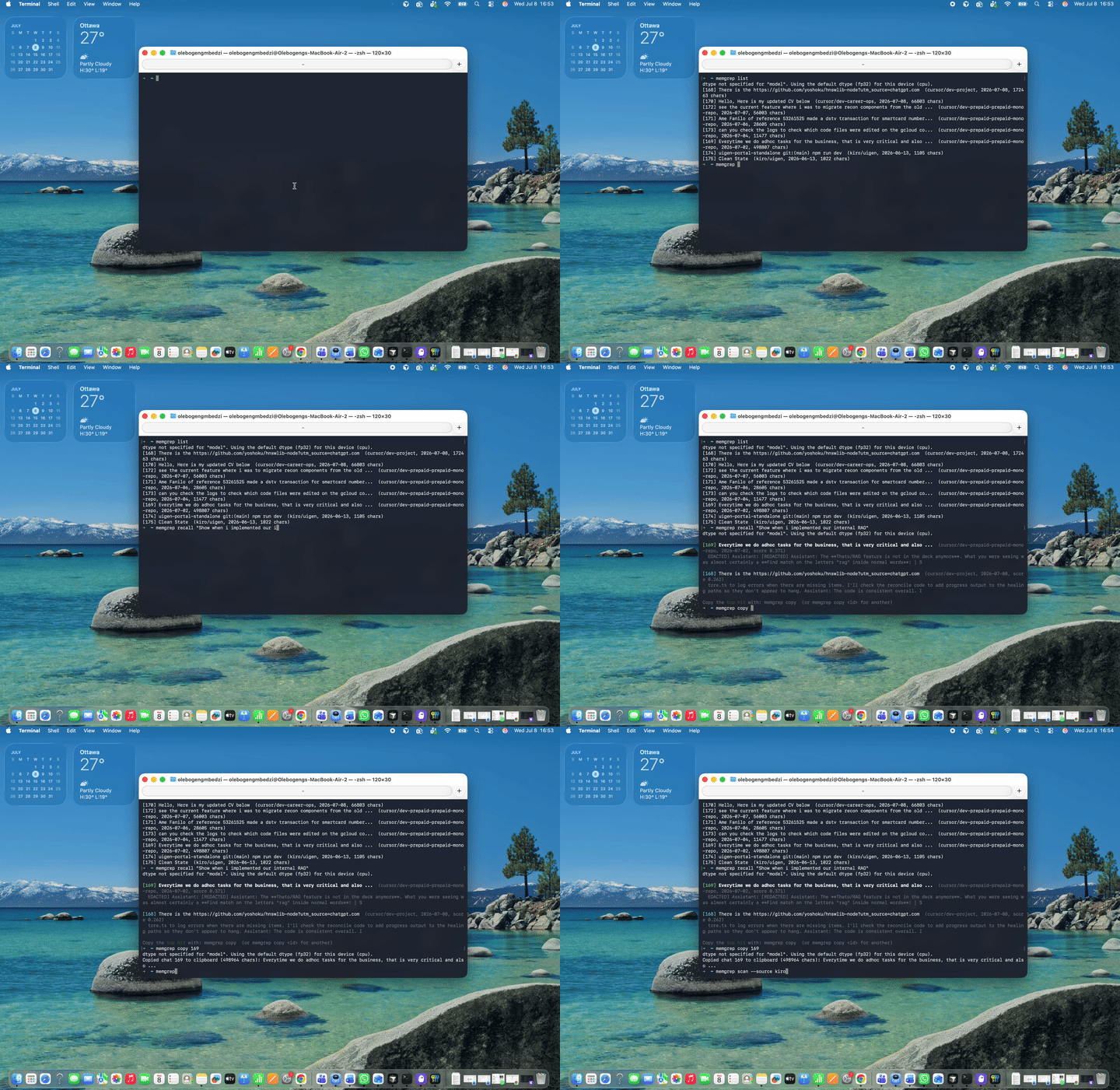
Demo
Why
You solved a tricky auth bug with an agent three weeks ago, in another project, in a different editor. Today's agent has no idea that ever happened. The knowledge exists (your tools keep transcripts on disk) but it is siloed per project, per tool, and invisible to search.
memgrep turns that pile of transcripts into one queryable memory. You ask in plain language ("how did we fix the recon variance?"), it finds the conversation where that happened, and either you or your agent pulls the whole thing back into context. Retrieval finds which chat matters; the agent swallows the whole thing.
Quickstart
npm install -g memgrep
memgrep ingest                                  # index your chat history (one-time scan, then incremental)
memgrep recall "how did we fix the auth race?"  # search it
memgrep copy                                    # top hit -> clipboard, paste anywhere
Requires Node.js 18+. Native addons (hnswlib, better-sqlite3) build automatically on macOS/Linux/Windows. The embedding model (~25 MB) downloads once from the Hugging Face Hub on first run; everything after that is offline.
Agent memory
memgrep scan                   # what chats exist on this machine? (* = not ingested yet)
memgrep scan --source kiro --new  # only Kiro chats I haven't ingested
memgrep ingest                 # scan all supported tools across all projects
memgrep ingest --source claude # or pick sources: cursor, claude, kiro
memgrep ingest --pick 2,5      # ingest by number from the last scan
memgrep ingest --last          # just my most recent chat (--last 3 for the last three)
memgrep ingest --pick          # choose from an interactive menu of recent chats
memgrep ingest ./chat.jsonl    # or one specific chat file (format auto-detected)
memgrep ingest notes.md --project infra --title "Postgres tuning"  # any text/markdown works too
memgrep list                   # what does my memory contain?
memgrep recall "how did we fix the auth race?"
memgrep show 42                # print a full remembered chat
memgrep copy                   # copy the top hit of your last recall to the clipboard
memgrep copy 42                # or copy a specific chat, ready to paste anywhere
memgrep delete 42              # forget it
memgrep delete --all           # wipe the whole memory (asks for confirmation; --yes to skip)
memgrep remember "we chose better-sqlite3 over node:sqlite for Node 18 support"
Memory lives in ~/.memgrep (override with MEMGREP_HOME). Ingestion is idempotent: re-running ingest picks up new and updated chats and skips everything unchanged. Tool noise and system context are stripped, so only the actual conversation is embedded.
The scan-then-pick workflow is the precise way to ingest: memgrep scan lists every chat memgrep can see, newest first, marking each as new (*), changed since ingest (~), or already ingested (blank). Then memgrep ingest --pick 2,5 ingests exactly those numbers. Nothing is embedded until you say so.
Supported history sources:
| Tool | Source | Notes |
|---|---|---|
| Cursor | ~/.cursor/projects/*/agent-transcripts/ |
Full user + assistant turns |
| Claude Code | ~/.claude/projects/*/*.jsonl |
Full user + assistant turns |
| Kiro IDE | Kiro globalStorage workspace sessions |
User turns and titles (assistant output lives in opaque execution records) |
| Antigravity | Not yet | Conversations are encrypted protobuf (.pb); agents can still query memory via MCP |
| Anything else | memgrep remember "<text>" |
Manual notes, decisions, postmortems |
New sources are pluggable: implement the two-method TranscriptSource interface and pass it to ingestTranscripts.
Give your agents access (MCP)
Memory is exposed through MCP, so it works in any MCP-capable agent: Cursor, Claude Code, Kiro, Antigravity, Windsurf, Codex, and whatever ships next. Ingest with the CLI, recall from anywhere. Register the server once per tool:
{
  "mcpServers": {
    "memgrep": {
      "command": "npx",
      "args": ["-y", "memgrep", "serve"]
    }
  }
}
Config locations: Cursor ~/.cursor/mcp.json, Claude Code claude mcp add memgrep -- npx -y memgrep serve, Kiro ~/.kiro/settings/mcp.json, Antigravity via its MCP settings UI.
The agent gets three tools: recall(query) to find relevant past chats, get_chat(id) to pull a full transcript into context, and list_chats(project?). The model: retrieval finds which chat matters, then the agent swallows the whole thing. Cross-tool means cross-pollination: an agent in Kiro can recall how a Cursor agent fixed a bug last month.
File search
Semantic grep over any folder, fully offline:
npx memgrep index ./docs
npx memgrep search "how do I configure auth?"
docs/authentication.md  (score 0.712)
  Configure auth by setting AUTH_SECRET in your environment and...
Options: --out / --index to choose the index directory (default .memgrep), --model to pick any Transformers.js-compatible embedding model, -k for the number of results.
Library usage
The same engine is available as an embeddable library. Think SQLite for semantic search: not a database server, not an API, not a subscription.
import { VectorIndex } from 'memgrep';

// Downloads the model on first use, cached afterwards.
const index = await VectorIndex.create({ model: 'Xenova/all-MiniLM-L6-v2' });

await index.add([
  { id: 'doc1', text: 'To reset your password, click the forgot password link.' },
  { id: 'doc2', text: 'Our refund policy allows returns within 30 days.', metadata: { url: '/refunds' } },
]);

const hits = await index.search('I forgot my login', { k: 5 });
// [{ id: 'doc1', score: 0.62, chunk: 'To reset your password...', chunkIndex: 0 }]

await index.save('./my-index');           // persist
const loaded = await VectorIndex.load('./my-index'); // reload later
Long documents are automatically split into overlapping chunks (configurable via chunkSize / chunkOverlap); search returns the best-matching chunk per document. remove(id) deletes a document, and re-adding an existing id replaces it.
| Method | Description |
|---|---|
VectorIndex.create(options?) |
New empty index. Options: model, chunkSize, chunkOverlap, initialCapacity. |
VectorIndex.load(dir) |
Load a saved index. |
index.add(doc | docs) |
Add or replace documents ({ id, text, metadata? }). |
index.search(query, { k? }) |
Top-k documents by cosine similarity. |
index.remove(id) |
Remove a document. |
index.save(dir) |
Persist to a directory. |
index.size |
Number of documents. |
The memory layer is exported too: MemoryStore, ingestTranscripts, and the per-tool parsers.
Bring your own database
If you already have a vector database (pgvector, Supabase, LanceDB, Qdrant), you can use memgrep purely as a local embedding pipeline and skip the built-in index. Embedder and chunkText are exported for exactly this: chunk your text, embed it on-device, and store the vectors wherever you like.
import { Embedder, chunkText } from 'memgrep';
import pg from 'pg';

const embedder = await Embedder.create('Xenova/all-MiniLM-L6-v2');
const db = new pg.Pool();

// Index: chunk, embed locally, insert into pgvector.
const chunks = chunkText(article.body);
const vectors = await embedder.embed(chunks);
for (let i = 0; i < chunks.length; i++) {
  await db.query(
    'INSERT INTO chunks (article_id, chunk_index, text, embedding) VALUES ($1, $2, $3, $4)',
    [article.id, i, chunks[i], JSON.stringify(vectors[i])],
  );
}

// Search: embed the query the same way, let the database rank.
const queryVector = await embedder.embedOne('how do refunds work?');
const { rows } = await db.query(
  'SELECT text, 1 - (embedding <=> $1) AS score FROM chunks ORDER BY embedding <=> $1 LIMIT 5',
  [JSON.stringify(queryVector)],
);
Vectors are L2-normalized, so cosine distance (pgvector's <=>) is the right operator. embedder.dimensions tells you the column size for your schema (384 for the default model). The one rule: always embed queries with the same model you indexed with.
How it works
The mental model: chunks are what's searched, chats are what's returned.
- Transcripts are parsed into clean
User:/Assistant:dialogue. Tool output, diffs, and system context are stripped; only the conversation is kept. - That text is chunked at paragraph/sentence boundaries (~1000 chars, 200 overlap), and each chunk is embedded locally into a 384-dim vector (Transformers.js, mean pooling, L2-normalized). Titles, projects, and dates are stored as plain columns, not embedded.
- Vectors go into an HNSW index (cosine space); chat records and chunk text live in SQLite.
- A query is embedded the same way, the nearest chunks are retrieved (over-fetched 4x, then deduplicated to the best chunk per chat), and results come back with similarity scores and the exact passage that matched.
- Ingestion is idempotent by content hash: unchanged chats are skipped in milliseconds, grown chats are replaced in place.
Reliability: SQLite is the source of truth and the vector index is a rebuildable cache. If a process dies mid-ingest (Ctrl-C, crash, power loss), no chats are lost: the next command that needs vectors (recall, ingest, serve) detects the divergence, re-embeds whatever is missing, and repairs the index, printing progress while it does. Commands that never touch vectors (list, show, copy, delete, scan) skip the repair and stay fast no matter what state the index is in. Deleting index.bin entirely just triggers a full rebuild from the database.
Limitations, honestly
- Exact identifiers are semantic search's weak spot. "merchant 7712" matches by the meaning of surrounding words, not the literal string. Hybrid keyword boosting is on the roadmap.
- Kiro ingestion is partial (user turns and titles; assistant output lives in opaque execution records). Antigravity can't be ingested (encrypted protobuf), though its agents can still query memory via MCP. Escape hatch for both: export or paste into a file and
memgrep ingest <file>. deleteis not permanent against re-ingest. If the source transcript still exists on disk, the next scan re-adds it. Wipe the transcript too, or don't re-scan that source.- One writer at a time. Concurrent memgrep processes can race on the index file; the self-heal repairs any loss on next open, but there is no cross-process lock yet.
- Recall quality tracks what was said. Sessions where the signal lived in tool output (which is stripped) search poorly. A one-line
memgrep rememberin your own words is often the highest-value thing you can store.
Roadmap
- Hybrid search (keyword/BM25 boost for exact ids and error strings)
- Tombstones so
deletesurvives re-ingest - More sources (Antigravity if its format opens up, Codex CLI, Windsurf)
- Watch mode / background daemon for continuous ingest
- Browser support for the library via a WASM HNSW index
Development
npm install
npm run build   # compile TypeScript
npm test        # unit + integration tests (first run downloads the model)
License
MIT


